Free Microsoft DP-600 Practice Test Questions MCQs
Stop wondering if you're ready. Our Microsoft DP-600 practice test is designed to identify your exact knowledge gaps. Validate your skills with Implementing Analytics Solutions Using Microsoft Fabric questions that mirror the real exam's format and difficulty. Build a personalized study plan based on your free DP-600 exam questions mcqs performance, focusing your effort where it matters most.
Targeted practice like this helps candidates feel significantly more prepared for Implementing Analytics Solutions Using Microsoft Fabric exam day.
2500+ already prepared
Updated On : 12-Oct-202650 Questions
Implementing Analytics Solutions Using Microsoft Fabric
4.9/5.0
Litware. Inc. Case Study
Overview
Litware. Inc. is a manufacturing company that has offices throughout North America. The analytics team at Litware contains data engineers, analytics engineers, data analysts, and data scientists.
Existing Environment
litware has been using a Microsoft Power Bl tenant for three years. Litware has NOT enabled any Fabric capacities and features.
Fabric Environment
Litware has data that must be analyzed as shown in the following table.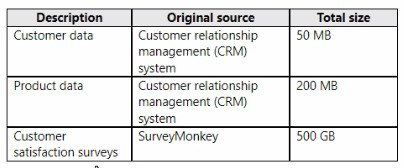
The Product data contains a single table and the following columns.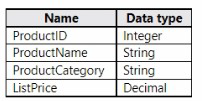
The customer satisfaction data contains the following tables:
• Survey
• Question
• Response
For each survey submitted, the following occurs:
• One row is added to the Survey table.
• One row is added to the Response table for each question in the survey.
The Question table contains the text of each survey question. The third question in each survey response is an overall satisfaction score. Customers can submit a survey after each purchase.
User Problems
The analytics team has large volumes of data, some of which is semi-structured. The team wants to use Fabric to create a new data store.
Product data is often classified into three pricing groups: high, medium, and low. This logic is implemented in several databases and semantic models, but the logic does NOT always match across implementations.
Planned Changes
Litware plans to enable Fabric features in the existing tenant. The analytics team will createa new data store as a proof of concept (PoC). The remaining Litware users will only get access to the Fabric features once the PoC is complete. The PoC will be completed by using a Fabric trial capacity.
The following three workspaces will be created:
• AnalyticsPOC: Will contain the data store, semantic models, reports, pipelines, dataflows, and notebooks used to populate the data store
• DataEngPOC: Will contain all the pipelines, dataflows, and notebooks used to populate Onelake
• DataSciPOC: Will contain all the notebooks and reports created by the data scientists The following will be created in the AnalyticsPOC workspace:
• A data store (type to be decided)
• A custom semantic model
• A default semantic model
• Interactive reports
The data engineers will create data pipelines to load data to OneLake either hourly or daily depending on the data source. The analytics engineers will create processes to ingest transform, and load the data to the data store in the AnalyticsPOC workspace daily.
Whenever possible, the data engineers will use low-code tools for data ingestion. The choice of which data cleansing and transformation tools to use will be at the data engineers' discretion.
All the semantic models and reports in the Analytics POC workspace will use the data store as the sole data source.
Technical Requirements
The data store must support the following:
• Read access by using T-SQL or Python
• Semi-structured and unstructured data
• Row-level security (RLS) for users executing T-SQL queries
Files loaded by the data engineers to OneLake will be stored in the Parquet format and will meet Delta Lake specifications.
Data will be loaded without transformation in one area of the AnalyticsPOC data store. The data will then be cleansed, merged, and transformed into a dimensional model.
The data load process must ensure that the raw and cleansed data is updated completely before populating the dimensional model.
The dimensional model must contain a date dimension. There is no existing data source for the date dimension. The Litware fiscal year matches the calendar year. The date dimension must always contain dates from 2010 through the end of the current year.
The product pricing group logic must be maintained by the analytics engineers in a single location. The pricing group data must be made available in the data store for T-SQL queries and in the default semantic model. The following logic must be used:
• List prices that are less than or equal to 50 are in the low pricing group.
• List prices that are greater than 50 and less than or equal to 1,000 are in the medium pricing group.
• List pnces that are greater than 1,000 are in the high pricing group.
Security Requirements
Only Fabric administrators and the analytics team must be able to see the Fabric items created as part of the PoC. Litware identifies the following security requirements for the Fabric items in the AnalyticsPOC workspace:
• Fabric administrators will be the workspace administrators.
• The data engineers must be able to read from and write to the data store. No access must be granted to datasets or reports.
• The analytics engineers must be able to read from, write to, and create schemas in the data store. They also must be able to create and share semantic models with the data analysts and view and modify all reports in the workspace.
• The data scientists must be able to read from the data store, but not write to it. They will access the data by using a Spark notebook.
• The data analysts must have read access to only the dimensional model objects in the data store. They also must have access to create Power Bl reports by using the semantic models created by the analytics engineers.
• The date dimension must be available to all users of the data store.
• The principle of least privilege must be followed.
Both the default and custom semantic models must include only tables or views from the dimensional model in the data store. Litware already has the following Microsoft Entra security groups:
• FabricAdmins: Fabric administrators
• AnalyticsTeam: All the members of the analytics team
• DataAnalysts: The data analysts on the analytics team
• DataScientists: The data scientists on the analytics team
• Data Engineers: The data engineers on the analytics team
• Analytics Engineers: The analytics engineers on the analytics team
Report Requirements
The data analysis must create a customer satisfaction report that meets the following requirements:
• Enables a user to select a product to filter customer survey responses to only those who have purchased that product
• Displays the average overall satisfaction score of all the surveys submitted during the last 12 months up to a selected date
• Shows data as soon as the data is updated in the data store
• Ensures that the report and the semantic model only contain data from the current and previous year
• Ensures that the report respects any table-level security specified in the source data store
• Minimizes the execution time of report queries
You have a Fabric tenant that contains a workspace named Workspace1. Workspace1 contains a lakehouse named Lakehouse1 and a warehouse named Warehouse1.
You need to create a new table in Warehouse1 named POSCustomers by querying the customer table in Lakehouse1.
How should you complete the T-SQL statement? To answer, select the appropriate optionsin the answer area.
NOTE: Each correct selection is worth one point.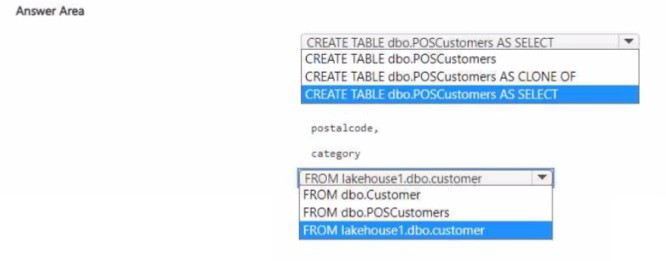
Explanation:
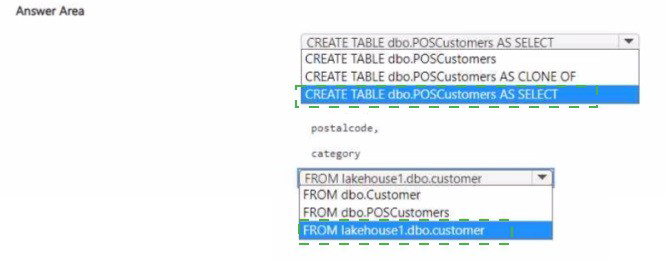
Creation Command: The requirement is to create a new table (dbo.POSCustomers) based on a query result. The most efficient and standard way to achieve this in Fabric/Synapse T-SQL environments is using the CTAS pattern: CREATE TABLE [name] AS SELECT [query].
Source Reference: In Microsoft Fabric, objects (like tables) in a Lakehouse's SQL Analytics Endpoint are exposed as distinct databases accessible from other Fabric items (like a Warehouse). To query across these boundaries (from Warehouse1 to Lakehouse1), you must explicitly qualify the source table using the three-part naming convention: LakehouseName.Schema.TableName.
Incorrect Option Explanations:
First Placeholder:
CREATE TABLE dbo.POSCustomers: This only creates an empty table structure without loading data, failing the requirement to create the table by querying the customer data.
CREATE TABLE dbo.POSCustomers AS CLONE OF: The CLONE OF command is used for creating a zero-copy clone of an existing table's schema and data in Delta Lake (Fabric/Synapse). While technically possible, it's not the correct pattern for selecting a subset of columns (postalcode, category) and creating a new table from a source query.
Second Placeholder:
FROM dbo.Customer: This would attempt to query a table named Customer within the current database (Warehouse1), failing to access the table located in Lakehouse1.
FROM dbo.POSCustomers: This refers to the table being created, which would lead to a recursive error or failure.
Reference:
Microsoft Learn: Querying data in the Fabric Warehouse using T-SQL; Microsoft Learn: Cross-database queries in Fabric.
You have a Fabric warehouse named Warehouse1 that contains a table named dbo.Product. dbo.Product contains the following columns.
You need to use a T-SQL query to add a column named PriceRange to dbo.Product. The
column must categorize each product based on UnitPrice. The solution must meet the following requirements:
• If UnitPrice is 0, PriceRange is "Not for resale".
• If UnitPrice is less than 50, PriceRange is "Under $50".
• If UnitPrice is between 50 and 250, PriceRange is "Under $250".
• In all other instances, PriceRange is "$250+".
How should you complete the query? To answer, drag the appropriate values to the correct targets. Each value may be used once, more than once, or not at all. You may need to drag the split bar between panes or scroll to view content.
NOTE: Each correct selection is worth one point.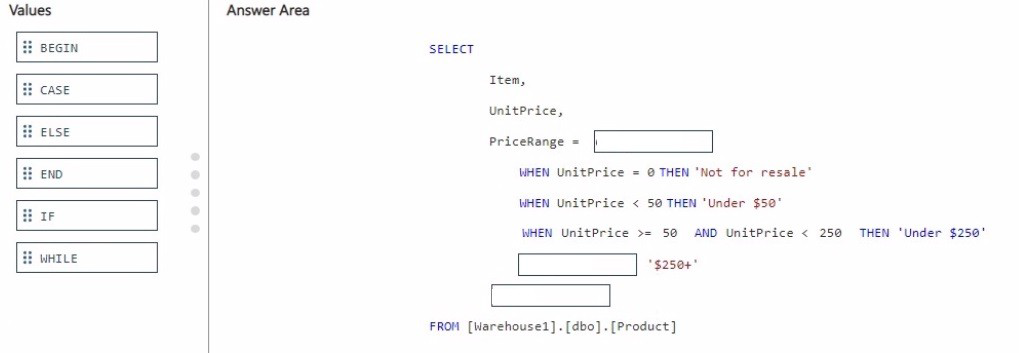
Explanation:
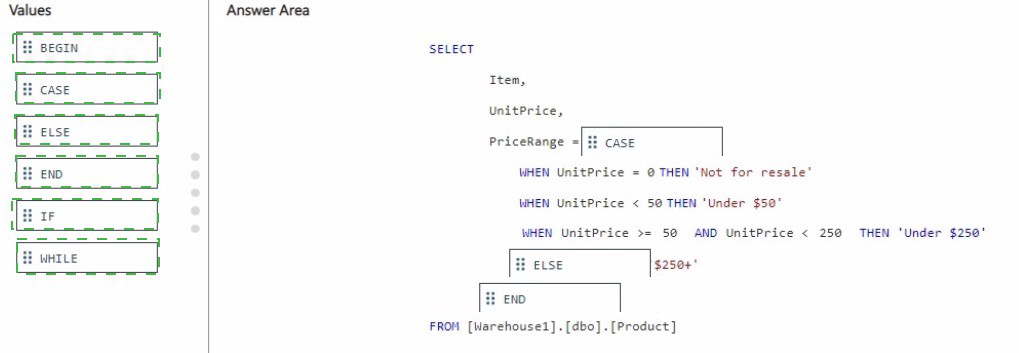
The goal is to implement conditional logic to categorize the UnitPrice column into a new column called PriceRange. The CASE expression is the standard T-SQL tool for this purpose, handling multiple, sequential conditions.
Correct Option Selections:
PriceRange = CASE:
Explanation: The CASE keyword initiates the conditional expression, allowing you to define multiple WHEN...THEN... clauses to categorize data based on specific criteria. * Correct Option: CASE must be used as the first keyword to apply the required conditional logic across the UnitPrice column and generate the PriceRange value.
Incorrect Option:
Keywords like BEGIN, IF, or WHILE are for procedural programming flow control, not for defining a conditional column expression within a SELECT statement.
[2] '$250+': ELSE
Explanation: The requirement states, "In all other instances, PriceRange is '$250+'." The ELSE clause catches any value that did not satisfy the preceding WHEN conditions (i.e., UnitPrice $\ge 250$), ensuring all remaining rows are correctly categorized as '$250+$'.
Correct Option:
ELSE correctly implements the catch-all requirement for the remaining high-value prices.
Incorrect Option:
Placing CASE or END here would result in a syntax error, as ELSE is required before the final default value.
[3] (Last line before FROM): END
Explanation: The END keyword is mandatory in T-SQL to signify the conclusion of the entire CASE expression, after which the new column is aliased (implicitly in this syntax) or named.
Correct Option:
END is necessary for the T-SQL statement to be syntactically correct and complete the PriceRange column definition.
Incorrect Option: BEGIN or IF are incorrect as they do not serve to close the CASE expression.
Reference:
Microsoft Learn: CASE (Transact-SQL) documentation explains its syntax, including the necessary use of CASE, WHEN, THEN, ELSE, and END.
Note: This question is part of a series of questions that present the same scenario. Each question in the series contains a unique solution that might meet the stated goals. Some question sets might have more than one correct solution, while others might not have a correct solution.
After you answer a question in this section, you will NOT be able to return to it. As a result, these questions will not appear in the review screen.
You have a Fabric tenant that contains a semantic model named Model1.
You discover that the following query performs slowly against Model1
.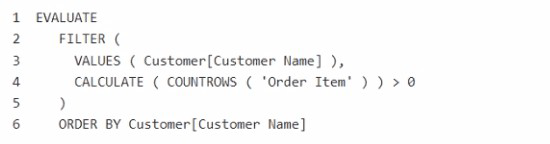
You need to reduce the execution time of the query.
Solution: You replace line 4 by using the following code:
Does this meet the goal?
A. Yes
B. No
Explanation:
The original query (CALCULATE( COUNTROWS('Order Item') ) > 0) counts all related rows in the 'Order Item' table for each customer to check for existence. While functional, COUNTROWS can be inefficient for simple existence checks as it forces a full scan and count of all matching rows. A more optimized pattern is to use a function designed for existence checking, which can short-circuit after finding the first matching row.
Correct Option:
A. Yes:
Replacing line 4 with NOT ( ISEMPTY ( CALCULATETABLE ( 'Order Item' ) ) ) is a valid performance optimization. The CALCULATETABLE('Order Item') returns a table filtered to the current customer's context. ISEMPTY() then checks if that filtered table is empty. This logic is semantically identical to COUNTROWS(...) > 0 but is often executed more efficiently by the engine, as it can stop scanning after confirming the presence of at least one row, potentially reducing execution time.
Incorrect Option:
B. No:
This answer would be incorrect because the proposed change is a known DAX performance optimization technique for existence checks. It preserves the exact same logical result (filtering customers with at least one order) while using a more efficient function, which directly meets the goal of reducing execution time.
Reference:
DAX performance guidance from sources like SQLBI recommends using ISEMPTY() over COUNTROWS() > 0 for existence checks because the storage engine can optimize ISEMPTY to avoid scanning all rows, leading to faster query performance, especially on large tables.
Note: This question is part of a series of questions that present the same scenario. Each question in the series contains a unique solution that might meet the stated goals. Some question sets might have more than one correct solution, while others might not have a correct solution.
After you answer a question in this section, you will NOT be able to return to it. As a result, these questions will not appear in the review screen.
You have a Fabric tenant that contains a semantic model named Model1.
You discover that the following query performs slowly against Model1.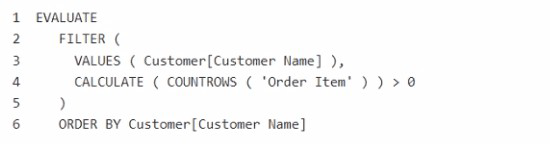
You need to reduce the execution time of the query.
Solution: You replace line 4 by using the following code:
Does this meet the goal?
A. Yes
B. No
Explanation:
The original query (line 4) uses CALCULATE( COUNTROWS('Order Item') ) > 0 to filter customers who have at least one related order. This is logically equivalent to checking for the existence of related rows. The proposed solution changes this to NOT ( CALCULATE( COUNTROWS('Order Item') ) < 9 ). This new condition filters for customers who have 9 or more orders (COUNTROWS >= 9), which is a different and more restrictive logical condition. It does not optimize the same query; it changes its business result.
Correct Option:
B. No:
The solution does not meet the goal. The goal is to reduce the execution time of the query while preserving its logic. The proposed code changes the filter logic from "customers with any orders" to "customers with 9 or more orders," which would return a different set of customers and is therefore not a valid performance optimization for the original query.
Incorrect Option:
A. Yes:
This would only be correct if the code change both improved performance and returned the same result set. Since the logic is altered, it is not a correct optimization for the given query.
Reference:
Performance tuning in DAX focuses on rewriting logic for efficiency (e.g., using COUNTROWS vs EXISTS or optimizing filter context) without altering the business logic. This solution changes the output, making it incorrect for the stated goal. A true performance fix would involve techniques like using EXISTS or ensuring proper relationship filtering.
| Page 1 out of 5 Pages |
Implementing Analytics Solutions Using Microsoft Fabric Practice Exam Questions
These DP-600 practice questions with explanations help candidates understand analytics and data engineering within Microsoft Fabric. Topics include data ingestion, transformation, modeling, and reporting. Each question is followed by a clear explanation that helps learners grasp complex analytics concepts and workflows. This learning-focused approach promotes deeper understanding of how data solutions are designed and implemented. By practicing these questions, candidates can improve their analytical thinking, strengthen their knowledge of Microsoft Fabric, and confidently prepare for the certification exam.DP-600 - Implementing Analytics Solutions Using Microsoft Fabric Official Exam Blueprint and Weight:
1. Maintain a Data Analytics Solution
Official Exam Weight: 25-30%
Subtopics: Implement workspace-level access controls, implement item-level access controls, implement row-level column-level object-level and file-level access control, apply sensitivity labels to items, endorse items, configure version control for workspace, create and manage Power BI Desktop project (.pbip), create and configure deployment pipelines, perform impact analysis of downstream dependencies from lakehouses warehouses dataflows and semantic models, deploy and manage semantic models using XMLA endpoint, create and update reusable assets including Power BI template (.pbit) files Power BI data source (.pbids) files and shared semantic models.
2. Prepare Data
Official Exam Weight: 45-50%
Subtopics: Create data connection, discover data using OneLake catalog and Real-Time hub, ingest or access data as needed, choose between different data stores, implement OneLake integration for Eventhouse and semantic models, create views functions and stored procedures, enrich data by adding new columns or tables, implement star schema for lakehouse or warehouse, denormalize data, aggregate data, merge or join data, identify and resolve duplicate data missing data or null values, convert column data types, filter data, select filter and aggregate data using Visual Query Editor, select filter and aggregate data using SQL, select filter and aggregate data using KQL, select filter and aggregate data using DAX.
3. Implement and Manage Semantic Models
Official Exam Weight: 25-30%
Subtopics: Choose storage mode, implement star schema for semantic model, implement relationships such as bridge tables and many-to-many relationships, write calculations that use DAX variables and functions such as iterators table filtering windowing and information functions, implement calculation groups dynamic format strings and field parameters, identify use cases for and configure large semantic model storage format, design and build composite models, implement performance improvements in queries and report visuals, improve DAX performance, configure Direct Lake including default fallback and refresh behavior, choose between Direct Lake on OneLake and Direct Lake on SQL endpoints, implement incremental refresh for semantic models.
| Domain | Title | Exam Weight |
|---|---|---|
| 1 | Maintain a Data Analytics Solution | 25-30% |
| 2 | Prepare Data | 45-50% |
| 3 | Implement and Manage Semantic Models | 25-30% |
Winning Strategy for DP-600: Analytics Solutions in Microsoft Fabric
Core Mindset: Architect End-to-End Analytics
The DP-600 validates your ability to design, build, and manage enterprise-scale analytics solutions using Microsoft Fabric. This is not a single-tool exam; it’s about integrating components into a cohesive analytics pipeline.
Phase 1: Master the Pillars of Fabric Analytics
Focus on the four core pillars, weighted heavily in the exam:
Data Engineering & Preparation (30%): Your ability to build a Lakehouse with Delta format and use Notebooks (PySpark/SQL) for transformation is fundamental. This feeds the rest of the analytics pipeline.
Data Modeling & Warehousing (30%): You must expertly use the Fabric Data Warehouse (T-SQL) to create efficient, denormalized models (star schema) and write analytical queries. This is the heart of the exam.
Data Visualization with Power BI (25%): This tests your Data Engineering role in preparing data for Power BI. Know how to create semantic models from Lakehouses/Warehouses, set up Direct Lake mode, and manage relationships and measures.
Administration & Monitoring (15%): Know how to manage workspaces, monitor pipeline performance, and govern data using OneLake and shortcuts.
Phase 2: The 5-Week Execution Blueprint
Week 1-2: Hands-On Fabric Foundation
Immediately secure a Fabric Trial Capacity.
Don’t watch videos first. Go build: Create a Lakehouse, ingest data, write a Spark transformation, and connect a Warehouse. Use the official Microsoft Learn modules as your guide.
Understand the critical difference between a Lakehouse (default Delta tables, Spark-based) and a Warehouse (T-SQL, decoupled storage).
Week 3-4: Integrate the Pipeline & Practice Scenarios
This is the most crucial phase. Build a complete analytics pipeline from start to finish:
Pipeline Activity → Notebook (to transform) → Lakehouse (to store) → Warehouse (to model) → Semantic Model → Power BI Report.
Use platforms like MSMCQ.com for targeted, scenario-based DP-600 practice questions. Implementing Analytics Solutions Using Microsoft Fabric questions will test your decision-making: Should you use a Lakehouse shortcut or a Warehouse view for this use case? Analyze every explanation.
Week 5: Deep Dive & Final Simulation
Master Direct Lake Mode: Know its benefits over Import/DirectQuery and its prerequisites.
Practice writing complex T-SQL for analytical queries and optimizing Spark performance.
Take timed, full-length Implementing Analytics Solutions Using Microsoft Fabric practice exam to build stamina and identify final weak spots.
Our Happy Customers
MSmcqs.com practice exams made studying for Microsoft Certified: Fabric Analytics Engineer Associate (DP-600) more efficient. The materials focused on analytics models, semantic layers, and reporting workflows.
Sofia Petrova | Bulgaria