Topic 3: Misc. Questions
You have an Azure subscription. The subscription contains multiple virtual machines that
run Windows Server. You have the Azure virtual machine backup policies shown in the
following table.
You are evaluating automatically moving recovery points to the vault-archive tier. For which
policies can you enable tiering?
A. Policy2 and Policy4 only
B. Policy4only
C. Policy1, Policy2, Policy3, and Policy4
D. Policy3 and Policy4 only
Explanation:
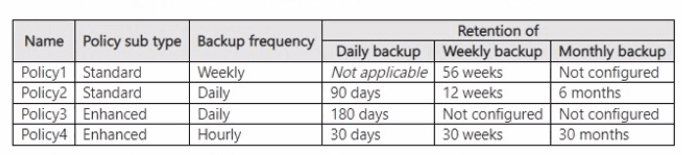
The question evaluates which Azure VM backup policies support automatic (smart) tiering of recovery points to the vault-archive tier. Archive tiering for Azure VMs is restricted to monthly or yearly recovery points that meet strict eligibility rules (age ≥ 3 months in the standard tier and remaining retention ≥ 6 months). The policy itself must therefore define a sufficiently long monthly or yearly retention period for the tiering option to be enabled.
✅ Correct Option: B. Policy4 only
Policy4 is an Enhanced policy that retains monthly recovery points for 30 months. This duration satisfies the requirement that monthly (or yearly) retention must be at least Tier-After duration + 6 months. Consequently, eligible monthly recovery points can be automatically moved to the vault-archive tier, allowing the tiering setting to be enabled on the policy.
❌ Incorrect options:
❌ A. Policy2 and Policy4 only
Policy2 retains monthly recovery points for only 6 months. After the mandatory 3-month stay in the standard tier the remaining retention falls below the required 6 months, so no recovery points become eligible and tiering cannot be enabled.
❌ C. Policy1, Policy2, Policy3, and Policy4
Policy1 and Policy3 have no monthly or yearly retention configured. Because archive tiering applies exclusively to monthly/yearly recovery points, these policies cannot support the feature.
❌ D. Policy3 and Policy4 only
Policy3 retains only daily recovery points and has no monthly or yearly retention. Daily recovery points are never eligible for the vault-archive tier, so tiering cannot be enabled on Policy3.
🔧 Reference:
→ Microsoft Learn: Use Archive tier – Enable Smart Tiering to Vault-archive using a backup policy
Confirms that automatic tiering requires a monthly or yearly retention period long enough to satisfy the “age ≥ 3 months and remaining retention ≥ 6 months” rule for Azure VM recovery points.
Your network contains an Active Directory Domain Services (AD DS) domain. The domain
contains domain controllers that run Windows Server 2019 and are configured as shown in
the following table.
You plan to run the adprep /domainprep command.
Which domain controller should be available for the command to complete?
A. DC1
B. DC2
C. DC3
D. DC4
E. DC5
Explanation:
The question tests which FSMO role holder must be reachable when running adprep /domainprep. Unlike forestprep, which requires the Schema Master, domainprep prepares the domain partition and therefore requires connectivity to the Infrastructure Master.
🟢 Correct Option:
E. DC5 — Infrastructure master
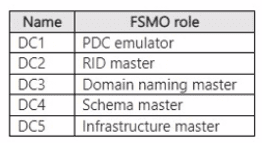
Microsoft specifies that adprep /domainprep must be run on the domain controller holding the Infrastructure Master FSMO role. The Infrastructure Master manages references between objects in different domains and maintains related domain information. According to the table, DC5 holds this role, so DC5 must be available for adprep /domainprep to complete successfully.
🔴 Incorrect options:
A. DC1 — PDC emulator
The PDC Emulator handles password changes, account lockouts, time synchronization, and other domain operations. It is not the FSMO role required by adprep /domainprep. Therefore, DC1 does not satisfy the specific connectivity requirement for this command.
B. DC2 — RID master
The RID Master allocates RID pools to domain controllers so they can create security principals with unique SIDs. Although important for domain operations, it is not required for adprep /domainprep. Therefore, DC2 is not the correct choice.
C. DC3 — Domain naming master
The Domain Naming Master manages adding and removing domains and application partitions within the forest. This role is relevant to forest namespace changes, not adprep /domainprep. Therefore, availability of DC3 does not satisfy the command's required FSMO dependency.
D. DC4 — Schema master
The Schema Master controls changes to the Active Directory schema and is required when running adprep /forestprep. It is not the required FSMO role for adprep /domainprep, so DC4 is incorrect.
🔧 Reference:
→ Adprep command — Microsoft Learn — Confirms that /domainprep must be run on the Infrastructure Master.
→ AD DS Configuration Wizard — Microsoft Learn — Confirms that /domainprep requires connectivity to the Infrastructure Master.
You have a server that runs Windows Server.
You need to enable the following security features:
• Core isolation
• Force randomization for images {Mandatory ASLR)
Which Windows Security tile should you use to enable each feature? To answer, select the
appropriate options in the answer area.
NOTE: Each correct selection is worth one point.
 Explanation
This question tests your knowledge of the Windows Security app interface and where specific advanced security features are configured. The correct mapping is based on the standard organization of settings within the Windows Security dashboard.
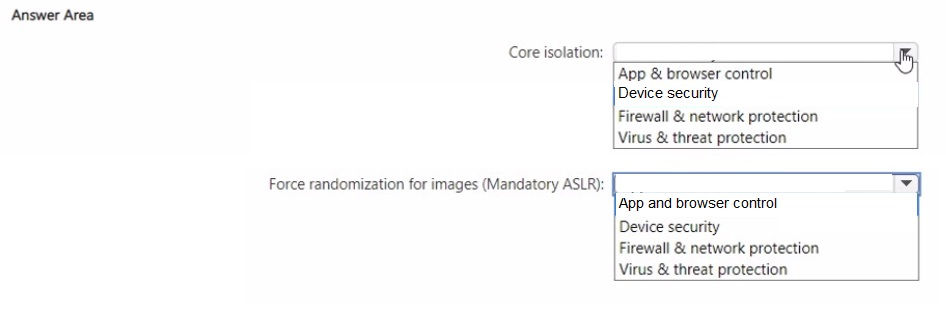
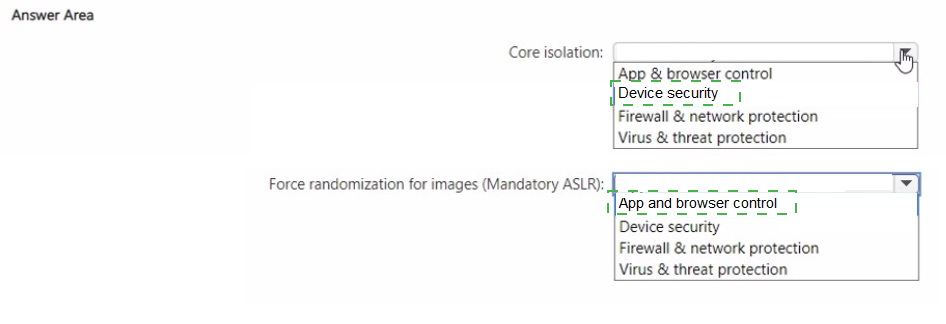
✅ Correct Option: Core isolation → Device security
Core isolation is a virtualization-based security feature that protects kernel-mode processes from malicious code. It is located under the Device security tile, which manages hardware-based security features like memory integrity and secure boot. This is the correct tile for enabling core isolation.
✅ Correct Option: Force randomization for images (Mandatory ASLR) → App & browser control
Mandatory ASLR is an exploit mitigation setting that forces system images to be loaded at random memory addresses. This setting is part of the Exploit Protection feature, which is accessed through the App & browser control tile. This is the correct tile for configuring ASLR.
❌ Incorrect option: Firewall & network protection
This tile is dedicated to managing Windows Defender Firewall settings, network profiles, and connection security rules. It does not contain core isolation or ASLR settings, so it is incorrect for either feature.
❌ Incorrect option: Virus & threat protection
This tile handles antivirus scans, threat history, and ransomware protection. It focuses on malware detection and removal, not on the advanced memory protection or virtualization features listed in the question.
🔧 Reference
→ Windows Security | Microsoft Learn
This documentation confirms that Device security manages core isolation and App & browser control manages Exploit Protection settings.
Your network contains an Active Directory Domain Services (AD DS) domain. The domain
contains two servers named Server1 and Server2 that run Windows Server.
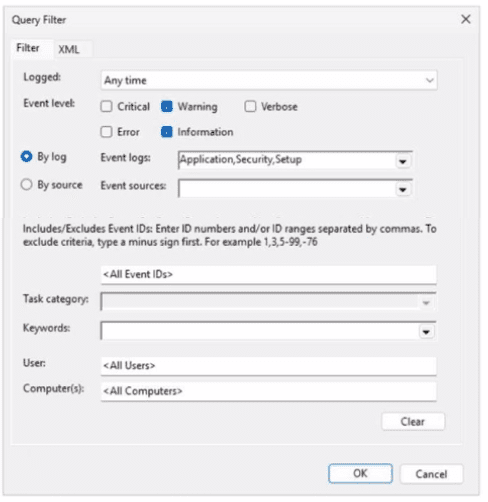
On Server1, you create an event subscription named Subscription! that retrieves events
from Server2. The Query Filter settings (or Subscription! are configured as shown in the
following exhibit.
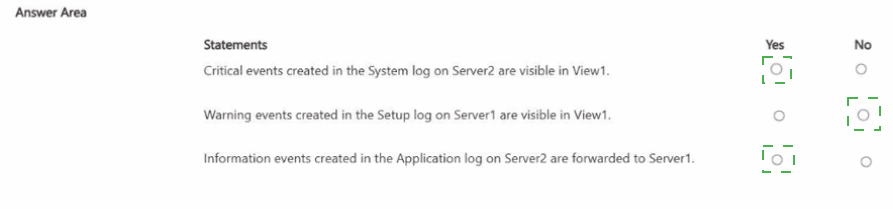
For each of the following statements, select Yes if the statement is true. Otherwise, select
No.
NOTE: Each correct selection is worth one point.
.png)
 Explanation:
This question tests your knowledge of configuring Windows Event Forwarding (WEF) subscription filters. Subscription filters define which event levels and log channels are retrieved from target collector nodes (Server2) and forwarded to the central subscription server (Server1).
✅ Correct Option:
✅ Statement 1: No
The subscription filter has only Warning and Information checked under Event level. Critical events are unchecked. Additionally, the System log is not included in the configured Event logs (Application,Security,Setup). Therefore, Critical events from the System log are not collected.
✅ Statement 2: No
Subscription1 retrieves events specifically from Server2 to forward to Server1. Events locally created on Server1 in its own Setup log are not collected or processed by this subscription, so they will not be forwarded or made visible via the subscription view.
✅ Statement 3: Yes
The Query Filter explicitly selects Information under Event level and targets the Application event log (Application,Security,Setup). Because Information events in the Application log match both filter parameters, Server2 will successfully forward them to Server1.
❌ Incorrect Options:
❌ Selecting "Yes" for Statement 1
Selecting "Yes" is incorrect because the subscription explicitly filters out Critical level events and does not query the System log channel on Server2.
❌ Selecting "Yes" for Statement 2
Selecting "Yes" is incorrect because event subscriptions retrieve event logs generated on remote target systems (Server2), not local events produced on the collecting host (Server1).
❌ Selecting "No" for Statement 3
Selecting "No" is incorrect because the subscription query parameters match both the Information event level severity and the Application log source on Server2.
🔧 Reference:
→ Microsoft Learn: Configure Event Subscription Query Filters confirms that Event Subscriptions only collect and forward logs matching the exact Event Levels and Event Logs configured in the Query Filter dialog.
You have a Storage Spaces Direct cluster named Cluster1 that contains multiple nodes.
You have a firmware update for the hard disks attached to each node.
You create a configuration file named FileLxm1 for the update.
You need to automate the rollout of the firmware update to the nodes of Cluster1. The
solution must minimize downtime of the workloads hosted in Cluster1.
How should you complete the PowerShell commands? To answer, select the appropriate
options in the answer area.
NOTE: Each correct selection is worth one point.
 Explanation:
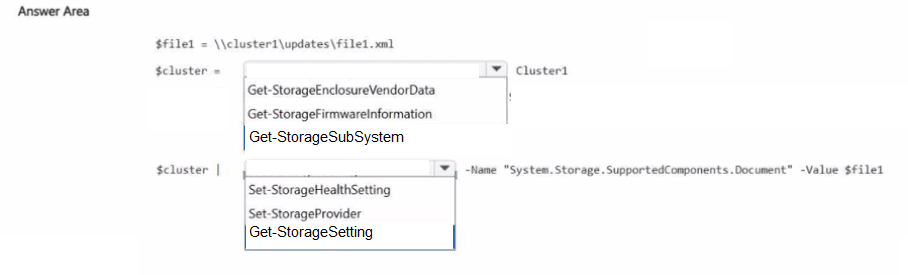
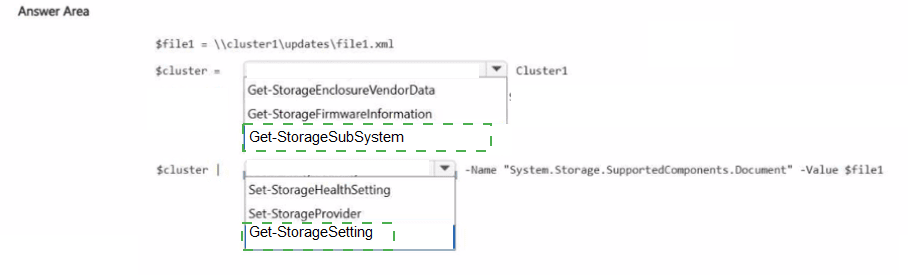
This question tests your knowledge of automating a firmware update rollout on a Storage Spaces Direct cluster while minimizing workload downtime. The process uses the Health Service in Windows Server to manage the rollout in a controlled, staggered manner. The official documentation specifies using Get-StorageSubSystem to retrieve the cluster's storage subsystem, piping it to Set-StorageHealthSetting to configure the specific setting for the supported components document.
✔️ Correct Options:
Cmdlet 1: Get-StorageSubSystem
You need this cmdlet to get the storage subsystem object for your cluster. The official syntax for modifying Health Service settings uses Get-StorageSubSystem Cluster* to target the cluster's storage subsystem.
Cmdlet 2: Set-StorageHealthSetting
This cmdlet modifies Health Service settings. You pipe the storage subsystem object to this cmdlet to configure the "System.Storage.SupportedComponents.Document" setting with the path to your firmware update configuration file ( $file1 ).
Target: Cluster1
Your PowerShell command should target the cluster's storage subsystem. The syntax Get-StorageSubSystem Cluster* retrieves the storage subsystem for a cluster named "Cluster1" or similar. The pipeline target should be the storage subsystem object, not the cluster name directly.
❌ Incorrect Options:
Cmdlet: Get-StorageEnclosureVendorData
This cmdlet retrieves vendor data from storage enclosures but is not used to configure the firmware update setting for the entire cluster.
Cmdlet: Get-StorageFirmwareInformation
This cmdlet retrieves current firmware information but does not configure the automatic firmware rollout setting.
Cmdlet: Set-StorageProvider
This cmdlet is used to manage storage providers, not to set specific Health Service configuration settings.
Cmdlet: Get-StorageSetting
This cmdlet retrieves storage settings but does not set or modify them like Set-StorageHealthSetting does.
Pipeline Target: Set-StorageHealthSetting
This is the cmdlet that performs the configuration, not the target of the pipeline. The pipeline's target is the cluster's storage subsystem.
Pipeline Target: Get-StorageSetting
This cmdlet retrieves settings but is not the target of the pipeline for configuring the firmware update document.
🔧 Reference:
→ Microsoft Learn: Modify Health Service settings: Confirms the Get-StorageSubSystem Cluster* | Set-StorageHealthSetting syntax and explains the Supported Components Document enforcement mechanism for firmware updates.
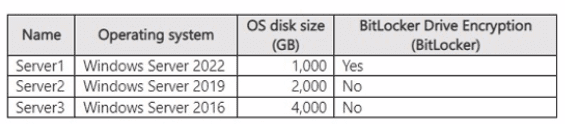
You have the on-premises servers shown in the following table.
You have an Azure subscription.
You plan to migrate the servers to Azure generation 2 virtual machines. Which servers can
be migrated to Azure by using Azure Migrate?
A. Server1 only
B. Server2 only
C. Server1 and Server2 only
D. Server2 and Server3 only
E. Server1, Server2. and Server3
Explanation:
This question tests the Azure Migrate support matrix for migrating on-premises servers to Azure Generation 2 virtual machines. Two key constraints apply: BitLocker must be disabled before replication, and the OS disk size for Gen2 VMs cannot exceed 4 TB.
✅ Correct Option:
D. Server2 and Server3 only
Server2 (Windows Server 2019, 2 TB OS disk, BitLocker off) and Server3 (Windows Server 2016, 4 TB OS disk, BitLocker off) meet all requirements. Both OS versions are supported for Gen2 migration, the disk sizes are within the 4 TB limit, and BitLocker is disabled, so Azure Migrate can successfully replicate and migrate them.
❌ Incorrect options:
A. Server1 only
Server1 has BitLocker enabled. Azure Migrate does not support machines with active BitLocker encryption; the feature must be disabled before replication can start.
B. Server2 only
Server3 is also fully supported. Its 4 TB OS disk equals the maximum allowed size for Generation 2 VMs, and BitLocker is disabled.
C. Server1 and Server2 only
Server1 is blocked by BitLocker. Only servers without BitLocker and with supported disk sizes can be migrated.
E. Server1, Server2, and Server3
Server1 cannot be migrated while BitLocker remains enabled, so the complete set is invalid.
🔧 Reference:
→ Microsoft Learn – Support matrix for VMware vSphere migration
Confirms that BitLocker must be disabled and that Gen2 OS disks are limited to 4 TB.
You have 100 Azure virtual machines that run Windows Server.
You plan to use Azure Monitor agents to track occurrences of event 10 1035 in the
Application log of each virtual machine.
You need to ensure that the events will be available tor analysis in Log Analytics. The
solution must minimize the total volume of events stored in Azure.
What should you do? To answer, select the appropriate options in the answer area.
NOTE: Each correct selection is worth one point.
 Explanation:
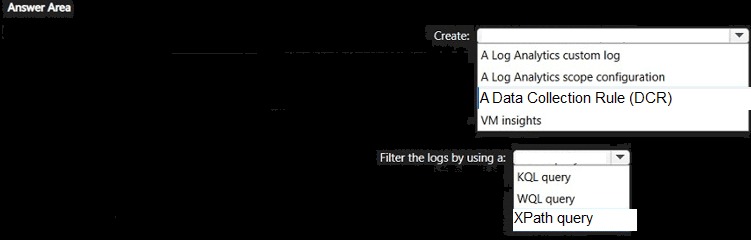
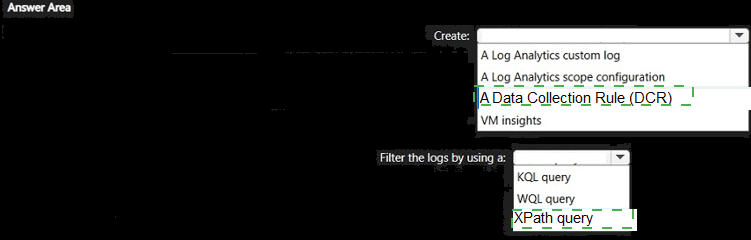
This question tests how to collect only a specific Windows event (Event ID 1035 from the Application log) from many Azure VMs while minimizing the volume of data ingested into Log Analytics. Azure Monitor Agent uses Data Collection Rules with XPath filters to select events at the source.
✅ Correct Option (Create):
A Data Collection Rule (DCR)
A DCR defines what data the Azure Monitor Agent collects and where it is sent. You associate the DCR with the VMs so only the required events are gathered.
✅ Correct Option (Filter):
XPath query
XPath queries filter Windows events on the agent before they are sent to Log Analytics. An example for this scenario is Application!*[System[EventID=1035]]. Filtering at the agent minimizes the volume of events stored.
❌ Incorrect options:
Create – A Log Analytics custom log
Custom logs are for collecting text files or other non-standard data, not for filtering native Windows event logs.
Create – A Log Analytics scope configuration
Scope configurations are not used to collect or filter Windows events with Azure Monitor Agent.
Create – VM insights
VM insights provides performance and dependency monitoring; it does not collect specific Application log events.
Filter – KQL query
KQL is used to query data already stored in Log Analytics. Filtering must occur at collection time to reduce volume.
Filter – WQL query
WQL is a Windows Management Instrumentation query language and is not used by Azure Monitor Agent for event-log filtering.
🔧 Reference:
→ Microsoft Learn – Collect Windows events from virtual machines with Azure Monitor Agent
Confirms that Data Collection Rules use XPath queries to filter specific events (such as Event ID 1035) at the agent, minimizing data volume.
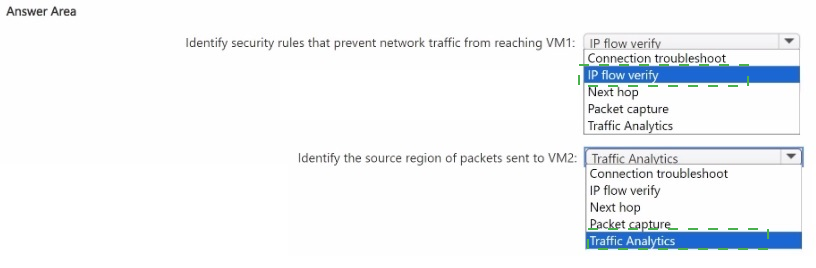
You have an Azure subscription. The subscription contains two virtual machines named
VM1 and VM2 that run Windows Server. You need to use Azure Network Watcher to meet
the following requirements;
• Identify security rules that prevent network traffic from reaching VM1.
• Identify the source region of packets sent to VM2.
What should you use for each requirement? To answer, select the appropriate options in
the answer area.
NOTE: Each correct selection is worth one point.
 Explanation
This question tests knowledge of the individual diagnostic capabilities within Azure Network Watcher, specifically which tool identifies blocking NSG rules versus which tool reveals geographic/traffic-source insights for incoming packets.
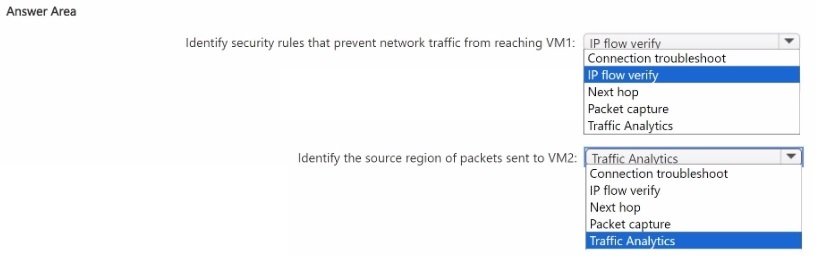
✅ Identify security rules that prevent network traffic from reaching VM1: IP flow verify
IP flow verify checks whether a packet is allowed or denied to/from a VM based on the 5-tuple, and returns the specific NSG rule responsible for a block. This directly identifies which security rule is preventing traffic from reaching VM1, matching the requirement precisely.
✅ Identify the source region of packets sent to VM2: Traffic Analytics
Traffic Analytics analyzes NSG flow logs and enriches them with geographic data, showing the source regions and countries of traffic hitting a resource. Since the requirement is about identifying where traffic to VM2 originates geographically, this is the tool built for that insight.
❌ Connection troubleshoot
This tool tests end-to-end connectivity between a source and destination, reporting latency and hop-by-hop results. It doesn't identify which specific NSG rule blocks traffic, nor does it report the geographic source region of packets.
❌ Next hop
Next hop shows the routing path a packet takes to reach its destination (e.g., via a virtual appliance or gateway). It reveals routing information, not which security rule is blocking access or where traffic originates geographically.
❌ Packet capture
Packet capture records raw network traffic on a VM for detailed inspection. While useful for deep analysis, it doesn't directly identify a blocking security rule or summarize source regions the way IP flow verify and Traffic Analytics do.
❌ Traffic Analytics (for the first requirement) / IP flow verify (for the second requirement)
Traffic Analytics doesn't pinpoint individual blocking NSG rules, and IP flow verify doesn't provide geographic source data — each tool serves a distinct diagnostic purpose, so swapping them doesn't satisfy either requirement.
Reference
🔧 Azure Network Watcher overview – Microsoft Learn → confirms IP flow verify diagnoses NSG rule blocks and Traffic Analytics provides geographic traffic insights.
| Page 10 out of 29 Pages |