Topic 5: Misc. Questions
Your on premises network contains an Active Directory Domain Services (AD DS) forest.
The forest contains a top level domain, three child domains, and an on-premises server named Server1.
You have a Microsoft Entra tenant. Server1 uses Microsoft Entra Connect Sync to replicate all the user objects from the three child domains to the tenant.
New contractors and employees are onboarded manually by using the Workday cloud- based human resources (HR) application.
You plan to automatically provision accounts for new users in one of the on-piemises child domains and the Microsoft Entra tenant. The provisioning logic for the employees will be
distinct from the provisioning logic for the contractors.
You need to identify the following:
• The minimum number of apps to register in the Microsoft Entra tenant
• The minimum number of Microsoft Entra Connect provisioning agents to deploy
The solution must minimize implementation effort.
What should you identify? To answer, select the appropriate options in the answer area.
NOTE Each correct selection is worth one point.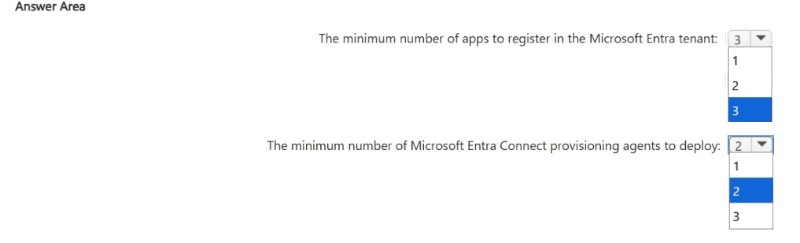
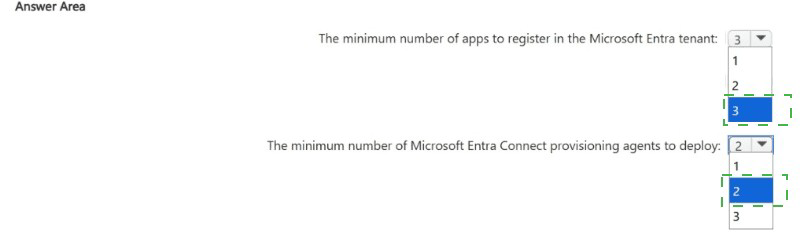
Correct Options:
The minimum number of apps to register in the Microsoft Entra tenant: 2
You need two enterprise apps in Microsoft Entra ID: one for provisioning employees from Workday and one for provisioning contractors. Each app contains distinct mapping and filtering rules. A single app cannot apply two different logic sets to different user types. Two apps provide clean separation with minimal implementation effort.
The minimum number of Microsoft Entra Connect provisioning agents to deploy: 1
Microsoft Entra Connect Provisioning Agent (for HR-driven provisioning) connects to on-premises AD. A single agent can write users to multiple domains, including child domains, as long as it has network access and appropriate permissions. Since you are provisioning into only one specific child domain, one agent is sufficient.
Incorrect Options:
Apps: 1 - One app cannot maintain two distinct provisioning logic sets (employees vs. contractors) without complex custom logic that increases implementation effort and risk. Microsoft recommends separate apps for different user populations with different mapping requirements.
Apps: 3 - Three apps exceed the minimum requirement. Two apps cleanly separate employees and contractors. A third app would be redundant and unnecessary.
Provisioning agents: 2 - Two agents are unnecessary for a single target child domain. Additional agents would provide high availability but are not required for the minimum solution. The question asks for the minimum number to deploy.
Provisioning agents: 3 - Three agents far exceed the minimum requirement. One agent can write to the target child domain successfully.
Reference:
Microsoft Learn: Tutorial for Workday to AD and Entra provisioning; Provision multiple HR sources; Microsoft Entra Connect Provisioning Agent deployment.
You have an Azure subscription that contains the resources shown in the following table.
Log files from App1 are ingested to App 1 Logs. An average of 120 GB of log data is ingested per day.
You configure an Azure Monitor alert that will be triggered if the App1 logs contain error messages.
You need to minimize the Log Analytics costs associated with App1. The solution must meet the following requirements:
• Ensure that all the log files from App1 are ingested to App 1 Logs.
• Minimize the impact on the Azure Monitor alert.
Which resource should you modify, and which modification should you perform? To answer, select the appropriate options in the answer area.
NOTE: Each correct selection is worth one point.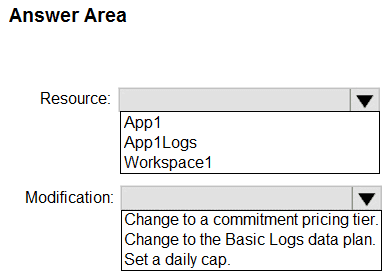
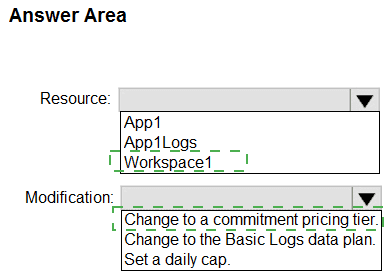
Explanation:
You need to minimize Log Analytics costs for 120 GB/day of log data while preserving the ability to trigger alerts on error messages. The Basic Logs data plan offers lower ingestion costs but does not support log-based alerts. The Analytics Logs plan (default) supports alerts but is more expensive. Changing Workspace1 to a commitment tier reduces per-GB cost significantly at high ingestion volumes. Daily caps would block data ingestion, violating the requirement.
Correct Options:
Resource: Workspace1
The Log Analytics workspace (Workspace1) controls pricing tier and data plan settings. App1 is the data source, and App1Logs is the destination table. Cost optimization for log ingestion must be configured at the workspace level, not at the individual app or table level.
Modification: Change to a commitment pricing tier
A commitment tier (formerly capacity reservation) reduces per-GB ingestion costs for volumes above 100 GB/day. At 120 GB/day, a commitment tier (e.g., 100 GB/day or 200 GB/day) provides significant savings over pay-as-you-go. This preserves Analytics Logs data plan, so alerting on error messages continues to work. Daily caps would block ingestion; Basic Logs disables alerting.
Incorrect Options:
Resource: App1 - App Service app does not directly control Log Analytics pricing. It only sends diagnostic logs to Workspace1. Modifying App1 cannot change ingestion costs.
Resource: App1Logs - The Log Analytics table inherits data plan settings from the workspace. You cannot independently modify pricing at the table level without changing workspace configuration.
Change to Basic Logs data plan - Basic Logs has lower ingestion cost but does not support Azure Monitor alerts. Error message alerts would break, violating the requirement to minimize impact on alerts.
Set a daily cap - Daily cap stops data ingestion once the limit is reached. This would cause log loss and missed error alerts, violating the requirement that all log files be ingested.
Reference:
Microsoft Learn: Azure Monitor Logs pricing details; Commitment tiers for Log Analytics; Basic Logs versus Analytics Logs.
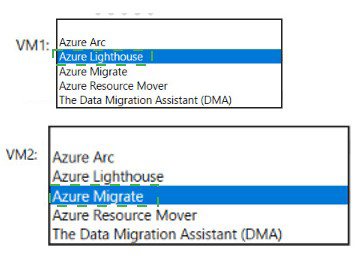
You have the resources shown in the following table.
You create a new resource group in Azure named RG2.
You need to move the virtual machines to RG2.
What should you use to move each virtual machine? To answer, select the appropriate options in the answer area.
NOTE: Each correct selection is worth one point.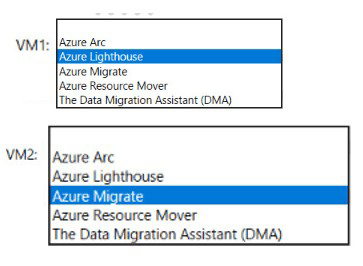
Your company, named Contoso, Ltd., has an Azure subscription that contains the following
resources:
• An Azure Synapse Analytics workspace named contosoworkspacel
• An Azure Data Lake Storage account named contosolakel
• An Azure SQL database named contososql1
The product data of Contoso is copied from contososqM to contosolakel.
Contoso has a partner company named Fabrikam Inc. Fabrikam has an Azure subscription that contains the following resources:
• A virtual machine named FabrikamVMI that runs Microsoft SQL Server 2019
• An Azure Storage account named fabrikamsal
Contoso plans to upload the research data on FabrikamVMI to contosolakel. During the upload, the research data must be transformed to the data formats used by Contoso.
The data in contosolakel will be analyzed by using contosoworkspacel.
You need to recommend a solution that meets the following requirements:
• Upload and transform the FabrikamVMI research data.
• Provide Fabrikam with restricted access to snapshots of the data in contosoworkspace1.
What should you recommend for each requirement? To answer, select the appropriate options in the answer area.
NOTE: Each correct selection is worth one point.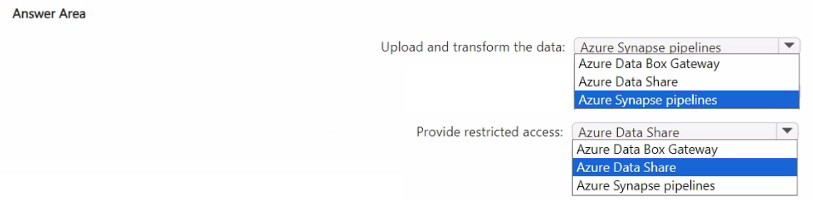
Explanation:
The first requirement is to upload data from Fabrikam's SQL Server VM (FabrikamVMI) to Contoso's Data Lake Storage (contosolake1) with transformation during upload. Azure Synapse pipelines (including Copy Data activity and data flows) can connect to on-premises/VM-based SQL Server and transform data before landing in Data Lake Storage. For the second requirement, providing restricted access to snapshots of data in Synapse workspace to an external partner is best achieved by Azure Data Share, which enables sharing datasets with external tenants securely.
Correct Options:
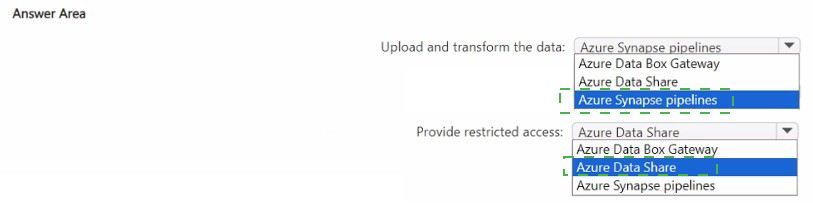
Upload and transform the data: Azure Synapse pipelines
Azure Synapse pipelines support integration runtimes to connect to SQL Server on a VM, and mapping data flows or Copy activity with transformations to convert data formats while moving from SQL Server to Azure Data Lake Storage. This provides a code-free or low-code ETL solution that meets both upload and transform requirements.
Provide restricted access: Azure Data Share
Azure Data Share allows Contoso to share snapshots of data from Synapse workspace or Data Lake Storage with Fabrikam's Azure subscription. It supports granular access controls, snapshot scheduling, and works across Microsoft Entra tenants. Fabrikam receives their own copy of the data, maintaining security and access restrictions.
Incorrect Options:
Azure Data Box Gateway - A physical or virtual device for offline or limited-bandwidth data transfer to Azure. Not appropriate for uploading from a VM that is already online and accessible. Does not provide data transformation capabilities during upload.
Azure Data Share (for upload and transform) - Data Share is for sharing existing data between tenants, not for uploading and transforming data from a source system. It does not perform ETL transformations.
Azure Synapse pipelines (for restricted access) - Synapse pipelines are for orchestration and data movement within or into Contoso's environment, not for securely sharing data snapshots with external partners across tenants without giving them direct access to Contoso resources.
Reference:
Microsoft Learn: Azure Synapse Analytics pipelines; Copy and transform data from SQL Server; Azure Data Share overview and cross-tenant sharing.
You have an Azure subscription.
You plan to deploy a high-throughput transactional workload that will use PostgreSQL.
You need to recommend a managed solution for storing relational data. The solution must
meet the following requirements:
• Support the horizontal scaling of transactional writes by using row-based sharding.
• Minimize administrative effort.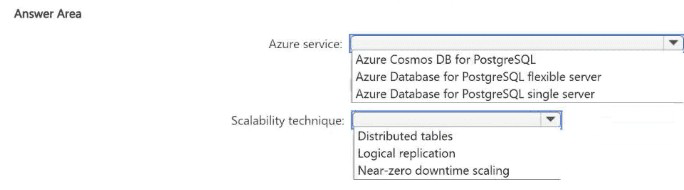
Explanation:
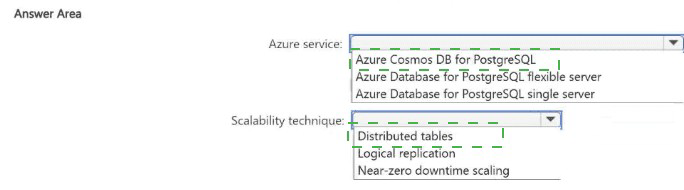
The workload requires horizontal scaling of transactional writes using row-based sharding. Row-based sharding distributes data across multiple nodes based on a shard key. Among Azure PostgreSQL offerings, only Azure Cosmos DB for PostgreSQL (formerly Citus) provides native row-based sharding with distributed tables. Flexible Server and Single Server do not support built-in horizontal sharding for transactional writes.
Correct Options:
Azure service: Azure Cosmos DB for PostgreSQL
This is the only Azure managed PostgreSQL service that natively supports row-based sharding through distributed tables. It uses Citus extension to horizontally partition data across multiple nodes, enabling high-throughput transactional writes. It provides managed scaling with minimal administrative effort compared to self-managed sharding solutions.
Scalability technique: Distributed tables
Distributed tables are the mechanism in Azure Cosmos DB for PostgreSQL that implements row-based sharding. Data is distributed across worker nodes based on a distribution column (shard key). This enables parallelized transactional writes and queries. Other techniques like logical replication or near-zero downtime scaling do not provide native horizontal write scaling.
Incorrect Options:
Azure Database for PostgreSQL flexible server - Supports read replicas and vertical scaling but does not provide built-in row-based sharding for transactional writes. Would require application-level sharding, increasing administrative effort.
Azure Database for PostgreSQL single server - Similar to flexible server, lacks native horizontal sharding. Also near deprecation, not recommended for new high-throughput workloads.
Logical replication - Used for replicating data between PostgreSQL instances for read scaling or migration, not for native row-based sharding of transactional writes across a cluster.
Near-zero downtime scaling - Refers to vertical scaling or storage scaling capabilities, not horizontal distribution of writes across multiple nodes.
Reference:
Microsoft Learn: Azure Cosmos DB for PostgreSQL distributed tables; Choose a PostgreSQL hosting option in Azure.
| Page 7 out of 36 Pages |