Topic 5: Misc. Questions

You have an Azure subscription.

You need to implement a policy to ensure that all new resource groups include a value for a tag named Department.

The solution must ensure that if a value is NOT entered for the Department tag, a resource group is created.

Which effect should you use?

A. deny

B. modify

C. manual

D. deploylfNotExists

B.   modify

Explanation:
You need a policy that ensures all new resource groups include a Department tag value, but if no value is entered, the resource group should still be created with a tag value automatically applied. The modify effect can add or replace tags on a resource during creation or update if they do not exist. This allows creation to succeed while enforcing the tag.

Correct Option:

B. modify
The modify effect is used to add, update, or remove properties on resources during creation or update. You can configure it to add the Department tag with a default value (e.g., "Unknown") if none is provided. The resource group creation succeeds while still meeting the tagging requirement.

Incorrect Options:

A. deny -
The deny effect blocks resource creation entirely if the tag is missing. This would cause the resource group creation to fail, violating the requirement that the resource group is created even without a tag value.

C. manual -
manual is not a valid Azure Policy effect. Azure Policy effects include audit, deny, modify, append, deployIfNotExists, etc. There is no manual effect.

D. deployIfNotExists -
This effect runs a deployment (e.g., ARM template) when a resource does not meet conditions. It is typically used for deploying extensions or settings, not for adding tags inline during creation. It is more complex and not appropriate for simple tag enforcement with automatic default values.

Reference:
Microsoft Learn: Azure Policy definition structure - modify effect; Add a default tag value with modify effect.

You have an Azure subscription that contains an Azure App Service app named App1 in a Standard App Service plan. App1 is accessed directly from the internet by using the following URL: https://app1.contoso.com. The Azure region that hosts App1 supports availability zones for App Service apps.

You need to recommend a redundancy solution for App1. The solution must meet the following requirements:

• Ensure that App1 is available if two availability zones fail.

• Minimize administrative effort.

• Minimize costs.

What should you recommend?

A. Create an App Service Environment v3. Redeploy App1.

B. Scale out the existing App1 App Service instance to three instances.

C. Create a new Premium v3 App Service plan. Redeploy App1.

D. Scale up the existing App Service plan for App1 to the Premium v3 tier.

A.   Create an App Service Environment v3. Redeploy App1.

Explanation:
To survive two availability zone failures, you need zone redundancy across all three zones. Standard and Premium v3 App Service plans support availability zones only when initially created with specific configuration. App Service Environment v3 (ASEv3) natively supports zone redundancy across three availability zones. Scaling out instances alone does not distribute across zones without zone-redundant configuration at plan creation.

Correct Option:

A. Create an App Service Environment v3. Redeploy App1.
ASEv3 with zone redundancy distributes instances across three availability zones. This ensures App1 continues running even if two zones fail (one remaining zone serves traffic). While ASEv3 has higher cost than single plans, it is the only option that guarantees survival of two zone failures with minimal administrative effort for redundancy.

Incorrect Options:

B. Scale out the existing App1 App Service instance to three instances.
Scaling to three instances does not automatically distribute them across availability zones. Without zone redundancy enabled at plan creation, all instances could run in the same zone. Three instances in one zone would all fail if that zone fails. This does not meet the requirement.

C. Create a new Premium v3 App Service plan. Redeploy App1.
A new Premium v3 plan can enable zone redundancy only at creation time. However, it supports only spreading instances across zones, but cannot survive two zone failures because the total instances would need to be distributed across three zones with sufficient instances per zone. Premium v3 typically requires a minimum of three instances but losing two zones still leaves one zone's instances. However, ASEv3 is the recommended solution for maximum zone failure tolerance.

D. Scale up the existing App Service plan for App1 to the Premium v3 tier.
Scaling up changes the tier but does not enable zone redundancy retroactively. Zone redundancy must be enabled when creating the App Service plan. An existing plan, even after scaling to Premium v3, cannot have zone redundancy applied. This would not distribute instances across zones.

Reference:
Microsoft Learn: Availability zones in App Service Environment v3; Zone redundancy in Azure App Service; App Service plan scaling vs. ASE.

You have an Azure App Service app named App1.

You need to recommend a solution to monitor the response times of App1 for end users.

The solution must minimize administrative effort.

What should you include in the recommendation?

A. Health check in App Service

B. Log Analytics

C. Application Insights

D. Azure Network Watcher connection monitor

C.   Application Insights

Explanation:
You need to monitor response times of App1 for end users with minimal administrative effort. Application Insights provides client-side and server-side response time monitoring, including real user monitoring (RUM) that captures actual end-user experience. It integrates natively with App Service with just an instrumentation key or connection string, requiring no code changes for basic monitoring.

Correct Option:

C. Application Insights
Application Insights is part of Azure Monitor and provides out-of-the-box performance monitoring for web applications. With a simple agent extension or SDK, it automatically collects request response times, dependency durations, and failure rates. For end-user response times, Application Insights offers Real User Monitoring (RUM) via a JavaScript snippet, requiring minimal configuration.

Incorrect Options:

A. Health check in App Service -
App Service health check monitors only instance health (heartbeat) and removes unhealthy instances from load balancer. It does not measure response times or end-user experience. Health check provides availability, not performance metrics.

B. Log Analytics -
Log Analytics is a data store and query engine. It does not automatically collect response time data. You would need to manually send custom data via API or configure diagnostics settings, which requires more administrative effort than Application Insights.

D. Azure Network Watcher connection monitor -
Connection Monitor measures network connectivity and latency between Azure resources or to endpoints. It does not measure application-level response times or end-user browser experience. It is for network-level monitoring, not application performance.

Reference:
Microsoft Learn: Application Insights overview for App Service; Real User Monitoring in Application Insights; Monitor App Service performance.

Your on-premises datacenter contains a server named Server1 that runs Microsoft SQL Server 2022. Server1 contains a 30-TB database named DB1 that stores customer data.

Server1 runs a custom application named App1 that verifies the compliance of records in DB1. App1 must run on the same server as DB1.

You have an Azure subscription.

You need to migrate DB1 to Azure. The solution must minimize administrative effort.

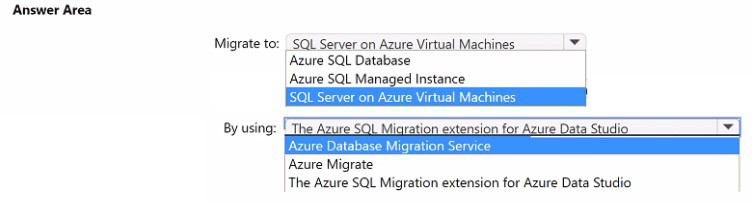
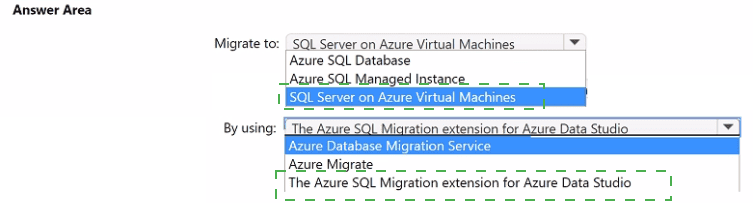
To which service should you migrate DB1, and what should you use to perform the migration? To answer, select the appropriate options in the answer area.


Explanation:
App1 must run on the same server as DB1, requiring full server-level access (not just database-level). Azure SQL Managed Instance and Azure SQL Database do not allow running custom Windows applications on the same compute instance. SQL Server on Azure Virtual Machines provides full OS control, allowing App1 to run on the same VM as DB1. The Azure SQL Migration extension for Azure Data Studio supports offline migration of large databases (30 TB) with minimal effort.

Correct Options:

Migrate to: SQL Server on Azure Virtual Machines
This is the only Azure SQL deployment option that allows you to run custom applications (App1) on the same server as the database. You have full Windows OS and SQL Server instance control. This meets the requirement that App1 must run on the same server as DB1, which is impossible with PaaS offerings.

By using: The Azure SQL Migration extension for Azure Data Studio
This extension supports large database migrations (30 TB) with flexible migration modes (online/offline). It integrates assessment, schema migration, and data movement. For SQL Server on Azure VMs, this extension provides a guided, low-administrative-effort migration experience compared to other tools.

Incorrect Options:

Azure SQL Database - PaaS service with no OS access. Cannot install or run custom applications like App1 on the same server. Eliminates administrative effort but fails the App1 co-location requirement.

Azure SQL Managed Instance - PaaS service with limited instance-level access but still no OS access. Cannot install or run custom Windows applications. App1 cannot run on the same managed instance compute.

Azure Database Migration Service (DMS) - Supports large migrations but requires more configuration and infrastructure setup compared to the Azure SQL Migration extension. Higher administrative effort for a 30-TB database.

Azure Migrate - Designed for server and workload assessment and migration (VMware, Hyper-V, physical). Not the specialized tool for SQL Server database migration to Azure SQL on VMs. Adds unnecessary overhead.

Reference:
Microsoft Learn: SQL Server on Azure Virtual Machines overview; Azure SQL Migration extension for Azure Data Studio; Choose the right SQL Server migration option.

You are building an app named App1 that will monitor thousands of sensors across multiple sites. The app will include the resources shown in the following table.
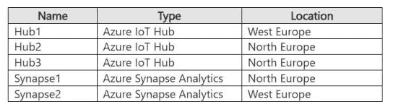


You need to recommend a real lime analytics solution lot App1. The solution must meet the following requirements;

• Perform analytics on the sensor data in real time.

• Ensure that the solution scales dynamically.

• Minimize development effort

• Minimize costs.

What is the minimum number of Azure Stream Analytics jobs you should deploy?

A. 1

B. 2

C. 3

D. 6

B.   2

You have multiple on-premises networks

You have multiple Azure subscriptions. Each subscription contains a virtual network that is assigned an IP address space of 172.16.0.0/16. Each virtual network is connected to the on premises networks by using ExpressRoute.

You plan to deploy a container orchestration solution that will use multiple Azure Kubernetes Service (AKS) clusters. The clusters will be deployed to the existing virtual networks.

You need to recommend a network configuration for the AKS dusters. The solution must meet the following requirements:

• Minimize the number of IP addresses required on each virtual network.

• Support outbound connectivity to on-premises datacenters.

• Support Windows node pools

Which AKS network model should you recommend?

A. Azure CNI Overlay

B. kubenet

C. Azure CNI

D. Azure CNI Powered by Cilium

A.   Azure CNI Overlay

Explanation:
You need to minimize IP address consumption on virtual networks (currently /16 each) while supporting outbound connectivity to on-premises via ExpressRoute and Windows node pools. Azure CNI Overlay (also called Azure CNI with overlay networking) uses a separate overlay network for pods, consuming IPs from a private CIDR distinct from the VNet. Pods can still reach on-premises via ExpressRoute, and it supports Windows node pools.

Correct Option:

A. Azure CNI Overlay
Azure CNI Overlay assigns pod IPs from a private overlay space, not from the VNet address space. This dramatically reduces VNet IP consumption compared to traditional Azure CNI. Outbound connectivity to on-premises is supported via ExpressRoute. Windows node pools are fully supported. This model meets all requirements while preserving VNet IP space for nodes and services only.

Incorrect Options:

B. kubenet -
kubenet uses a limited IP address model with NAT for outbound traffic. It does not support Windows node pools. Also, kubenet does not provide native pod-to-on-premises connectivity without complex routing configuration, making it unsuitable for ExpressRoute back to on-premises datacenters.

C. Azure CNI -
Traditional Azure CNI assigns pod IPs directly from the VNet subnet space. This consumes a large number of VNet IP addresses (one per pod). With multiple AKS clusters sharing a /16 VNet, IP exhaustion is likely. It supports Windows but fails the IP minimization requirement.

D. Azure CNI Powered by Cilium -
This provides advanced networking and security features but shares the same IP consumption model as Azure CNI (pods get VNet IPs). It does not reduce IP address consumption compared to standard Azure CNI. Overlay mode is the key to minimizing IP usage.

Reference:
Microsoft Learn: Azure CNI Overlay networking for AKS; Compare kubenet and Azure CNI; Windows node pools support in AKS.

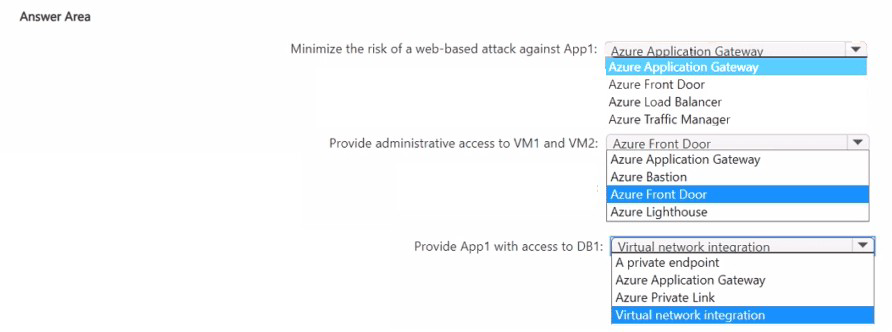
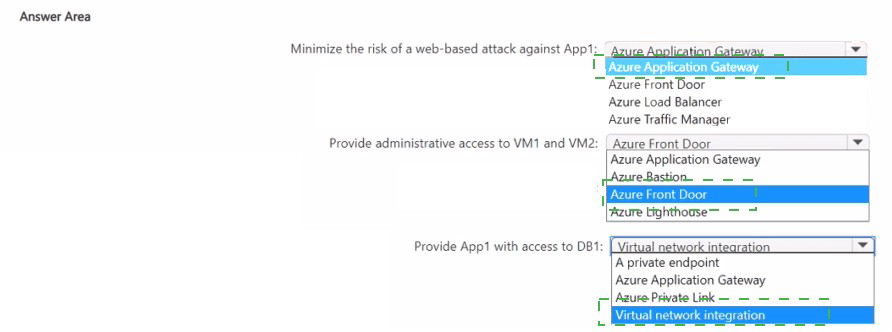
You plan to deploy an Azure App Service web app named App1 that will service users in a single geographical region. App1 will access a highly available database named DB1 that will be hosted on two Azure virtual machines named VM1 and VM2.

You need to recommend a solution that meets the following requirements:

• Uses Azure Web Application Firewall (WAF) to minimize the risk of a web-based attack against App1

• Ensures that administrators can access VM1 and VM2 securely from the internet

• Ensures that traffic from App1 to DB1 is NOT sent via the internet

• Minimizes costs

What should you include in the recommendation for each requirement? To answer, select the appropriate options in the answer area.

You have an on-premises network.

You have an Azure subscription.

You plan to centralize the collection and analytics of Azure and on-premises resources by using Log Analytics.

You are evaluating the cost implications of using the Basic log data plan versus the Analytics log data plan.

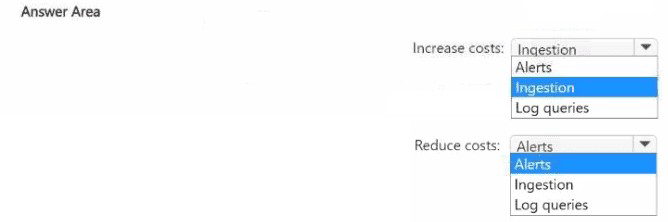
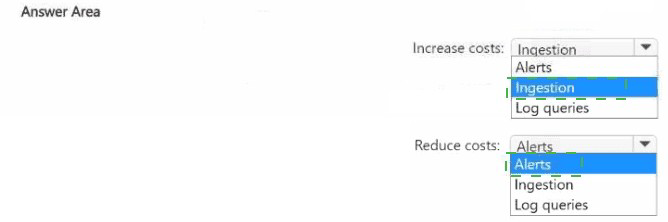
What will increase costs by using the Basic log data plan, and what will reduce costs by using the Basic log data plan? To answer, select the appropriate options in the answer area.

NOTE: Each correct selection is worth one point.


Explanation:
The Basic log data plan has lower ingestion costs but lacks full query capabilities and alerting support compared to the Analytics log data plan. Basic logs are cheaper to ingest but cannot be used for log-based alerts or high-performance log queries. Using Basic logs reduces ingestion costs, but increases costs for alerts (because you may need alternative solutions) and reduces query capabilities.

Correct Options:

Increase costs: Alerts
Basic log data plan does not support direct log-based alerts. To achieve alerting on Basic logs, you may need to export data to external systems or use additional services (e.g., Azure Monitor metrics, Event Hubs, or third-party tools), which increases overall cost or complexity. Analytics logs include native alerting at no extra per-alert cost beyond ingestion.

Reduce costs: Ingestion
The Basic log data plan has significantly lower ingestion costs per gigabyte compared to the Analytics log data plan. For high-volume, verbose logs that do not require real-time query or alerting, Basic logs reduce overall spending on data ingestion while still storing the data for basic retrieval.

Incorrect Options:

Ingestion (for increase costs) - This is incorrect because Basic logs actually reduce ingestion costs, not increase them. Ingestion cost is the primary saving of the Basic plan.

Log queries (for reduce costs) - Basic logs do not support rich log queries with full KQL capabilities. Query performance and features are reduced, but this is a functional limitation, not a cost reduction. Basic queries are not cheaper; they are simply less capable.

Reference:
Microsoft Learn: Azure Monitor Logs pricing; Basic Logs versus Analytics Logs; Alerting support for Basic Logs.

You have 12 on-premises data sources that contain customer information and consist of Microsoft SQL Server, MySQL, and Oracle databases.

You have an Azure subscription.

You plan to create an Azure Data Lake Storage account that will consolidate the customer information for analysis and reporting.

You need to recommend a solution to automatically copy new information from the data sources to the Data Lake Storage account by using extract, transform and load (ETL). The solution must minimize administrative effort.

What should you include in the recommendation?

A. Azure Data Factory

B. Azure Data Explorer

C. Azure Data Share

D. Azure Data Studio

A.   Azure Data Factory

Explanation:
You need to automatically copy new data from 12 heterogeneous on-premises sources (SQL Server, MySQL, Oracle) to Azure Data Lake Storage using ETL, with minimal administrative effort. Azure Data Factory is a cloud-based ETL service with native connectors for all these sources. It supports incremental loading (copying only new/changed data) and provides a visual interface for orchestration without managing infrastructure.

Correct Option:

A. Azure Data Factory
Azure Data Factory (ADF) is a fully managed ETL service. It includes built-in connectors for SQL Server, MySQL, Oracle, and Azure Data Lake Storage. ADF supports incremental copy using watermark tables or change tracking, minimizing administrative effort through scheduled triggers, monitoring, and no server management. Self-hosted integration runtime connects to on-premises sources securely.

Incorrect Options:

B. Azure Data Explorer -
Data Explorer is optimized for time-series and log analytics, not for ETL from multiple relational sources to Data Lake Storage. It does not provide native incremental ETL pipelines from on-premises SQL, MySQL, and Oracle databases.

C. Azure Data Share -
Data Share is for sharing existing datasets between Azure tenants or organizations, not for extracting, transforming, and loading data from on-premises heterogeneous sources. It does not perform ETL transformations or incremental loading.

D. Azure Data Studio -
Data Studio is a cross-platform database management tool for querying and developing on SQL Server and Azure SQL. It is not an automated ETL orchestration service and cannot run scheduled, production-grade data movement pipelines.

Reference:
Microsoft Learn: Azure Data Factory overview; Incremental copy patterns in Azure Data Factory; Connectors for SQL Server, MySQL, and Oracle.

You have an Azure subscription that contains an Azure Cosmos DB for NoSQL account named account1 and an Azure Synapse Analytics workspace named Workspace1. The account1 account contains a container named Container1 that has the analytical store enabled.

You need to recommend a solution that will process the data stored in Container1 in near- real-time (NRT) and output the results to a data warehouse in Workspace1 by using a runtime engine in the workspace. The solution must minimize data movement.

Which pool in Workspace! should you use?

A. serverless SQL

B. Data Explorer

C. dedicated SQL

D. Apache Spark

A.   serverless SQL

Explanation:
Azure Synapse Link enables near-real-time analytics on Cosmos DB analytical store without ETL. Serverless SQL can query the analytical store directly using T-SQL, minimizing data movement because queries run in-place. Results can be written to a data warehouse (dedicated SQL pool) using CREATE EXTERNAL TABLE AS SELECT (CETAS). This meets NRT requirements with minimal data movement.

Correct Option:

A. Serverless SQL
Serverless SQL pool can directly query Cosmos DB analytical store using the built-in Cosmos DB connector. It processes data in-place without copying to Spark or dedicated SQL first. Results can be stored in a dedicated SQL pool data warehouse using CETAS statements. This minimizes data movement and latency for near-real-time processing.

Incorrect Options:

B. Data Explorer -
Azure Data Explorer pool in Synapse is for time-series and log analytics, not for processing Cosmos DB analytical store data. It does not have native connectivity to Cosmos DB analytical store for near-real-time queries.

C. Dedicated SQL -
Dedicated SQL pool requires data to be loaded or polybase-queried from external sources. It cannot directly query Cosmos DB analytical store in near-real-time without intermediate staging, increasing data movement.

D. Apache Spark -
Spark pool can read from Cosmos DB analytical store and process near-real-time data. However, it typically loads data into Spark memory/executors, creating more data movement than serverless SQL, which queries directly without data relocation.

Reference:
Microsoft Learn: Azure Synapse Link for Azure Cosmos DB; Query Cosmos DB analytical store with serverless SQL pool; Serverless SQL versus Spark for Cosmos DB.

Page 6 out of 36 Pages