Topic 5: Misc. Questions
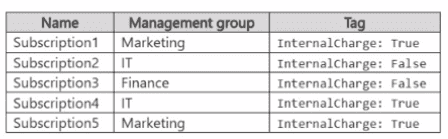
You have five Azure subscriptions as shown in the following table.
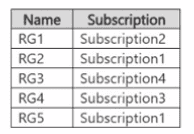
You have the resource groups shown in the following table.
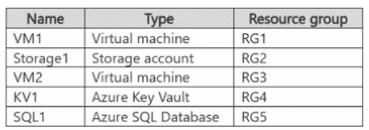
You have the Azure resources shown in the following table.
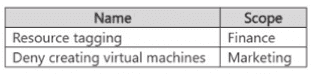
You create the Azure Policy assignments shown in the following table.
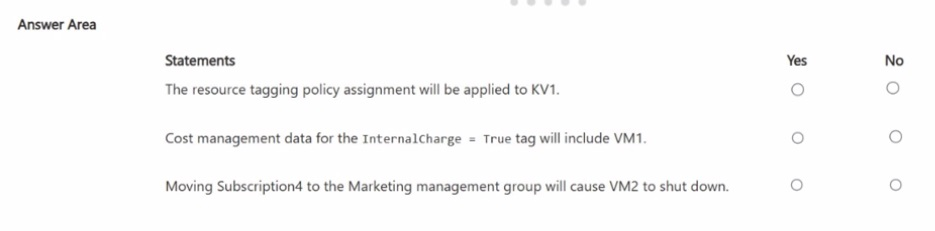
For each of the following statements, select Yes if the statement is true. Otherwise, select
No.
NOTE: Each correct selection is worth one point.
Explanation:
Statement Evaluations
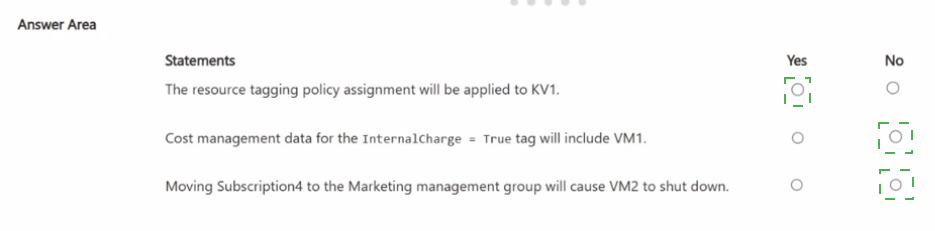
1. The resource tagging policy assignment will be applied to KV1.
Answer: Yes
Explanation:
The "Resource tagging" policy is assigned at the Finance management group scope.
KV1 resides in RG4, which is in Subscription3.
Subscription3 belongs to the Finance management group.
All resources within that management group hierarchy (subscriptions → resource groups → resources) are subject to the policy assignment. Therefore, KV1 will have the resource tagging policy applied.
2. Cost management data for the InternalCharge = True tag will include VM1.
Answer: No
Explanation:
Azure Cost Management uses tags directly applied to the resource itself (or the resource group, if the resource inherits tags via an Azure Policy configuration—but no such inheritance policy is present here).
VM1 is in RG1, under Subscription2.
Subscription2 has the tag InternalCharge: False.
VM1 has no tag specified, and by default, subscription-level tags do not automatically flow to resources for cost tracking.
Filtering cost data by InternalCharge = True will not include VM1, because it does not carry that tag.
3. Moving Subscription4 to the Marketing management group will cause VM2 to shut down.
Answer: No
Explanation:
The "Deny creating virtual machines" policy assigned to the Marketing management group only prevents the creation of new VMs (including updates that would trigger a creation).
Existing VMs, such as VM2 in Subscription4, are not affected by such a Deny policy. They continue to run normally.
Moving a subscription into a management group with this policy will not cause any existing resources to be shut down, deleted, or stopped.
You have an Azure subscription.
You plan to host three apps named App1, App2, and App3 by using Azure Container Apps.
The apps have the following network requirements:
• Implement network security groups (NSGs) to allow external inbound connections to App1 and App2.
• Implement IP address restrictions for App3 to allow external inbound connections.
• Implement NSGs to allow connectivity between App1 and App2.
• Fully isolate App3 from App1 and App2.
The apps have the following compute requirements:
• Implement dynamically allocated compute for Appl.
• Implement up to 10 general purpose Dedicated-D16 instances for App2.
• Implement up to 10 memory optimized Dedicated-E16 instances for App3.
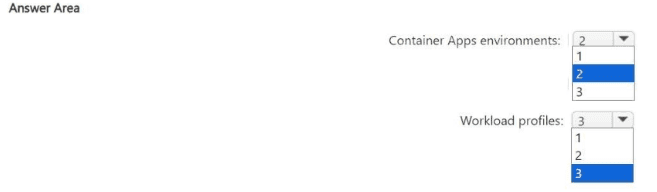
You need to recommend the minimum number of Container Apps environments and
workload profiles required. What should you recommend? To answer, select the
appropriate options in the answer area.
NOTE: Each correct selection is worth one point.
Explanation:
To solve this, focus on two key design constraints in Azure Container Apps:
Networking isolation is defined at the Container Apps environment level
Compute types (consumption vs dedicated SKUs) are defined using workload profiles within an environment
Step 1: Determine environment separation (networking)
Requirements:
App1 & App2:
Must communicate with each other
Use NSGs
App3:
Must be fully isolated from App1 and App2
Uses IP restrictions instead of NSGs
Key point:
Full isolation requires a separate Container Apps environment
Apps in the same environment share the same virtual network boundary
Conclusion:
1 environment for App1 + App2
1 environment for App3
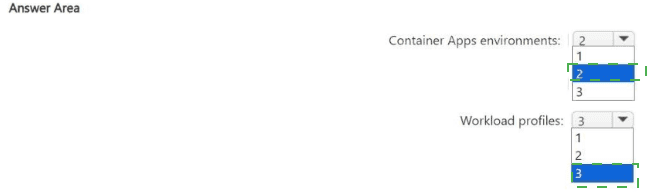
Total Container Apps environments = 2
Step 2: Determine workload profiles (compute)
App requirements:
App1
Dynamically allocated compute → Consumption profile
App2
Up to 10 Dedicated-D16 (general purpose) → Dedicated workload profile
App3
Up to 10 Dedicated-E16 (memory optimized) → Another dedicated workload profile
Important:
Different VM SKUs (D-series vs E-series) require separate workload profiles
Consumption profile is separate from dedicated profiles
Conclusion:
You need:
Consumption profile (App1)
Dedicated D16 profile (App2)
Dedicated E16 profile (App3)
Total workload profiles = 3
Final Answer
Container Apps environments: 2
Workload profiles: 3
AZ-305 Exam Insight
Environment = networking + isolation boundary
Workload profile = compute type and scaling characteristics
If apps need:
Different isolation → separate environments
Different VM SKUs → separate workload profiles
You have the Azure resources shown in the following table.
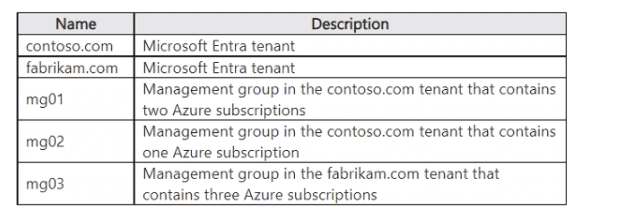
You need to recommend a virtual network management solution that uses Azure Virtual
Network Manager. The solution must meet the following requirements:
• Minimize the number of network managers.
• Minimize administrative effort when assigning the network group membership.
What should you include in the recommendation? To answer, select the appropriate
options in the answer area.
NOTE: Each correct selection is worth one point.
Explanation:
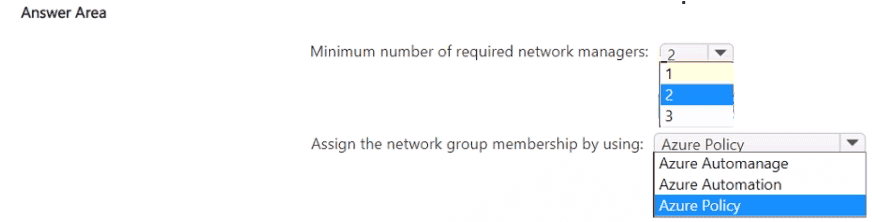
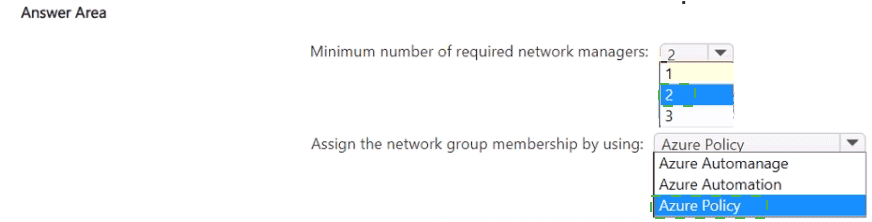
Minimum number of network managers
Azure Virtual Network Manager is a per-tenant resource. It can manage virtual networks across multiple subscriptions, but only within the same Microsoft Entra tenant.
The table shows two different tenants:
contoso.com
fabrikam.com
Because a single network manager cannot span tenants, you need at least one network manager per tenant. That gives a minimum of 2 network managers — one in contoso.com and one in fabrikam.com. All the subscriptions under management groups mg01, mg02 (in contoso.com) can be served by one network manager; all subscriptions under mg03 (in fabrikam.com) need a separate network manager.
Assigning network group membership
Network groups in Azure Virtual Network Manager define which virtual networks are governed by a connectivity or security configuration. Membership can be assigned manually (by selecting VNets one by one) or dynamically using Azure Policy.
To minimize administrative effort, you use Azure Policy with a custom policy definition that evaluates conditions (e.g., resource name, tags, location) and automatically adds matching virtual networks to the network group. This eliminates the need for manual updates whenever new VNets are created or existing ones change.
Azure Automanage automates VM management best practices, not network group membership.
Azure Automation is used for runbooks and configuration management, not for defining dynamic network group membership.
Therefore, Azure Policy is the recommended approach for low-touch, automatic network group assignment.
Reference
Azure Virtual Network Manager – Cross-tenant support and network groups (confirms per-tenant scope)
Dynamic network group membership with Azure Policy
You have an Azure subscription. The subscription contains Azure virtual machines that run
Windows Server 2022 and Linux.
You need to use Azure Monitor to design an alerting strategy for security-related events.
Which Azure Monitor Logs tables should you query? To answer, drag the appropriate
tables to the correct log types. Each table may be used once, more than once, or not at all.
You may need to drag the split bar between panes or scroll to view content. NOTE: Each
correct selection is worth one point.


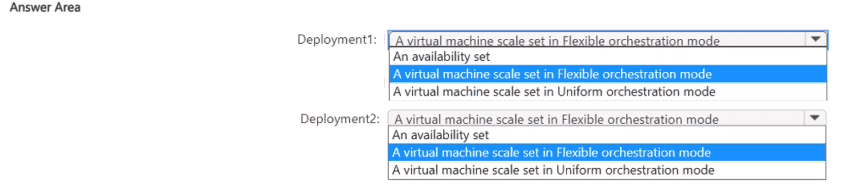
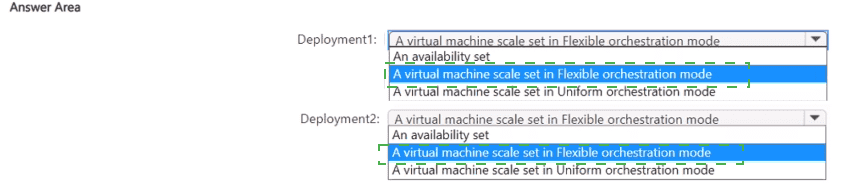
You have an Azure subscription.
You plan to deploy two 100-virtual machine deployments as shown in the following table.
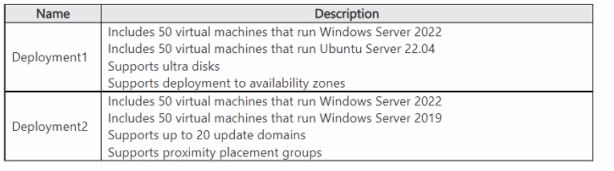
You need to recommend a virtual machine grouping solution for the deployments.
What should you include in the recommendation for each deployment? To answer, select
the appropriate options in the answer area.
NOTE: Each correct selection is worth one point.
You have a Microsoft Entra tenant named contoso.com that contains multiple enterprise apps.
Your company has a business partner that has a Microsoft Entra tenant named fabrikam.com.
You need to recommend an identity governance solution that will provide users in fabrikam.com with access to the enterprise apps in contoso.com. The solution must meet the following requirements:
• Ensure that administrators in fabrikam.com can provide the fabrikam.com users with access to the contoso.com enterprise apps.
• Automatically provision identities for the fabrikam.com users to enable access to the contoso.com enterprise apps.
• Provide policy-based management of access assignments, approvals, and expirations.
• Minimize administrative effort.
What should you include in the recommendation? To answer, select the appropriate options in the answer area.
NOTE: Each correct collection is worth one point.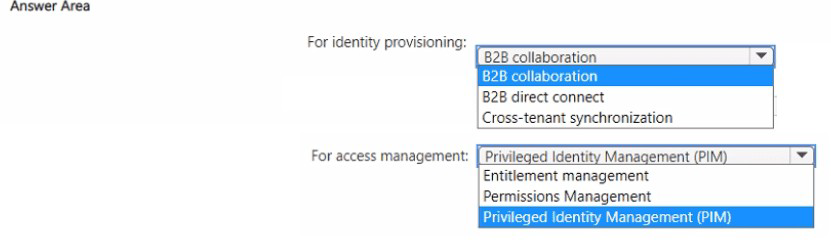
Explanation:
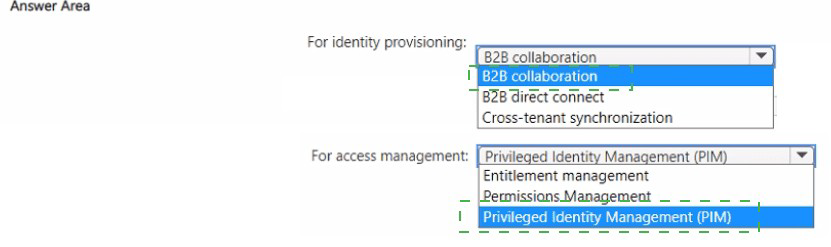
You need to provide fabrikam.com users access to contoso.com enterprise apps with automated identity provisioning and policy-based access management (assignments, approvals, expirations). B2B collaboration invites external users to your tenant. Cross-tenant synchronization automatically provisions identities from fabrikam.com to contoso.com. Entitlement management provides policy-based access packages with approvals and expirations. This combination minimizes administrative effort.
Correct Options:
For identity provisioning: Cross-tenant synchronization
Cross-tenant synchronization automatically creates, updates, and deletes B2B users in contoso.com based on users from fabrikam.com. It provisions identities programmatically without manual invitations. This ensures fabrikam.com administrators can manage which users are synchronized, meeting the requirement that they provide access to their users.
For access management: Entitlement management
Entitlement management allows you to create access packages with policies that govern assignments, approvals, and expirations. You can add the synchronized fabrikam.com users as allowed requestors or assignees. This provides policy-based governance with minimal administrative effort compared to manual role assignments.
Incorrect Options:
B2B collaboration (for identity provisioning) - B2B collaboration requires manual invitation or self-service sign-up. It does not automatically provision identities in bulk or allow fabrikam.com administrators to manage the provisioning process. Cross-tenant synchronization is the automated solution.
B2B direct connect (for identity provisioning) - B2B direct connect is for sharing Teams resources with external users using mutual trust and shared settings. It does not provision identities for enterprise app access across tenants.
Privileged Identity Management (PIM) - PIM manages just-in-time activation of privileged roles within a tenant. It does not manage access assignments, approvals, and expirations for external users accessing enterprise apps. PIM is for role elevation, not general access governance.
Permissions Management - Permissions Management is for managing permissions across multicloud infrastructures (AWS, GCP, Azure). It does not provide policy-based access assignments for external users to enterprise apps.
Reference:
Microsoft Learn: Cross-tenant synchronization overview; Microsoft Entra entitlement management; B2B collaboration vs. cross-tenant synchronization.
| Page 5 out of 36 Pages |