Topic 5: Misc. Questions
You have an Azure subscription that contains the virtual machines shown in the following
table.

You need to recommend a logging solution for the virtual machines. The solution must
meet the following requirements:
• Operating system logs from VM1 must be collected and stored in a Log Analytics
workspace.
• Syslog data logs from VM2 must be archived to a storage account.
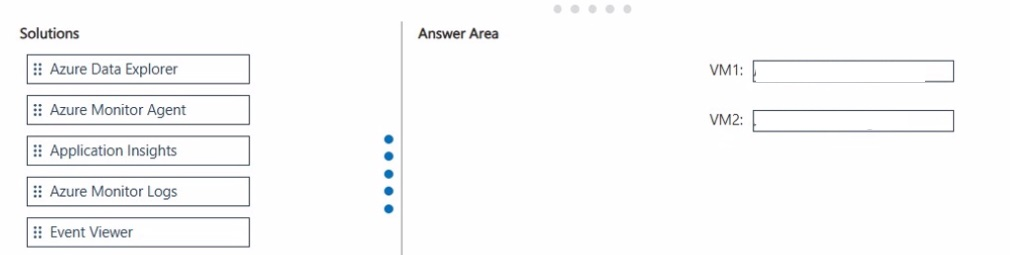
What solution should you include in the recommendation for each virtual machine? To
answer, drag the appropriate solutions to the correct virtual machines.
Each solution may be used once, more than once, or not at all. You may need to drag the
split bar between panes or scroll to view content.
NOTE: Each correct selection is worth one point.
Explanation:
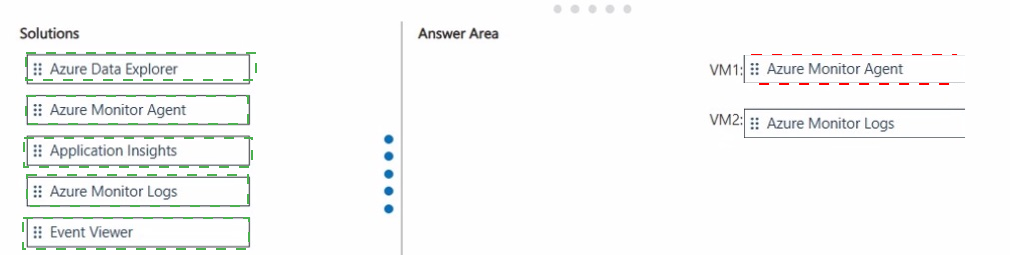
For the logging solution requirements of your virtual machines, here is the recommended selection for each:
VM1: Azure Monitor Agent
Reasoning: To collect operating system logs from a Windows machine and store them in a Log Analytics workspace, you must install the Azure Monitor Agent (AMA). This agent replaces the legacy Log Analytics agent and uses Data Collection Rules (DCRs) to manage which logs are sent to the workspace.
VM2: Azure Monitor Agent
Reasoning: To collect Syslog data from an Ubuntu server, the Azure Monitor Agent is required. While the goal is to archive the data to a storage account, the agent is the mechanism that captures the Syslog data. In a modern Azure environment, the AMA can be configured via a Data Collection Rule to route data directly to various destinations, including a Log Analytics workspace or a storage account for long-term archival.
Technical Insight: Azure Monitor Agent (AMA) vs. Legacy
The Azure Monitor Agent is the current unified solution for gathering guest-level telemetry from both Windows and Linux machines. It offers enhanced security and performance compared to previous agents and allows for "multi-homing" (sending data to multiple workspaces or regions simultaneously).
You have an Azure subscription that contains an Azure key vault named KV1 and a virtual
machine named VM1. VM1 runs Windows Server 2022: Azure Edition.
You plan to deploy an ASP.NET Core-based application named App1 to VM1.
You need to configure App1 to use a system-assigned managed identity to retrieve secrets
from KV1. The solution must minimize development effort.
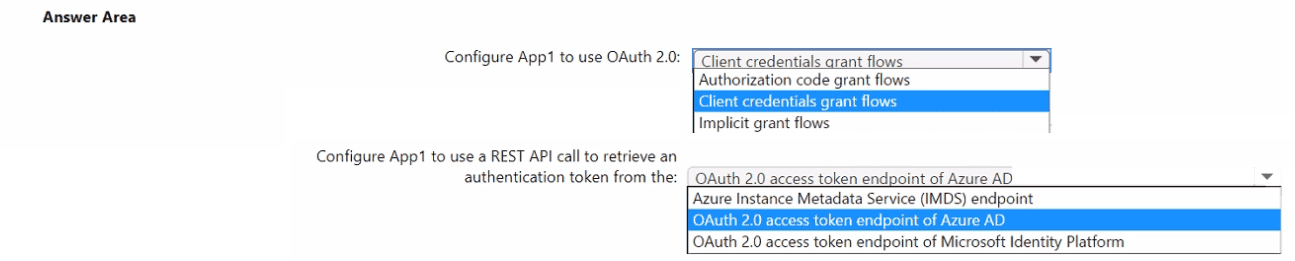
What should you do? To answer, select the appropriate options in the answer area.
NOTE: Each correct selection is worth one point.
Explanation:
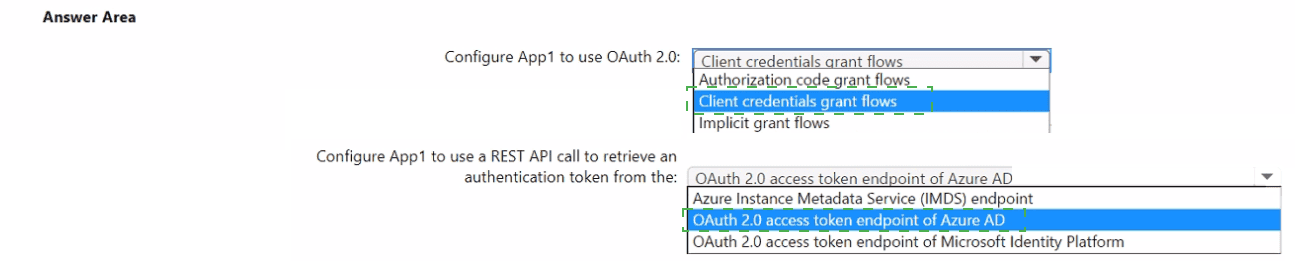
Configure App1 to use Client credentials grant flows and retrieve tokens from the Azure Instance Metadata Service (IMDS) endpoint. Enabling the VM’s system-assigned managed identity, granting that identity Key Vault Get permissions, and using the VM IMDS token endpoint (or the Azure SDK’s DefaultAzureCredential which calls IMDS) minimizes development work and avoids storing credentials.
Selected options
Configure App1 to use OAuth 2.0: Client credentials grant flows.
Configure App1 to use a REST API call to retrieve an authentication token from the: Azure Instance Metadata Service (IMDS) endpoint.
Why these choices are correct
System-assigned managed identities are service principals created and managed by Azure and are intended for workloads running on a single Azure resource (here, VM1). The VM’s managed identity is used like a client credential to request access tokens for Azure resources. This maps conceptually to the client credentials flow (machine-to-machine) rather than interactive flows.
IMDS is the local endpoint inside the VM that issues tokens for the VM’s managed identity. Applications running on the VM request an access token from IMDS (a local, non-routable endpoint) and then use that token to call Key Vault. This avoids embedding secrets in code and requires minimal code changes.
Minimal-effort implementation steps (practical)
Enable system-assigned managed identity on VM1 (Azure portal / CLI). This creates the identity and associates it with VM1.
Grant Key Vault access: In KV1, add an access policy (or use RBAC) that grants the VM’s managed identity Get (and List if needed) permissions for secrets.
Use the Azure SDK (recommended): In App1, use DefaultAzureCredential (or ManagedIdentityCredential) from Azure SDKs; the SDK automatically calls IMDS to obtain tokens when running on the VM. This is the least-effort approach and handles token caching/refresh.
Example (C#):
var client = new SecretClient(new Uri("https://
KeyVaultSecret secret = await client.GetSecretAsync("MySecret");
The SDK hides the IMDS call details and reduces custom code.
If you must call REST directly: Request a token from IMDS at [http://169.254.169.254/metadata/identity/oauth2/token?api-version=2018-02-01&resource=https://vault.azure.net](http://169.254.169.254/metadata/identity/oauth2/token?api-version=2018-02-01&resource=https://vault.azure.net) with header Metadata:true, then use the returned access token in the Authorization: Bearer
Important notes and tradeoffs
Read-only access: Ensure only required Key Vault permissions are granted to follow least privilege.
Local endpoint only: IMDS is accessible only from inside the VM; for local development use environment credentials or Visual Studio sign-in.
SDK recommended: Using Azure SDKs (DefaultAzureCredential) minimizes development effort and handles token lifecycle automatically.
You have an Azure subscription. The subscription contains virtual machines that run
Windows Server.
You are designing a disaster recovery solution that will immediately deploy a new virtual
machine when an existing virtual machine fails. The solution must meet the following
requirements:
• New virtual machines must be deployed with all the required configurations in place.
• Virtual machine deployments must use an infrastructure as code (laC) methodology.
• New virtual machines must be created by using standard Microsoft disk images.
• New virtual machines must be authorized by virtual machine administrators.
• Virtual machine deployments must be managed by using CI/CD pipelines.
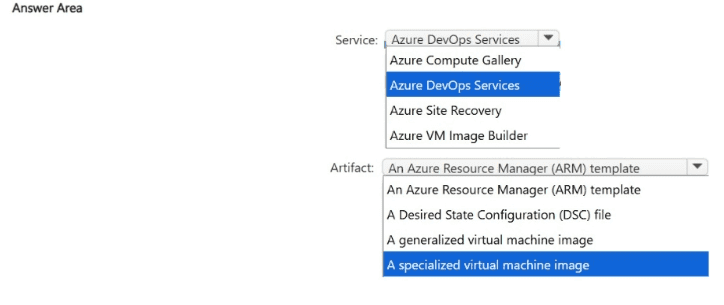
You need to recommend which service to use to manage the virtual machine deployment
process and which artifact to use to create each virtual machine.
What should you recommend? To answer, select the appropriate options in the answer
area.
NOTE: Each correct selection is worth one point.
Explanation:
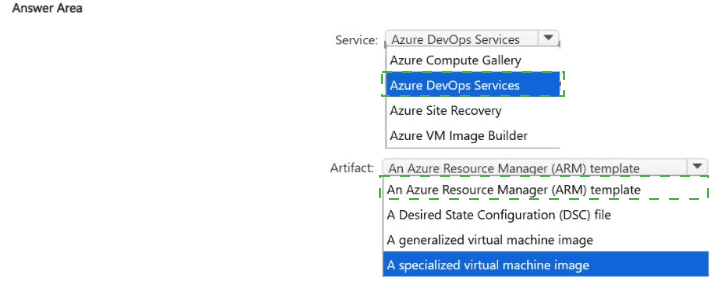
To meet the requirements for a disaster recovery solution using Infrastructure as Code (IaC) and CI/CD pipelines, here are the recommended selections for the answer area:
Service: Azure DevOps Services
CI/CD Management: The requirement explicitly states that deployments must be managed by CI/CD pipelines. Azure DevOps Services (specifically Azure Pipelines) provides the native capability to orchestrate the build and release process for Azure resources.
Authorization: Azure DevOps allows for Pre-deployment approvals. This ensures that new virtual machines are authorized by virtual machine administrators before the pipeline executes the deployment, satisfying the requirement for admin authorization.
IaC Integration: It seamlessly integrates with IaC tools like ARM templates or Bicep to automate the deployment of infrastructure.
Artifact: An Azure Resource Manager (ARM) template
IaC Methodology: The ARM template is the primary Infrastructure as Code artifact for Azure. It defines the desired state of the virtual machine and its surrounding infrastructure (network, storage, etc.) in a declarative JSON format.
Standard Microsoft Images: Within an ARM template, you can specify the publisher, offer, and sku to ensure the VM is created using a standard Microsoft disk image (e.g., Windows Server 2022) rather than a custom-built generalized or specialized image.
Configuration: You can include scripts or extensions within the ARM template (like the Custom Script Extension or DSC) to ensure the new virtual machines are deployed with all required configurations in place.
Why other options were not selected:
Azure Site Recovery: While a great DR tool, it typically replicates existing VMs rather than deploying new ones via IaC/standard images in a CI/CD pipeline.
Specialized/Generalized Images: The requirement specifies using standard Microsoft disk images, which eliminates the need for custom specialized or generalized images.
Desired State Configuration (DSC) file: DSC is used for configuring the OS after deployment. It is an extension of the process, but the primary artifact for the deployment itself is the ARM template.
You have 15 on-premises Hyper-V virtual machines.
You have an Azure subscription that contains an Azure Migrate project named Project 1.
You need to assess the virtual machines for migration to Azure by using Project 1.
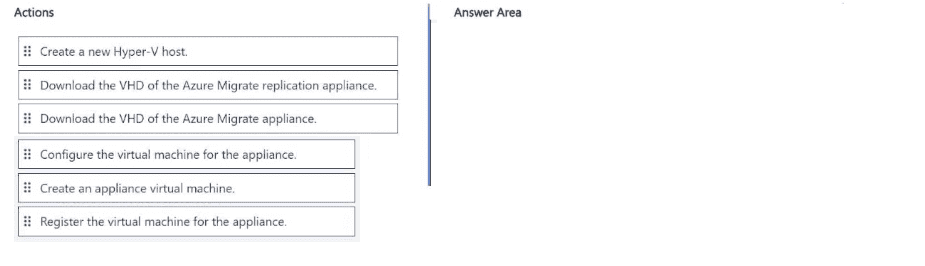
Which four actions should you perform in sequence? To answer, move the appropriate
actions from the list of actions to the answer area and arrange them in the correct order.
Explanation:
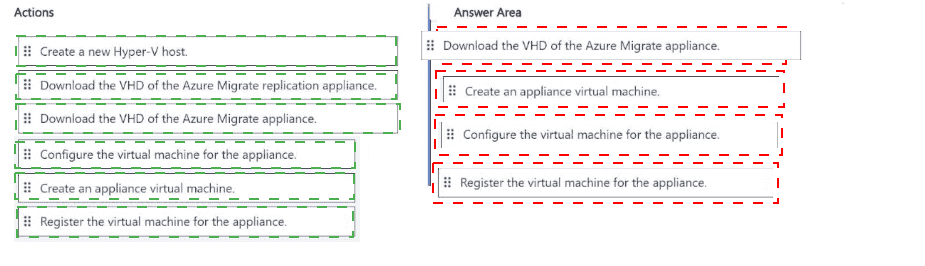
This is the standard sequence for deploying the Azure Migrate appliance for Hyper-V discovery and assessment:
Step 1: Download the VHD of the Azure Migrate appliance
First step — you must download the appliance VHD from the Azure Migrate project in the portal.
Step 2: Create an appliance virtual machine
Import the downloaded VHD into Hyper-V and create the VM.
Step 3: Configure the virtual machine for the appliance
Power on the appliance VM and run the initial configuration (network settings, etc.) via the console.
Step 4: Register the virtual machine for the appliance
Register the appliance with your Azure Migrate project (Project 1) using the project key. After registration, you can start discovery.
Note:
“Download the VHD of the Azure Migrate replication appliance” is not used here. That is for the replication appliance used during actual migration (Azure Migrate: Migration and modernization), not for assessment/discovery.
“Create a new Hyper-V host” is not needed — you use your existing Hyper-V hosts.
This sequence matches Microsoft’s official documentation and is a very common drag-and-drop question in the AZ-305 exam.
You have an Azure subscription. The subscription contains a Log Analytics workspace
named WS1 that is accessible via a public endpoint. The subscription contains the virtual
machines shown in the following table.
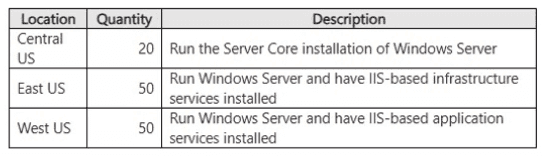
You need to collects logs from the virtual machines and forward the logs to WS1 by using
the Azure Monitor Agent. The solution must meet the following requirements:
• Collect Windows logs and IIS logs from the virtual machines in the East US Azure region.
• Collect Windows logs from the virtual machines in the Central US Azure region.
• Collect IIS logs from the virtual machines in the West US Azure region.
The solution must minimize the volume of data collected.
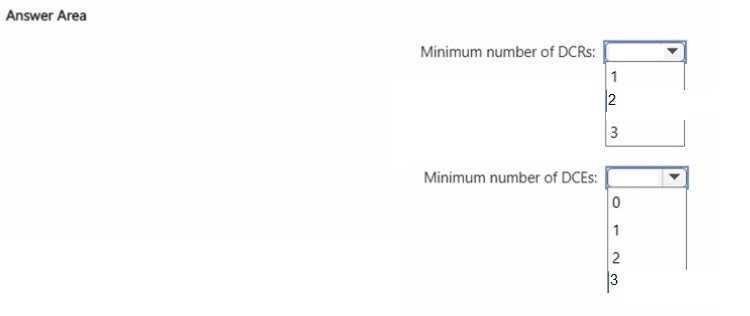
What is the minimum number of data collection rules (OCRs) and data collection endpoints
(DCEs) required? To answer, select the appropriate options in the answer area.
NOTE: Each correct selection is worth one point.
Explanation:
To determine the minimum number of Data Collection Rules (DCRs) and Data Collection Endpoints (DCEs), we need to look at how Azure Monitor Agent (AMA) handles different log types and regional connectivity requirements.
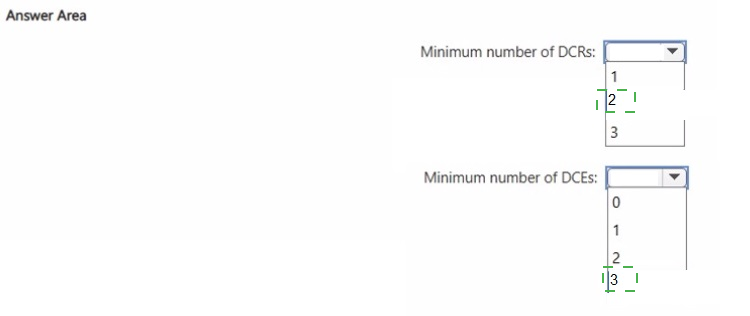
1. Minimum number of DCRs: 2
A Data Collection Rule (DCR) defines what data to collect and where to send it. To minimize data volume while meeting regional requirements, we can group the requirements by data source type:
DCR 1 (Windows Logs): This rule will be applied to virtual machines in East US and Central US.
DCR 2 (IIS Logs): This rule will be applied to virtual machines in East US and West US.
By using two DCRs based on the data source type rather than the region, you ensure that:
East US VMs (assigned both DCRs) collect both Windows and IIS logs.
Central US VMs (assigned DCR 1) collect only Windows logs.
West US VMs (assigned DCR 2) collect only IIS logs.
This approach fulfills all regional requirements while strictly collecting only what is necessary.
2. Minimum number of DCEs: 3
A Data Collection Endpoint (DCE) is required when using the Azure Monitor Agent for certain data types or when using private connectivity scenarios. DCEs are region-specific resources that act as ingestion entry points for monitoring data.
Since the virtual machines are deployed across three different regions (East US, Central US, and West US), you need one DCE per region to ensure proper regional ingestion and configuration alignment.
This results in the minimum of three DCEs, one for each region.
Reference
Microsoft Documentation: Data collection rules in Azure Monitor
Microsoft Documentation: Data collection endpoints in Azure Monitor
You have a mobile app that is deployed to 100,000 users. Each instance of the app collects
usage data.
You have an Azure subscription.
You need to recommend a solution that meets the following requirements:
• Accepts the usage data from the app instances
• Calculates the average hourly CPU utilization of each app instance and writes the
average to an Azure SQL database
• Minimizes costs and administrative effort
What should you include in the recommendation? To answer, select the appropriate
options in the answer area. NOTE: Each correct selection is worth one point.
Explanation:
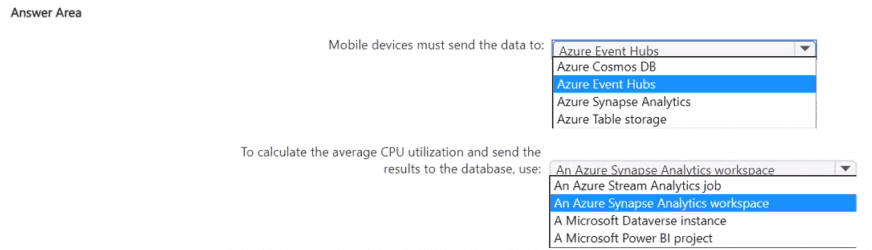
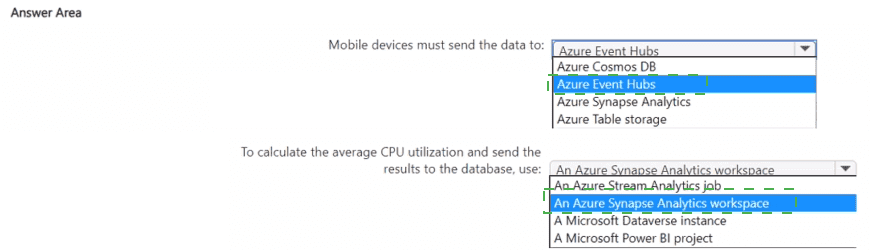
Use Azure Event Hubs to ingest telemetry from the mobile apps and an Azure Stream Analytics job to compute hourly per-device CPU averages and write results to Azure SQL Database. This combination scales to 100k devices, is fully managed (low admin), and supports windowed aggregations with direct output to Azure SQL.
Recommended components (direct answers)
Mobile devices must send the data to: Azure Event Hubs.
To calculate the average CPU utilization and send the results to the database, use: Azure Stream Analytics job.
Why this meets the requirements
Scalability and ingestion: Azure Event Hubs is designed to ingest telemetry from hundreds of thousands to millions of devices with low latency and elastic throughput, so it handles 100,000 mobile app instances without custom infrastructure.
Low administration and cost: Both Event Hubs and Stream Analytics are fully managed PaaS services; you avoid VM management and can scale units or streaming units as needed, minimizing operational overhead.
Windowed aggregation and direct sink: Azure Stream Analytics supports time-windowed queries (tumbling/sliding) to compute hourly averages per device and can output directly to Azure SQL Database, eliminating the need for intermediate storage or custom compute. This keeps latency low and avoids extra data duplication.
Short comparison table (key decision criteria)
Requirement: Ingest 100k devices
Event Hubs: Excellent (massive ingest, Kafka-compatible)
Stream Analytics: N/A
Alternatives: IoT Hub adds device management but more cost if you don't need device twin features.
Requirement: Compute hourly per-device avg
Event Hubs: N/A
Stream Analytics: Excellent (windowing, SQL-like queries)
Alternatives: Databricks/Synapse more powerful but higher admin/cost.
Requirement: Write to Azure SQL DB
Event Hubs: N/A
Stream Analytics: Direct output supported
Alternatives: Custom functions or ETL add complexity.
Implementation outline (practical steps)
Create an Event Hubs namespace and event hub; choose throughput units or Premium tier based on expected ingress.
Have mobile apps send telemetry (AMQP/HTTPS/Kafka API) with a device identifier and CPU metric.
Create an Azure Stream Analytics job with the Event Hub as input; use a TUMBLINGWINDOW(hour, 1) or equivalent to compute AVG(cpu) grouped by device id.
Configure the job output to Azure SQL Database and map fields to the target table (device_id, hour_bucket, avg_cpu).
Monitor and scale Stream Analytics streaming units as needed; enable diagnostics and retry policies.
Tradeoffs and notes
If you need device management or per-device provisioning, consider IoT Hub instead of Event Hubs.
For complex ML or heavy transformations, Databricks/Synapse may be appropriate but increases cost and admin.
You have an on-premises app named App1 that supports REST calls and webhooks.
You have an Azure subscription.
You plan to develop a new app named App2 that will send a Microsoft Teams message
when a new record is added to App1.
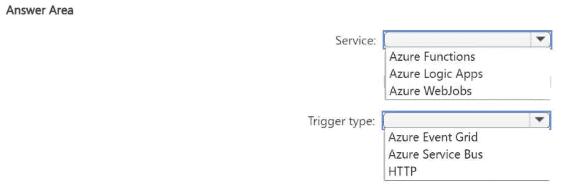
You need to recommend a service to host App2 and the type of trigger to use to call App2.
The solution must minimize development effort.
What should you recommend? To answer, select the appropriate options in the answer
area.
NOTE: Each correct selection is worth one point.
Explanation
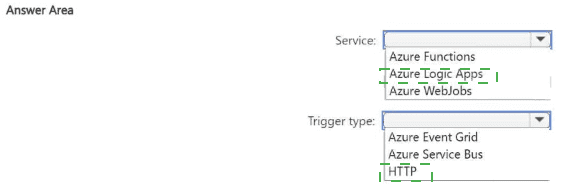
Azure Logic Apps is the best choice here because:
It is a low-code / no-code integration platform designed exactly for scenarios like this.
You can create a workflow using the visual designer that:
Receives an HTTP request (webhook) from App1 when a new record is added.
Parses the incoming payload (if needed).
Uses the built-in Microsoft Teams connector to send a message.
Almost zero development effort — you can build the entire solution with drag-and-drop in the Azure portal.
Why HTTP trigger?
App1 supports webhooks and REST calls.
The simplest and most direct way is for App1 to call a webhook URL (HTTP POST) provided by the Logic App when a new record is created.
Why Not the Other Options?
Azure Functions
Requires writing code (even if minimal), handling JSON parsing, authentication, etc. → Higher development effort.
Azure WebJobs
Old approach, requires an App Service and more management. Not serverless-friendly for this use case.
Azure Event Grid
Good for Azure-native events, but App1 is on-premises and uses webhooks/REST. Not the most direct.
Azure Service Bus
Requires App1 to send messages to a queue/topic → more complex setup.
Key AZ-305 Concept
When the requirement is "minimize development effort" for integration/automation (especially with SaaS connectors like Teams), Azure Logic Apps is almost always the preferred recommendation.
You have the following projects;
• Project1: The development of an app that processes scanned images stored in an Azure
Blob Storage account
• Project2: The migration of an on-premises app that processes log files as they arrive in an
SMB file share
• Project3: The migration of an on-premises app that processes PDF documents stored on
a local file system
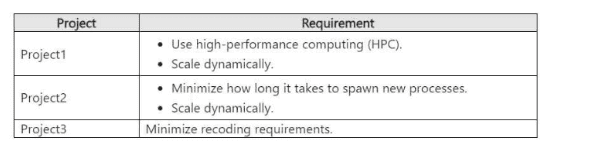
The projects have the requirements shown in the following table.
Project3 does NOT support the use of containers.
You need to recommend a compute solution for the projects.
What should you include in the recommendation for each project? To answer, select the
appropriate options in the answer area.
NOTE: Each correct selection is worth one point.
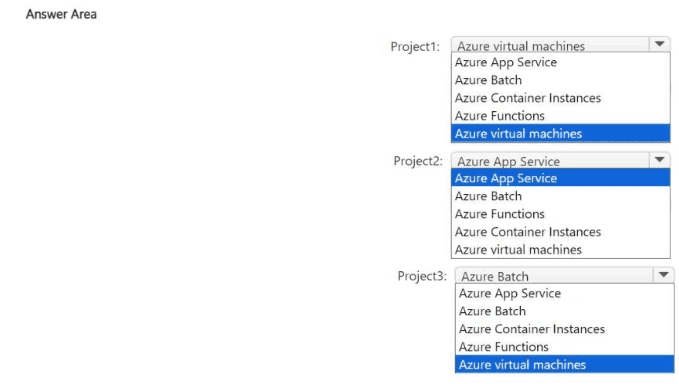
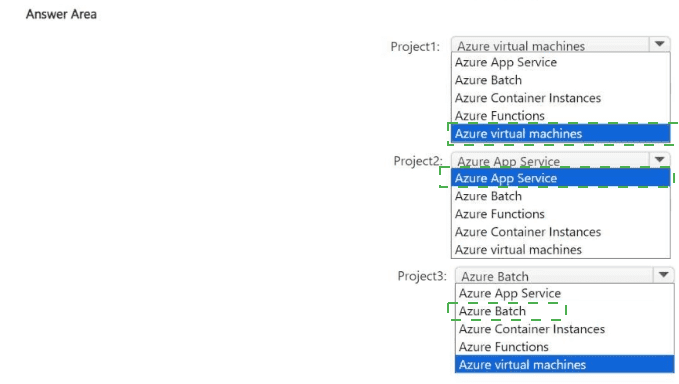
Explanation:
For this AZ-305 compute selection scenario, we must match the specific technical constraints and scaling requirements of each project to the most appropriate Azure service.
Project 1: Azure Batch
Requirement: Use high-performance computing (HPC) and scale dynamically.
Why Azure Batch: Azure Batch is specifically designed for large-scale parallel and high-performance computing (HPC) applications. It manages the job scheduling and automatically scales a pool of compute nodes (VMs) based on the volume of tasks (processing scanned images).
Note on the Image: The provided answer image shows "Azure virtual machines" selected, but for the AZ-305 exam, if "Azure Batch" is an option alongside an HPC requirement, Azure Batch is the standard correct answer as it provides the managed orchestration needed for dynamic scaling.
Project 2: Azure Functions
Requirement: Minimize process spawn time and scale dynamically.
Why Azure Functions: This is a serverless compute service. When log files arrive in a share, a trigger can immediately execute a function.
Minimize Spawn Time: Serverless functions are designed to start in milliseconds (especially in the Consumption or Premium plans).
Dynamic Scaling: It scales automatically from zero to thousands of concurrent executions based on the number of incoming events.
Note on the Image: The provided answer image shows "Azure App Service." While App Service can scale, it has a longer "cold start" and is less optimized for event-driven, per-file processing compared to Azure Functions.
Project 3: Azure Virtual Machines
Requirement: Minimize recoding and no container support.
Why Azure Virtual Machines: This is a classic "Lift and Shift" migration.
Minimize Recoding: Since the app expects a local file system and cannot be containerized, moving it to an Azure VM allows it to run in an environment almost identical to its on-premises home.
File System: You can mount Azure Files or disk storage to provide the file system access the app requires without rewriting the data access layer.
Reference
Microsoft Documentation: Batch and High Performance Computing (HPC)
Microsoft Documentation: Azure Functions Overview
| Page 3 out of 36 Pages |