Topic 5: Mix Questions
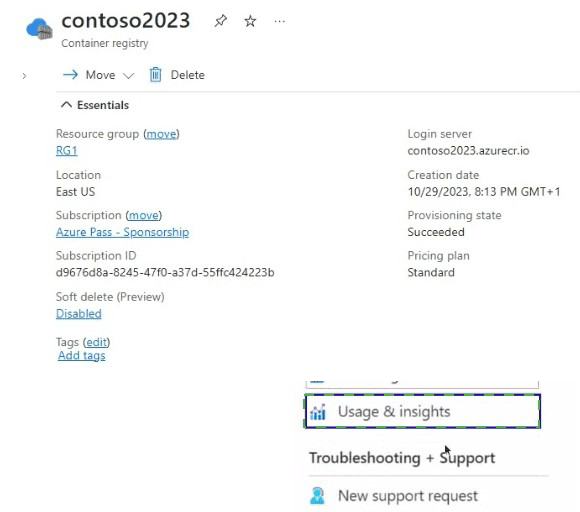
You have an Azure container registry named contoso2023 as shown in the following
exhibit.
Explanation:
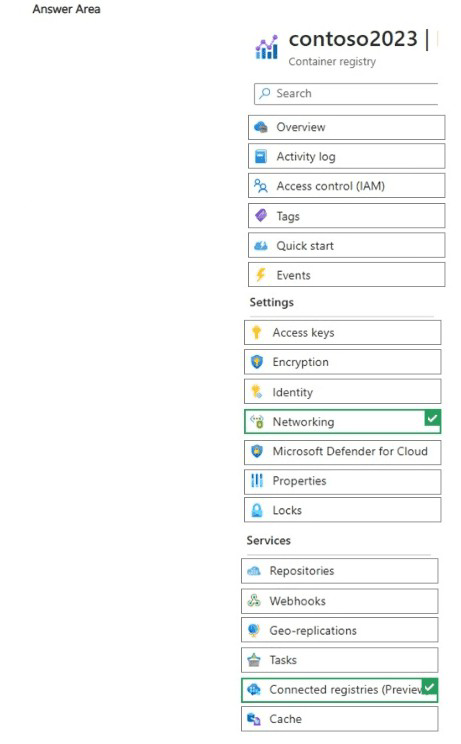
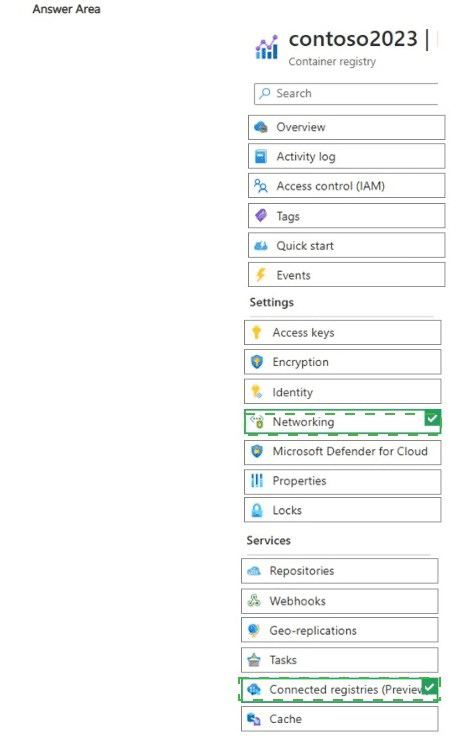
The exhibit shows the Azure portal view of a container registry named contoso2023 (Standard tier) with the "Networking" blade selected and "Connected registries (Preview)" highlighted under Services. This preview feature enables creating on-premises or remote replicas that sync images/artifacts from the cloud registry for faster, lower-latency access in distributed or edge scenarios. The question likely tests identifying where to manage this capability, as "Connected registries (Preview)" is explicitly visible and directly related to registry replication/sync features.
Correct Option:
Connected registries (Preview)
This is the correct blade/section because it is the dedicated location in the Azure portal for managing connected registry resources (in Preview at the time). Connected registries allow you to deploy a local/on-premises registry instance that synchronizes content (pull/push) with the cloud-based Azure Container Registry, improving performance for remote locations, reducing WAN traffic, and supporting scenarios like disconnected operations or edge computing. The exhibit highlights this under Services, confirming it's the entry point for configuration.
Incorrect Option:
Networking
While selected in the exhibit, the Networking blade primarily handles public/private endpoint access, firewalls, virtual network integration, and dedicated data endpoints (available in Premium tier). It does not manage connected registries, which are a separate replication/sync feature. Selecting Networking alone won't enable or configure connected registry scenarios.
Incorrect Option:
Usage & insights
This blade (highlighted in the second exhibit) provides monitoring metrics, such as pull/push counts, storage usage, and performance insights for the registry. It is for observability and troubleshooting, not for configuring or enabling connected registries or any synchronization features.
Reference:
Microsoft Learn: What is a connected registry? - https://learn.microsoft.com/en-us/azure/container-registry/intro-connected-registry
Microsoft Learn: Create a connected registry - https://learn.microsoft.com/en-us/azure/container-registry/quickstart-create-connected-registry
You have an Azure subscription and a Microsoft Entra ID P1 license.
You need to perform the following actions:
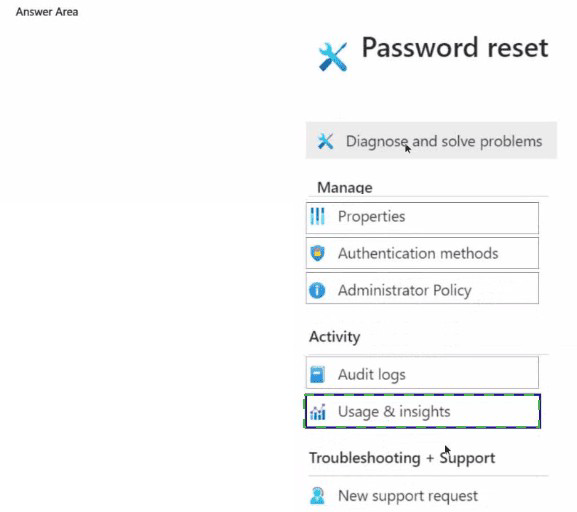
* Enable self-service password reset (SSPR) for all users.
* Require the users to answer four questions when registering for SSPR.
Which two settings should you use? To answer, select the appropriate settings in the
answer area.
NOTE: Each correct selection is worth one point.
Explanation:
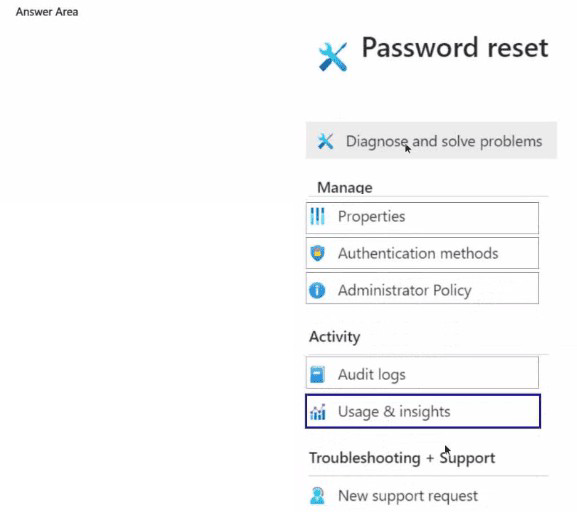
This question tests configuration of Azure AD Self-Service Password Reset (SSPR). SSPR allows users to reset their own passwords without administrator intervention. Enabling it for all users is a global on/off switch, while the number of required security questions for registration is a separate, detailed policy setting.
Correct Options:
Password reset
This is the main configuration blade for SSPR in the Azure AD admin center. Selecting this is the first step, as it's where you navigate to enable SSPR for the desired group of users (in this case, "All") and configure its core behavior. You cannot set any SSPR details without first accessing this area.
Authentication methods
This is a sub-setting within the "Password reset" configuration. Once in the Password reset blade, you select "Authentication methods" to define how users can verify their identity. Here, you configure the number and types of security questions. Specifically, you would set "Number of questions required to register" to 4 and "Number of questions required to reset" (e.g., to 2).
Incorrect Options / Why Other Settings are Not Correct:
Properties:
This blade contains high-level directory properties like the tenant name, technical contact info, and settings for security defaults. It does not contain SSPR configuration.
Administrator Policy:
This is not a standard Azure AD blade. Password policies for administrators are typically enforced via Conditional Access or are the same as for users, configured within the main SSPR settings.
Audit logs:
This is for reviewing historical events and sign-ins, not for configuring services.
New support request: This is for opening a ticket with Microsoft support, not for service configuration.
Reference:
Microsoft Learn documentation, "Tutorial: Enable users to unlock their account or reset passwords using Azure Active Directory self-service password reset". The steps guide you to: 1) Navigate to Azure Active Directory > Password reset. 2) To configure security questions, under the Authentication methods tab, set the number of questions required for registration and reset.
You have an Azure subscription that contains the resources shown in the following table.
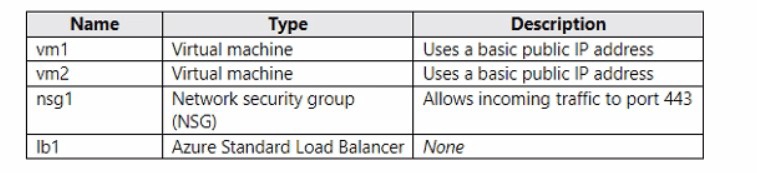 You need to load balance HTTPS connections to vm1 and vm2 by using Ib1.
Which three actions should you perform in sequence? To answer, move the appropriate
actions from the list of actions to the answer area and arrange them in the correct order.
You need to load balance HTTPS connections to vm1 and vm2 by using Ib1.
Which three actions should you perform in sequence? To answer, move the appropriate
actions from the list of actions to the answer area and arrange them in the correct order.


Explanation:
This question tests the steps required to convert two standalone VMs with individual public IPs into a high-availability set load-balanced by a Standard SKU Load Balancer for HTTPS (port 443). The Standard Load Balancer requires VMs to be in a backend pool, which itself requires specific configurations. The order is crucial.
Correct Sequence & Justification:
Remove the public IP addresses from vm1 and vm2.
Why first? The end goal is for clients to connect to the load balancer's public IP address, not directly to the VMs. The VMs' individual basic public IP addresses must be removed so that all inbound HTTPS traffic is forced to come through the load balancer's frontend IP. This is a prerequisite for proper load balancer functionality.
Create an availability set and add vm1 and vm2 to it.
Why second? For a Standard Load Balancer's backend pool, the VMs must be placed into a high-availability construct. The two primary options are an Availability Set or an Availability Zone. Since the table doesn't mention zones, the correct step is to create an Availability Set. This ensures the VMs are placed across different fault and update domains, meeting the high-availability requirement for the load-balanced solution.
Create a health probe and backend pool on lb1.
Why third? After the VMs are prepared (no individual PIPs, in an availability set), you configure the load balancer. The backend pool is the logical grouping of the VMs (vm1 and vm2) that will receive traffic. The health probe (e.g., on port 443) is essential for the load balancer to determine which VM instances are healthy and can receive traffic. This configuration must be done before creating the rule that directs traffic.
*(The final step, implied to complete the solution but not part of the three you select in sequence, would be: Create a load balancing rule on lb1. This rule ties the frontend IP/port (e.g., FrontendIP:443) to the backend pool and health probe, defining the distribution logic.)*
Why Other Actions Are Not in the Sequence:
Remove nsg1:
The existing NSG allowing port 443 is still useful and likely necessary for the load balancer's health probe and for the VMs to accept the load-balanced traffic. Removing it is not a required step and could break connectivity.
Create a load balancing rule on lb1:
This is a critical final step, but it logically comes after the backend pool and health probe are created, as the rule references them. The question asks for the first three sequential actions to set up the foundation.
Reference:
Microsoft Learn documentation, "Tutorial: Load balance internet traffic to VMs using Azure Load Balancer". The standard procedure is: 1) Create VMs in an availability set (or zone), 2) Create a Standard Load Balancer, 3) Create a backend pool and add VMs, 4) Create a health probe, and 5) Create a load-balancing rule.
You have an Azure subscription that contains a resource group named RG1.
You need to prevent administrators from inadvertently modifying the resources in RG1.
How should you complete the PowerShell command? To answer, select the options in the
answer area.
NOTE: Each correct answer is worth one point.


Explanation:
This question tests the use of PowerShell to create an Azure Resource Manager lock. Management locks prevent accidental modification or deletion of resources. A ReadOnly lock prevents all modifications, while a CanNotDelete lock only prevents deletion. The scenario requires preventing administrators from "inadvertently modifying" resources, which calls for the stricter ReadOnly lock.
Correct Command and Options:
The completed PowerShell command to place a ReadOnly lock on the resource group RG1 is:
text
New-AzResourceLock -LockName
Cmdlet: New-AzResourceLock
This is the correct cmdlet specifically designed to create a new management lock on Azure resources or resource groups. The other cmdlets (Lock-AzRmStorageContainerImmutabilityPolicy, Set-AzResource, Set-AzAppConfigurationLock) are for specific, different types of locks or settings.
Parameter for Lock Type: ReadOnly
The -LockLevel parameter accepts either ReadOnly or CanNotDelete. Since the requirement is to prevent modification (not just deletion), the ReadOnly lock is necessary. It blocks all write/update operations, effectively preventing inadvertent changes.
Parameter for Scope: -ResourceGroupName RG1
The -ResourceGroupName parameter specifies the target scope for the lock. Placing the lock at the resource group level applies the lock to all resources within RG1, meeting the requirement to protect all resources in that group.
Incorrect Options:
Lock-AzRmStorageContainerImmutabilityPolicy:
This cmdlet is for enabling immutable blob storage policies on a specific container, not for creating a general ARM management lock on a resource group.
CanNotDelete:
This lock level only prevents deletion. Resources could still be reconfigured or updated, which does not fully meet the goal of preventing modification.
DeleteResources / False:
These are not valid values for the -LockLevel parameter in the New-AzResourceLock cmdlet.
Reference:
Microsoft Learn documentation, "Lock resources to prevent unexpected changes". The article details using the New-AzResourceLock PowerShell cmdlet with the -LockLevel parameter set to ReadOnly or CanNotDelete to lock a subscription, resource group, or resource.
You have an on-premises network.
You have an Azure subscription that contains two virtual networks named VNet1 and
VNet2. VNet1 uses an IP address space of 192.168.8.0/24. VNet2 uses an IP address
space of 192.168.9.0/24.
You need to configure the virtual networks. The solution must meet the following
requirements:
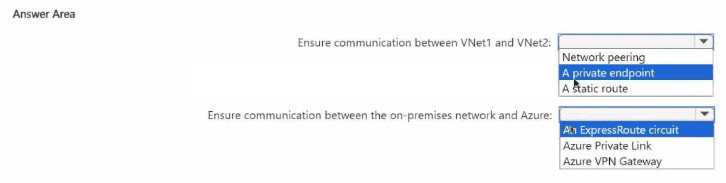
* Ensure that the resources on VNet1 can communicate with the resources on VNet2.
* Ensure that the resources on the on-premises network can communicate with Azure
resources.
* Minimize costs
Explanation:
This question tests the selection of appropriate and cost-effective connectivity solutions for different Azure networking scenarios. The requirements are: 1) Connect two Azure VNets, and 2) Connect an on-premises network to Azure. The key constraint is to minimize costs.
Correct Options:
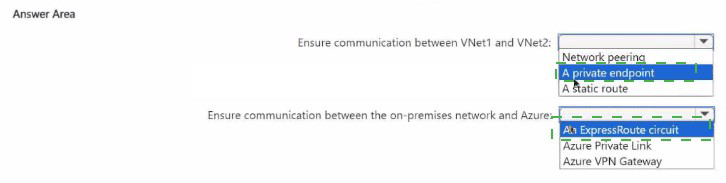
Ensure communication between VNet1 and VNet2: Network peering
VNet Peering is the native, recommended, and most cost-effective method for connecting two virtual networks within the same Azure region (Global VNet Peering for different regions). It creates a direct, low-latency link over the Microsoft backbone. There is no gateway device required and no data transfer charges for traffic between the peered VNets in the same region, aligning perfectly with cost minimization.
Ensure communication between the on-premises network and Azure: Azure VPN Gateway
To connect an on-premises network to Azure, the two primary options are Site-to-Site VPN (VPN Gateway) and ExpressRoute. The requirement to minimize costs dictates choosing Azure VPN Gateway. ExpressRoute provides a private, dedicated connection with higher reliability and bandwidth but at a significantly higher cost (circuit fees, provider charges). A Site-to-Site VPN over the public internet using a VPN Gateway is the standard, lower-cost solution for hybrid connectivity.
Incorrect Options:
For VNet-to-VNet:
A private endpoint:
This is for securely connecting to a specific Azure PaaS service (like Storage, SQL DB) from a VNet, not for general network-to-network connectivity between two VNets.
A static route:
Static routes are configuration elements used within a route table to direct traffic. By themselves, they do not establish connectivity. They might be used in conjunction with a gateway or peering, but are not the primary connectivity solution.
For On-premises-to-Azure:
An ExpressRoute circuit:
While it meets the connectivity requirement, it is a premium, high-cost service and therefore does not satisfy the "minimize costs" requirement.
Azure Private Link:
Similar to a private endpoint, Private Link is for accessing specific Azure PaaS and partner services privately from on-premises or a VNet. It is not a general network connectivity solution for connecting an entire on-premises network to an Azure VNet.
Reference:
Microsoft Learn documentation on "Virtual network peering" and "About VPN Gateway". The peering documentation highlights it as the preferred, low-latency, high-bandwidth connection between VNets. The VPN Gateway documentation positions it as the standard, cost-effective way to create a cross-premises connection.
| Page 3 out of 45 Pages |