Topic 6: Misc. Questions
You have an Azure subscription that contains the resources shown in the following table.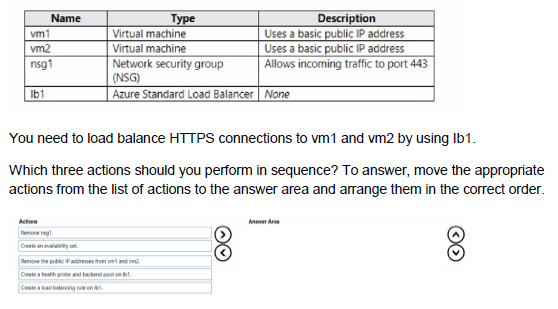
Explanation:
You need to configure Azure Standard Load Balancer (lb1) to load-balance HTTPS traffic (port 443) to vm1 and vm2. Currently, both VMs have basic public IP addresses, and there is no backend pool, health probe, or load-balancing rule on lb1.
For a Standard Load Balancer to work correctly with VMs:
VMs must not have a public IP address attached to their NIC (Standard LB does not support VMs with public IPs in the backend pool).
VMs should be placed in the same availability set or use Availability Zones (but availability set is the most common requirement in AZ-104 questions).
You must create a backend pool, a health probe (for HTTPS/port 443), and a load-balancing rule.
Correct Sequence (in exact order):
Remove the public IP addresses from vm1 and vm2
This is the first mandatory step. Standard Load Balancer does not allow VMs that have a public IP attached to their network interface. You must remove the public IPs before adding the VMs to the backend pool.
Create an availability set
VMs behind a Standard Load Balancer (especially when using a basic backend pool) must be in the same availability set (or use Availability Zones). Since no availability set is mentioned in the table, you need to create one and place both VMs into it.
Create a health probe and backend pool on lb1
After the VMs are ready (no public IP + same availability set), you create:
A backend pool and add vm1 + vm2 to it.
A health probe (HTTPS on port 443) so the load balancer knows which VMs are healthy.
A load-balancing rule (HTTPS port 443 front-end → back-end).
Correct Order (top to bottom):
Remove the public IP addresses from vm1 and vm2
Create an availability set
Create a health probe and backend pool on lb1
(You can then create the load-balancing rule as the final step, but the question asks for the three key actions, and the probe + backend pool are usually grouped together.)
Incorrect Options (why they are wrong in sequence):
Creating the load-balancing rule too early → will fail because backend pool and probe don’t exist yet.
Removing NSG or creating availability set first → removing public IPs must come before anything else for Standard LB compatibility.
Creating backend pool before removing public IPs → deployment will fail with validation error.
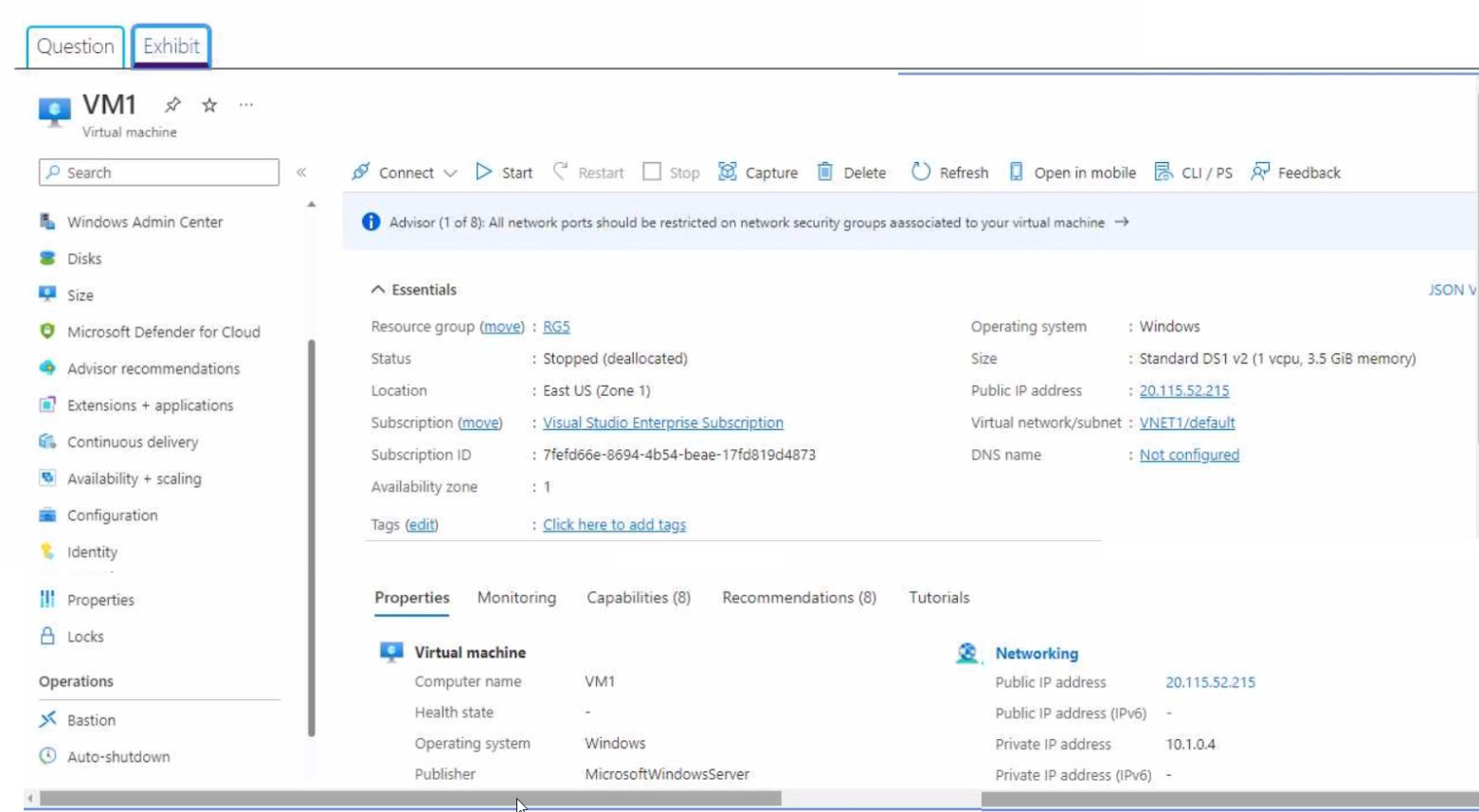
You create an Azure VM named VM1 that runs Windows Server 2019. VM1 is configured as shown in the exhibit (Click the Exhibit tab.)
A. Configure a DNS name for VM1.
B. Start VM1.
C. Capture a snapshot of VM1.
D. Connect to VM1.
Desired State Configuration (DSC) extensions require the virtual machine to be in a running state to install and configure. The exhibit shows VM1 is in a "Stopped (deallocated)" state.
Correct Option: B. Start VM1.
The exhibit shows VM1 status as "Stopped (deallocated)". Before you can install or configure the Desired State Configuration extension, the virtual machine must be running. Starting VM1 is the first step to enable DSC.
Incorrect Options:
A. Configure a DNS name for VM1.
DNS configuration is not required for enabling DSC. DSC extensions work with the VM's private IP or existing DNS resolution.
C. Capture a snapshot of VM1.
Capturing a snapshot creates a backup but is not required before enabling DSC. This is an optional precaution, not a prerequisite.
D. Connect to VM1.
Connecting to VM1 is not necessary to enable the DSC extension. The extension can be installed from the Azure portal, PowerShell, or CLI without establishing a remote desktop connection.
Reference:
Microsoft Learn: Desired State Configuration (DSC) extension
Microsoft Learn: Deploy VM extension from Azure portal
Microsoft Learn: VM states and billing implications
Explanation:
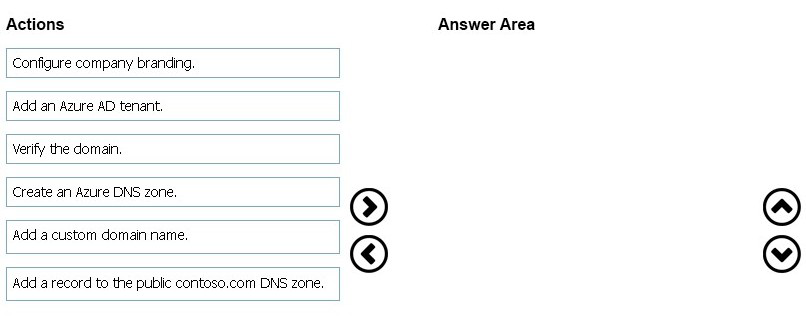
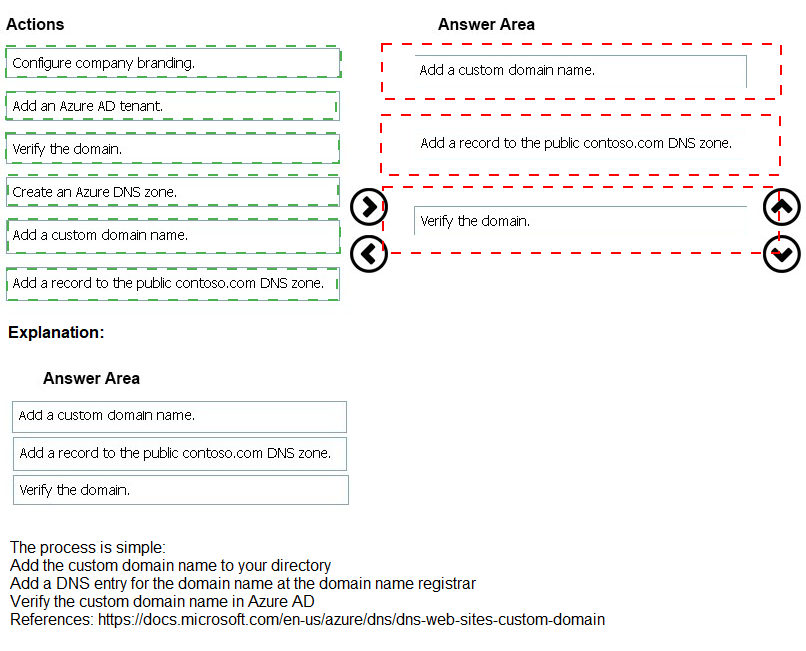
To use a custom domain name (contoso.com) for Azure AD users, you must add the custom domain to Azure AD, verify ownership by adding a DNS record, and then confirm the verification.
Correct Order:
1. Add a custom domain name.
First, in Azure AD, add the custom domain name "contoso.com". This registers the domain with Azure AD but it remains unverified until DNS verification is complete.
2. Verify the domain.
Azure AD provides a verification TXT or MX record. You must add this verification record to your public DNS zone with the third-party registrar to prove domain ownership.
3. Configure company branding (optional) or confirm domain.
After DNS propagation, Azure AD detects the verification record and marks the domain as verified. You can then create Azure AD users with @contoso.com suffixes.
Incorrect Actions:
Create an Azure DNS zone: Not required if using a third-party registrar for DNS.
Add an Azure AD tenant: The tenant already exists with an initial domain.
Add a record to the public contoso.com DNS zone: This is part of the verification process but occurs after adding the domain to Azure AD.
Reference:
Microsoft Learn: Add a custom domain name to Azure AD
Microsoft Learn: Verify a custom domain name in Azure AD
You have an Azure subscription that contains the resources in the following table.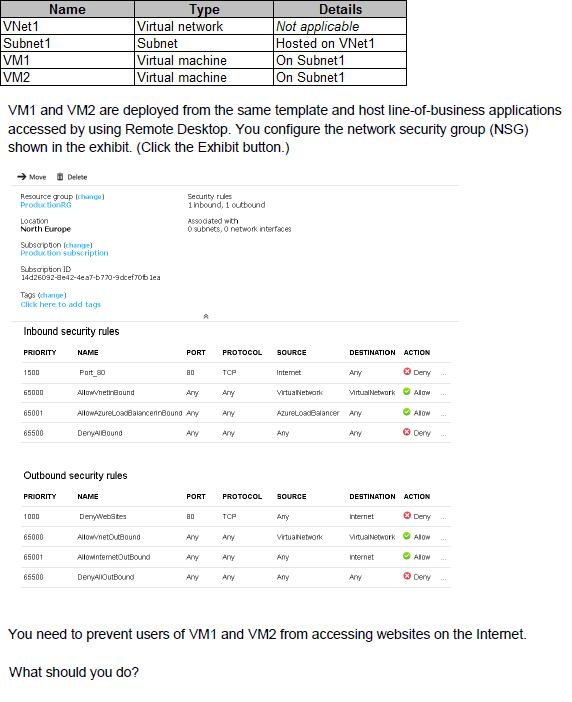
A. Associate the NSG to Subnet1.
B. Disassociate the NSG from a network interface.
C. Change the DenyWebSites outbound security rule.
D. Change the Port_80 inbound security rule
Explanation:
The NSG currently has an outbound rule (DenyWebSites) that blocks port 80 traffic to the Internet. However, for this rule to affect VM1 and VM2, the NSG must be associated with Subnet1 where both VMs reside.
Correct Option:
A. Associate the NSG to Subnet1.
The NSG contains the outbound rule DenyWebSites that blocks TCP port 80 traffic to the Internet. However, the NSG is currently not associated with Subnet1. By associating the NSG to Subnet1, the outbound rule will apply to VM1 and VM2, preventing them from accessing websites on the Internet.
Incorrect Options:
B. Disassociate the NSG from a network interface.
Disassociating would remove any existing association, making the NSG ineffective, which would allow internet access, not prevent it.
C. Change the DenyWebSites outbound security rule.
The rule is already correctly configured to deny port 80 outbound traffic. Changing it would not solve the issue if the NSG is not associated.
D. Change the Port_80 inbound security rule.
This rule controls inbound port 80 traffic, not outbound. Modifying it would not affect the VMs' ability to access websites on the Internet.
Reference:
Microsoft Learn: Network security groups
Microsoft Learn: Associate a network security group to a subnet
Explanation:
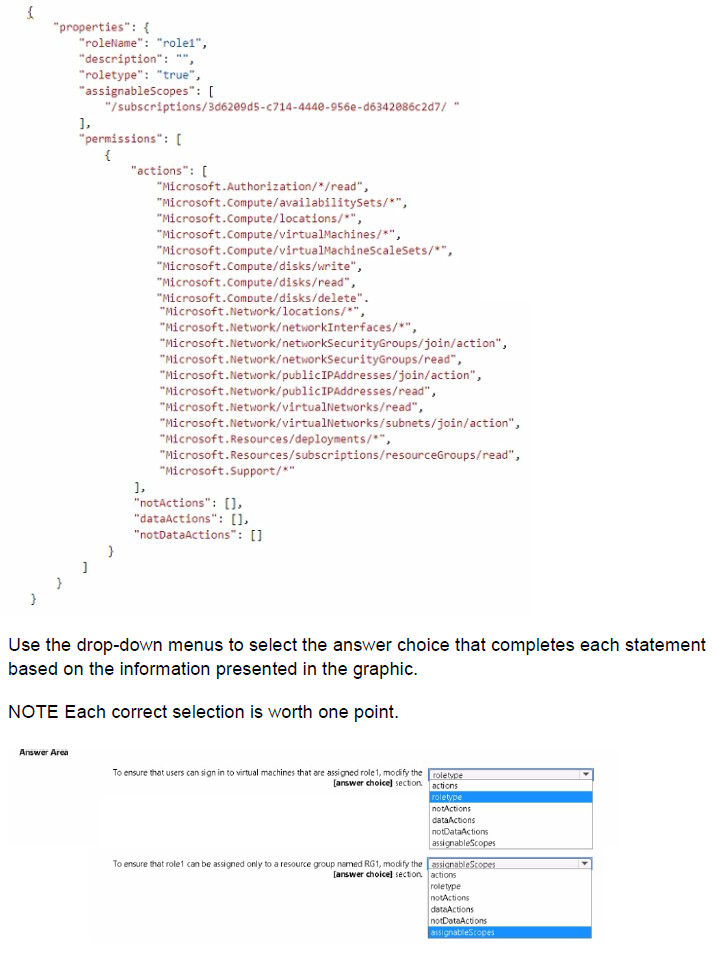
The custom role "role1" currently lacks permissions for virtual machine login (Microsoft.Compute/virtualMachines/login/action). To enable sign-in, you need to add this action. To restrict assignment to a specific resource group, you modify the assignableScopes.
Correct Options:
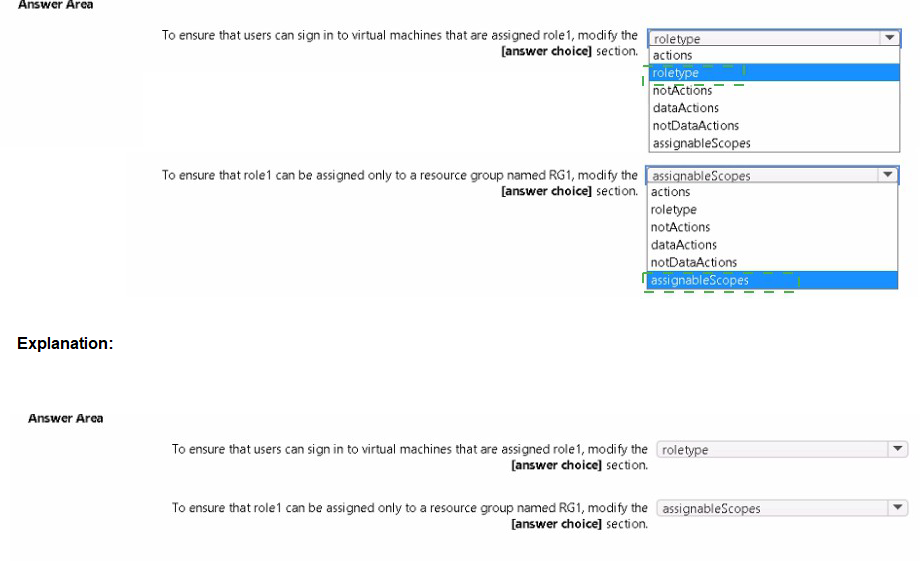
First statement: To ensure that users can sign in to virtual machines that are assigned role1, modify the actions section.
The role definition currently includes "Microsoft.Compute/virtualMachines/*", which grants management permissions but does NOT include the login action. To allow users to sign in to VMs, you need to add "Microsoft.Compute/virtualMachines/login/action" to the actions array.
Second statement: To ensure that role1 can be assigned only to a resource group named RG1, modify the assignableScopes section.
The assignableScopes array currently contains the subscription ID. To restrict assignment to only RG1, you change this to "/subscriptions/3d62e09d5-c714-4440-956e-d6342086c2d7/resourceGroups/RG1". This limits the role's assignable scope to the specific resource group.
Incorrect Options:
roletype: This defines the role type (built-in or custom) and does not affect login permissions or assignable scopes.
notActions: Used to exclude specific actions from permissions, not to add login capability.
dataActions: Used for data plane operations (e.g., storage data), not for VM sign-in.
Reference:
Microsoft Learn: Azure custom roles
Microsoft Learn: Virtual Machine User Login role
Microsoft Learn: Assignable scopes in custom roles
| Page 15 out of 45 Pages |