Topic 5: Mix Questions
You have an Azure subscription that contains an Azure Storage account named storage1 and the users shown in the following table.
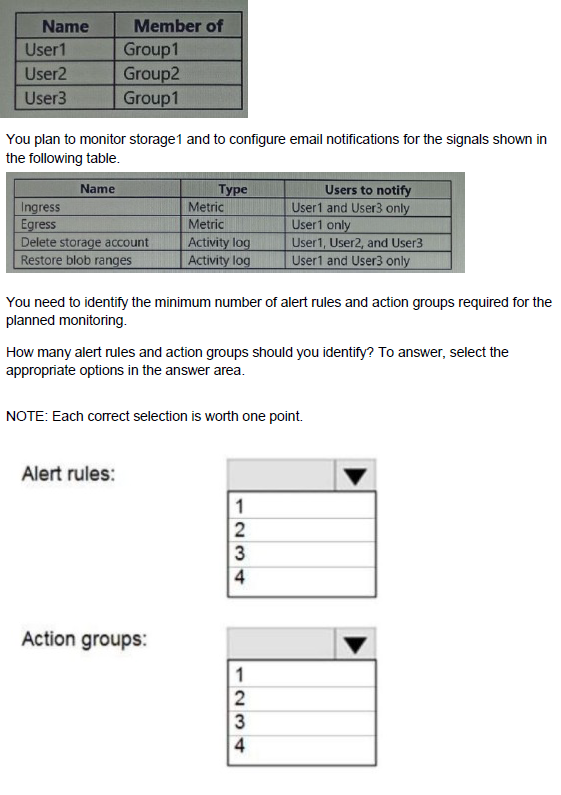
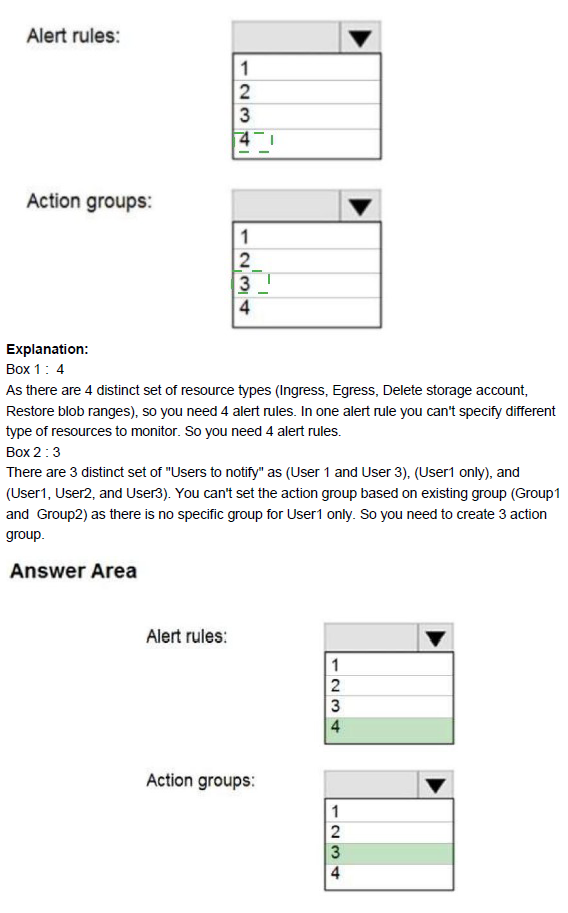
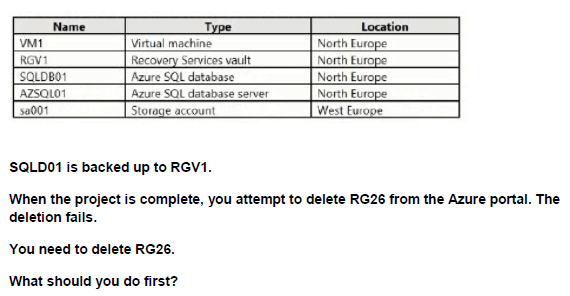
A.
B.
C.
D. StopVM1.
You have an Azure subscription named Sub1.
You plan to deploy a multi-tiered application that will contain the tiers shown in the following table.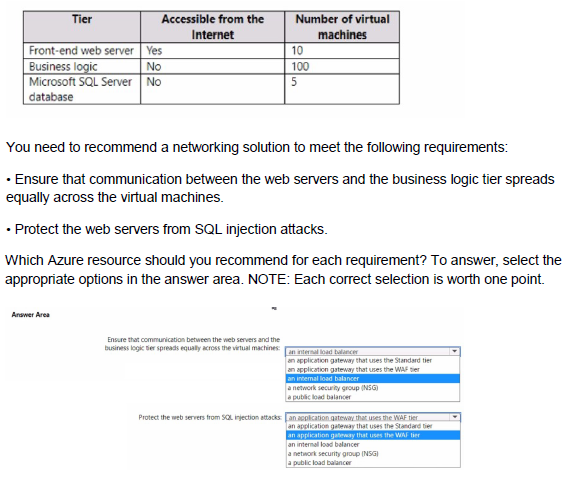
Explanation:
The multi-tier application has three tiers:
Front-end web servers (10 VMs) – accessible from the internet
Business logic tier (100 VMs) – not accessible from the internet
Microsoft SQL Server database tier (5 VMs) – not accessible from the internet
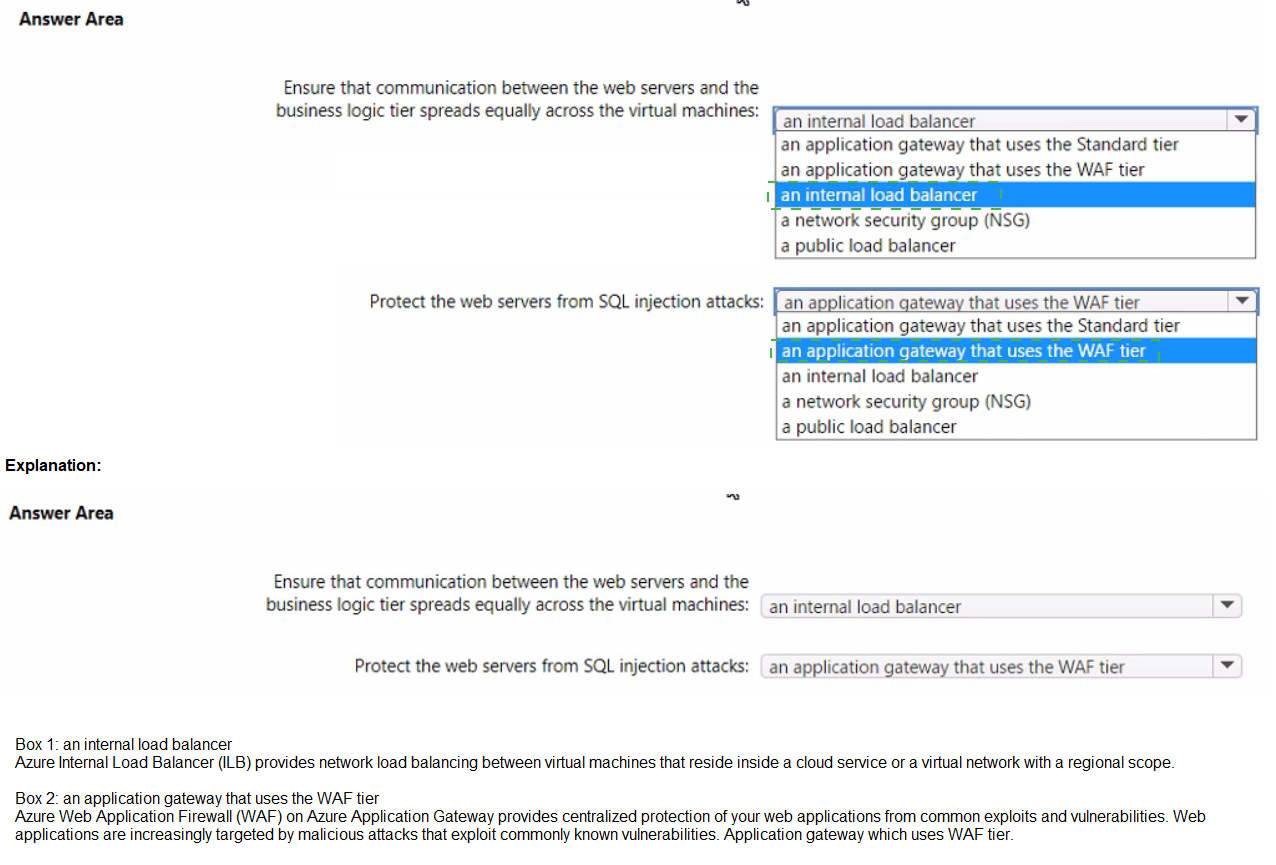
Requirement 1: Ensure communication between the web servers and the business logic tier spreads equally across the virtual machines.
This requires a load balancer that distributes traffic evenly (hash-based distribution) from the front-end tier to the business logic tier. An internal load balancer is the correct choice because the business logic tier should not be directly exposed to the internet.
Requirement 2: Protect the web servers from SQL injection attacks.
SQL injection is an application-layer (Layer 7) attack. Azure Application Gateway with the Web Application Firewall (WAF) enabled provides built-in protection against OWASP top 10 threats, including SQL injection. An internal load balancer or NSG cannot inspect HTTP/HTTPS payload to block SQL injection.
Correct Option:
Ensure that communication between the web servers and the business logic tier spreads equally across the virtual machines:an internal load balancer
(It sits between the front-end web tier and the business logic tier and evenly distributes traffic across all 100 business logic VMs.)
Protect the web servers from SQL injection attacks:an application gateway that uses the WAF tier
(Application Gateway WAF inspects incoming HTTP/HTTPS traffic to the front-end web servers and blocks SQL injection attempts.)
Incorrect Option:
an application gateway that uses the Standard tier — Does not include WAF, so no protection against SQL injection.
a network security group (NSG) — Can control ports/IPs but cannot inspect application payload to block SQL injection.
a public load balancer — Not suitable for internal tier-to-tier communication.
an internal load balancer (for the second requirement) — Cannot protect against Layer 7 attacks like SQL injection.
Reference:
Azure Application Gateway Web Application Firewall
Azure Load Balancer overview
You have an Azure subscription
You plan to deploy a new storage account
You need to configure encryption for the account The solution must meet the following requirements:
• Use a customer-managed key stored in an key vault
• Use the maximum supported bit length.
Which type of key and which bit length should you use?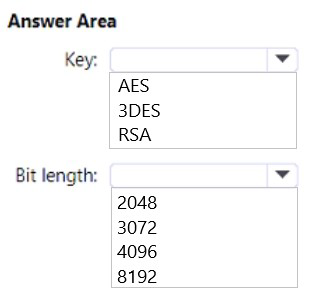
Explanation:
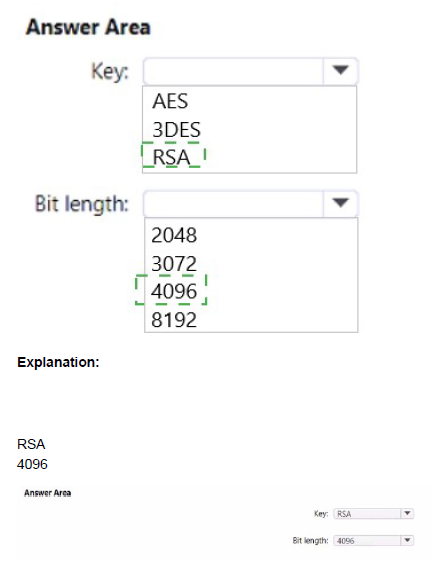
For Azure Storage encryption with customer-managed keys, you must use an RSA key stored in Azure Key Vault. The maximum supported bit length for customer-managed keys in Azure Storage is 4096 bits.
Correct Options:
Key type: RSA
Azure Storage encryption supports only RSA keys when using customer-managed keys. RSA-HSM keys are also supported but require a dedicated HSM. RSA is the standard key type used for storage account encryption.
Bit length: 4096
The maximum supported bit length for RSA keys used with Azure Storage encryption is 4096 bits. This provides the highest level of security while remaining compatible with Azure Storage service requirements.
Reference:
Microsoft Learn: Customer-managed keys for Azure Storage encryption
Microsoft Learn: About Azure Key Vault keys
Microsoft Learn: Supported key types and key sizes
You have an Azure subscription that contains an Azure Directory (Azure AD) tenant named contoso.com. The tenant is synced to the on-premises Active Directory domain. The domain contains the users shown in the following table.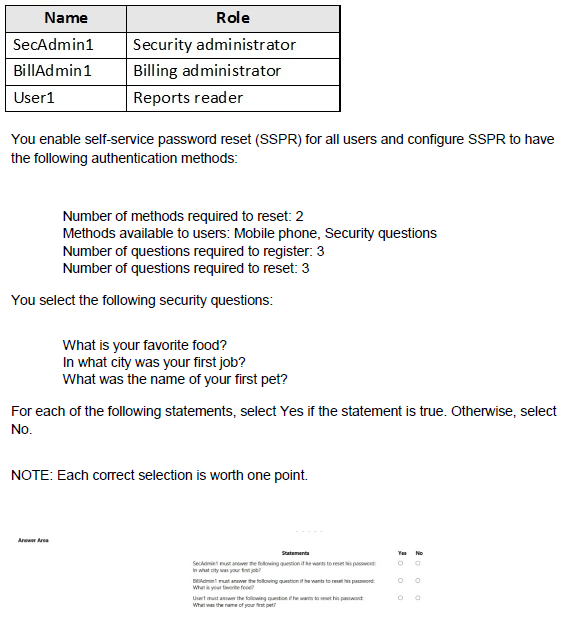
Explanation:
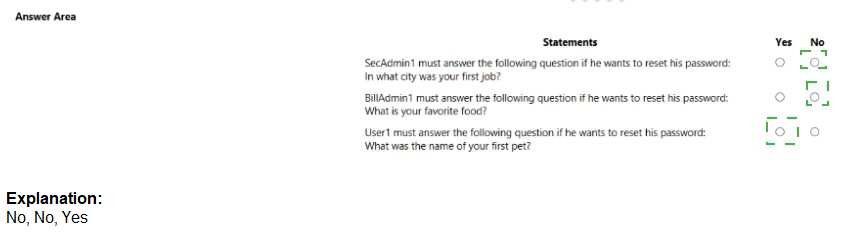
Self-service password reset (SSPR) has different requirements for administrators versus regular users. Administrators are always enabled for SSPR and are required to use two authentication methods to reset their password, regardless of user settings.
Correct Answers:
Statement 1: SecAdmin1 must answer the following question if he wants to reset his password: What is your favorite food?
Answer: No
SecAdmin1 is a Security administrator. Administrators are required to use two authentication methods to reset their password. They can choose any two available methods. They are not required to answer a specific security question; they can select from mobile phone or any of the security questions.
Statement 2: BillAdmin1 must answer the following question if he wants to reset his password: What is your favorite food?
Answer: No
BillAdmin1 is a Billing administrator, which is also considered an administrative role. Like SecAdmin1, administrators can choose which two authentication methods to use. They are not required to answer a specific security question.
Statement 3: User1 must answer the following question if he wants to reset his password: What was the name of your first pet?
Answer: No
User1 is a Reports reader (regular user). The SSPR configuration requires 3 security questions to register, but when resetting, the user must answer the number of questions required (3). However, the specific questions answered are those the user selected during registration, not predetermined ones. The user chooses which questions to answer, so there is no requirement to answer "What was the name of your first pet?"
Reference:
Microsoft Learn: Self-service password reset (SSPR) for administrators
Microsoft Learn: Authentication methods in SSPR
Microsoft Learn: Administrator reset policy differences
You have an Azure subscription that is linked to an Azure AD tenant. The tenant contains two users named User1 and User2. The subscription contains the resources shown in the following table.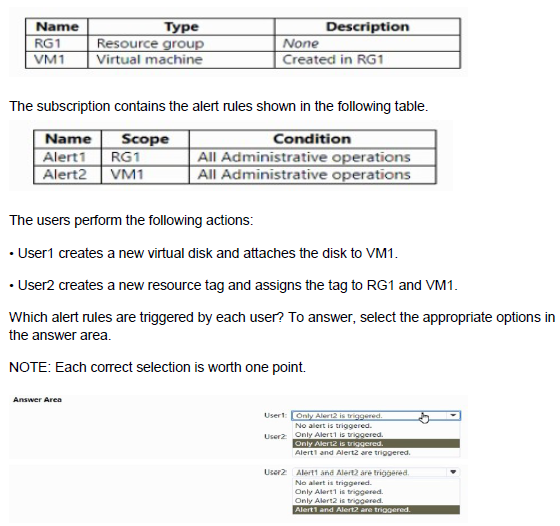
Explanation:
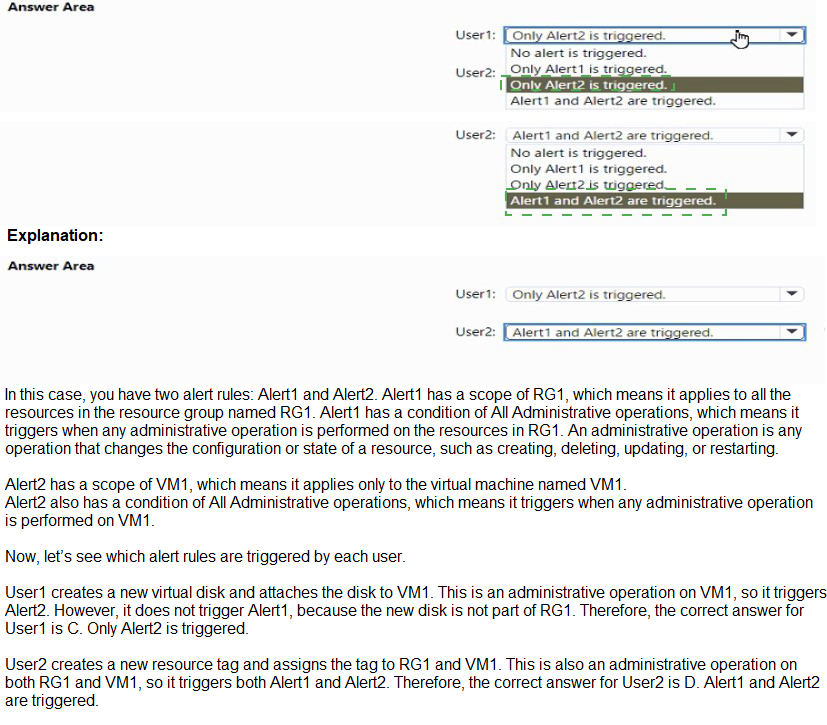
Alert1 is scoped to RG1 and triggers on all administrative operations within RG1. Alert2 is scoped to VM1 and triggers on administrative operations directly on VM1. Administrative operations include resource modifications like creating disks and adding tags.
Correct Answers:
User1: Only Alert2 is triggered.
User1 creates a new virtual disk and attaches it to VM1. This is an administrative operation directly on VM1 (attaching a disk is an operation on the VM resource). Alert2 (scoped to VM1) triggers. Alert1 (scoped to RG1) does not trigger because the operation is at the VM level, not a direct operation on RG1.
User2: Alert1 and Alert2 are triggered.
User2 creates a new resource tag and assigns the tag to RG1 and VM1. Tagging RG1 is an administrative operation on RG1, triggering Alert1. Tagging VM1 is an administrative operation on VM1, triggering Alert2. Both alerts are triggered.
Reference:
Microsoft Learn: Azure Monitor alert rules
Microsoft Learn: Activity log alerts in Azure Monitor
Microsoft Learn: Scope in Azure Monitor alerts
You have an Azure subscription that contains the storage accounts shown in the following table.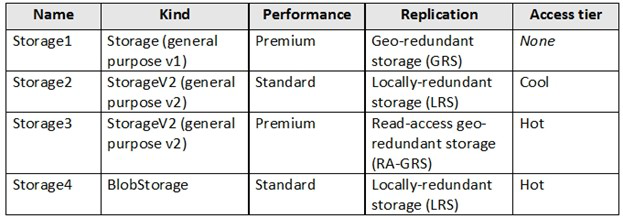
You need to identify which storage account can be converted to zone-redundant storage (ZRS) replication by requesting a live migration from Azure support.
What should you identify?
A. Storage1
B. Storage2
C. Storage3
D. Storage4
Explanation:
Azure Storage supports changing the replication type via a live migration request to Azure Support in specific cases only. Live migration to Zone-Redundant Storage (ZRS) is possible only for general-purpose v2 (StorageV2) accounts that are currently using Locally-redundant storage (LRS). Other kinds (StorageV1, BlobStorage) or replication types (GRS, RA-GRS) cannot be live-migrated to ZRS. Premium performance also does not support ZRS live migration in most scenarios.
Correct Option:
B. Storage2
Storage2 is:
Kind = StorageV2 (general purpose v2)
Performance = Standard
Replication = Locally-redundant storage (LRS)
This is the only storage account in the table that meets all the requirements for a live migration to Zone-Redundant Storage (ZRS) by requesting Azure Support.
Incorrect Option:
A. Storage1 — StorageV1 (general purpose v1). StorageV1 accounts cannot be live-migrated to ZRS.
C. Storage3 — Currently using Read-access geo-redundant storage (RA-GRS). You cannot directly live-migrate from RA-GRS/GRS to ZRS.
D. Storage4 — Kind = BlobStorage (not general-purpose v2). BlobStorage accounts do not support live migration to ZRS.
Reference:
Azure Storage redundancy – change replication type
Live migration to ZRS
You have the Azure resources shown on the following exhibit.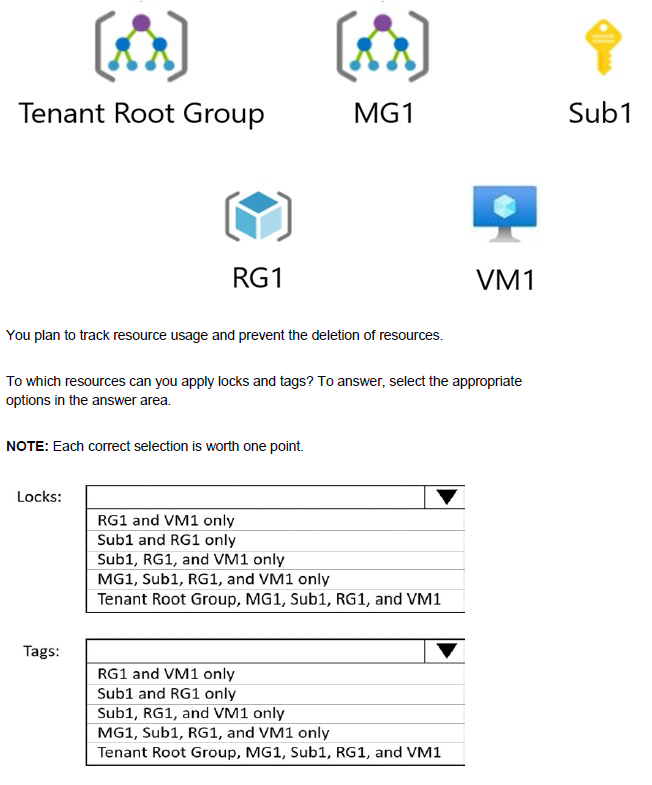
Explanation:
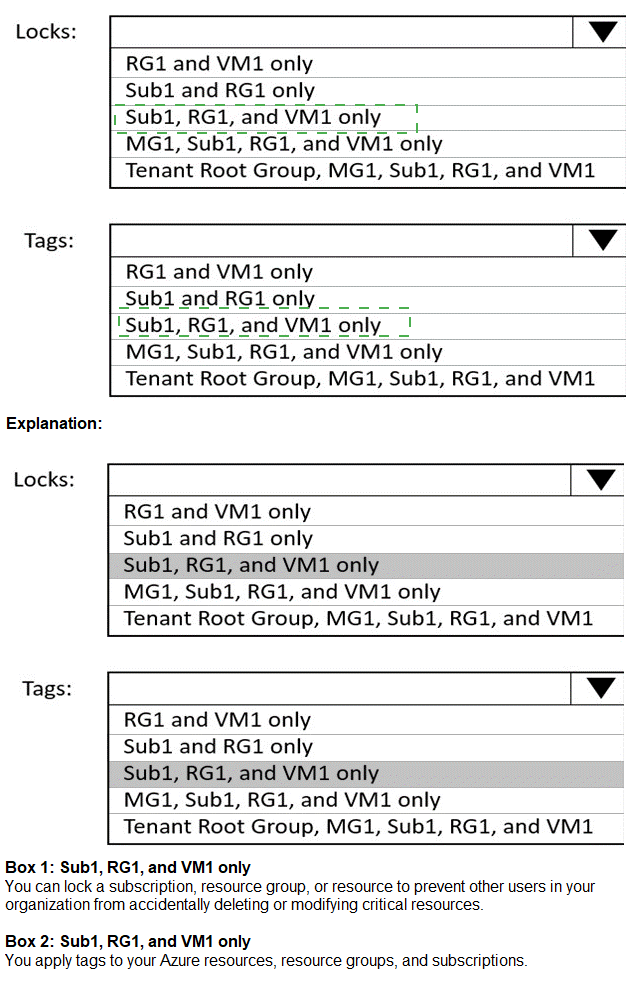
Locks and tags can be applied at different scopes in Azure. Locks can be applied at resource group level and above, but not directly to individual resources in some cases. Tags can be applied at all scopes from resource to management group.
Correct Options:
Locks: Sub1 and RG1 only
Locks can be applied at the subscription level (Sub1) and resource group level (RG1). They cannot be applied directly to management groups (MG1, Tenant Root Group) or individual resources like VM1. Locks are inherited from higher scopes to lower scopes.
Tags: Tenant Root Group, MG1, Sub1, RG1, and VM1
Tags can be applied at all scopes in the Azure hierarchy: Tenant Root Group, management groups, subscriptions, resource groups, and individual resources. This allows for flexible resource organization and cost tracking at any level.
Reference:
Microsoft Learn: Protect your resources with a lock
Microsoft Learn: Use tags to organize Azure resources
Microsoft Learn: Tag scope limitations
You plan to deploy five virtual machines to a virtual network subnet.
Each virtual machine will have a public IP address and a private IP address. Each virtual machine requires the same inbound and outbound security rules.
What is the minimum number of network interfaces and network security groups that you require? To answer, select the appropriate options in the answer area.
NOTE: Each correct selection is worth one point.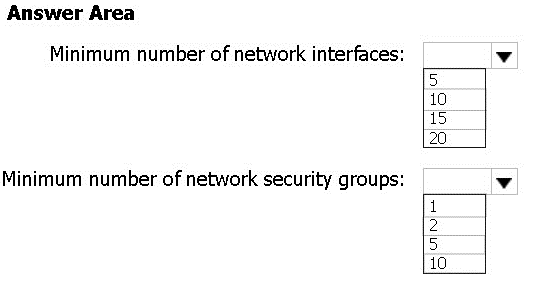
Explanation:
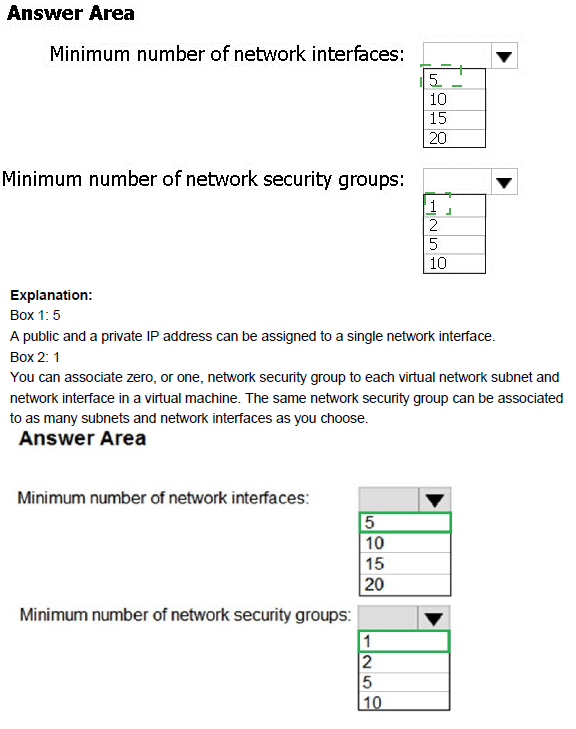
Each virtual machine requires at least one network interface (NIC). A single network security group (NSG) can be associated with multiple subnets or network interfaces, applying the same rules to all.
Correct Options:
Minimum number of network interfaces: 5
Each virtual machine requires at least one network interface to connect to the virtual network. With five virtual machines, you need a minimum of five network interfaces (one per VM).
Minimum number of network security groups: 1
A single network security group can be associated with all five network interfaces (or the subnet containing them) to apply the same inbound and outbound security rules to all virtual machines. This meets the requirement with the minimum number of NSGs.
Reference:
Microsoft Learn: Network security groups
Microsoft Learn: Create and manage network interfaces
Microsoft Learn: Filter network traffic with a network security group
You have an Azure Storage account named storage1 that contains two containers named container 1 and container2. Blob versioning is enabled for both containers.
You periodically take blob snapshots of critical blobs. You create the following lifecycle management policy: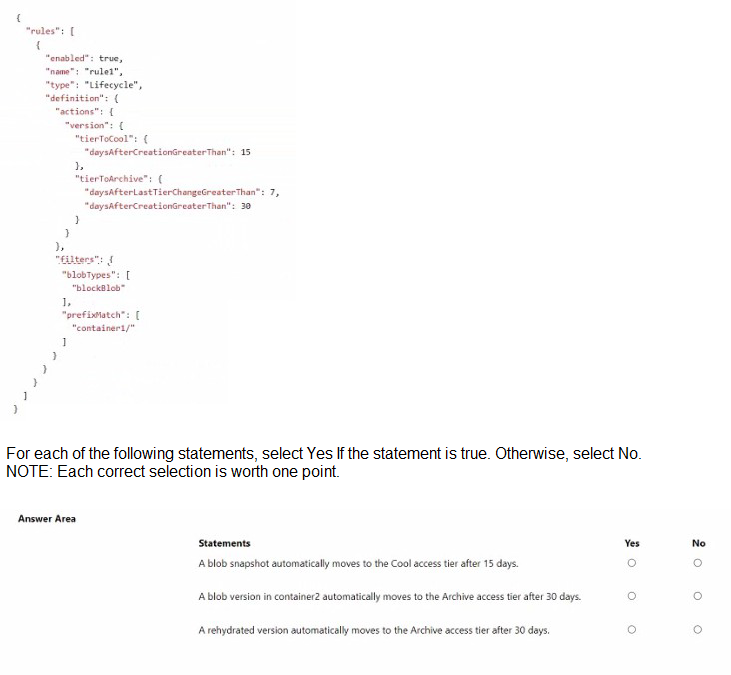
Explanation:
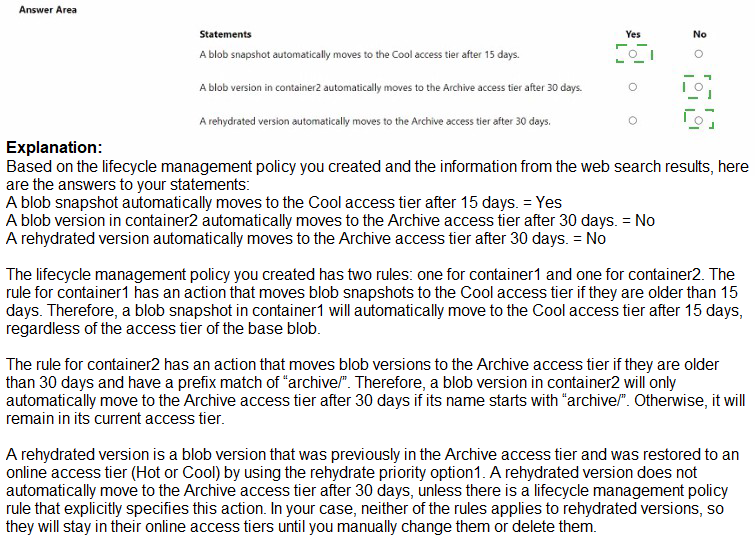
The lifecycle management policy applies to block blobs with the prefix "container1/". The actions are configured for versions (snapshots are considered versions when versioning is enabled). The policy does not apply to container2.
Correct Answers:
Statement 1: A blob snapshot automatically moves to the Cool access tier after 15 days.
Answer: Yes
The policy has "tierToCool" with "daysAfterCreationGreaterThan": 15. Since snapshots are versions, and the policy applies to block blobs with prefix "container1/", snapshots of blobs in container1 will move to Cool after 15 days.
Statement 2: A blob version in container2 automatically moves to the Archive access tier after 30 days.
Answer: No
The policy filters include "prefixMatch": "container1/". This means the lifecycle rules only apply to blobs and their versions in container1, not container2. Therefore, no tier movement occurs for versions in container2.
Statement 3: A rehydrated version automatically moves to the Archive access tier after 30 days.
Answer: No
The "tierToArchive" rule specifies "daysAfterCreationGreaterThan": 30. However, when a version is rehydrated (moved from Archive to Hot/Cool), its creation date does not change. The rule would only apply after 30 days from original creation, not from rehydration. Additionally, the rule only applies to container1 blobs.
Reference:
Microsoft Learn: Lifecycle management policy for Azure Blob Storage
Microsoft Learn: Access tiers for blob data
Microsoft Learn: Versioning and lifecycle management
| Page 14 out of 45 Pages |