Topic 3: Misc. Questions

You have an Azure Subscription that contains an Azure OpenAI resource named AI1 and a user named User1.

You need to ensure that User1 can add custom data sources to AI1. The solution must follow the principle of least privilege.

Which role should you assign to User1?

A. Search Service Contributor

B. Cognitive Services OpenAI Contributor

C. Cognitive Services Contributor

D. Search index Data Contributor

B.   Cognitive Services OpenAI Contributor

You have a Microsoft OneDrive folder that contains a 20-GB video file named FileVavi. You need to index File1.avi by using the Azure Video Indexer website. What should you do?

A. Upload File1.avi to the www.youtube.com webpage. and then copy the URL of the video to the Azure Al Video Indexer website

B. From OneDrive. create a download link, and then copy the link to the Azure Al Video Indexer website.

C. From OneDrive, create a sharing link for File1.avi and then copy the link to the Azure Al Video Indexer website.

D. Download File1 avi to a local computer, and then upload the file to the Azure Al Video Indexer website.

B.   From OneDrive. create a download link, and then copy the link to the Azure Al Video Indexer website.

Explanation:
Azure Video Indexer can process video files directly from OneDrive (as well as other cloud storage) by providing a URL. The recommended approach is to generate a download link (or sharing link with download permission) from OneDrive and paste it into Video Indexer. This avoids downloading the 20-GB file locally and re-uploading.

Correct Option:

B. From OneDrive, create a download link, and then copy the link to the Azure AI Video Indexer website.
In OneDrive, you can generate a direct download link or a sharing link that allows access. Video Indexer accepts video URLs from supported sources (including OneDrive). The service will fetch the video directly from OneDrive for indexing, saving time and bandwidth.

Incorrect Options:

A. Upload File1.avi to www.youtube.com and then copy the URL to Video Indexer. – This adds an unnecessary intermediate step (uploading to YouTube) and may violate privacy/compliance. Video Indexer can accept YouTube URLs, but it is not the most direct method.

C. From OneDrive, create a sharing link for File1.avi and then copy the link to Video Indexer. – A generic sharing link may not work if it requires authentication or opens a web page rather than providing a direct file download. Video Indexer needs a direct file URL (download link), not an interactive sharing page.

D. Download File1.avi to a local computer, and then upload the file to Video Indexer. – For a 20-GB file, this is inefficient and time-consuming. Using a direct OneDrive link avoids the download/upload round trip.

Reference:
Microsoft Learn: "Azure Video Indexer – Upload from URL" – Supports direct URLs from OneDrive, SharePoint, and other cloud storage.

You are developing an app that will use the Azure AI vision API to analyze an image.

You need configure the request that will be used by the app to identity whether an image is clipart or a line drawing.

How should you complete the request? To answer. Select the appropriate options in the answer area.

NOTE: Each correct select is worth one point.


Explanation:
To identify if an image is clipart or a line drawing, you need the Image Type feature. The correct API endpoint is POST (or GET with image URL in query) to analyze with visualFeatures=ImageType. The ImageType feature returns clipArtType (0-3 scale) and lineDrawingType (0-1 scale).

Correct Options:

HTTP Method: POST
The Analyze Image API typically uses POST when sending image binary data in the request body, or GET when using a URL parameter. POST is the standard method for local image uploads.

Path: analyze
The endpoint path is /vision/v3.2/analyze (or /retrieval:analyze for newer versions). The analyze operation performs image analysis.

Visual Feature: imageType
The imageType visual feature returns classification of the image as clip art or line drawing. The other options (description generates captions, objects detects objects, tags generates keywords) do not provide image type detection.

Why Other Options Are Incorrect:

Visual Feature alternatives:

description – Returns a caption (e.g., "a person sitting on a bench"), not clipart/line drawing classification.

objects – Detects objects with bounding boxes, not image type.

tags – Returns general keywords, not image type.

HTTP Method alternatives:

GET – Can be used if image URL is passed as a query parameter, but POST is more common for local files and preferred for security. The question implies POST based on typical patterns.

PATCH – Not supported for this API.

Reference:
Microsoft Learn: "Computer Vision – Analyze Image API" – Use visualFeatures=ImageType to get clipArtType and lineDrawingType.

You have an Azure subscription that contains an Azure AI Document intelligence resource named D1.

You create a PDF document named test.pdf that contain tabular data.

You need to analyze Test.pdf by using DI1.

How should you complete the command? To answer, select the appropriate option in the answer area.

NOTE: Each correct selection is worth one point.


Explanation:
To analyze a PDF containing tabular data, you need to use the prebuilt-layout model, which extracts tables, text, and structure. The API key header for Document Intelligence is Ocp-Apim-Subscription-Key. The endpoint URL should end with the model name followed by :analyze?api-version=....

Correct Options:

For the header name (after -H): Ocp-Apim-Subscription-Key
Document Intelligence (formerly Form Recognizer) uses the header Ocp-Apim-Subscription-Key for API key authentication. Subscription-Key is not correct; Key1 and Secret are invalid.

For the model name (after documentModels/): prebuilt-layout
prebuilt-layout extracts text, tables, selection marks, and structure from documents. This is the correct model for PDFs with tabular data. prebuilt-document also extracts tables but is more general; prebuilt-contract is for contracts; prebuilt-read is OCR-focused without table extraction.

Why Other Options Are Incorrect:

Header alternatives:
Key1 – Not a valid header name for Document Intelligence.

Secret – Not valid.
Subscription-Key – Missing Ocp-Apim- prefix; incorrect.

Model alternatives:
prebuilt-contract – Optimized for contract analysis (parties, dates, obligations), not general tabular data.

prebuilt-document – Extracts tables but is more focused on key-value pairs and entities. prebuilt-layout is specifically for layout and table extraction.

prebuilt-read – OCR-only; does not extract tables as structured data.

Reference:
Microsoft Learn: "Document Intelligence – prebuilt-layout model" – Extracts tables, text, and structure.

You are building an app that will perform translations by using the Azure Al Translator service.

You need to ensure that the app will translate user-inputted text.

How should you complete the code? To answer, select the appropriate options in the answer area.

NOTE: Each correct selection is worth one point.


Explanation:
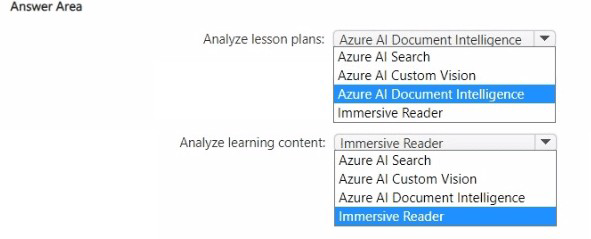
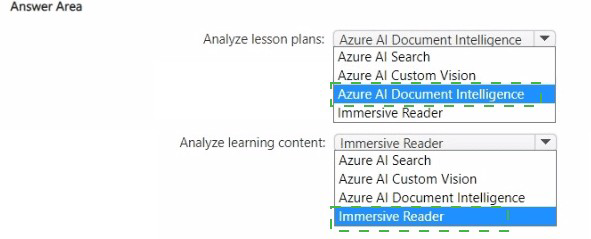
The Translator SDK's TranslateAsync method requires the target language(s) and the input text. The method returns a Response>. After obtaining the response, you access the translated text from the first translation's Text property.

Correct Options:

First blank (after client.): TranslateAsync
The correct method is TranslateAsync (async version). It takes target language(s) and input text. Translate is synchronous (not shown as an option in typical SDK). TranslationRecognizer is for Speech SDK, not Translator.

Second blank (parameters for TranslateAsync): targetLanguage, input
TranslateAsync expects parameters like: (targetLanguage, text) or (text, targetLanguage) depending on SDK version. The target language (e.g., "es") and the input string are required.

Third blank (after translations[0].): Text
To get the translated text, access the Text property of the first translation: translations[0]?.Translations[0]?.Text. The Text property contains the translated output.

Why Other Options Are Incorrect:

First blank alternatives:

TranslateAsync with ConfigureAwait(false) – That's a continuation option, not the method name.

Translate(targetLanguage.input) – Synchronous version (if exists) but not the async pattern.

TranslationRecognizer() – This is for speech translation, not text translation.

Third blank alternatives:

translationsValue.Add(translation) – Adding to a list, not retrieving translated text.

translations[0].text += $"\n{translationsValue}" – Incorrect property name (should be Text, not text) and wrong logic.

translation2.Translations[0]?.Text – translation2 is not defined.

Reference:
Microsoft Learn: "Translator SDK – TranslateAsync method" – Signature: TranslateAsync(string targetLanguage, string text, ...).

You are building an agent by using the Azure Al Foundry Agent Service.

You need to ensure that the agent can access publicly accessible data that was released during the past 90 days.

How should you complete the code? To answer, select the appropriate options in the answer area.

NOTE: Each correct selection is worth one point.


Explanation:
To access publicly accessible data from the recent past (90 days), the agent needs a Bing Grounding tool (Bing Search) which can retrieve current web content. The Azure AI Foundry Agent Service supports BingGroundingTool for this purpose. The connection ID should reference a configured Bing Search resource.

Correct Options:

First blank (after search =): AzureAISearchTool –
No, for public web data, BingGroundingTool is correct. Looking at the options, AzureAISearchTool is for private/custom search indexes. The correct tool is BingGroundingTool (but it appears in the second blank area).

Second blank (after with project): BingGroundingTool
The BingGroundingTool provides access to Bing Search for real-time, publicly accessible web data. It can retrieve information from the past 90 days. This tool is specifically designed for grounding responses with current public web content.

Third blank (after agent = project_client.agents.create_agent(): model="gpt-4o"
The model parameter specifies which model the agent uses. gpt-4o is a common choice. The other options ("my-assistant", "my-assistant" with name) are not model names.

Why Other Options Are Incorrect:

AzureAISearchTool – This connects to a private Azure Cognitive Search index, not publicly accessible web data. It cannot access recent public web content from the past 90 days.

functionTool – A generic tool for custom functions, not pre-configured for web search. Would require implementing Bing Search logic manually.

model="my-assistant" – This is not a valid model name. The model parameter expects deployment names like "gpt-4o", "gpt-35-turbo", etc.

Reference:
Microsoft Learn: "Azure AI Foundry Agent Service – Bing Grounding tool" – Enables agents to search public web content for real-time information.

You have an Azure subscription that contains an Azure Al Language custom question answering project named QA1.

You need to import question and answer pairs to QA1.

Which two file formats can you use? Each correct answer presents a complete solution

NOTE; Each correct selection is worth one point.

A. Excel

B. TSV

C. JSON

D. LU

E. CSV

A.   Excel
B.   TSV

Explanation:
Azure AI Language custom question answering supports importing question and answer pairs from structured file formats. Excel (.xlsx) and TSV (Tab-Separated Values) are both supported for bulk import. These files must follow a specific schema with columns for questions, answers, metadata, and follow-up prompts.

Correct Options:

A. Excel
Excel (.xlsx) files are supported for importing QnA pairs into a custom question answering project. The file should have columns like "QnA ID", "Questions", "Answers", "Metadata", etc. Excel provides an easy way to manage large sets of QnA pairs.

B. TSV
TSV (Tab-Separated Values) files are supported and commonly used for importing QnA pairs. Like Excel, the TSV must follow the required schema with tabs separating columns. This format is useful for data exchange between systems.

Incorrect Options:

C. JSON –
JSON is not a direct import format for custom question answering projects. While the export uses JSON, import is supported via Excel, TSV, or URL-based sources (files, SharePoint). JSON import is not listed as a supported method.

D. LU –
LU (Language Understanding) files are used for LUIS applications (intents and entities), not for QnA Maker or custom question answering. This format is not supported for importing QnA pairs.

E. CSV –
CSV (Comma-Separated Values) is not supported. The required delimiter is tab, not comma. Using CSV would cause parsing errors because questions and answers often contain commas.

Reference:
Microsoft Learn: "Import question and answer pairs" – Supported formats: Excel (.xlsx), TSV (.tsv), and URLs (SharePoint, public URLs).

You have an Azure subscription that contains an Azure OpenA1 resource. You configure a model that has the following settings:

• Temperature: 1

• Top probabilities: 0.5

• Max response tokens: 100

You ask the model a question and receive the following response.


For each of the following statements, select Yes if the statement is true. Otherwise, select No..

NOTE: Each correct selection is worth point..


Explanation:
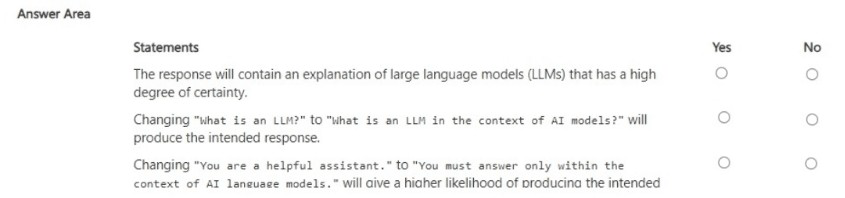
The response shows a successful completion with finish_reason: "stop" (natural stop, not truncation). Billing for Azure OpenAI is based on total tokens (prompt + completion). The Max response tokens parameter limits only the completion tokens, not prompt tokens.

Correct Answers:

Statement 1: The subscription will be charged 86 tokens for the execution of the session.
No – The subscription is charged for total tokens (prompt + completion), which is prompt_tokens: 37 + completion_tokens: 86 = 123 tokens. The 86 is only completion tokens. Billing is based on total_tokens (123), not just completion tokens.

Statement 2: The text completion was truncated because the Max response tokens value was exceeded.
No – finish_reason: "stop" indicates the model stopped naturally (reached a stopping condition, not length limit). If Max response tokens (100) had been exceeded, finish_reason would be "length". Since completion_tokens is 86 (<100), truncation did not occur.

Statement 3: The prompt_tokens value will be included in the calculation of the Max response tokens value.
No – Max response tokens limits only the completion tokens (generated output). It does not include prompt_tokens. The prompt tokens are fixed and billed separately but do not count against the Max response tokens limit.

Reference:
Microsoft Learn: "Azure OpenAI – Tokens and billing" – Total tokens = prompt + completion; max_tokens limits completion only.

You have an Azure subscription and 10,000 ASCII files.

You need to identify files that contain specific phrases. The solution must use cosine similarity.

Which Azure OpenAI model should you use?

A. text-embedding-ada-002

B. GPT-4

C. GPT-35 Turbo

D. GPT-4-32k

A.   text-embedding-ada-002

Explanation:
Cosine similarity requires vector embeddings of text. The text-embedding-ada-002 model is specifically designed to convert text into vector embeddings. You generate embeddings for each ASCII file and for your target phrase, then compute cosine similarity between vectors to identify files containing similar phrases. This is the standard approach for semantic similarity search.

Correct Option:

A. text-embedding-ada-002
This embedding model outputs 1536-dimensional vectors representing the semantic meaning of input text. Cosine similarity between embedding vectors measures semantic relatedness. It is ideal for finding files containing specific phrases based on meaning, not just keyword matching.

Incorrect Options:

B. GPT-4 –
A generative model for text completion and chat. It does not output embeddings and is not designed for cosine similarity calculations. Using it for this task would be inefficient and costly.

C. GPT-35 Turbo –
Similarly a generative chat model, not an embedding model. Cannot produce vectors for cosine similarity.

D. GPT-4-32k –
A version of GPT-4 with larger context window (32k tokens). Still a generative model, not an embedding model.

Reference:
Microsoft Learn: "Azure OpenAI – Embeddings" – text-embedding-ada-002 is the recommended model for cosine similarity search.

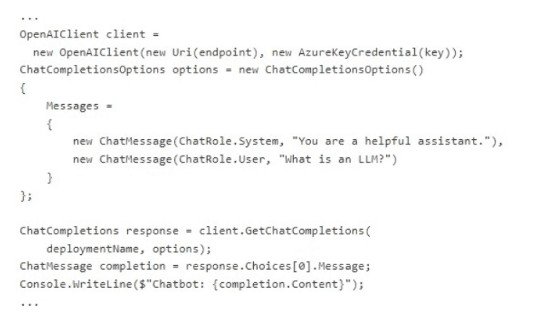
You have a chatbot that uses Azure OpenAI to generate responses.

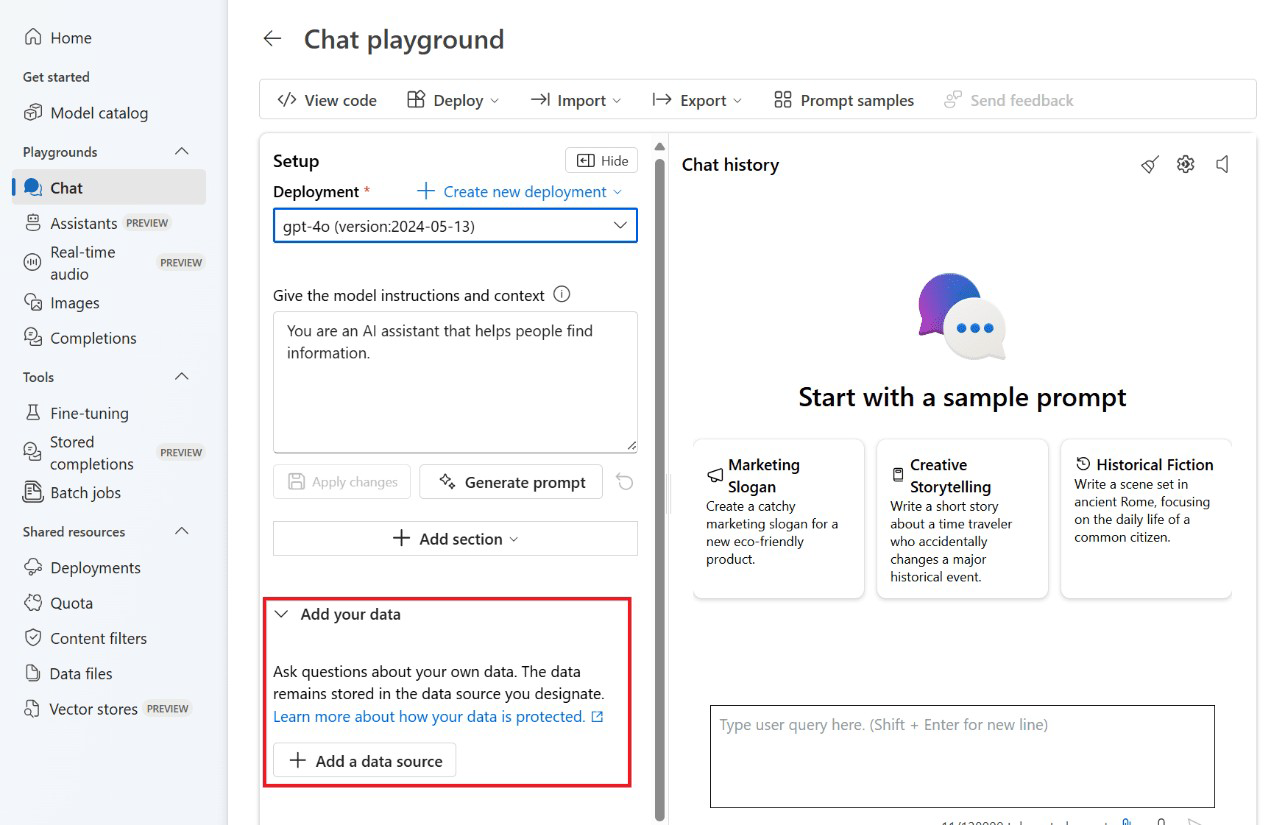
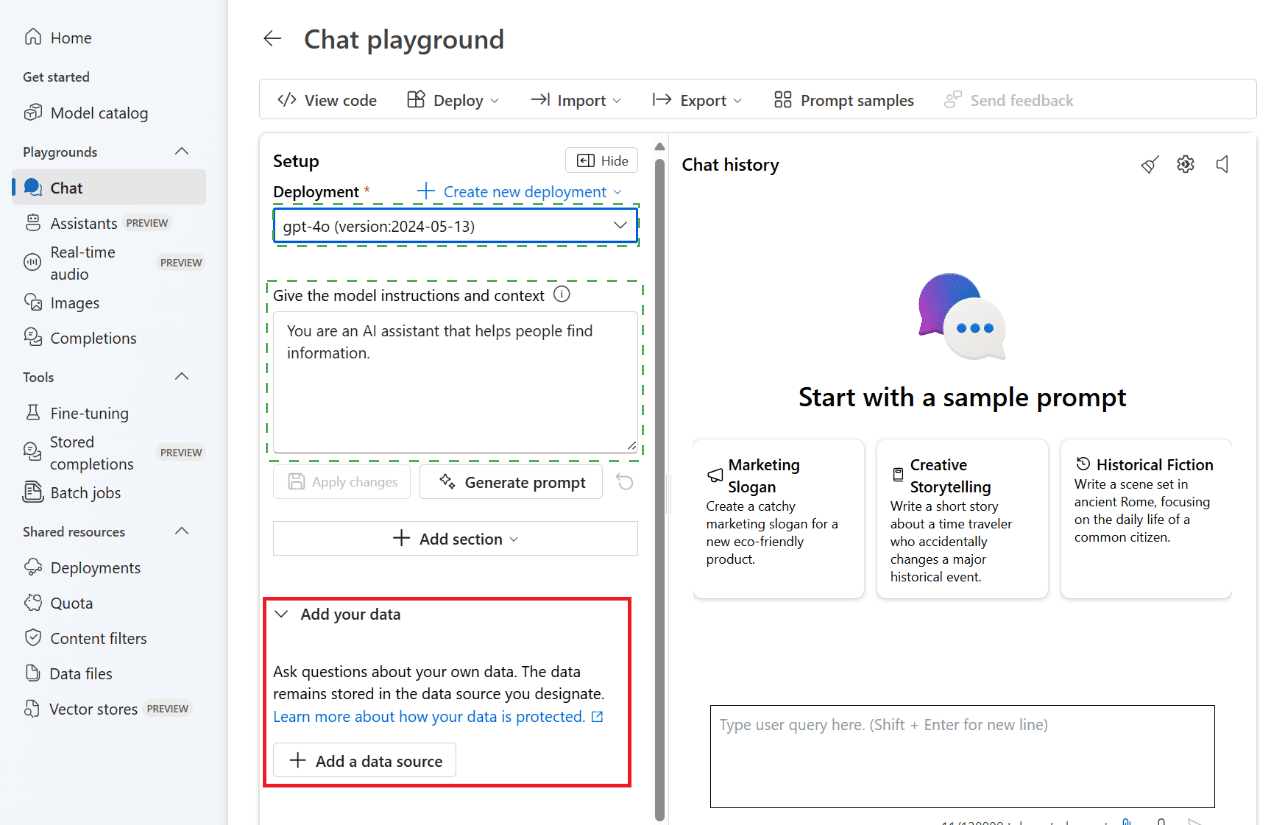
You need to upload company data by using Chat playground. The solution must ensure that the chatbot uses the data to answer user questions.

How should you complete the code? To answer, select the appropriate options in the answer area.

NOTE: Each correct selection is worth one point.


Explanation:
To use company data (from Azure Cognitive Search) with Azure OpenAI in the Chat playground, you configure ChatCompletionsOptions with AzureChatExtensionConfiguration. This enables Retrieval Augmented Generation (RAG), where the model retrieves relevant data from your search index and grounds responses in that data.

Correct Options:

First blank: ChatCompletionsOptions
ChatCompletionsOptions is the class used for chat completion requests with extensions (data sources). It supports adding AzureChatExtensionConfiguration to integrate external data. CompletionOptions is for older non-chat completions; StreamingChatCompletions is a result type, not an options class.

Second blank (Extensions = new { ... }): AzureChatExtensionConfiguration
The extensions collection expects AzureChatExtensionConfiguration objects. Specifically, SearchAzureCognitiveSearchChatExtensionConfiguration (a subclass) is used for Azure Cognitive Search as the data source. This tells Azure OpenAI to retrieve relevant chunks from your search index.

Why Other Options Are Incorrect:

First blank alternatives:

CompletionOptions – Used for legacy text completion (not chat), does not support extensions or messages.

StreamingChatCompletions – This is a response type for streaming results, not a configuration options class.

Extensions alternatives:
AzureChatExtensionsOptions – This is a container class, not the actual extension configuration. You need to add AzureChatExtensionConfiguration objects. (The third option is incomplete but would be invalid.)

Reference:
Microsoft Learn: "Azure OpenAI – Add your data (RAG)" – Use ChatCompletionsOptions with AzureChatExtensionConfiguration to integrate Cognitive Search.

Page 8 out of 35 Pages