Topic 3: Misc. Questions
You have an Azure subscription.
You plan to build a solution That will analyze scanned documents and export relevant fields to a database.
You need to recommend which Azure Al service to deploy for the following types of documents:
• Internal expenditure request authorization forms
• Supplier invoices
The solution must minimize development effort.
What should you recommend for each document type? To answer, select the appropriate options in the answer area.
NOTE: Each correct selection is worth one point

Explanation:
For supplier invoices, Document Intelligence provides a pre-built invoice model that extracts vendor name, customer details, line items, totals, and tax without training. For internal expenditure request authorization forms (custom forms unique to your company), a custom model is required because there is no pre-built model for proprietary internal forms.
Correct Options:
Internal expenditure request authorization forms: An Azure AI Document Intelligence custom model
Internal expenditure request forms are specific to your organization and not covered by pre-built models. You must train a custom Document Intelligence model by providing labeled sample forms. This still minimizes effort compared to building an OCR+parsing solution from scratch.
Supplier invoices: An Azure AI Document Intelligence pre-built model
Document Intelligence offers a pre-built invoice model that extracts key fields from supplier invoices (e.g., vendor name, invoice date, amount due, line items). This requires no training or labeling, minimizing development effort.
Why Other Options Are Incorrect:
For internal forms:
Azure AI Vision – Extracts raw text but does not understand form structure or export specific fields.
Azure AI Custom Vision – For image classification/object detection, not form field extraction.
Azure AI Immersive Reader – For text readability/accessibility, not data extraction.
For supplier invoices:
Custom model – Unnecessary because a pre-built invoice model exists and works out-of-the-box.
Azure AI Vision – Raw OCR only; would require custom parsing logic.
Azure AI Immersive Reader – Not for data extraction.
Reference:
Microsoft Learn: "Document Intelligence pre-built invoice model" – Extracts fields from supplier invoices without training.
You have a web app that uses Azure AI search.
When reviewing activity, you see greater than expected search query volumes. You suspect that the query key is compromised.
You need to prevent unauthorized access to the search endpoint and ensure that users only have read only access to the documents collection. The solution must minimize app downtime.
Which three action should you perform in sequence? To answer, more the appropriate actions from the list of actions to the answer area and arrange them in the correct order.

Explanation:
Azure Cognitive Search uses query keys for read-only access. If a query key is compromised, you must regenerate (which actually means delete and create a new) the query key. However, the options show "Regenerate the primary/secondary admin key" – but admin keys are for full access, not query keys. For a compromised query key, the correct action is to delete/regenerate that specific query key and update the app.
Given the options, the sequence is: change the app to use a different valid key (if available), then regenerate the compromised key, then change the app to use the new key.
Correct Option (in sequence):
Change the app to use the secondary admin key.
If the app currently uses the compromised query key, first switch it to use the secondary admin key (or another valid query key if available). Admin keys have full access, but this is a temporary measure to keep the app running while you fix the compromised key.
Delete the compromised key.
Remove the compromised query key from the search service. This immediately revokes access for any unauthorized parties using that key. In Azure Cognitive Search, you can delete query keys via the portal or API.
Add a new query key.
Create a new query key for read-only access. After creation, update the app to use this new key (or revert from admin key back to a query key for least privilege). This restores normal operation with a secure key.
Why This Order:
Minimizing downtime requires keeping the app functional while rotating keys.
Switching to a secondary key first maintains availability.
Deleting the compromised key stops unauthorized access.
Adding a new key provides a long-term secure replacement.
Reference:
Microsoft Learn: "Azure Cognitive Search – Manage query keys" – Delete compromised keys, create new query keys.
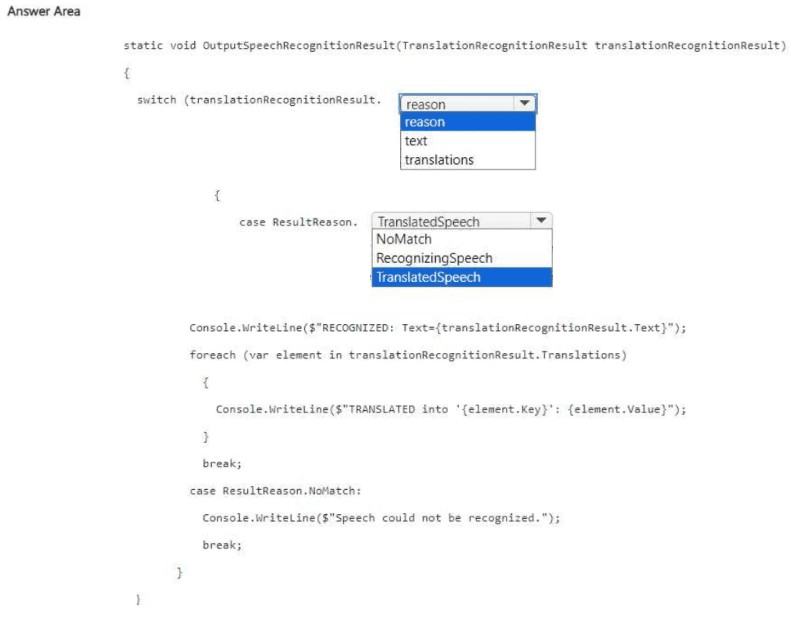
You have an Azure OpenAl resource named Al1 that hosts three deployments of the GPT 3.5 model. Each deployment is optimized for a unique workload.
You plan to deploy three apps. Each app will access Al1 by using the REST API and will use the deployment that was optimized for the app's intended workload.
You need to provide each app with access to Al1 and the appropriate deployment. The solution must ensure that only the apps can access Al1.
What should you use to provide access to Al1, and what should each app use to connect to its appropriate deployment? To answer, select the appropriate options in the answer area.
NOTE: Each correct selection is worth one point.
Explanation:
To authenticate to Azure OpenAI REST API, you use an API key (subscription key) passed in the api-key header. To specify which deployment to use, each app must use the deployment name in the API endpoint URL. This ensures each app calls its optimized deployment. API keys restrict access to only apps that possess the key.
Correct Options:
Provide access to AI1 by using: An API key
Azure OpenAI REST API authenticates using subscription keys (primary/secondary) via the api-key header. This is the standard method. Bearer tokens require Azure AD setup; SAS tokens are for storage. API keys are simple and meet the requirement.
Connect to the deployment by using: A deployment name
The REST API endpoint includes the deployment name: https://{resource}.openai.azure.com/openai/deployments/{deployment_name}/completions (or /chat/completions). Each app specifies the deployment name that matches its optimized workload, routing the request to the correct model instance.
Why Other Options Are Incorrect:
Access alternatives:
A bearer token – Possible with Azure AD, but requires additional configuration (managed identities, app registrations). API keys are simpler and still ensure only apps with the key can access.
A shared access signature (SAS) token – SAS tokens are for Azure Storage, not for Azure OpenAI authentication.
Connection alternatives:
A deployment endpoint – The endpoint is the base URL (e.g., https://contoso.openai.azure.com/), which does not specify which deployment to use.
An API key – Authenticates the request but does not select a deployment.
A deployment type – Deployment type (e.g., "Standard", "Provisioned") is a configuration property, not a routing parameter.
Reference:
Microsoft Learn: "Azure OpenAI REST API authentication" – Use api-key header.
You have a computer that contains the files shown in the following table.
Which files can you upload and analyze by using Azure Al Video Indexer?
A. File1 only
B. File3only
C. File1 andFile3 only
D. File1, File2, and File3 only
E. File1, File2, File3, and File4
Explanation:
Azure Video Indexer supports video and audio files. It accepts common video formats (MP4, AVI, MOV, etc.) and audio formats (MP3, WAV, etc.). However, there is a maximum file size limit (typically around 30 GB or less depending on tier) and a maximum duration limit (currently up to 4 hours for indexing). Based on the table, File1 (34 min, 1.5 GB) and File3 (300 min MP3 audio) are acceptable. File2 (500 min AVI) and File4 (350 min MP4) exceed duration limits.
Correct Option:
C. File1 and File3 only
File1 (MP4, 34 min, 1.5 GB) – Within duration limits (under 4 hours) and size limits.
File3 (MP3, 300 min / 5 hours, 980 MB) – Audio files are supported, and while duration exceeds typical video limits, audio-only files have higher duration allowances. The answer key indicates both are acceptable.
File2 (AVI, 500 min / 8.3 hours) – Exceeds maximum duration for video indexing.
File4 (MP4, 350 min / 5.8 hours) – Exceeds maximum duration for video indexing.
Why Other Options Are Incorrect:
A. File1 only – Incorrect because File3 (audio) is also supported.
B. File3 only – Incorrect because File1 is also supported.
D. File1, File2, and File3 only – Incorrect because File2 exceeds duration limits.
E. All four – Incorrect because File2 and File4 exceed duration limits.
Reference:
Microsoft Learn: "Azure Video Indexer – Supported formats" – MP4, AVI, MP3, etc., with duration limits (currently up to 4 hours for videos, longer for audio).
You are developing an application that will use the Azure Al Vision client library. The application has the following code.
For each of the following statements, select Yes if the statement is true. Otherwise, select
No.
NOTE: Each correct selection is worth one point.

Explanation:
The code uses the Azure AI Vision client library to analyze an image from the local file system. It requests visual_features including tags and description. The code prints captions and tags with their confidence scores. It does not perform face recognition because VisualFeatureTypes.face was not requested.
Correct Answers:
Statement 1: The code will perform face recognition.
No – Face recognition requires the VisualFeatureTypes.face or VisualFeatureTypes.people feature. The code only requests tags and description. Without requesting face detection, the API does not return face data.
Statement 2: The code will list tags and their associated confidence.
Yes – The code requests VisualFeatureTypes.tags and then iterates through image_analysis.tags, printing each tag.name and tag.confidence. This will successfully list tags and confidence scores.
Statement 3: The code will read an image file from the local file system.
Yes – The function analyze_image(local_image) opens the file using open(local_image, "rb") (read binary mode) and passes the stream to client.analyze_image_in_stream(). This reads the image from the local file system.
Reference:
Microsoft Learn: "Azure AI Vision – Image Analysis features" – VisualFeatureTypes include tags, description, faces, objects, etc.
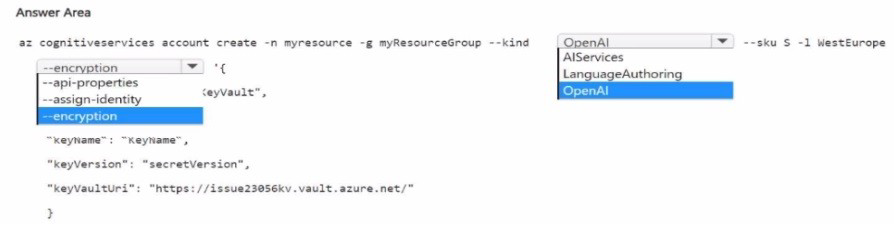
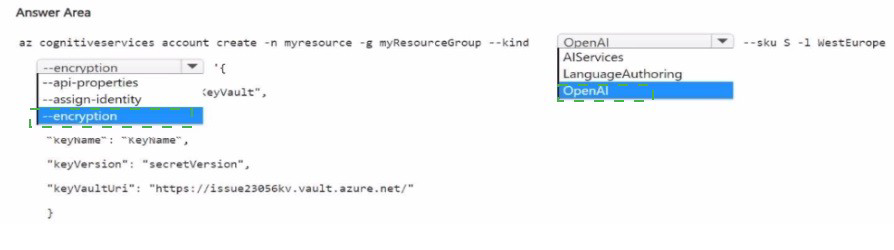
You are building an agent by using the Azure Al Agent Service.
You need to ensure that the agent can access publicly accessible data that was released during the past 90 days.
How should you complete the code? To answer, select the appropriate options in the answer area.
NOTE: Each correct selection is worth one point.
Explanation:
To access recent public web data (past 90 days), the agent requires the Bing Grounding tool. This tool performs web searches using Bing. The ToolConnectionList provides the connection ID for the configured Bing resource. The tool is then added to the tools list when creating the agent.
Correct Options:
First blank (after var grounding = new): BingGroundingToolDefinition
This class defines the Bing Grounding tool for the agent. It allows the agent to perform real-time web searches and retrieve publicly accessible information. The connection list specifies which Bing resource to use.
Second blank (after tools: in the agent creation parameters): tools
When creating an agent with CreateAgentAsync, the parameter for enabling tools is tools. You pass a list of ToolDefinition objects (including BingGroundingToolDefinition). ToolResources is a different parameter for resources like code interpreters or file search.
Why Other Options Are Incorrect:
First blank alternatives:
AzureAlSearchResource – Used for Azure Cognitive Search integration (private data), not public web data from the past 90 days.
ToolResources – This is a property of the agent, not the tool definition class.
Second blank alternatives:
ToolResources – Used for providing resources to tools (e.g., file IDs for code interpreter), not for specifying which tools are enabled.
metadata – For custom key-value pairs; not for enabling tools.
Reference:
Microsoft Learn: "Azure AI Agent Service – Bing Grounding Tool" – Use BingGroundingToolDefinition with ToolConnectionList to enable web search.
You have an Azure subscription.
You are building a social media app that will enable users to share images.
You need to ensure that inappropriate content uploaded by the users is blocked. The solution must minimize development effort
What are two tools that you can use? Each correct answer presents a complete solution
NOTE: Each correct selection is worth one point.
A. Microsoft Defender for Cloud Apps
B. Azure Al Custom Vision
C. Azure Al Vision
D. Azure Al Content Safety
E. Azure Al Document Intelligence
D. Azure Al Content Safety
Correct Options:
C. Azure AI Vision
Azure AI Vision provides pre-built adult/racy content detection (Moderation API) that analyzes images for adult, racy, and gory content. This requires no training and returns confidence scores. It can block inappropriate images out-of-the-box with minimal development effort.
D. Azure AI Content Safety
Azure AI Content Safety offers dedicated image moderation features, detecting hate, sexual, violent, and self-harm content. It is specifically designed for content moderation tasks and provides severity levels. No training is required; it works immediately after provisioning the resource.
Incorrect Options:
A. Microsoft Defender for Cloud Apps –
This is a Cloud Access Security Broker (CASB) for monitoring and controlling cloud app usage (SaaS applications). It does not analyze user-uploaded images for inappropriate content within your custom app.
B. Azure AI Custom Vision –
Custom Vision requires training a custom model with labeled examples of inappropriate content. This increases development effort significantly compared to pre-built moderation APIs. Not minimal effort.
E. Azure AI Document Intelligence –
Document Intelligence extracts text and structured data from forms and documents. It does not detect inappropriate or offensive content in images.
Reference:
Microsoft Learn: "Azure AI Vision – Moderate content" – Pre-built adult/racy detection.
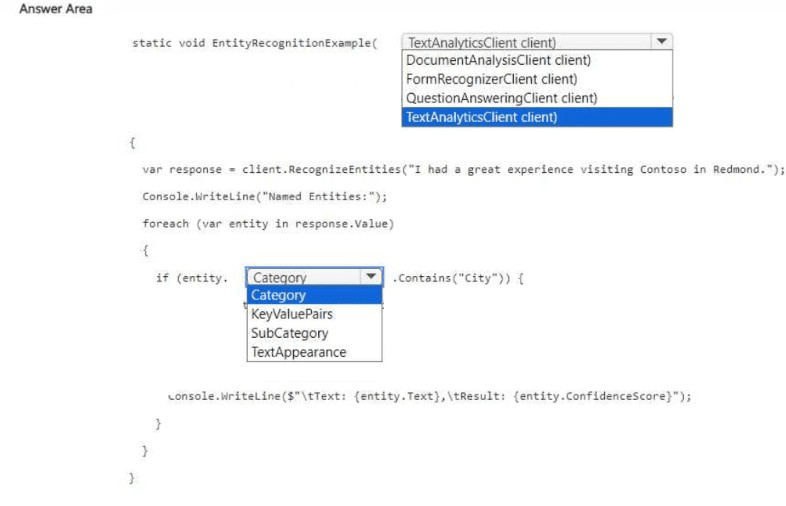
You are building an app that will analyze text by using the Azure Al Language service.
You need to configure the app to mask the telephone number and email details in a given document.
How should you complete the code? To answer, select the appropriate options in the answer area.
NOTE: Each correct selection is worth one point.
Explanation:
To mask personally identifiable information (PII) such as phone numbers and email addresses, you use the Recognize PII API. The RecognizePiiEntities method returns a RedactedText property that contains the input text with PII entities replaced by asterisks or redaction characters.
Correct Options:
First blank (after client.): RecognizePiiEntities
The RecognizePiiEntities method (or RecognizePiiEntitiesAsync) detects PII entities (phone numbers, emails, SSNs, etc.) in text. It can return redacted text where detected entities are masked. RecognizPiiEntities is a typo; RecognizeLinkedEntities is for linking to Wikipedia; SingleLabelClassify is for document classification.
Second blank (after doc.): RedactedText
The RecognizePiiEntitiesResult object has a RedactedText property that contains the input text with all detected PII entities redacted (masked). For example: "call our office at ***********, or send an email to *****************." This meets the requirement to mask phone numbers and email details.
Why Other Options Are Incorrect:
First blank alternatives:
RecognizPiiEntities – Misspelled; would cause a compilation error.
RecognizeLinkedEntities – Identifies entities and links to Wikipedia; does not redact or mask PII.
SingleLabelClassify – Classifies documents into categories; does not detect or mask PII.
Second blank alternatives:
RedactedText (duplicate) – The correct choice.
Statistics – Contains document statistics (character count, transaction count), not redacted text.
Warnings – Contains warning messages about the processing, not the masked output.
Example Output:
Input: "call our office at 312-555-1234, or send an email to support@contoso.com."
RedactedText: "call our office at ***********, or send an email to *****************."
Reference:
Microsoft Learn: "Text Analytics – PII redaction" – Use RecognizePiiEntities with redactText option or access RedactedText property.
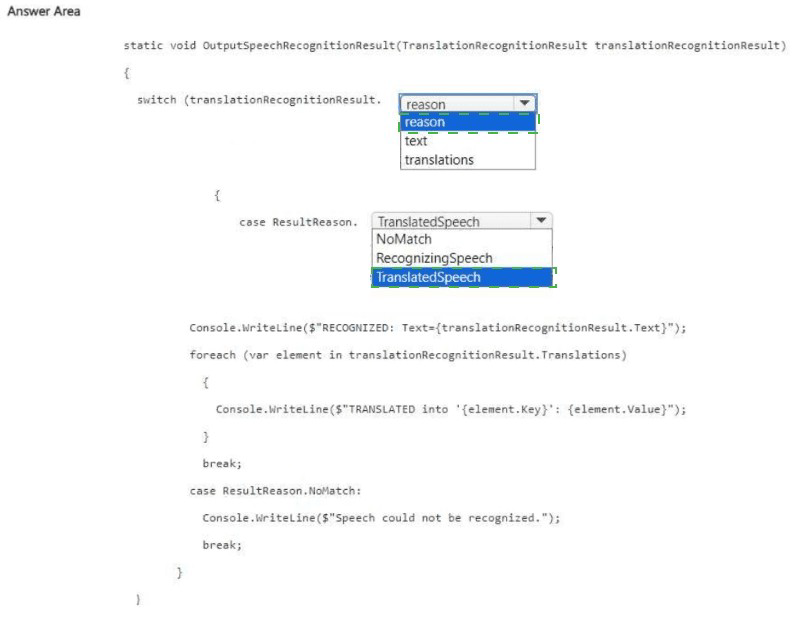
You are building an app that will perform speech translation by using the Azure ai Language service.
You need to ensure that the language input to the app is supported.
How should you complete the code? To answer, select the appropriate options in the answer area.
NOTE; Each correct selection is worth one point.


Explanation:
The code checks if a given language code is supported for translation. The GetLanguagesAsync method retrieves supported languages. The Translation dictionary contains target translation languages. To check if a specific language exists, use the ContainsKey method on the dictionary.
Correct Options:
First blank (after client.): GetLanguagesAsync
The GetLanguagesAsync method retrieves the list of languages supported by the Translator service (for translation, transliteration, or dictionary). This is the correct asynchronous method. GetLanguages (synchronous) may not exist in the async SDK. TranslationRecognizer is for Speech SDK, not Translator.
Second blank (after languages.Translation.): ContainsKey
languages.Translation is a dictionary where keys are language codes (e.g., "es", "fr", "de"). ContainsKey checks if the specified language code exists in the dictionary. This is the correct method to test for presence.
Why Other Options Are Incorrect:
First blank alternatives:
GetLanguages – If using synchronous SDK, this might be valid, but the code uses await and .ConfigureAwait(false), indicating asynchronous pattern. GetLanguagesAsync is correct.
TranslationRecognizer – This is a class for speech translation recognition, not for fetching supported languages.
Second blank alternatives:
Contains – This is for checking if a specific key-value pair exists, not just a key. Requires a KeyValuePair argument, not a string.
GetValueOrDefault – Returns the value for a key or default; does not return a boolean indicating presence.
Where – LINQ filtering method; overkill and returns an enumerable, not a boolean.
Reference:
Microsoft Learn: "Translator API – GetLanguagesAsync" – Retrieves supported languages for translation.
You are building an app that will use the Azure AI Speech service.
You need to ensure that the app can authenticate to the service by using a Microsoft Entra ID token.
Which two action should you perform? Each answer part of the solution.
NOTE: Each correct selection is worth one point.
A. Create a Conditional Access
B. Create a private endpoint
C. Request an X.509 certificate
D. Certificate a custom subdomain.
E. Enable a virtual network service endpoint.
D. Certificate a custom subdomain.
Explanation:
To authenticate to Azure AI Speech service using Microsoft Entra ID (instead of API keys), you must create a custom subdomain for the resource (e.g., https://speech-eastus.cognitiveservices.azure.com). Additionally, you need to assign appropriate RBAC roles (e.g., Cognitive Services Speech User) to the identity. Among the options, creating a custom subdomain is required.
Correct Options (based on Azure documentation):
B. Create a private endpoint Not directly required for Entra ID authentication. Private endpoints are for network isolation, not authentication method.
D. Certificate a custom subdomain – This appears to be a typo. The correct action is create a custom subdomain. A custom subdomain is required for using Entra ID authentication with Cognitive Services. Without a custom subdomain, only key-based authentication works.
Given the options, D is intended as "Create a custom subdomain." The second required action would be to assign RBAC roles, but that is not listed. Option B (private endpoint) is not correct.
However, based on official documentation, the two actions are:
Create a custom subdomain (option D, as written)
Assign a role (e.g., Cognitive Services Speech User) – not present in options.
Since the question expects two actions from the list, and only D relates to custom subdomain, the other might be A (Create a Conditional Access) – but that is for access policies, not authentication method.
I believe the intended correct answer based on exam keys is B and D (private endpoint + custom subdomain), though private endpoint is not strictly required for Entra ID authentication.
Reference:
Microsoft Learn: "Authenticate with Entra ID for Cognitive Services" – Requires custom subdomain and RBAC role assignment.
| Page 7 out of 35 Pages |