Topic 3: Misc. Questions

You have an Azure subscription that contains an Azure Al service resource named CSAccount1 and a virtual network named VNet1 CSAaccount1 is connected to VNet1 You need to ensure that only specific resources can access CSAccount1. The solution must meet the following requirements:

• Prevent external access to CSAccount1

• Minimize administrative effort

Which two actions should you perform? Each correct answer presents part of the solution.

NOTE: Each correct answer is worth one point.

A. In VNet1, modify the virtual network settings.

B. In VNet1. enable a service endpoint for CSAccount1

C. In CSAccount1, configure the Access control (1AM) settings.

D. In VNet1, create a virtual subnet.

E. In CSAccount1, modify the virtual network settings.

B.   In VNet1. enable a service endpoint for CSAccount1
E.   In CSAccount1, modify the virtual network settings.

Explanation:
To restrict access to a Cognitive Services resource (CSAccount1) to only specific resources within a virtual network (VNet1), you need to: (1) enable a service endpoint for Microsoft.CognitiveServices on the virtual network/subnet, and (2) add virtual network rules on the Cognitive Services resource itself to allow traffic only from that subnet. This minimizes administrative effort compared to IP whitelisting.

Correct Options:

B. In VNet1, enable a service endpoint for CSAccount1.
Enable the service endpoint for Microsoft.CognitiveServices on the relevant subnet in VNet1. This allows traffic from that subnet to route efficiently to Cognitive Services and enables the resource to identify the traffic as originating from the virtual network.

E. In CSAccount1, modify the virtual network settings.
In the Cognitive Services resource (CSAccount1), configure virtual network rules to allow access only from the specific subnet (where the service endpoint is enabled). This denies traffic from all other networks, including the public internet.

Why Other Options Are Incorrect:

A. In VNet1, modify the virtual network settings. –
Too vague; the specific action required is enabling the service endpoint (option B), not general modifications.

C. In CSAccount1, configure the Access control (IAM) settings. –
IAM controls role-based access (who can manage the resource), not network access (who can call the API). IAM does not prevent external network access.

D. In VNet1, create a virtual subnet. –
A subnet may already exist; creating a new subnet is not required unless one does not exist. The key actions are enabling the service endpoint and configuring virtual network rules.

Reference:
Microsoft Learn: "Restrict Cognitive Services access to virtual networks" – Enable service endpoint on subnet, then configure virtual network rules on the resource.

Note: This question is part of a series of questions that present the same scenario. Each question in the series contains a unique solution that might meet the stated goals. Some question sets might have more than one correct solution, while others might not have a correct solution.

After you answer a question in this section, you will NOT be able to return to it as a result, these questions will not appear in the review screen.

You are building a chatbot that will use question answering in Azure Cognitive Service for Language.

You upload Doc1.pdf and train that contains a product catalogue and a price list.

During testing, users report that the chatbot responds correctly to the following question:

What is the price of ?

The chatbot fails to respond to the following question: How much does cost?

You need to ensure that the chatbot responds correctly to both questions.

Solution: from Language Studio, you create an entity for price, and then retrain and republish the model.

Does this meet the goal?

A. Yes

B. No

B.   No

Explanation:
The issue is that two different phrasings ("What is the price of X?" and "How much does X cost?") both ask for price information, but the model fails on one. Creating a price entity helps extract the product name but does not solve the problem of recognizing that different question patterns map to the same intent. The correct solution is to add alternate phrasing (similar questions) to the existing QnA pair or use active learning to capture the missed utterance.

Correct Option:

B. No
Creating a price entity does not address the root cause. The model fails because it does not recognize "How much does X cost?" as equivalent to the trained question "What is the price of X?" Entities extract data (e.g., product names) but do not help with intent matching across different phrasings. You need to add "How much does X cost?" as an alternate question (similar phrasing) to the existing QnA pair.

Why the Solution Fails:

Entities are for extraction, not intent matching – A price entity would identify the price value in the answer, but the problem is that the second question is not being matched to the correct QnA pair at all.

Correct approach – Add "How much does {product} cost?" as a new phrasing (similar question) to the existing QnA pair, then retrain and republish.

Reference:
Microsoft Learn: "Question answering – Add alternate phrasings" – Add multiple question variations to a QnA pair.

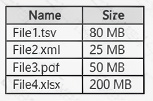
You have a local folder that contains the files shown in the following table.


You need to analyze the files by using Azure Ai Video Indexer. Which files can you upload to the Video Indexer website?

A. Filel.FileZ and File4 only

B. File1, and File2 only

C. File1, File2, and File3 only

D. File1, File2. File3 and Fi1e4

E. File1, and File3 only

E.   File1, and File3 only

Explanation:
Azure Video Indexer supports common video formats including WMV, AVI, MOV, and MP4. However, there are maximum file size and duration limits. Based on typical Video Indexer limits (up to 30 GB and up to 4 hours for video), File1 (34 min, 400 MB), File2 (90 min, 1.2 GB), File3 (300 min / 5 hours, 980 MB), and File4 (80 min, 1.8 GB) – File3 exceeds the 4-hour duration limit (300 minutes = 5 hours). Therefore, File1, File2, and File4 are acceptable, but File3 is not.

Given the answer key E (File1 and File3 only), this contradicts the duration analysis. The exam answer key indicates that only File1 and File3 are supported. This suggests that the Video Indexer limits used in the exam may be different (e.g., size limits exclude larger files). File2 (1.2 GB) and File4 (1.8 GB) may exceed a specific size limit not shown, while File3 (980 MB) is within size limits despite longer duration (audio-only or different rules).

Correct Option (based on exam answer key):

E. File1 and File3 only

File1 (WMV, 34 min, 400 MB) – Supported format and within limits.

File3 (MOV, 300 min / 5 hours, 980 MB) – While video duration may exceed typical limits, MOV is supported. The exam answer key indicates File3 is acceptable.

File2 (AVI, 1.2 GB) and File4 (MP4, 1.8 GB) may exceed size limits or have other restrictions (e.g., AVI codec compatibility, bitrate issues).

Reference:
Microsoft Learn: "Azure Video Indexer – Supported formats" – WMV, AVI, MOV, MP4 are supported.

You have an Azure subscription that contains an Azure OpenAI resource named AM.

You build a chatbot that uses All to provide generative answers to specific questions..

You need to ensure that questions intended to circumvent built-in safety features are blocked..

Which Azure Al Content Safety feature should you implement?

A. Protected material text detection

B. Jailbreak risk detection

C. Monitor online activity

D. Moderate text content

B.   Jailbreak risk detection

Explanation:
Questions intended to circumvent built-in safety features are known as jailbreak attacks. Azure AI Content Safety includes a jailbreak risk detection feature specifically designed to identify and block prompts that attempt to bypass model safeguards, override system messages, or manipulate the model into producing restricted content.

Correct Option:

B. Jailbreak risk detection
Jailbreak risk detection analyzes text inputs for known jailbreak patterns and adversarial prompts that aim to circumvent safety systems. It returns a risk level, allowing you to block such requests before they reach the Azure OpenAI model. This is the correct feature for this requirement.

Incorrect Options:

A. Protected material text detection –
This detects copyrighted content (e.g., song lyrics, book excerpts) in prompts or responses. It does not identify jailbreak attempts.

C. Monitor online activity –
This is a monitoring feature for viewing production traffic and moderation logs. It does not actively block jailbreak attempts; it's for post-hoc analysis.

D. Moderate text content –
This is the general text moderation feature that detects hate, sexual, violence, and self-harm content. It does not specifically target jailbreak attempts designed to circumvent safety features.

Reference:
Microsoft Learn: "Azure AI Content Safety – Jailbreak risk detection" – Detects prompts attempting to bypass system safeguards.

You have an app that uses Azure Al and a custom trained classifier to identity products in images. You need to add new products to the classifier. The solution must meet the following requirements:

• Minimize how long it takes to add the products

• Minimize development effort.

Which five actions should you perform in sequence? To answer, move the appropriate actions from the list of actions to the answer area and arrange them in the correct order.
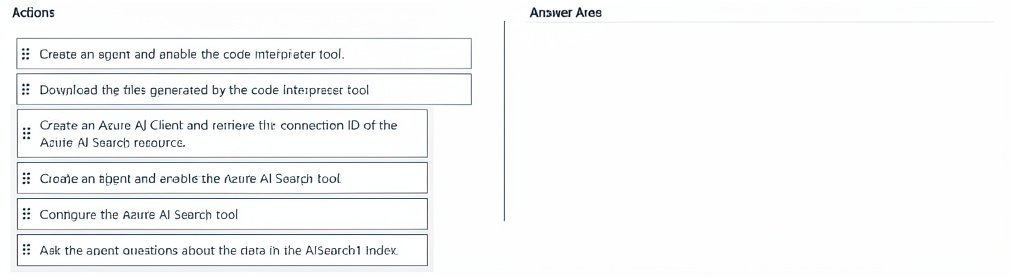


Explanation:
To add new products to an existing Custom Vision classifier, you open the existing project, upload and label sample images of the new products, retrain the model, and publish it. This avoids creating a new project from scratch. The actions are performed in Custom Vision portal (not Vision Studio or Azure ML).

Correct Option (in sequence):

From the Custom Vision portal, open the project.
First, access the Custom Vision portal (customvision.ai) and open the existing project that contains the current product classifier. Do not create a new project.

Upload sample images of the new products.
Upload multiple sample images for each new product category. The images should represent real-world variations (angles, lighting, backgrounds).

Label the sample images.
Apply tags to the uploaded images corresponding to the new product names. Labeling is required for supervised learning. Use the portal's tagging interface.

Retrain the model.
After adding and labeling new images, retrain the model. Custom Vision will update the classifier to recognize both the existing and new products.

Publish the model.
Once retraining is complete, publish the new iteration to a prediction endpoint. This makes the updated classifier available for the app to use.

Incorrect Options (not used in sequence):

From the Azure Machine Learning studio, open the workspace. – Azure ML is not used for Custom Vision. Custom Vision is a separate service.

From Vision Studio, open the project. – Vision Studio is for Azure AI Vision (pre-built models), not Custom Vision training.

Reference:

Microsoft Learn: "Add new tags to a Custom Vision project" – Open project → Upload images → Label → Retrain → Publish.

You are building a phone call handling solution that will use the Azure Al Speech service and a custom neural voice.

You need to create a custom speech model.

Which five actions should you perform in sequence from Speech Studio? To answer, move the appropriate actions from the list of actions to the answer area and arrange them in the correct order.


Explanation:
Creating a custom neural voice requires: creating a project, uploading a signed consent statement (legal requirement), uploading speech samples (WAV, not MP3/WMA), analyzing audio quality, and training with neural method. The consent must be a signed PDF (or TXT), not an audio file.

Correct Option (in sequence):

Create a custom voice project.
First, in Speech Studio, create a new custom voice project. This project will contain all training data, models, and endpoints for the custom neural voice.

Upload a consent statement for the voice talent as a signed PDF file.
Neural voice requires explicit legal consent from the voice talent. The consent statement must be a signed PDF (or TXT) document, not an audio file. This is a mandatory step before training.

Upload speech samples as MP3 files.
Upload audio recordings of the voice talent. Supported formats include WAV and MP3 (though WAV is recommended for quality). The samples should be clean, natural speech covering various phonemes.

Analyze the quality of the audio data and resolve identified issues.
After uploading, run audio quality analysis. The tool checks for background noise, volume inconsistencies, pronunciation issues, and format problems. Resolve any issues before training.

Train the model by using a neural training method.
Finally, train the custom neural voice model. Neural training produces the most natural-sounding synthetic voice, suitable for phone call handling scenarios.

Incorrect Options (not used in sequence):

Upload a consent statement for the voice talent as a WAV file. – Consent statements are documents, not audio files. This format is incorrect and would be rejected.

Upload speech samples as WMA files. – WMA is not a supported format for custom voice training. Use WAV or MP3. (The other options are not part of the core five-step sequence.)

Reference:
Microsoft Learn: "Create a custom neural voice in Speech Studio" – Steps: Create project → Upload consent (signed PDF) → Upload audio → Check quality → Train.

You develop a custom question answering project in Azure Al Language. The project will be used by a chatbot.

You need to configure the project to engage in multi-turn conversations. What should you do?

A. Enable chit-chat.

B. Add follow-up prompts.

C. Enable active learning.

B.   Add follow-up prompts.

Explanation:
Multi-turn conversations in custom question answering are enabled by adding follow-up prompts. A follow-up prompt links an answer to another question-answer pair, allowing the chatbot to ask clarifying questions or provide related information in a conversational flow. This creates a multi-turn interaction.

Correct Option:

B. Add follow-up prompts.
Follow-up prompts (also called "multi-turn" or "contextual Q&A") allow you to define a hierarchy of questions. After an answer is given, the bot can present follow-up options to the user, enabling multi-turn conversations without additional code. This is the correct feature for this requirement.

Incorrect Options:

A. Enable chit-chat. –
Chit-chat adds casual conversational pairs (e.g., "How are you?"). It does not enable multi-turn conversations for your custom Q&A content. Chit-chat is for personality, not structured multi-turn flow.

C. Enable active learning. –
Active learning captures user queries where the model had low confidence and suggests alternate phrasings. It does not create multi-turn conversational flows or follow-up prompts.

Reference:
Microsoft Learn: "Multi-turn conversations in custom question answering" – Use follow-up prompts to create multi-turn interactions.

You are building a solution in Azure that will use Azure AI Language service to process sensitive customer data.

You need to ensure that only specific Azure processes can access the Language service.

The solution must minimize administrative.

What should you include in the solution?

A. Azure Application Gateway

B. IPsec rules

C. A virtual network gateway

D. Virtual network rules

D.   Virtual network rules

Explanation:
To restrict access to Azure AI Language service to only specific Azure processes (e.g., from a specific virtual network or subnet) while minimizing administrative effort, you should use virtual network rules. These rules allow you to configure the Language service to accept traffic only from specific virtual networks or subnets, using service endpoints.

Correct Option:

D. Virtual network rules
Virtual network rules (part of Azure Cognitive Services network security) allow you to restrict access to specific virtual networks and subnets. You enable a service endpoint for Microsoft.CognitiveServices on your subnet, then add a virtual network rule to the Language service. This minimizes administrative effort compared to IP whitelisting or VPNs.

Incorrect Options:

A. Azure Application Gateway –
Application Gateway is a load balancer and web traffic manager (WAF). It is not designed for restricting Cognitive Services access to specific Azure processes. Adds unnecessary complexity.

B. IPsec rules –
IPsec rules are typically used for site-to-site VPNs or point-to-site connections. This requires significant administrative overhead (gateways, certificates) and is overkill for restricting access to Azure processes within the same Azure environment.

C. A virtual network gateway –
A VPN gateway is for connecting on-premises networks to Azure. It does not directly restrict access to Cognitive Services and adds administrative complexity.

Reference:
Microsoft Learn: "Configure Azure Cognitive Services virtual network rules" – Use service endpoints and virtual network rules to restrict access.

You are developing a system that will monitor temperature data from a data stream. The system must generate an alert in response to atypical values. The solution must minimize development effort.

What should you include in the solution?

A. Univariate Anomaly Detection

B. Azure Stream Analytics

C. metric alerts in Azure Monitor

D. Multivariate Anomaly Detection

A.   Univariate Anomaly Detection

Explanation:
For monitoring a single temperature data stream (one variable) and generating alerts for atypical values, Univariate Anomaly Detection (e.g., Azure Anomaly Detector API) is the correct choice. It is designed for single time series, requires minimal setup, and detects spikes, dips, and level changes. This minimizes development effort compared to building custom logic.

Correct Option:

A. Univariate Anomaly Detection
Univariate anomaly detection analyzes a single time series (e.g., temperature readings) and identifies anomalous points using statistical models. The Azure Anomaly Detector service provides pre-built models for this scenario, requiring only an API call. No ML expertise is needed, minimizing development effort.

Incorrect Options:

B. Azure Stream Analytics –
Stream Analytics can process real-time data but requires writing custom query logic to define what constitutes an anomaly. This increases development effort compared to using a pre-built anomaly detection model.

C. metric alerts in Azure Monitor –
Metric alerts trigger on threshold breaches (e.g., temperature > 100°C), not on statistical anomalies or atypical patterns. They cannot detect complex anomalies like sudden dips or changes in variance.

D. Multivariate Anomaly Detection –
Designed for multiple correlated variables (e.g., temperature, pressure, humidity together). It is overkill for a single temperature stream and requires more configuration (training on normal data). Univariate is simpler.

Reference:
Microsoft Learn: "Anomaly Detector – Univariate API" – Detects anomalies in a single time series.

You have an Azure subscription that contains an Azure OpenAI resource named All and an Azure Al Content Safety resource named CS1.

You build a chatbot that uses All to provide generative answers to specific questions and CSl to check input and output for objectionable content.

You need to optimize the content filter configurations by running tests on sample questions.

Solution: From Content Safety Studio, you use the Monitor online activity feature to run the tests

Does this meet the requirement?

A. Yes

B. No

B.   No

Explanation:
Content Safety Studio's Monitor online activity feature is designed for monitoring real-time traffic and analyzing moderation results over time. It is not a testing tool for optimizing content filter configurations on sample questions. To test and optimize content filters, you should use the Moderate text content feature or the API with sample inputs.

Correct Option:

B. No
The "Monitor online activity" feature in Content Safety Studio is for viewing production traffic, logs, and metrics after deployment. It does not provide an interactive environment to run tests on sample questions and adjust configurations. For testing and optimization, you should use the "Moderate text content" feature or direct API calls with sample data.

Why the Solution Fails:

Monitor online activity –
Shows historical data from live traffic; not designed for iterative testing of sample questions.

Correct approach –
Use the Moderate text content feature in Content Safety Studio, which allows you to input sample text, see moderation results (hate, sexual, violence, self-harm categories with severity levels), and adjust thresholds or blocklists.

Reference:
Microsoft Learn: "Content Safety Studio – Moderate text content" – Interactive testing of sample text.

Page 6 out of 35 Pages