Topic 3: Misc. Questions
You are building a text-to-speech app that will use a custom neural voice.
You need to create an SSML file for the app. The solution must ensure that the voice profile meets the following requirements:
• Expresses a calm tone
• Imitates the voice of a young adult female
How should you complete the code? To answer, select the appropriate options in the answer area. NOTE: Each correct selection is worth one point.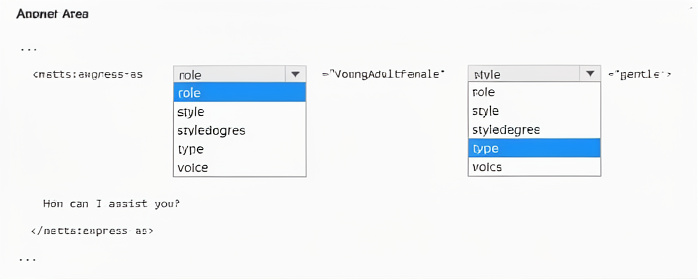
Explanation:
The
Correct Option Details:
role="YoungAdultFemale" –
The role attribute specifies the demographic characteristic of the voice (e.g., YoungAdultFemale, YoungAdultMale, SeniorFemale). This imitates a young adult female voice.
style="gentle" –
The style attribute defines the emotional or speaking style. gentle produces a soft, calm tone suitable for soothing or polite interactions. Other styles include cheerful, sad, angry, whispering, etc.
Incorrect Options (why they don’t fit):
style="youngAdultFemale" – style does not accept demographic values; youngAdultFemale is not a valid style. Styles describe emotional delivery, not age/gender.
type="YoungAdultFemale" – type is not a valid attribute of
voice="YoungAdultFemale" – voice attribute belongs to the
Reference:
SSML with custom neural voice – mstts:express-as – Explains style (e.g., gentle) for tone and role (e.g., YoungAdultFemale) for demographic imitation.
List of supported styles and roles – Shows gentle for calm delivery and YoungAdultFemale as a valid role.
You have a chatbot that uses the Azure Al Language custom question answering service.
You need to test the chatbot. The solution must ensure that the chatbot responds only when an answer has a confidence score of at least 95 percent.
How should you complete the cURL statement? To answer, select the appropriate options in the answer area.
NOTE: Each correct selection is worth one point.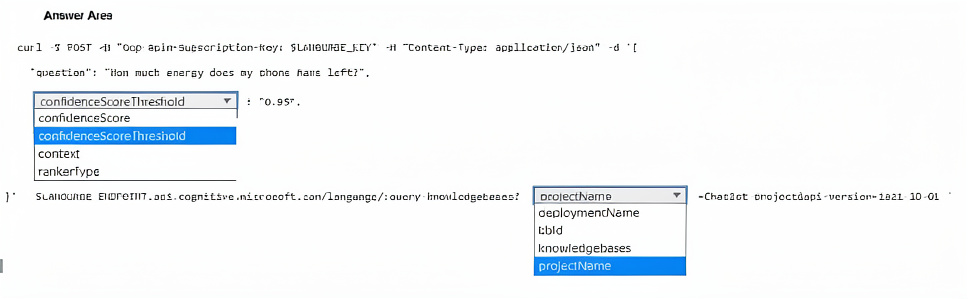
Explanation:
The custom question answering endpoint for querying a knowledge base uses /knowledgebases in the URL. The requirement that the chatbot responds only when confidence ≥ 95% is achieved by setting confidenceScoreThreshold: 0.95. The confidenceScore parameter is an output, not an input filter.
Correct Option Details:
knowledgebases – The REST endpoint for querying a custom question answering project is:
{endpoint}/language/query-knowledgebases?projectName={name}&deploymentName={name}&api-version=2021-10-01
The path segment is query-knowledgebases.
confidenceScoreThreshold – This input parameter filters answers; only those with confidence ≥ the specified value (here 0.95) are returned. Matches "responds only when an answer has a confidence score of at least 95 percent."
Incorrect Options (why they don’t fit):
projectName / deploymentName – These are query parameters in the URL string, not the path segment. The dropdown shown is for the path after query-knowledgebases?, so projectName is incorrect there.
kbd – Not a valid custom question answering endpoint path.
confidenceScore – This is an output field in each answer, not an input filter. Setting it in the request body has no effect.
context / rankertype – These are optional input parameters but do not control the confidence threshold for filtering responses.
Reference:
Custom question answering REST API – Query knowledge base – Shows confidenceScoreThreshold as the request parameter to filter by confidence.
Confidence score documentation – Explains setting threshold to ensure only high-confidence answers are returned.
You have an Azure subscription that contains a Content Safety in Foundry Control Plane resource.
You are building a social media messaging app.
You need to build a solution that will analyze messages and flag messages that contain explicit content.
How should you complete the code? To answer, select the appropriate options in the answer area.
NOTE: Each correct selection is worth one point.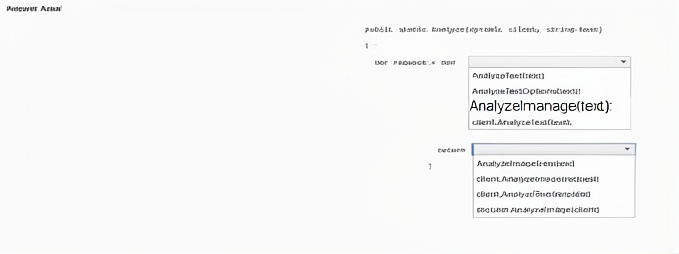
Explanation:
The code uses a deployment name (completionName) and a user question. For non-chat text generation (legacy completion models like text-davinci-003), GetCompletions is correct. The response contains Choices collection; index [0] holds the primary generated text. Embeddings and image generation do not answer text questions.
Correct Option Details:
GetCompletions – This method calls a completion deployment (e.g., text-davinci-003) to generate text from a prompt. It matches the pattern GetCompletions(deploymentName, prompt).
response.Value.Choices[0].Text – The Completions object returns a list of Choice objects. Choices[0].Text contains the generated answer string, suitable for console output.
Incorrect Options:
GetEmbeddings – Returns vector representations of input text, not natural language answers. Cannot answer "what is Microsoft Azure?" in readable form.
GetImageGenerations – Generates images from prompts, not text answers. Irrelevant for console Q&A.
response.Value.Choices[1].Text – Index [1] would be a secondary completion choice if n > 1 was set. Default n=1 means only Choices[0] exists; [1] causes runtime error.
response.Value.Id / response.Value.PromptFilterResults – These return metadata (request ID, content safety results), not the generated answer text.
Reference:
Azure OpenAI .NET SDK – GetCompletions method – Official documentation for text completions.
Completions class – Choices property – Shows Choices[0].Text as the primary generated output.
You have an Azure subscription that contains an Azure OpenA1 resource named All.
You plan to develop a console app that will answer user questions.
You need to call All and output the results to the console.
How should you complete the code? To answer, select the appropriate options in the answer area
NOTE: Each correct selection is worth one point.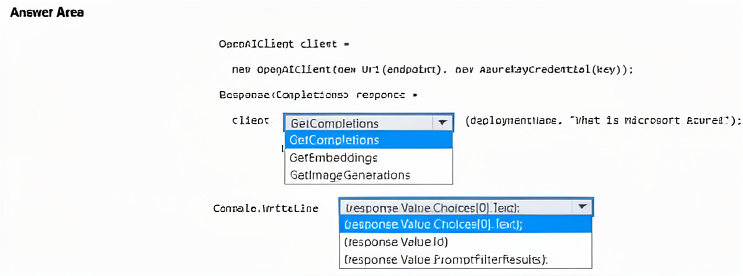
Explanation:
The code uses a deployment name (completionName) and a user question. For non-chat text generation (legacy completion models like text-davinci-003), GetCompletions is correct. The response contains Choices collection; index [0] holds the primary generated text. Embeddings and image generation do not answer text questions.
Correct Option Details:
GetCompletions – This method calls a completion deployment (e.g., text-davinci-003) to generate text from a prompt. It matches the pattern GetCompletions(deploymentName, prompt).
response.Value.Choices[0].Text – The Completions object returns a list of Choice objects. Choices[0].Text contains the generated answer string, suitable for console output.
Incorrect Options:
GetEmbeddings – Returns vector representations of input text, not natural language answers. Cannot answer "what is Microsoft Azure?" in readable form.
GetImageGenerations – Generates images from prompts, not text answers. Irrelevant for console Q&A.
response.Value.Choices[1].Text – Index [1] would be a secondary completion choice if n > 1 was set. Default n=1 means only Choices[0] exists; [1] causes runtime error.
response.Value.Id / response.Value.PromptFilterResults – These return metadata (request ID, content safety results), not the generated answer text.
Reference:
Azure OpenAI .NET SDK – GetCompletions method – Official documentation for text completions.
Completions class – Choices property – Shows Choices[0].Text as the primary generated output.
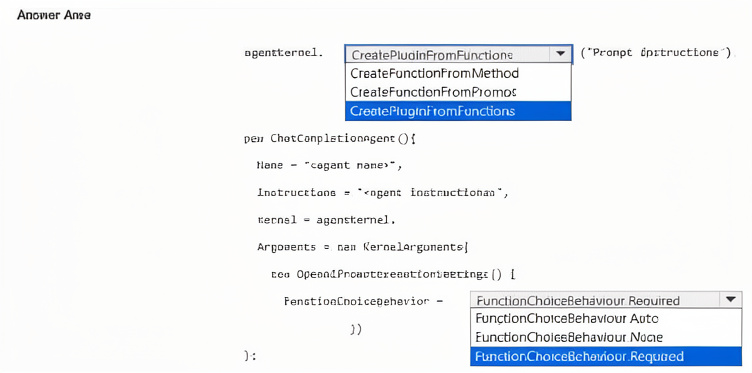
You are building an agent by using the Semantic Kernel. The agent will use a custom plugin. You need to ensure that the agent meets the following requirements:
• The agent must use function calling.
• All functions that match the instructions must be triggered.
• All required parameters in the function must be requested by the agent if the user fails to provide them.
How should you complete the code? To answer, select the appropriate options in the answer area. NOTE: Each correct selection is worth one point.
Explanation:
The agent must use function calling, trigger all matching functions, and request missing required parameters. FunctionChoiceBehavior Required forces the model to call functions when the instruction matches, and Semantic Kernel automatically handles parameter prompting. CreatePluginFromFunctions is the correct method to build a plugin from multiple functions.
Correct Option Details:
CreatePluginFromFunctions –
This method creates a plugin by aggregating one or more functions from methods or delegates, allowing the agent to expose all custom functions collectively.
FunctionChoiceBehavior Required –
This setting ensures the agent must call functions that match the user’s intent, and if required parameters are missing, the agent will ask the user for them (auto-prompting).
Incorrect Options (why they don’t fit):
CreatePluginFromFunction – Not a standard method; singular form is incorrect. The SDK uses CreatePluginFromFunctions (plural) or ImportPluginFromFunctions.
CreateFunctionFromMethod / CreateFunctionFromPrompt – These create individual functions, not the plugin itself. The code needs a plugin container first.
FunctionChoiceBehavior Auto – Would allow the model to decide whether to call functions or respond directly, violating “must use function calling.”
FunctionChoiceBehavior None – Disables function calling entirely.
FunctionChoiceBehavior Required (listed twice in image – same correct choice).
Reference:
Microsoft Semantic Kernel – Function Calling – Explains FunctionChoiceBehavior.Required forces function invocation and parameter requests.
Semantic Kernel – KernelPlugin.CreateFromFunctions – Official method for creating a plugin from multiple functions.
| Page 5 out of 40 Pages |