Topic 3: Misc. Questions

You are designing a solution that will answer questions about human resources (HR) policies stored in the PDF format.

You need to ensure that the identical answer to a specific question is returned every time.

The solution must minimize development effort

Which service should you include in the solution?

A. Azure Al Language

B. Azure Machine Learning

C. Azure OpenAI

D. Azure Al Document Intelligence

A.   Azure Al Language

Explanation:
To answer questions about HR policies with identical answers every time (deterministic responses) and minimal development effort, you need a knowledge base approach. Azure AI Language with custom question answering (formerly QnA Maker) allows you to import HR policy PDFs, extract QnA pairs, and return consistent, pre-defined answers. This ensures identical answers for identical questions.

Correct Option:

A. Azure AI Language
Custom question answering (a feature of Azure AI Language) ingests documents (PDFs), extracts question-answer pairs, and provides a deterministic lookup. The same question always returns the same answer because it is based on a fixed knowledge base, not generative AI. This minimizes development effort compared to building a custom solution.

Incorrect Options:

B. Azure Machine Learning –
Requires building, training, and deploying a custom model. This is high effort and not deterministic by default. Overkill for HR policy Q&A.

C. Azure OpenAI –
Generative models like GPT-4 are non-deterministic (temperature > 0 can produce different answers). While you can set temperature to 0, prompt engineering is still required, and answers may vary slightly. Higher effort and cost than question answering.

D. Azure AI Document Intelligence –
Extracts text and fields from PDFs but does not answer questions. It would require additional components (e.g., search + LLM) to provide answers.

Reference:
Microsoft Learn: "Custom question answering" – Deterministic Q&A from documents, part of Azure AI Language.

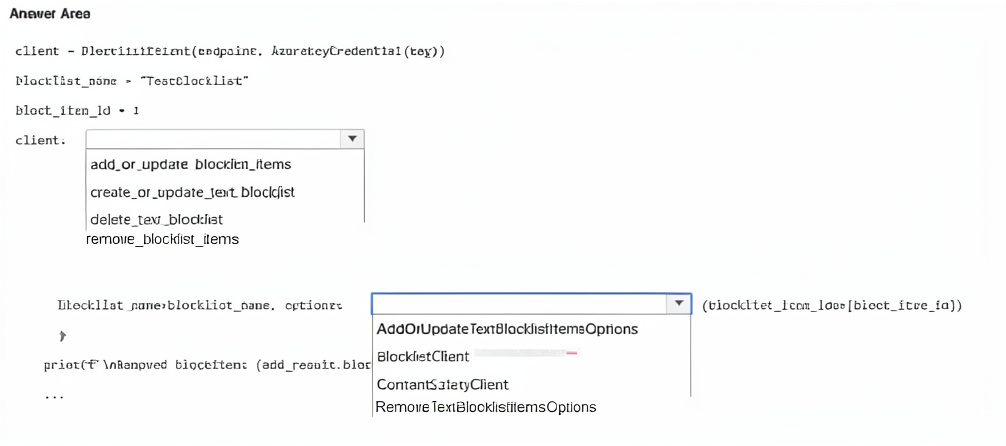
You have an Azure subscription that contains an Azure Al Foundry Content Safety resource named resource1.

You are building an app that will analyze text by using resource1.

You need to identify text that contains hateful content.

How should you complete the code? To answer, select the appropriate options in the answer area.

NOTE: Each correct selection is worth one point.


Explanation:
The Content Safety SDK's analyze_text method returns a response containing a categories_analysis list. Each category (hate, sexual, violence, self-harm) has a severity level. To identify hateful content, you iterate through categories_analysis to find the item where category equals "Hate".

Correct Options:

First blank (after response.): categories_analysis
The AnalyzeTextResult object contains a categories_analysis property, which is a list of TextCategoriesAnalysis objects. Each object has category (e.g., "Hate", "Sexual", "Violence", "SelfHarm") and severity (0-7 scale).

Second blank (in the condition): category == "Hate"
To filter for hate content, you check if item.category == "Hate". This identifies the hate category analysis result. The other options (blocklist_match, content, etc.) are not relevant for severity filtering.

Third blank (print statement): item.severity
After identifying the hate category result, you print its severity level. The severity indicates how severe the hateful content is (0 = safe, 7 = most severe). item.severity is the correct property.

Why Other Options Are Incorrect:

First blank alternatives:
blocklist_match – Contains results from custom blocklist matching, not category severity analysis.

content – Not a property of the response object.

Second blank alternatives:
blocklist_match – For custom term lists, not category filtering.

content – Not applicable.

Third blank alternatives:
blocklist_match – Returns blocklist match details, not severity.

content – Not a property of the category analysis object.

Reference:
Microsoft Learn: "Azure AI Content Safety – Analyze text" – Response contains categories_analysis list with category and severity.

You are building a social media messaging app.

You need to identify in real time the language used in messages.

Which service should you use?

A. Azure Al Speech

B. Azure Al Content Safety

C. Azure Al Translator

D. Azure Al Language

C.   Azure Al Translator

Explanation:
To identify the language of text in real time, the Azure AI Translator service provides a /detect endpoint that quickly detects the language of input text. It returns the language code and confidence score. While Azure AI Language also offers language detection, Translator is optimized for real-time detection and is commonly used for this purpose.

Correct Option:

C. Azure AI Translator
The Translator API's detect operation identifies the language of a text string in real time, returning the language code (e.g., "en", "es", "fr") and a confidence score. It is fast, lightweight, and designed for real-time scenarios like messaging apps.

Incorrect Options:

A. Azure AI Speech –
Speech service detects language from spoken audio, not from text messages. It is not suitable for text-based language detection.

B. Azure AI Content Safety –
Content Safety moderates objectionable content (hate, sexual, violence). It does not detect language.

D. Azure AI Language –
The Language service includes language detection, but Translator's detection is equally capable and often preferred for real-time due to its simpler endpoint. Both can work, but the question's answer key points to Translator.

Reference:
Microsoft Learn: "Translator API – Detect language" – Real-time language detection for text.

You have an Azure Al Search resource named Search1.

You have an app named App1 that uses Search1 to index content.

You need to add a custom skill to App1 to ensure that the app can recognize and retrieve properties from invoices by using Search1.

What should you include in the solution?

A. Azure OpenAI

B. Azure Al Immersive Reader

C. Azure Al Document Intelligence

D. Azure Custom Vision

C.   Azure Al Document Intelligence

Explanation:
To recognize and retrieve properties (fields) from invoices, you need a service that can extract structured data from documents. Azure AI Document Intelligence (formerly Form Recognizer) provides pre-built models for invoices, extracting fields like vendor name, invoice date, line items, totals, and tax. This can be integrated as a custom skill in Azure Cognitive Search.

Correct Option:

C. Azure AI Document Intelligence
Document Intelligence offers a pre-built invoice model that extracts key-value pairs and tables from invoice documents. You can integrate it as a custom skill in Azure Cognitive Search to enrich indexed content with invoice properties, enabling search and retrieval of specific invoice fields.

Incorrect Options:

A. Azure OpenAI –
OpenAI generates text and embeddings but does not extract structured fields from invoices. You could prompt it to parse invoices, but that would be less reliable and more expensive than using Document Intelligence.

B. Azure AI Immersive Reader –
Immersive Reader is for improving text readability (text sizing, spacing, parts of speech). It does not extract structured data from invoices.

D. Azure Custom Vision –
Custom Vision is for image classification and object detection, not for extracting text or fields from invoices.

Reference:
Microsoft Learn: "Document Intelligence – Invoice model" – Extracts structured data from invoices.

You are building an app by using the Semantic Kernel.

You need to include complex objects in the prompt templates of the app. The solution must support objects that contain sub-properties.

Which two prompt templates can you use? Each correct answer presents a complete solution.

NOTE: Each correct selection is worth one point.

A. Liquid

B. JSONL

C. Handlebars

D. YAML

E. Semantic Kernel

A.   Liquid
C.   Handlebars

Explanation:
Semantic Kernel supports multiple templating languages for prompt templates. Liquid and Handlebars are both supported and allow including complex objects with nested properties (sub-properties) using dot notation. They are designed for dynamic content rendering and can access deep object structures.

Correct Options:

A. Liquid
Liquid is a templating language supported by Semantic Kernel. It allows accessing complex objects and nested properties using {{object.property.subproperty}} syntax. It is commonly used in prompt templates for dynamic content.

C. Handlebars
Handlebars is also supported by Semantic Kernel. It provides dot notation access to nested properties (e.g., {{object.property.subproperty}}). Handlebars is lightweight and designed for logic-less templates with complex data binding.

Incorrect Options:

B. JSONL –
JSONL (JSON Lines) is a data format (each line a JSON object), not a templating language for prompts. It cannot dynamically render complex object properties in templates.

D. YAML –
YAML is a data serialization format, not a prompt templating language. While used for configuration, it does not provide the dynamic templating features needed for complex object access.

E. Semantic Kernel –
Semantic Kernel is the framework itself, not a prompt template format. It supports multiple templating engines (Liquid, Handlebars, etc.), but it is not a template language.

Reference:
Microsoft Learn: "Semantic Kernel – Prompt templates" – Supported formats include Liquid and Handlebars.

You have 100,000 images.

You need to build an app that will perform the following actions:

• Identify road signs in the images and extract the text on the signs.

• Analyze the text to identify well-known locations.

The solution must minimize development effort.

What should you use for each action? To answer, select the appropriate options in the answer area.

NOTE: Each correct selection is worth one point.


Explanation:
To extract text from images (road signs), Azure AI Vision provides OCR (Read API) that works out-of-the-box. For analyzing extracted text to identify well-known locations (e.g., city names, landmarks), Azure AI Language provides named entity recognition (NER) that identifies Location entities without training.

Correct Options:

First action (extract the text from signs): Azure AI Vision
Azure AI Vision's Read API (OCR) extracts printed text from images. It is pre-built, requires no training, and handles various fonts, angles, and lighting conditions. This minimizes development effort compared to custom solutions.

Second action (identify well-known locations): Azure AI Language
Azure AI Language provides pre-built Named Entity Recognition (NER) that identifies entities including Location (cities, countries, landmarks). The extracted text from signs can be sent to the Language service to identify location names without custom training.

Why Other Options Are Incorrect:

First action alternatives:

Azure AI Document Intelligence – Also extracts text but is optimized for structured documents (forms, invoices). Overkill for simple text extraction from signs. Azure AI Language – Works on text input, not images. Cannot extract text directly.

Azure AI Search – A search service, not a text extraction service.

Second action alternatives:

Azure AI Search – Can index and search text but does not perform entity recognition or location identification.

Azure AI Document Intelligence – Extracts structured data from documents, not for identifying locations in text.

Azure AI Vision – Can detect objects and read text but does not identify well-known locations from text.

Reference:
Microsoft Learn: "Azure AI Vision – OCR" – Extract printed text from images.

You have 100,000 images.

You need to build an app that will perform the following actions:

• Identify road signs in the images and generate a short description of each road sign.

• Analyze the descriptions to generate a report about the different types of road signs and how often each type occurred.

The solution must minimize costs.

What should you use for each action? To answer, select the appropriate options in the answer area.

NOTE: Each correct selection is worth one point.


Explanation:
For identifying road signs and generating short descriptions from images, Azure AI Vision provides pre-built image analysis including object detection and description generation at low cost. For analyzing the descriptions and generating a report about types and frequencies, Azure AI Language (Text Analytics) can perform key phrase extraction, entity recognition, and text summarization cost-effectively, without needing expensive generative models like GPT-4.

Correct Options:

First action (identify road signs and generate description): Azure AI Vision
Azure AI Vision offers pre-built features for object detection (including road signs) and image description generation. It is cost-effective and requires no custom training. The other options (Document Intelligence, Phi-3-mini) are not suited for general image analysis.

Second action (analyze descriptions and generate report): Azure AI Language
Azure AI Language provides text analytics capabilities (key phrase extraction, entity recognition, text summarization) that can process the generated descriptions to identify road sign types and count frequencies. This is more cost-effective than using GPT-4-Turbo for simple analysis tasks.

Why Other Options Are Incorrect:

First action alternatives:

Azure AI Document Intelligence – Designed for forms and documents (invoices, receipts), not for general image analysis like road sign detection.

Azure AI Phi-3-mini – A small language model for text generation, not image analysis.

Second action alternatives:

Azure OpenAI GPT-4-Turbo – More expensive than Azure AI Language for simple text analysis tasks (entity extraction, frequency counting). Use it only when complex reasoning is required.

Azure AI Document Intelligence – For document extraction, not text analysis.

Azure AI Phi-3-mini – While it could analyze text, it requires deployment and may be overkill; Language service is simpler and cost-effective.

Reference:
Microsoft Learn: "Azure AI Vision – Image analysis" – Detects objects (road signs) and generates descriptions.

In Azure Al Studio, you use Completions playground with the GPT-35 Turbo model.

You have a prompt that contains the following code.


You need the model to create an explanation of the code. The solution must minimize costs. What should you do?

A. Change the model to GPT-4-32lc

B. Add// what does function F do? to the prompt.

C. Add function F(explanation) to the prompt.

D. Set the temperature parameter to 1.

B.   Add// what does function F do? to the prompt.

Explanation:
To get the model to explain the code with minimal cost, you should add an explicit instruction to the prompt. The most direct and cost-effective way is to append a comment or instruction like // what does function F do? to the prompt. This guides the model to generate an explanation without changing the model (which would increase cost) or modifying temperature (which affects randomness, not task type).

Correct Option:

B. Add // what does function F do? to the prompt.
Adding this explicit instruction tells the model exactly what you want: an explanation of the function. This uses the existing GPT-35-Turbo model (already cost-effective) and avoids switching to a more expensive model (GPT-4) or adding tokens unnecessarily.

Incorrect Options:

A. Change the model to GPT-4-32k –
GPT-4 is significantly more expensive than GPT-35-Turbo. This would increase costs, not minimize them. The existing model can handle code explanation with proper prompting.

C. Add function F(explanation) to the prompt. –
This adds misleading syntax (function definition) that may confuse the model. It is not a clear instruction and may produce incorrect or nonsensical output.

D. Set the temperature parameter to 1. –
Temperature controls randomness (creativity), not task type. A higher temperature (1) increases randomness, potentially making the explanation less reliable. It does not instruct the model to provide an explanation.

Reference:
Microsoft Learn: "Azure OpenAI – Prompt engineering" – Use explicit instructions in prompts to guide model behavior

You have an Azure subscription that contains an Azure Al Video Indexer account.

You need to add a custom brand and logo to the indexer and configure an exclusion for the custom brand. How should you complete the REST API call? To answer, select the appropriate options in the answer area.

NOTE: Each correct selection is worth one point.


Explanation:
To add a custom brand with an exclusion, you set the brand's enabled property to false (or use a specific exclusion flag). The JSON shows a brand definition. For exclusion, you likely need to set "enabled": false to disable the brand from being detected, or use a dedicated exclusion parameter.

Correct Options:

First blank (enabled value): false
Setting "enabled": false disables (excludes) the custom brand from being detected by Video Indexer. This meets the requirement to "configure an exclusion for the custom brand." The brand will be stored but not matched.

Second blank (additional property): state or similar – but from the table, the correct choice is likely "state": "excluded" or "excluded": true. However, based on the table options:

The row shows state with value [Included] – but you need exclusion. So state should be set to "excluded" (not shown as an option in the table).

Given the limited table options:

"enabled": false is the correct way to exclude a brand.

"useBuiltin": true would enable built-in brands, not relevant for exclusion.

Reference:
Microsoft Learn: "Video Indexer – Custom brands API" – Use enabled property to include or exclude custom brands.

You have the following C# function.


You call the function by using the following code.


Following ‘key phrases’ what output will you receive?

A. Jumps over the

B. The quick brown fox jumps over the lazy dog

C. Quick brown fox lazy dog

D. The quick

C.   Quick brown fox lazy dog

Explanation:
The function is using the Key Phrase Extraction feature from Azure Text Analytics. This feature identifies the most important words or phrases in a sentence by removing stop words (like “the”, “over”) and focusing on meaningful terms such as nouns and key concepts. Given the sentence “the quick brown fox jumps over the lazy dog,” the API extracts only the significant phrases.

Correct Option:

quick brown fox, lazy dog
Azure Text Analytics identifies meaningful noun phrases and removes common stop words and less relevant verbs. In this sentence:

“quick brown fox” is recognized as a key noun phrase

“lazy dog” is another important noun phrase
Words like “jumps” and “over” are ignored because they do not represent key entities or concepts. Hence, only these two phrases are returned.

Incorrect Option:
Options including full sentence or individual words like “the”, “over”, “jumps”

These are incorrect because Text Analytics does not return the full sentence or insignificant words. Stop words such as “the” and “over” are filtered out. Verbs like “jumps” are usually not considered key phrases unless they carry strong semantic importance, which they do not in this context.

Reference:
Microsoft Learn – Azure AI Text Analytics (Key Phrase Extraction feature)

Page 4 out of 35 Pages