Topic 3: Misc. Questions

You have a factory that produces food products.

You need to build a monitoring solution for staff compliance with personal protective equipment (PPE) requirements. The solution must meet the following requirements:

• identify staff who have removed masks or safety glasses.

• Perform a compliance check every 15 minutes.•

Minimize development effort.
• Minimize costs.
Which service should you use?

A. Face

B. Computer Vision

C. Azure Video Analyzer for Media (formerly Video indexer)

A.   Face

Explanation:
The core requirement is to identify if staff are wearing specific PPE—masks and safety glasses—which is a task of detecting facial features and accessories on individuals. The solution must be low-cost and low-development effort, ruling out complex custom model development. A managed service offering pre-built detection for these specific attributes is ideal.

Correct ption:
A. Face:
The Azure AI Face service provides a Detect API with specific attributes, including faceAttributes for headwear, glasses, and mask. This is a direct, pre-built solution. By analyzing images (e.g., from cameras every 15 minutes), you can check if mask or glasses attributes are detected, minimizing development effort and cost as you only pay for
API calls without training models.

Incorrect Options:

B. Computer Vision
While Computer Vision can detect objects and tags, its generic object detection is not optimized for precise facial attribute detection like masks and safety glasses. It might tag a person but wouldn't reliably return attributes for specific PPE on the face, leading to inaccurate compliance checks.

C. Azure Video Analyzer for Media (formerly Video Indexer):
This service excels at analyzing video/audio for insights like transcripts, keywords, and faces over time, but it is a higher-level, more expensive service designed for media content analysis. It is overkill and more costly for a simple, periodic image-based PPE check. Its primary output is not fine-grained, real-time facial accessory detection.

Reference:

Microsoft Learn - "Face detection and attributes" - Documents that the Face API's detect operation can return attributes for glasses, headwear, and mask, making it the appropriate managed service for this specific PPE compliance scenario.

You are building an app that will use the Azure Video Indexer service.

You plan to train a language model to recognize industry-specific terms.

You need to upload a file that contains the industry-specific terms.

Which file format should you use?

A.

PDF

B.

XML

C.

TXT

D.

XLS

C.   

TXT


Explanation:
Azure Video Indexer allows you to improve speech recognition accuracy by uploading a custom language model with a list of specific terms. The service requires this list to be in a simple, plain text format where each line contains a single term or phrase. This format is straightforward for the service to parse and integrate into its speech-to-text processing for the specified videos.

Correct Option:

C. TXT:
The required format is a plain text file (.txt). You create a file where each industry-specific term or phrase is on a new line. This simple list is then uploaded to Video Indexer's Custom Language Model to bias the speech recognition engine towards recognizing those terms accurately.

Incorrect Options:

A. PDF:
Video Indexer's custom language model feature does not support uploading PDF files. PDFs are complex document formats containing layout and formatting data, which the service cannot directly parse for a simple term list

B. XML:
While Video Indexer uses XML for output transcripts, it does not accept XML as the input format for uploading a custom term list. The input for the language model must be a plain text file.

D. XLS: Excel (.xls or .xlsx) spreadsheet files are not supported for uploading custom terms. The service requires the simpler, line-delimited .txt format for this specific purpose.

Reference:
Microsoft Learn - "Customize a Language Model with Video Indexer" explicitly states: "To add words to the language model, the recommended way is to use a text file." It details that the file should be a .txt file with UTF-8 encoding, with each word or phrase on its own line.

You have an Azure subscription that contains a multi-service Azure Cognitive Services Translator resource named Translator1.

You are building an app that will translate text and documents by using Translator1.

You need to create the REST API request for the app.

Which headers should you include in the request?

A. the subscription key and the client trace ID

B. the subscription key, the subscription region, and the content type

C. the resource ID and the content language

D. the access control request, the content type, and the content length

B.   the subscription key, the subscription region, and the content type

Explanation:
To successfully authenticate and execute a REST API request against the Azure Translator service (part of a multi-service Cognitive Services resource), specific HTTP headers are required. The request must include authentication via the subscription key, must specify the region where the resource is deployed, and should define the format of the data being sent.

Correct Option

B. the subscription key, the subscription region, and the content type:
Subscription Key (Ocp-Apim-Subscription-Key): Mandatory for authentication. This is the key from your Translator1 resource.

Subscription Region (Ocp-Apim-Subscription-Region): Mandatory for multi-service resources. It specifies the region of your resource (e.g., westus2) to route the request correctly.

Content Type (Content-Type): Required for most requests (e.g., application/json for text translation, multipart/form-data for document translation) to tell the API how to interpret the request body.

Incorrect Options:

A. the subscription key and the client trace ID:
While the subscription key is correct, the client trace ID (X-ClientTraceId) is an optional header used for debugging, not a mandatory one. Crucially, this option misses the required Ocp-Apim-Subscription-Region header for a multi-service resource.

C. the resource ID and the content language:
The resource ID is not used as a standard REST API header for authentication. The content language (Content-Language) header might be used in some Cognitive Services APIs to specify the input language, but for Translator's core text translation, the source language is typically specified in the JSON request body (from parameter), not as a header. This option lacks the essential authentication headers.

D. the access control request, the content type, and the content length:
Access-Control-Request-* headers are used in CORS preflight requests by browsers, not in standard server-to-server API calls.

Content-Length is handled automatically by HTTP clients. This set does not include the necessary authentication headers (Ocp-Apim-Subscription-Key and Ocp-Apim-Subscription-Region).

Reference:
Microsoft Learn - "Translator reference - Headers" - Documents the mandatory headers Ocp-Apim-Subscription-Key, Ocp-Apim-Subscription-Region (for multi-service resources), and Content-Type for making requests to the Translator v3.0 API.

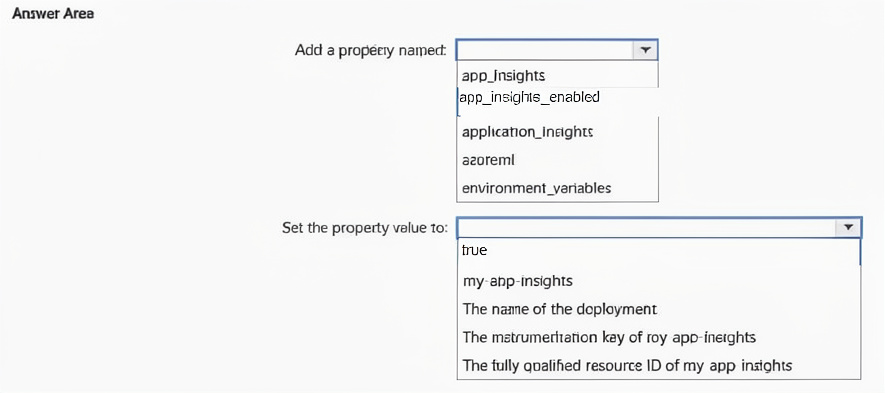
You plan to provision Azure Cognitive Services resources by using the following method.

You need to create a Standard tier resource that will convert scanned receipts into text. How should you call the method? To answer, select the appropriate options in the answer area.
NOTE: Each correct selection is worth one point.


Explanation:
The goal is to provision a Standard tier resource for converting scanned receipts into text. This is a classic use case for Form Recognizer, specifically its pre-built Receipt model. The Standard tier for Form Recognizer is S0. The code method requires the kind (service type) and location parameters, which must match valid Azure values.

Correct Selections:

Provision Resource ("res1"): FormRecognizer
The kind parameter in the CognitiveServicesAccount constructor defines the type of service to create. To use Form Recognizer APIs, the kind must be set to "FormRecognizer". This is the specific cognitive service capable of analyzing receipts and other documents.

"eastus", "S1"
This selection is incorrect for the Form Recognizer service. The standard tier for Form Recognizer is "S0", not "S1". Furthermore, the location (region) and tier parameters are likely passed separately (location in the parameters object and tier as a method argument or within the Sku). This answer choice has the correct location ("eastus" is a valid region) but the wrong tier for the intended service, making it an incorrect pairing for the FormRecognizer kind.

Correct Parameter Pair for Form Recognizer:
Based on the answer area, the correct pair that matches the requirements ("Standard tier", "convert scanned receipts") is:

FormRecognizer (for the kind parameter)
"S0", "eastus" (where "S0" is the Standard tier SKU and "eastus" is the location/region parameter).

Why the other combinations are incorrect:
ComputerVision:
While Computer Vision has OCR capabilities, it is not specialized for structured data extraction from receipts (like merchant name, date, line items, total). Form Recognizer is the dedicated service for this.

CustomVision.Prediction/Training:
These are for building, training, and deploying custom image classification/detection models, not for pre-built document analysis.

"useast", "S1":
"useast" is not a standard Azure region identifier (the correct format is like "eastus"). "S1" is a valid tier for many services, but not the Standard (S0) tier for Form Recognizer.

Reference:
Microsoft Learn documentation on Form Recognizer service and its SKUs (F0 Free, S0 Standard), and the Azure SDK reference for the CognitiveServicesAccount constructor parameters.

You plan to build an app that will generate a list of tags for uploaded images. The app must meet the following requirements:
• Generate tags in a user’s preferred language.
• Support English, French, and Spanish.
• Minimize development effort
You need to build a function that will generate the tags for the app. Which Azure service endpoint should you use?

A. Custom Vision image classification

B. Content Moderator Image Moderation

C. Custom Translator

D. Computer Vision Image Analysis

D.   Computer Vision Image Analysis

Explanation:
The requirement is to generate descriptive tags for uploaded images in multiple supported languages (English, French, Spanish) with minimal development effort. This points directly to a pre-built, general-purpose computer vision model that can analyze image content and return tags, with built-in support for language localization of the output.

Correct Option:

D. Computer Vision Image Analysis:
The Computer Vision service's /analyze endpoint includes a visualFeatures=Tags parameter and a language parameter (e.g., en, fr, es). This is a fully managed API that provides relevant tags for an image in the user's specified language with a single call, perfectly minimizing development effort.

Incorrect Options:

A. Custom Vision image classification:
Custom Vision is for training custom models to recognize user-specific tags/categories (e.g., "defective product," "ripe fruit"). It is not a general-purpose tag generator and does not natively output tags in multiple languages; the output classes are defined during training in a single language.

B. Content Moderator Image Moderation:
This service scans for adult/racy content and specific undesirable elements (like weapons). It does not generate general descriptive tags (e.g., "dog," "outdoor," "car") about the image content.

C. Custom Translator:
This is a text translation service for building domain-specific translation models. It does not analyze images or generate tags.

Reference:
Microsoft Learn - "Computer Vision - Image Analysis" documents the language parameter for the Analyze Image operation, which can return tags and descriptions in supported languages.

You are building an Al solution that will use Sentiment Analysis results from surveys to calculate bonuses for customer service staff. You need to ensure that the solution meets the Microsoft responsible Al principles. What should you do?

A. Add a human review and approval step before making decisions that affect the staffs financial situation

B. Include the Sentiment Analysis results when surveys return a low confidence score.

C. Use all the surveys, including surveys by customers who requested that their account be deleted and their data be removed.

D. Publish the raw survey data to a central location and provide the staff with access to the location.

A.   Add a human review and approval step before making decisions that affect the staffs financial situation

Explanation:
A core Microsoft Responsible AI principle is Accountability and Human-AI Collaboration. Using AI output (like sentiment scores) to directly impact financial outcomes (bonuses) introduces significant risk of harm due to potential model errors, biases, or misinterpretation of context. To mitigate this, human oversight is essential for critical decisions, ensuring fairness and allowing for contextual judgment that an automated system might lack.

Correct Option:

A. Add a human review and approval step before making decisions that affect the staff's financial situation.
This directly implements the principle of human-in-the-loop for high-stakes decisions. It ensures that a manager can review the sentiment analysis in context, consider other factors, and correct any potential errors or biases in the AI's output before finalizing bonuses, promoting fairness and accountability.

Incorrect Options:

B. Include the Sentiment Analysis results when surveys return a low confidence score.
This violates the principle of Reliability & Safety. Using low-confidence, potentially unreliable AI predictions in critical financial calculations is irresponsible and increases the risk of unfair outcomes. Low-confidence results should be flagged for human review or excluded.

C. Use all the surveys, including surveys by customers who requested that their account and data be deleted.
This violates the principles of Privacy and Transparency. It disregards user privacy requests and data governance policies. Responsible AI requires adhering to data subject rights and using data only as permitted.

D. Publish the raw survey data to a central location and provide staff access.
This violates Privacy and Security principles. Sharing raw, potentially sensitive customer feedback broadly creates privacy risks and could lead to harassment or unfair treatment of staff based on unverified comments.

Reference:
Microsoft Responsible AI principles, specifically Accountability ("Human oversight of AI systems") and guidelines for Human-AI collaboration, which recommend keeping humans in the loop for consequential decisions, especially those affecting employment or finances.

You have an Azure subscription that contains a Language service resource named ta1 and a virtual network named vnet1. You need to ensure that only resources in vnet1 can access ta1. What should you configure?

A. a network security group (NSG) for vnet1

B. Azure Firewall for vnet1

C. the virtual network settings for ta 1

D. a Language service container for ta1

C.   the virtual network settings for ta 1

Explanation:
The requirement is to restrict access to a specific Cognitive Services resource (ta1) so that only clients within a designated virtual network (vnet1) can connect. This is a network-level access control problem for the resource itself. The direct solution is to configure the service's built-in networking settings to deny public internet access and allow access only from the specified virtual network and its subnets.

Correct Option:

C. the virtual network settings for ta1:
Within the Azure portal (or via ARM/CLI), you navigate to the Networking settings of the ta1 Language service resource. Here, you can configure "Selected networks" or "Private endpoints" to block public access and explicitly allow access from vnet1 and its subnets. This applies the restriction at the resource's firewall level.

Incorrect Options:

A. a network security group (NSG) for vnet1:
An NSG is attached to subnets or network interfaces within the VNet. It filters traffic between resources inside the VNet or from the VNet outbound. It cannot filter inbound traffic to an external service like ta1 from the public internet; that control must be on the service itself.

B. Azure Firewall for vnet1:
Azure Firewall protects outbound traffic from the VNet. While you could theoretically route all outbound traffic through it, it does not prevent the service (ta1) from being accessed directly from the public internet by clients outside the VNet. The service's own access controls are still needed.

D. a Language service container for ta1:
Deploying a container is for running the service on-premises or in a container instance, not for configuring network access restrictions on the cloud-based, SaaS ta1 resource.

Reference:
Microsoft Learn - "Configure network security for Azure Cognitive Services" - Details how to use the Networking blade of a Cognitive Services resource to restrict access to specific virtual networks, disabling public internet access.

You are developing a monitoring system that will analyze engine sensor data, such as rotation speed, angle, temperature, and pressure. The system must generate an alert in response to atypical values.

What should you include in the solution?

A. Application Insights in Azure Monitor

B. metric alerts in Azure Monitor

C. Multivariate Anomaly Detection

D. Univariate Anomaly Detection

C.   Multivariate Anomaly Detection

Explanation:
The system must analyze multiple sensor data streams (rotation speed, angle, temperature, pressure) collectively to detect atypical states. Anomalies may not be evident in any single metric alone but in their combined patterns (e.g., a specific combination of high temperature and low rotation speed might be abnormal). This requires a model that understands the correlations between multiple variables.

Correct Option:

C. Multivariate Anomaly Detection:
This service (part of Azure AI Anomaly Detector) is designed precisely for this scenario. It learns the normal patterns and relationships between multiple time-series variables from historical data. It then flags anomalies based on deviations from the learned inter-variable correlations, making it ideal for complex machinery monitoring where faults manifest across several sensors simultaneously.

Incorrect Options:

A. Application Insights in Azure Monitor:
This is for monitoring application performance and diagnostics (requests, failures, dependencies). It is not designed for analyzing multivariate sensor data from physical engines to detect anomalous operational states.

B. Metric alerts in Azure Monitor:
Metric alerts are for simple, threshold-based rules on individual metrics (e.g., "temperature > 100"). They cannot detect complex anomalies that involve relationships between multiple metrics, as they evaluate each metric in isolation.

D. Univariate Anomaly Detection:
This service detects anomalies in a single time-series variable. While it could monitor each sensor independently, it would miss contextual anomalies that only appear when considering the combined behavior of all sensors together, which is the likely requirement for engine diagnostics.

Reference:
Microsoft Learn - "Multivariate Anomaly Detection" - Describes its use for scenarios where anomalies are reflected in correlations between multiple metrics, such as monitoring complex systems with several sensors.

You are building an app that will include one million scanned magazine articles. Each article will be stored as an image file. You need to configure the app to extract text from the images. The solution must minimize development effort. What should you include in the solution?

A. Computer Vision Image Analysis

B. the Read API in Computer Vision

C. Form Recognizer

D. Azure Cognitive Service for Language

B.   the Read API in Computer Vision

Explanation:
The task is to perform Optical Character Recognition (OCR) on a very large volume of scanned image files (magazine articles) to extract textual content. The primary requirement is to minimize development effort, which points to using a pre-built, managed API designed for high-volume, accurate text extraction from various image formats.

Correct Option:

B. the Read API in Computer Vision:
This is the dedicated, high-performance OCR engine within Azure Computer Vision. It is optimized for reading large amounts of text from images and documents (like scanned magazine pages), supports asynchronous batch processing, and extracts text with layout information. Using this managed API requires minimal development effort compared to building a custom solution.

Incorrect Options:

A. Computer Vision Image Analysis:
While the Image Analysis API (/analyze) can extract some text via the OCR visual feature, it is designed for general image analysis (tags, objects, faces) and is not optimized for high-volume, dense text extraction from documents. The Read API is the specific, superior tool within Computer Vision for this exact document OCR scenario.

C. Form Recognizer:
This service is specialized for extracting structured data from forms, receipts, invoices, and documents into key-value pairs and tables. While it uses OCR, its strength is understanding document structure for specific form types, not extracting the full body text of generic magazine articles efficiently.

D. Azure Cognitive Service for Language:
This suite includes text analytics (sentiment, entities) but does not include OCR capabilities. It processes text that has already been extracted. It cannot extract text from images itself.

Reference:
Microsoft Learn - "Computer Vision - Read API" explicitly describes the Read API as the solution for extracting printed and handwritten text from images and multi-page PDF documents, highlighting its asynchronous design suitable for large documents.

You train a Conversational Language Understanding model to understand the natural language input of users.

You need to evaluate the accuracy of the model before deploying it.

What are two methods you can use? Each correct answer presents a complete solution.

NOTE: Each correct selection is worth one point.
A. From the language authoring REST endpoint, retrieve the model evaluation summary.

B. From Language Studio, enable Active Learning, and then validate the utterances logged for review.

C. From Language Studio, select Model performance.

D. From the Azure portal, enable log collection in Log Analytics, and then analyze the logs.

A.   From the language authoring REST endpoint, retrieve the model evaluation summary.
C.   From Language Studio, select Model performance.

Explanation:
Evaluating a Conversational Language Understanding (CLU) model's accuracy is a standard step before deployment. This evaluation provides metrics like precision, recall, and F1-score. There are two primary ways to access this evaluation data: via the development interface (Language Studio) or programmatically via the REST API.

Correct Options:

A. From the language authoring REST endpoint, retrieve the model evaluation summary.
This is the programmatic method. The CLU authoring API provides an endpoint (e.g., GET /authoring/analyze-conversations/projects/{projectName}/models/{trainedModelLabel}/evaluation/summary-result) that returns the detailed evaluation summary, including performance metrics for intents and entities, allowing for automated testing and integration into CI/CD pipelines.

C. From Language Studio, select Model performance.
This is the graphical user interface method. In Azure AI Language Studio, you navigate to your CLU project, select the trained model, and click "Model performance" (or similar under evaluation). This presents a visual dashboard with all accuracy metrics, confusion matrices, and detailed breakdowns for easy analysis without writing code.

Incorrect Options:

B. From Language Studio, enable Active Learning, and then validate the utterances logged for review.
Active Learning is a post-deployment improvement feature where low-confidence predictions are logged for human review to create new training data. This helps improve a deployed model but is not the method for the initial pre-deployment accuracy evaluation.

D. From the Azure portal, enable log collection in Log Analytics, and then analyze the logs.
This is for monitoring a deployed, live model's usage and performance in production (e.g., tracking prediction latency, endpoint hits). Log Analytics does not provide the precision/recall evaluation of the model's test set, which is calculated during the training/evaluation phase before deployment.

Reference:
Microsoft Learn - "Conversational Language Understanding - Evaluation metrics" and the REST API documentation for the evaluation summary endpoint, which detail how to assess model performance both in Language Studio and via API calls.

Page 3 out of 26 Pages