Topic 3: Misc. Questions

You have an Azure subscription that contains an Azure Al Language custom question answering project named QA1.

You need to import question and answer pairs to QA1.

Which two file formats can you use? Each correct answer presents a complete solution

NOTE; Each correct selection is worth one point.

A. Excel

B. TSV

C. JSON

D. LU

E. CSV

A.   Excel
B.   TSV

Explanation:
Azure AI Language custom question answering supports importing question and answer pairs from structured file formats. Excel (.xlsx) and TSV (Tab-Separated Values) are both supported for bulk import. These files must follow a specific schema with columns for questions, answers, metadata, and follow-up prompts.

Correct Options:

A. Excel
Excel (.xlsx) files are supported for importing QnA pairs into a custom question answering project. The file should have columns like "QnA ID", "Questions", "Answers", "Metadata", etc. Excel provides an easy way to manage large sets of QnA pairs.

B. TSV
TSV (Tab-Separated Values) files are supported and commonly used for importing QnA pairs. Like Excel, the TSV must follow the required schema with tabs separating columns. This format is useful for data exchange between systems.

Incorrect Options:

C. JSON –
JSON is not a direct import format for custom question answering projects. While the export uses JSON, import is supported via Excel, TSV, or URL-based sources (files, SharePoint). JSON import is not listed as a supported method.

D. LU –
LU (Language Understanding) files are used for LUIS applications (intents and entities), not for QnA Maker or custom question answering. This format is not supported for importing QnA pairs.

E. CSV –
CSV (Comma-Separated Values) is not supported. The required delimiter is tab, not comma. Using CSV would cause parsing errors because questions and answers often contain commas.

Reference:
Microsoft Learn: "Import question and answer pairs" – Supported formats: Excel (.xlsx), TSV (.tsv), and URLs (SharePoint, public URLs).

You have an Azure subscription that contains an Azure OpenA1 resource. You configure a model that has the following settings:

• Temperature: 1

• Top probabilities: 0.5

• Max response tokens: 100

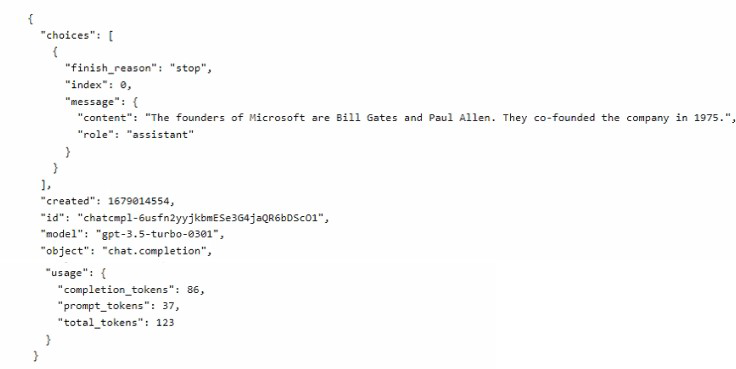
You ask the model a question and receive the following response.


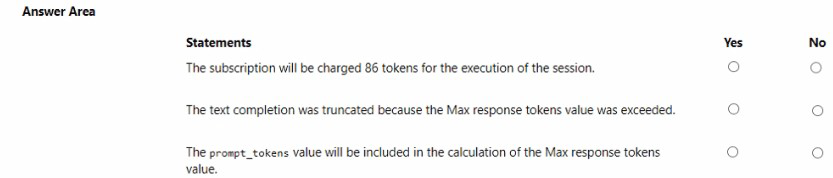
For each of the following statements, select Yes if the statement is true. Otherwise, select No..

NOTE: Each correct selection is worth point..


Explanation:
The response shows a successful completion with finish_reason: "stop" (natural stop, not truncation). Billing for Azure OpenAI is based on total tokens (prompt + completion). The Max response tokens parameter limits only the completion tokens, not prompt tokens.

Correct Answers:

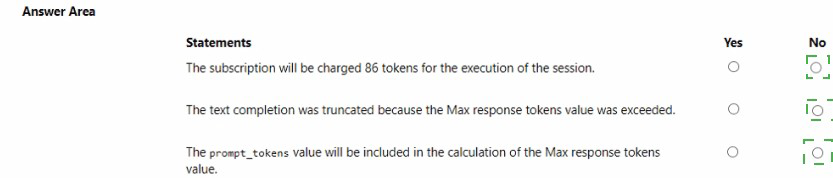
Statement 1: The subscription will be charged 86 tokens for the execution of the session.
No – The subscription is charged for total tokens (prompt + completion), which is prompt_tokens: 37 + completion_tokens: 86 = 123 tokens. The 86 is only completion tokens. Billing is based on total_tokens (123), not just completion tokens.

Statement 2: The text completion was truncated because the Max response tokens value was exceeded.
No – finish_reason: "stop" indicates the model stopped naturally (reached a stopping condition, not length limit). If Max response tokens (100) had been exceeded, finish_reason would be "length". Since completion_tokens is 86 (<100), truncation did not occur.

Statement 3: The prompt_tokens value will be included in the calculation of the Max response tokens value.
No – Max response tokens limits only the completion tokens (generated output). It does not include prompt_tokens. The prompt tokens are fixed and billed separately but do not count against the Max response tokens limit.

Reference:
Microsoft Learn: "Azure OpenAI – Tokens and billing" – Total tokens = prompt + completion; max_tokens limits completion only.

You have an Azure subscription and 10,000 ASCII files.

You need to identify files that contain specific phrases. The solution must use cosine similarity.

Which Azure OpenAI model should you use?

A. text-embedding-ada-002

B. GPT-4

C. GPT-35 Turbo

D. GPT-4-32k

A.   text-embedding-ada-002

Explanation:
Cosine similarity requires vector embeddings of text. The text-embedding-ada-002 model is specifically designed to convert text into vector embeddings. You generate embeddings for each ASCII file and for your target phrase, then compute cosine similarity between vectors to identify files containing similar phrases. This is the standard approach for semantic similarity search.

Correct Option:

A. text-embedding-ada-002
This embedding model outputs 1536-dimensional vectors representing the semantic meaning of input text. Cosine similarity between embedding vectors measures semantic relatedness. It is ideal for finding files containing specific phrases based on meaning, not just keyword matching.

Incorrect Options:

B. GPT-4 –
A generative model for text completion and chat. It does not output embeddings and is not designed for cosine similarity calculations. Using it for this task would be inefficient and costly.

C. GPT-35 Turbo –
Similarly a generative chat model, not an embedding model. Cannot produce vectors for cosine similarity.

D. GPT-4-32k –
A version of GPT-4 with larger context window (32k tokens). Still a generative model, not an embedding model.

Reference:
Microsoft Learn: "Azure OpenAI – Embeddings" – text-embedding-ada-002 is the recommended model for cosine similarity search.

You have a chatbot that uses Azure OpenAI to generate responses.

You need to upload company data by using Chat playground. The solution must ensure that the chatbot uses the data to answer user questions.

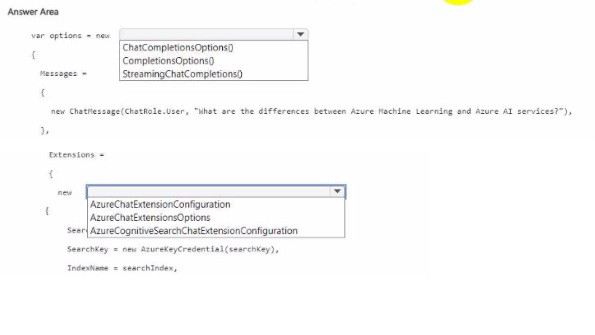
How should you complete the code? To answer, select the appropriate options in the answer area.

NOTE: Each correct selection is worth one point.


Explanation:
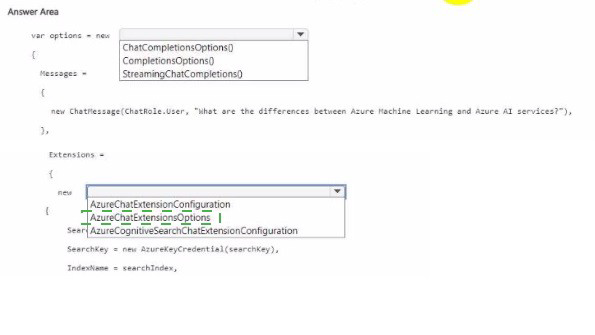
To use company data (from Azure Cognitive Search) with Azure OpenAI in the Chat playground, you configure ChatCompletionsOptions with AzureChatExtensionConfiguration. This enables Retrieval Augmented Generation (RAG), where the model retrieves relevant data from your search index and grounds responses in that data.

Correct Options:

First blank: ChatCompletionsOptions
ChatCompletionsOptions is the class used for chat completion requests with extensions (data sources). It supports adding AzureChatExtensionConfiguration to integrate external data. CompletionOptions is for older non-chat completions; StreamingChatCompletions is a result type, not an options class.

Second blank (Extensions = new { ... }): AzureChatExtensionConfiguration
The extensions collection expects AzureChatExtensionConfiguration objects. Specifically, SearchAzureCognitiveSearchChatExtensionConfiguration (a subclass) is used for Azure Cognitive Search as the data source. This tells Azure OpenAI to retrieve relevant chunks from your search index.

Why Other Options Are Incorrect:

First blank alternatives:

CompletionOptions – Used for legacy text completion (not chat), does not support extensions or messages.

StreamingChatCompletions – This is a response type for streaming results, not a configuration options class.

Extensions alternatives:
AzureChatExtensionsOptions – This is a container class, not the actual extension configuration. You need to add AzureChatExtensionConfiguration objects. (The third option is incomplete but would be invalid.)

Reference:
Microsoft Learn: "Azure OpenAI – Add your data (RAG)" – Use ChatCompletionsOptions with AzureChatExtensionConfiguration to integrate Cognitive Search.

You are developing a text processing solution.

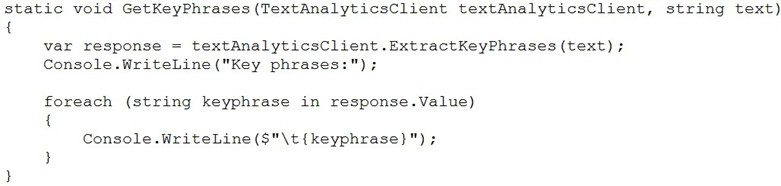
You develop the following method.


You call the method by using the following code.

GetKeyPhrases(textAnalyticsClient, "the cat sat on the mat");

For each of the following statements, select Yes if the statement is true. Otherwise, select No.

NOTE: Each correct selection is worth one point.


Explanation:
The code uses ExtractKeyPhrases on the sentence "the cat sat on the mat". Key phrase extraction identifies important nouns and noun phrases, not all words. Stop words ("the", "on") and verbs ("sat") are typically excluded. The method returns only key phrase strings, not confidence scores.

Correct Answers:

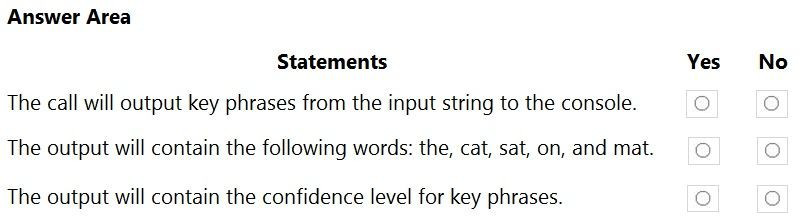
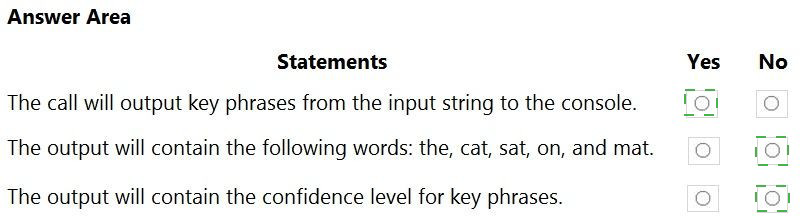
Statement 1: The call will output key phrases from the input string to the console.
Yes – The method iterates through response.Value (key phrases) and writes each to the console using Console.WriteLine(). Assuming the API call succeeds and returns at least one key phrase, output will be produced.

Statement 2: The output will contain the following words: the, cat, sat, on, and mat.
No – Key phrase extraction does not return stop words ("the", "on") or verbs ("sat"). For this sentence, likely output is just "cat" and "mat" (or "cat" and "mat" separately). It will not output all five words as individual key phrases.

Statement 3: The output will contain the confidence level for key phrases.
No – The ExtractKeyPhrases method returns a KeyPhraseCollection containing only the key phrase strings. Confidence scores are not provided for key phrase extraction (unlike entity recognition or sentiment analysis). The code writes keyphrase directly, not any confidence value.

Reference:
Microsoft Learn: "Text Analytics – Key Phrase Extraction" – Returns key phrases as strings, no confidence scores. Stop words and common verbs are filtered out.

You have a blog that allows users to append feedback comments. Some of the feedback comments contain harmful content that includes discriminatory language.

You need to create a prototype of a solution that will detect the harmful content. The solution must minimize development effort.

Which two actions should you perform? Each correct answer presents part of the solution.

NOTE: Each correct selection is worth one point.

A. Sign in to Content Safety Studio and select Moderate text content.

B. From the Azure portal, create an Azure Al Content Safety resource.

C. From the Azure portal, create an Azure OpenAI resource.

D. Sign in to Azure Al Foundry and select Safety + security.

E. Sign in to Content Safety Studio and select Protected material detection for text.

A.   Sign in to Content Safety Studio and select Moderate text content.
B.   From the Azure portal, create an Azure Al Content Safety resource.


Explanation:
To detect harmful content (discriminatory language) with minimal development effort, you need an Azure AI Content Safety resource and its testing interface. First, create the Content Safety resource, then use Content Safety Studio's "Moderate text content" feature to test and prototype detection without writing code.

Correct Options:

B. From the Azure portal, create an Azure AI Content Safety resource.
First, provision an Azure AI Content Safety resource in your subscription. This resource provides the API for text moderation, including detection of hate speech, discriminatory language, and other harmful content.

A. Sign in to Content Safety Studio and select Moderate text content.
After creating the resource, go to Content Safety Studio (content-safety.cognitive.azure.com). Select "Moderate text content" to test the service with sample comments. This allows rapid prototyping without coding.

Incorrect Options:

C. From the Azure portal, create an Azure OpenAI resource. – Azure OpenAI is for text generation, not content moderation. It does not have built-in detection of discriminatory language with minimal effort.

D. Sign in to Azure AI Foundry and select Safety + security. – AI Foundry is for managing AI models, not a direct prototyping tool for Content Safety moderation.

E. Sign in to Content Safety Studio and select Protected material detection for text. – Protected material detection identifies copyrighted content, not discriminatory or harmful language.

Reference:
Microsoft Learn: "Azure AI Content Safety – Quickstart" – Create resource, then use Studio for prototyping.

You have an app named App1 that uses a custom Azure Al Document Intelligence model to recognize contract documents. You need to ensure that the model supports an additional contract format. The solution must minimize development effort. What should you do?

A. Lower the confidence score threshold of App1.

B. Lower the accuracy threshold of App1.

C. Add the additional contract format to the existing training set. Retrain the model.

D. Create a new training set and add the additional contract format to the new training set.

E. Create and train a new custom model.

C.   Add the additional contract format to the existing training set. Retrain the model.

Explanation:
To support an additional contract format with minimal development effort, you should add the new format's labeled samples to the existing training dataset and retrain the model. This extends the existing model's capabilities without starting from scratch, preserving previous learning while incorporating the new format.

Correct Option:

C. Add the additional contract format to the existing training set. Retrain the model.
Document Intelligence custom models are iteratively improved. By adding labeled examples of the new contract format to your existing training set and retraining, the model learns to recognize both the original and new formats. This minimizes effort compared to creating a new model.

Incorrect Options:

A. Lower the confidence score threshold of App1. –
This changes the acceptance criteria for predictions but does not teach the model to recognize the new contract format. It may increase false positives.

B. Lower the accuracy threshold of App1. –
Similar to confidence threshold, this does not improve model capability; it only reduces quality standards.

D. Create a new training set and add the additional contract format to the new training set. –
This would require starting over and would not include the original contract format unless you also add those samples, duplicating effort.

E. Create and train a new custom model. –
This discards all previous training, requiring relabeling of original contracts plus new ones. This is higher effort than retraining the existing model.

Reference:
Microsoft Learn: "Document Intelligence – Improve a custom model" – Add new labeled data to existing training set and retrain.

You have an Azure subscription that contains an Azure Al Content Safety resource named CS1. You plan to build an app that will analyze user-gene rated documents and identify obscure offensive terms. You need to create a dictionary that will contain the offensive terms. The solution must minimize development effort. What should you use?

A. a text classifier

B. text moderation

C. language detection

D. a blacklist

D.   a blacklist

Explanation:
Content Safety allows you to create custom blocklists (blacklists) of terms to detect. For obscure offensive terms not covered by the default models, you can create a custom blacklist (blocklist) and add your specific terms. This requires no model training and minimizes development effort compared to building a custom classifier.

Correct Option:

D. a blacklist
Azure AI Content Safety supports custom blocklists (blacklists) where you can upload a list of terms to be detected as offensive. The API then checks input text against both the default model and your custom list. This is the minimal-effort solution for detecting obscure offensive terms.

Incorrect Options:

A. a text classifier –
Building a text classifier requires labeling data, training a model, and deployment. This is high effort compared to using a blacklist.

B. text moderation –
Text moderation is a capability (Content Safety or Content Moderator), not a specific solution for custom terms. While Content Moderator supports custom term lists, the question asks for "what should you use" – the blacklist/blocklist is the correct feature.

C. language detection –
Language detection identifies the language of the text. It does not detect offensive terms.

Reference:
Microsoft Learn: "Azure AI Content Safety – Custom blocklists" – Create blocklists of terms to detect offensive content.

You train an Azure Custom Vision object detection model to identify a company's products by using the Retail domain.

You plan to deploy the model as part of a mobile app for Android phones.

You need to prepare the model for deployment.

Which three actions should you perform in sequence? To answer, move the appropriate actions from the list of actions to the answer area and arrange them in the correct order.




Explanation:
For mobile deployment (Android), the model must be in a compact domain (e.g., "General (compact)" or "Retail (compact)"). The Retail domain is not compact and cannot be exported. You must change the domain to a compact version, retrain the model, then export it (e.g., to TensorFlow Lite for Android).

Correct Option (in sequence):

Change the model domain.
First, change the project domain from "Retail" to a compact domain compatible with mobile export, such as "General (compact)" or "Retail (compact)". The domain determines export capabilities. This is done in the Custom Vision portal under Project Settings.

Retrain the model.
After changing the domain, retrain the model. Training adjusts the model architecture to the new compact domain. The model will now be optimized for size and speed, suitable for mobile deployment.

Export the model.
Once retrained, export the model to a format compatible with Android (e.g., TensorFlow Lite, ONNX, CoreML). The export option appears after training a compact domain model. Download the exported file for integration into the Android app.

Incorrect Option (not used in sequence):
Test the model. – Testing is optional for validation but not required for preparing the model for deployment. Export can be done without explicit testing.

Reference:
Microsoft Learn: "Custom Vision – Export models for mobile" – Compact domains support export; change domain → retrain → export.

You are building an app that will translate speech by using the Azure Al Language service.

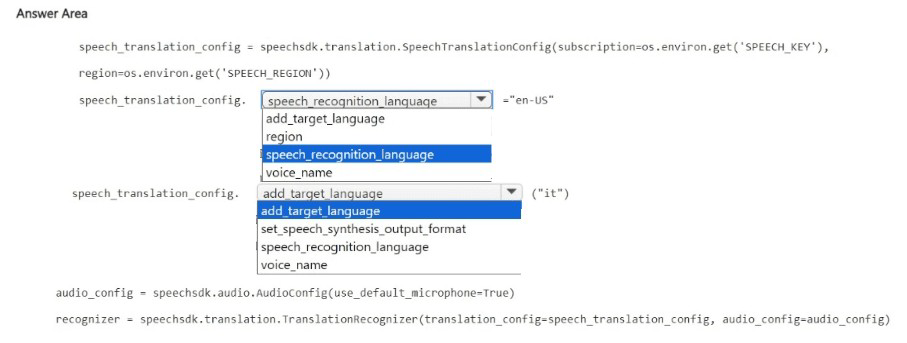
You need configure the app to translate the speech from English to Italian.

How should you complete the code? To answer, select the appropriate options in the answer area.

NOTE: Each correct selection is worth one point.


Explanation:
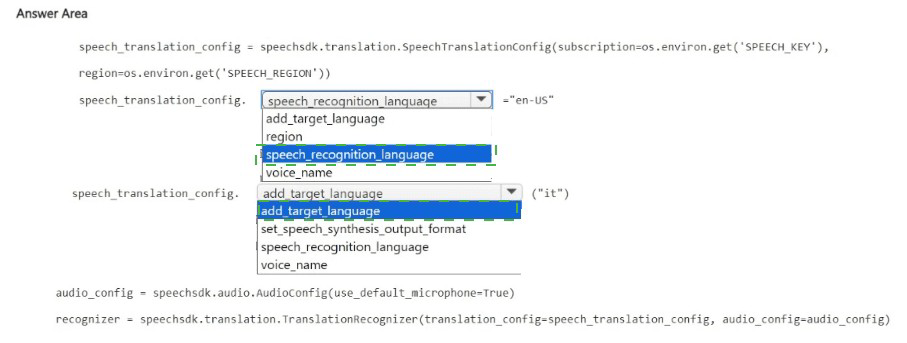
To configure speech translation from English to Italian, set the source language using speech_recognition_language (to "en-US") and add the target language using add_target_language (to "it-IT" or "it"). The add_target_language method adds Italian as a translation target.

Correct Options:

First blank (after speech_translation_config.): speech_recognition_language
This property sets the language of the incoming speech audio. For English, set it to "en-US". The speech recognizer will listen for English and convert it to text before translation.

Second blank (assigned value): "en-US" (implied from the code)
The value assigned to speech_recognition_language should be the locale code for English (United States).

Third blank (after speech_translation_config.): add_target_language
This method adds a target language for translation. For Italian, you would call add_target_language("it-IT") or add_target_language("it"). The method adds Italian as an output language.

Fourth blank (value for target language): "it" or "it-IT" (not explicitly shown in the answer area options, but implied)

Why Other Options Are Incorrect:

For the first blank:

add_target_language – This is for setting target languages, not the source language.

region – This is set in the SpeechTranslationConfig constructor, not as a property here.

voice_name – This specifies the voice for speech synthesis output, not the source language.

For the third blank:

set_speech_synthesis_output_format – This sets the audio output format (e.g., raw PCM, MP3), not the translation target.

speech_recognition_language – Already used for source language; cannot be used for target.

voice_name – Sets the voice for synthesis, not the translation language.

Reference:
Microsoft Learn: "Speech SDK – Translation recognizer" – Use speech_recognition_language for source, add_target_language for target(s).

Page 14 out of 40 Pages