Topic 3: Misc. Questions
You are building an app that will analyze text by using the Azure Al Language service.
You need to configure the app to mask the telephone number and email details in a given document.
How should you complete the code? To answer, select the appropriate options in the answer area.
NOTE: Each correct selection is worth one point.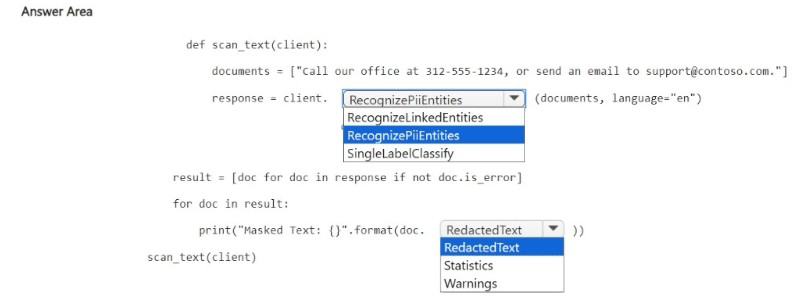
Explanation:
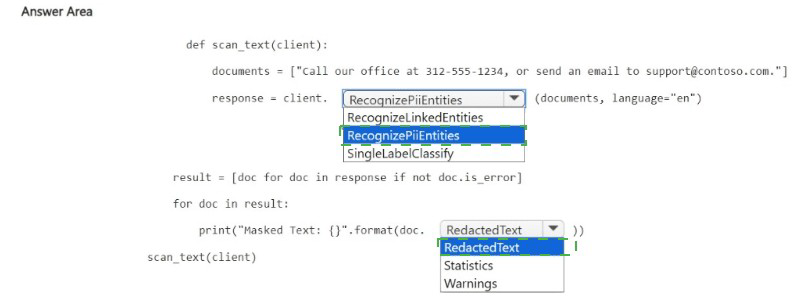
To mask personally identifiable information (PII) such as phone numbers and email addresses, you use the Recognize PII API. The RecognizePiiEntities method returns a RedactedText property that contains the input text with PII entities replaced by asterisks or redaction characters.
Correct Options:
First blank (after client.): RecognizePiiEntities
The RecognizePiiEntities method (or RecognizePiiEntitiesAsync) detects PII entities (phone numbers, emails, SSNs, etc.) in text. It can return redacted text where detected entities are masked. RecognizPiiEntities is a typo; RecognizeLinkedEntities is for linking to Wikipedia; SingleLabelClassify is for document classification.
Second blank (after doc.): RedactedText
The RecognizePiiEntitiesResult object has a RedactedText property that contains the input text with all detected PII entities redacted (masked). For example: "call our office at ***********, or send an email to *****************." This meets the requirement to mask phone numbers and email details.
Why Other Options Are Incorrect:
First blank alternatives:
RecognizPiiEntities – Misspelled; would cause a compilation error.
RecognizeLinkedEntities – Identifies entities and links to Wikipedia; does not redact or mask PII.
SingleLabelClassify – Classifies documents into categories; does not detect or mask PII.
Second blank alternatives:
RedactedText (duplicate) – The correct choice.
Statistics – Contains document statistics (character count, transaction count), not redacted text.
Warnings – Contains warning messages about the processing, not the masked output.
Example Output:
Input: "call our office at 312-555-1234, or send an email to support@contoso.com."
RedactedText: "call our office at ***********, or send an email to *****************."
Reference:
Microsoft Learn: "Text Analytics – PII redaction" – Use RecognizePiiEntities with redactText option or access RedactedText property.
You are building an app that will perform speech translation by using the Azure ai Language service.
You need to ensure that the language input to the app is supported.
How should you complete the code? To answer, select the appropriate options in the answer area.
NOTE; Each correct selection is worth one point.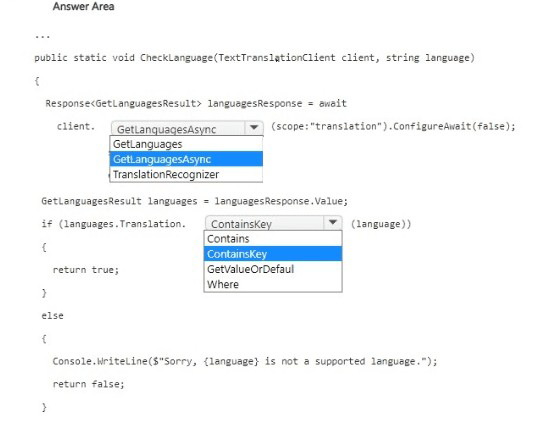
Explanation:
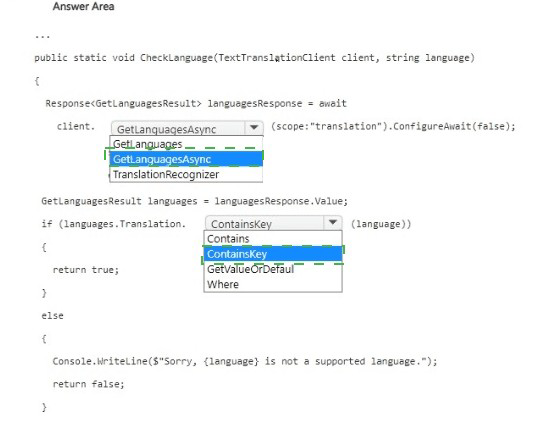
The code checks if a given language code is supported for translation. The GetLanguagesAsync method retrieves supported languages. The Translation dictionary contains target translation languages. To check if a specific language exists, use the ContainsKey method on the dictionary.
Correct Options:
First blank (after client.): GetLanguagesAsync
The GetLanguagesAsync method retrieves the list of languages supported by the Translator service (for translation, transliteration, or dictionary). This is the correct asynchronous method. GetLanguages (synchronous) may not exist in the async SDK. TranslationRecognizer is for Speech SDK, not Translator.
Second blank (after languages.Translation.): ContainsKey
languages.Translation is a dictionary where keys are language codes (e.g., "es", "fr", "de"). ContainsKey checks if the specified language code exists in the dictionary. This is the correct method to test for presence.
Why Other Options Are Incorrect:
First blank alternatives:
GetLanguages – If using synchronous SDK, this might be valid, but the code uses await and .ConfigureAwait(false), indicating asynchronous pattern. GetLanguagesAsync is correct.
TranslationRecognizer – This is a class for speech translation recognition, not for fetching supported languages.
Second blank alternatives:
Contains – This is for checking if a specific key-value pair exists, not just a key. Requires a KeyValuePair argument, not a string.
GetValueOrDefault – Returns the value for a key or default; does not return a boolean indicating presence.
Where – LINQ filtering method; overkill and returns an enumerable, not a boolean.
Reference:
Microsoft Learn: "Translator API – GetLanguagesAsync" – Retrieves supported languages for translation.
You are developing an app that will use the Azure AI vision API to analyze an image.
You need configure the request that will be used by the app to identity whether an image is clipart or a line drawing.
How should you complete the request? To answer. Select the appropriate options in the answer area.
NOTE: Each correct select is worth one point.

Explanation:
To identify if an image is clipart or a line drawing, you need the Image Type feature. The correct API endpoint is POST (or GET with image URL in query) to analyze with visualFeatures=ImageType. The ImageType feature returns clipArtType (0-3 scale) and lineDrawingType (0-1 scale).
Correct Options:
HTTP Method: POST
The Analyze Image API typically uses POST when sending image binary data in the request body, or GET when using a URL parameter. POST is the standard method for local image uploads.
Path: analyze
The endpoint path is /vision/v3.2/analyze (or /retrieval:analyze for newer versions). The analyze operation performs image analysis.
Visual Feature: imageType
The imageType visual feature returns classification of the image as clip art or line drawing. The other options (description generates captions, objects detects objects, tags generates keywords) do not provide image type detection.
Why Other Options Are Incorrect:
Visual Feature alternatives:
description – Returns a caption (e.g., "a person sitting on a bench"), not clipart/line drawing classification.
objects – Detects objects with bounding boxes, not image type.
tags – Returns general keywords, not image type.
HTTP Method alternatives:
GET – Can be used if image URL is passed as a query parameter, but POST is more common for local files and preferred for security. The question implies POST based on typical patterns.
PATCH – Not supported for this API.
Reference:
Microsoft Learn: "Computer Vision – Analyze Image API" – Use visualFeatures=ImageType to get clipArtType and lineDrawingType.
You have an Azure subscription that contains an Azure AI Document intelligence resource named D1.
You create a PDF document named test.pdf that contain tabular data.
You need to analyze Test.pdf by using DI1.
How should you complete the command? To answer, select the appropriate option in the answer area.
NOTE: Each correct selection is worth one point.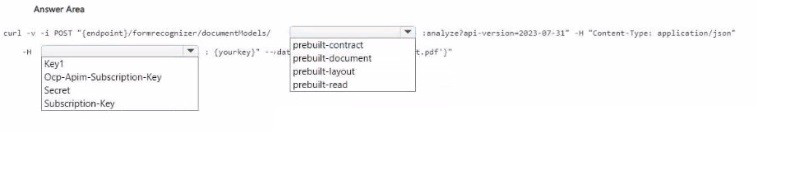
Explanation:
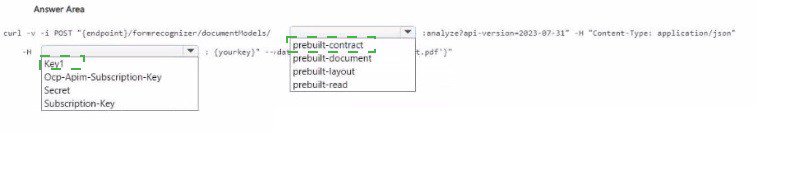
To analyze a PDF containing tabular data, you need to use the prebuilt-layout model, which extracts tables, text, and structure. The API key header for Document Intelligence is Ocp-Apim-Subscription-Key. The endpoint URL should end with the model name followed by :analyze?api-version=....
Correct Options:
For the header name (after -H): Ocp-Apim-Subscription-Key
Document Intelligence (formerly Form Recognizer) uses the header Ocp-Apim-Subscription-Key for API key authentication. Subscription-Key is not correct; Key1 and Secret are invalid.
For the model name (after documentModels/): prebuilt-layout
prebuilt-layout extracts text, tables, selection marks, and structure from documents. This is the correct model for PDFs with tabular data. prebuilt-document also extracts tables but is more general; prebuilt-contract is for contracts; prebuilt-read is OCR-focused without table extraction.
Why Other Options Are Incorrect:
Header alternatives:
Key1 – Not a valid header name for Document Intelligence.
Secret – Not valid.
Subscription-Key – Missing Ocp-Apim- prefix; incorrect.
Model alternatives:
prebuilt-contract – Optimized for contract analysis (parties, dates, obligations), not general tabular data.
prebuilt-document – Extracts tables but is more focused on key-value pairs and entities. prebuilt-layout is specifically for layout and table extraction.
prebuilt-read – OCR-only; does not extract tables as structured data.
Reference:
Microsoft Learn: "Document Intelligence – prebuilt-layout model" – Extracts tables, text, and structure.
You are building an app that will perform translations by using the Azure Al Translator service.
You need to ensure that the app will translate user-inputted text.
How should you complete the code? To answer, select the appropriate options in the answer area.
NOTE: Each correct selection is worth one point.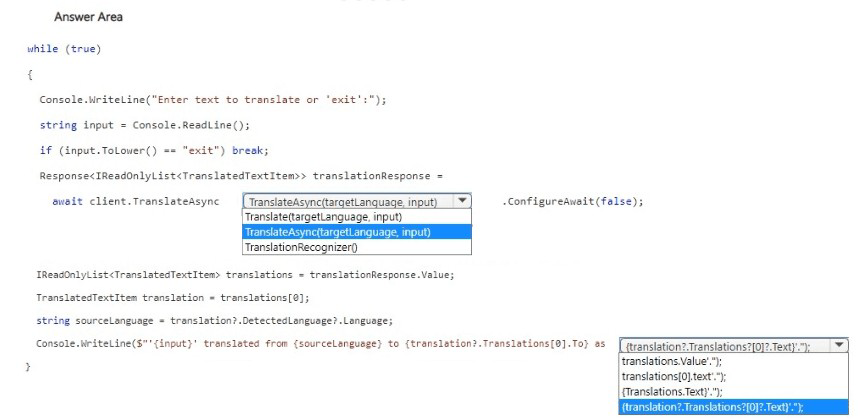
Explanation:
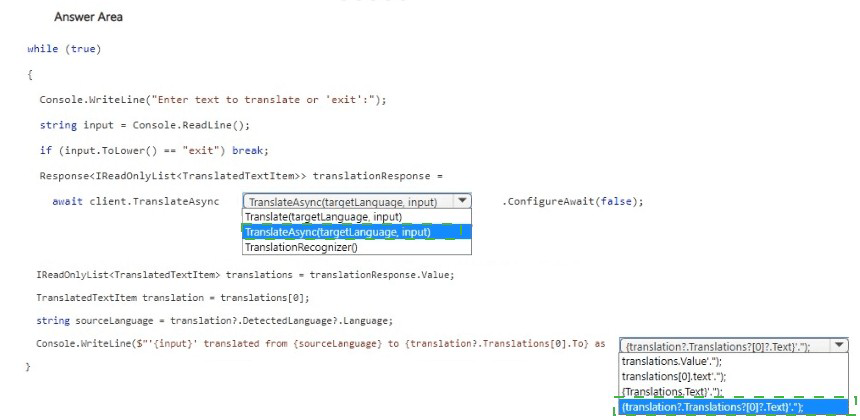
The Translator SDK's TranslateAsync method requires the target language(s) and the input text. The method returns a Response
Correct Options:
First blank (after client.): TranslateAsync
The correct method is TranslateAsync (async version). It takes target language(s) and input text. Translate is synchronous (not shown as an option in typical SDK). TranslationRecognizer is for Speech SDK, not Translator.
Second blank (parameters for TranslateAsync): targetLanguage, input
TranslateAsync expects parameters like: (targetLanguage, text) or (text, targetLanguage) depending on SDK version. The target language (e.g., "es") and the input string are required.
Third blank (after translations[0].): Text
To get the translated text, access the Text property of the first translation: translations[0]?.Translations[0]?.Text. The Text property contains the translated output.
Why Other Options Are Incorrect:
First blank alternatives:
TranslateAsync with ConfigureAwait(false) – That's a continuation option, not the method name.
Translate(targetLanguage.input) – Synchronous version (if exists) but not the async pattern.
TranslationRecognizer() – This is for speech translation, not text translation.
Third blank alternatives:
translationsValue.Add(translation) – Adding to a list, not retrieving translated text.
translations[0].text += $"\n{translationsValue}" – Incorrect property name (should be Text, not text) and wrong logic.
translation2.Translations[0]?.Text – translation2 is not defined.
Reference:
Microsoft Learn: "Translator SDK – TranslateAsync method" – Signature: TranslateAsync(string targetLanguage, string text, ...).
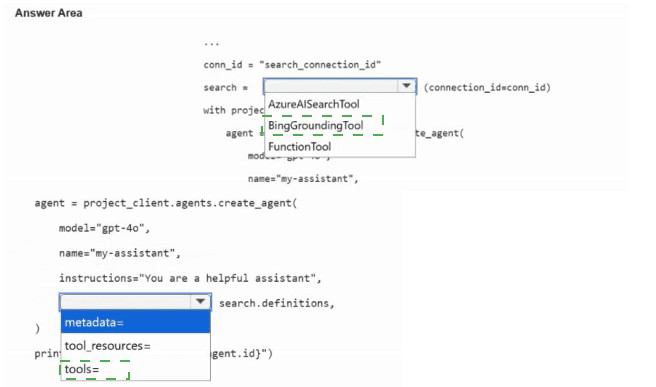
You are building an agent by using the Azure Al Foundry Agent Service.
You need to ensure that the agent can access publicly accessible data that was released during the past 90 days.
How should you complete the code? To answer, select the appropriate options in the answer area.
NOTE: Each correct selection is worth one point.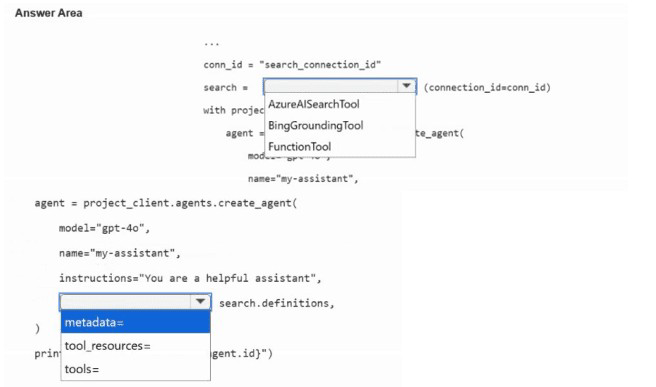
Explanation:
To access publicly accessible data from the recent past (90 days), the agent needs a Bing Grounding tool (Bing Search) which can retrieve current web content. The Azure AI Foundry Agent Service supports BingGroundingTool for this purpose. The connection ID should reference a configured Bing Search resource.
Correct Options:
First blank (after search =): AzureAISearchTool –
No, for public web data, BingGroundingTool is correct. Looking at the options, AzureAISearchTool is for private/custom search indexes. The correct tool is BingGroundingTool (but it appears in the second blank area).
Second blank (after with project): BingGroundingTool
The BingGroundingTool provides access to Bing Search for real-time, publicly accessible web data. It can retrieve information from the past 90 days. This tool is specifically designed for grounding responses with current public web content.
Third blank (after agent = project_client.agents.create_agent(): model="gpt-4o"
The model parameter specifies which model the agent uses. gpt-4o is a common choice. The other options ("my-assistant", "my-assistant" with name) are not model names.
Why Other Options Are Incorrect:
AzureAISearchTool – This connects to a private Azure Cognitive Search index, not publicly accessible web data. It cannot access recent public web content from the past 90 days.
functionTool – A generic tool for custom functions, not pre-configured for web search. Would require implementing Bing Search logic manually.
model="my-assistant" – This is not a valid model name. The model parameter expects deployment names like "gpt-4o", "gpt-35-turbo", etc.
Reference:
Microsoft Learn: "Azure AI Foundry Agent Service – Bing Grounding tool" – Enables agents to search public web content for real-time information.
| Page 13 out of 40 Pages |