Topic 3: Misc. Questions
You have an Azure subscription.
You plan to build a solution That will analyze scanned documents and export relevant fields to a database.
You need to recommend which Azure Al service to deploy for the following types of documents:
• Internal expenditure request authorization forms
• Supplier invoices
The solution must minimize development effort.
What should you recommend for each document type? To answer, select the appropriate options in the answer area.
NOTE: Each correct selection is worth one point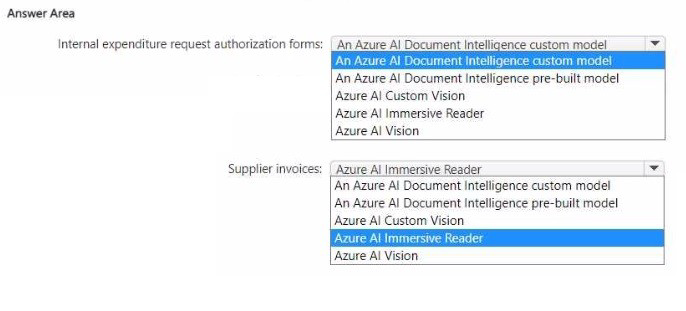
Explanation:
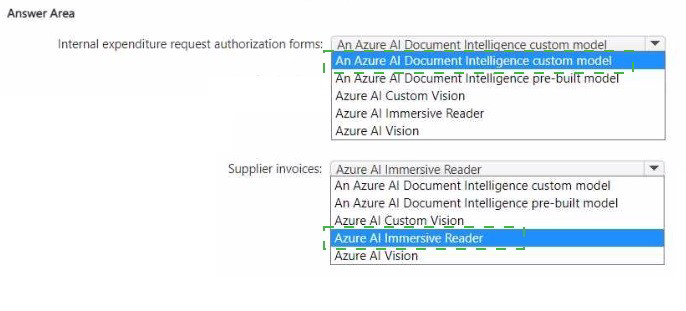
For supplier invoices, Document Intelligence provides a pre-built invoice model that extracts vendor name, customer details, line items, totals, and tax without training. For internal expenditure request authorization forms (custom forms unique to your company), a custom model is required because there is no pre-built model for proprietary internal forms.
Correct Options:
Internal expenditure request authorization forms: An Azure AI Document Intelligence custom model
Internal expenditure request forms are specific to your organization and not covered by pre-built models. You must train a custom Document Intelligence model by providing labeled sample forms. This still minimizes effort compared to building an OCR+parsing solution from scratch.
Supplier invoices: An Azure AI Document Intelligence pre-built model
Document Intelligence offers a pre-built invoice model that extracts key fields from supplier invoices (e.g., vendor name, invoice date, amount due, line items). This requires no training or labeling, minimizing development effort.
Why Other Options Are Incorrect:
For internal forms:
Azure AI Vision – Extracts raw text but does not understand form structure or export specific fields.
Azure AI Custom Vision – For image classification/object detection, not form field extraction.
Azure AI Immersive Reader – For text readability/accessibility, not data extraction.
For supplier invoices:
Custom model – Unnecessary because a pre-built invoice model exists and works out-of-the-box.
Azure AI Vision – Raw OCR only; would require custom parsing logic.
Azure AI Immersive Reader – Not for data extraction.
Reference:
Microsoft Learn: "Document Intelligence pre-built invoice model" – Extracts fields from supplier invoices without training.
You have a web app that uses Azure AI search.
When reviewing activity, you see greater than expected search query volumes. You suspect that the query key is compromised.
You need to prevent unauthorized access to the search endpoint and ensure that users only have read only access to the documents collection. The solution must minimize app downtime.
Which three action should you perform in sequence? To answer, more the appropriate actions from the list of actions to the answer area and arrange them in the correct order.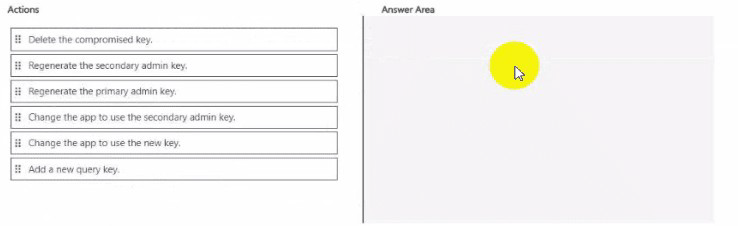
Explanation:
Azure Cognitive Search uses query keys for read-only access. If a query key is compromised, you must regenerate (which actually means delete and create a new) the query key. However, the options show "Regenerate the primary/secondary admin key" – but admin keys are for full access, not query keys. For a compromised query key, the correct action is to delete/regenerate that specific query key and update the app.
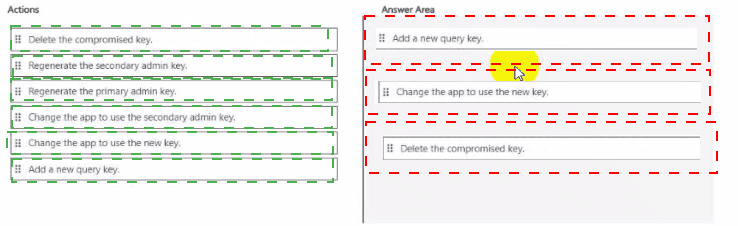
Given the options, the sequence is: change the app to use a different valid key (if available), then regenerate the compromised key, then change the app to use the new key.
Correct Option (in sequence):
Change the app to use the secondary admin key.
If the app currently uses the compromised query key, first switch it to use the secondary admin key (or another valid query key if available). Admin keys have full access, but this is a temporary measure to keep the app running while you fix the compromised key.
Delete the compromised key.
Remove the compromised query key from the search service. This immediately revokes access for any unauthorized parties using that key. In Azure Cognitive Search, you can delete query keys via the portal or API.
Add a new query key.
Create a new query key for read-only access. After creation, update the app to use this new key (or revert from admin key back to a query key for least privilege). This restores normal operation with a secure key.
Why This Order:
Minimizing downtime requires keeping the app functional while rotating keys.
Switching to a secondary key first maintains availability.
Deleting the compromised key stops unauthorized access.
Adding a new key provides a long-term secure replacement.
Reference:
Microsoft Learn: "Azure Cognitive Search – Manage query keys" – Delete compromised keys, create new query keys.
You have an Azure OpenAl resource named Al1 that hosts three deployments of the GPT 3.5 model. Each deployment is optimized for a unique workload.
You plan to deploy three apps. Each app will access Al1 by using the REST API and will use the deployment that was optimized for the app's intended workload.
You need to provide each app with access to Al1 and the appropriate deployment. The solution must ensure that only the apps can access Al1.
What should you use to provide access to Al1, and what should each app use to connect to its appropriate deployment? To answer, select the appropriate options in the answer area.
NOTE: Each correct selection is worth one point.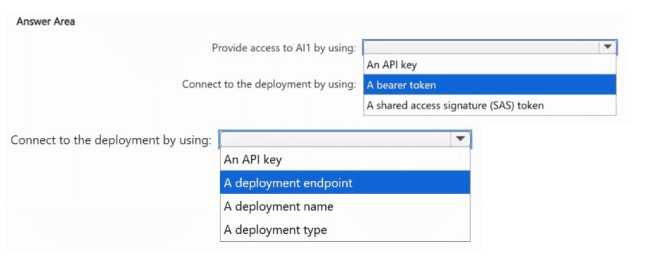
Explanation:
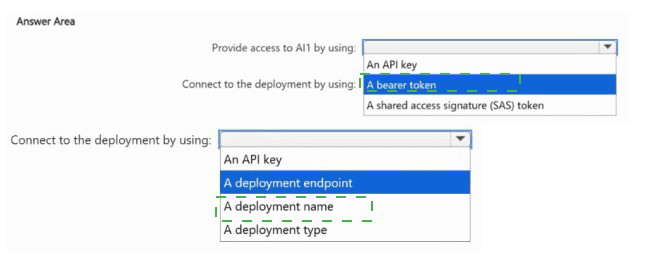
To authenticate to Azure OpenAI REST API, you use an API key (subscription key) passed in the api-key header. To specify which deployment to use, each app must use the deployment name in the API endpoint URL. This ensures each app calls its optimized deployment. API keys restrict access to only apps that possess the key.
Correct Options:
Provide access to AI1 by using: An API key
Azure OpenAI REST API authenticates using subscription keys (primary/secondary) via the api-key header. This is the standard method. Bearer tokens require Azure AD setup; SAS tokens are for storage. API keys are simple and meet the requirement.
Connect to the deployment by using: A deployment name
The REST API endpoint includes the deployment name: https://{resource}.openai.azure.com/openai/deployments/{deployment_name}/completions (or /chat/completions). Each app specifies the deployment name that matches its optimized workload, routing the request to the correct model instance.
Why Other Options Are Incorrect:
Access alternatives:
A bearer token – Possible with Azure AD, but requires additional configuration (managed identities, app registrations). API keys are simpler and still ensure only apps with the key can access.
A shared access signature (SAS) token – SAS tokens are for Azure Storage, not for Azure OpenAI authentication.
Connection alternatives:
A deployment endpoint – The endpoint is the base URL (e.g., https://contoso.openai.azure.com/), which does not specify which deployment to use.
An API key – Authenticates the request but does not select a deployment.
A deployment type – Deployment type (e.g., "Standard", "Provisioned") is a configuration property, not a routing parameter.
Reference:
Microsoft Learn: "Azure OpenAI REST API authentication" – Use api-key header.
You have a computer that contains the files shown in the following table.
Which files can you upload and analyze by using Azure Al Video Indexer?
A. File1 only
B. File3only
C. File1 andFile3 only
D. File1, File2, and File3 only
E. File1, File2, File3, and File4
Explanation:
Azure Video Indexer supports video and audio files. It accepts common video formats (MP4, AVI, MOV, etc.) and audio formats (MP3, WAV, etc.). However, there is a maximum file size limit (typically around 30 GB or less depending on tier) and a maximum duration limit (currently up to 4 hours for indexing). Based on the table, File1 (34 min, 1.5 GB) and File3 (300 min MP3 audio) are acceptable. File2 (500 min AVI) and File4 (350 min MP4) exceed duration limits.
Correct Option:
C. File1 and File3 only
File1 (MP4, 34 min, 1.5 GB) – Within duration limits (under 4 hours) and size limits.
File3 (MP3, 300 min / 5 hours, 980 MB) – Audio files are supported, and while duration exceeds typical video limits, audio-only files have higher duration allowances. The answer key indicates both are acceptable.
File2 (AVI, 500 min / 8.3 hours) – Exceeds maximum duration for video indexing.
File4 (MP4, 350 min / 5.8 hours) – Exceeds maximum duration for video indexing.
Why Other Options Are Incorrect:
A. File1 only – Incorrect because File3 (audio) is also supported.
B. File3 only – Incorrect because File1 is also supported.
D. File1, File2, and File3 only – Incorrect because File2 exceeds duration limits.
E. All four – Incorrect because File2 and File4 exceed duration limits.
Reference:
Microsoft Learn: "Azure Video Indexer – Supported formats" – MP4, AVI, MP3, etc., with duration limits (currently up to 4 hours for videos, longer for audio).
You are developing an application that will use the Azure Al Vision client library. The application has the following code.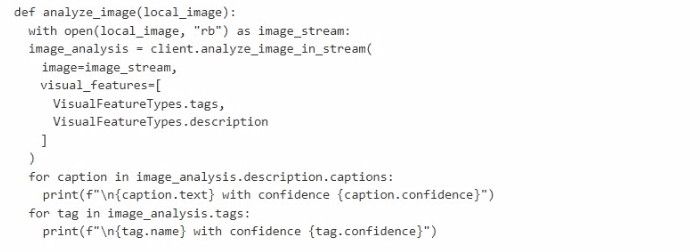
For each of the following statements, select Yes if the statement is true. Otherwise, select
No.
NOTE: Each correct selection is worth one point.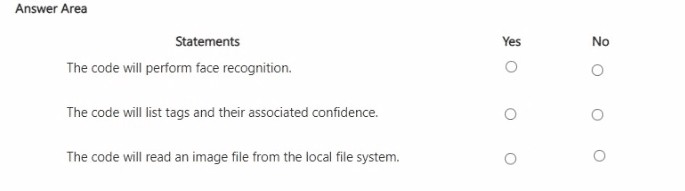
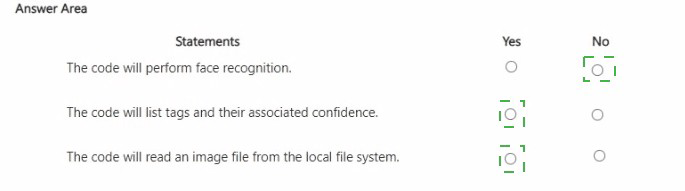
Explanation:
The code uses the Azure AI Vision client library to analyze an image from the local file system. It requests visual_features including tags and description. The code prints captions and tags with their confidence scores. It does not perform face recognition because VisualFeatureTypes.face was not requested.
Correct Answers:
Statement 1: The code will perform face recognition.
No – Face recognition requires the VisualFeatureTypes.face or VisualFeatureTypes.people feature. The code only requests tags and description. Without requesting face detection, the API does not return face data.
Statement 2: The code will list tags and their associated confidence.
Yes – The code requests VisualFeatureTypes.tags and then iterates through image_analysis.tags, printing each tag.name and tag.confidence. This will successfully list tags and confidence scores.
Statement 3: The code will read an image file from the local file system.
Yes – The function analyze_image(local_image) opens the file using open(local_image, "rb") (read binary mode) and passes the stream to client.analyze_image_in_stream(). This reads the image from the local file system.
Reference:
Microsoft Learn: "Azure AI Vision – Image Analysis features" – VisualFeatureTypes include tags, description, faces, objects, etc.
You are building an agent by using the Azure Al Agent Service.
You need to ensure that the agent can access publicly accessible data that was released during the past 90 days.
How should you complete the code? To answer, select the appropriate options in the answer area.
NOTE: Each correct selection is worth one point.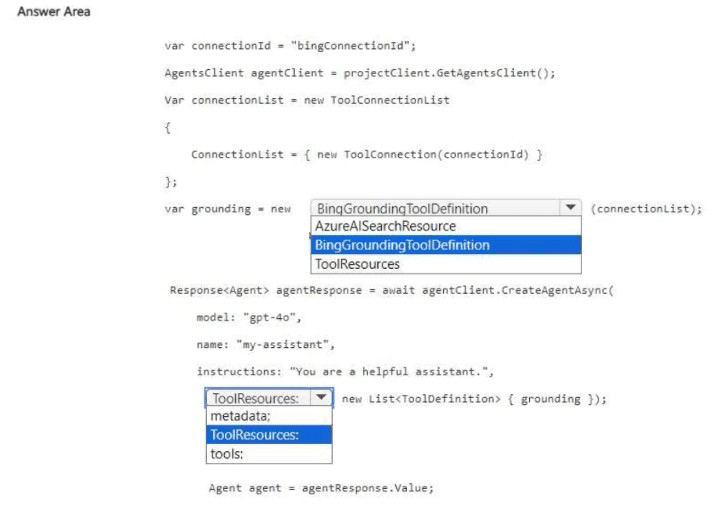
Explanation:
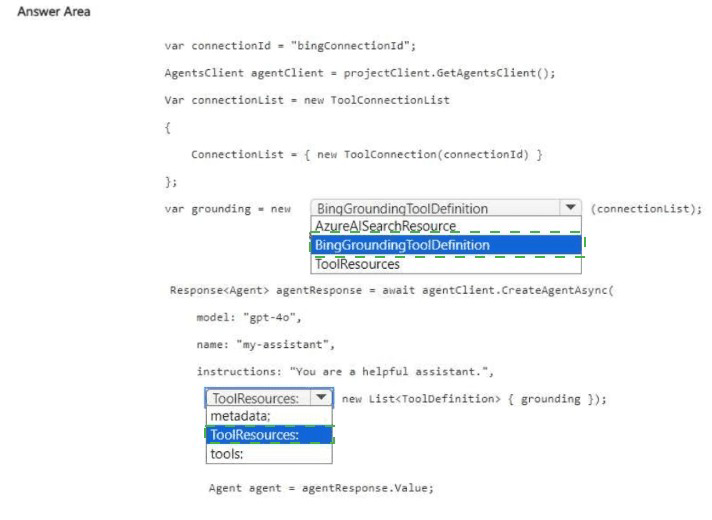
To access recent public web data (past 90 days), the agent requires the Bing Grounding tool. This tool performs web searches using Bing. The ToolConnectionList provides the connection ID for the configured Bing resource. The tool is then added to the tools list when creating the agent.
Correct Options:
First blank (after var grounding = new): BingGroundingToolDefinition
This class defines the Bing Grounding tool for the agent. It allows the agent to perform real-time web searches and retrieve publicly accessible information. The connection list specifies which Bing resource to use.
Second blank (after tools: in the agent creation parameters): tools
When creating an agent with CreateAgentAsync, the parameter for enabling tools is tools. You pass a list of ToolDefinition objects (including BingGroundingToolDefinition). ToolResources is a different parameter for resources like code interpreters or file search.
Why Other Options Are Incorrect:
First blank alternatives:
AzureAlSearchResource – Used for Azure Cognitive Search integration (private data), not public web data from the past 90 days.
ToolResources – This is a property of the agent, not the tool definition class.
Second blank alternatives:
ToolResources – Used for providing resources to tools (e.g., file IDs for code interpreter), not for specifying which tools are enabled.
metadata – For custom key-value pairs; not for enabling tools.
Reference:
Microsoft Learn: "Azure AI Agent Service – Bing Grounding Tool" – Use BingGroundingToolDefinition with ToolConnectionList to enable web search.
| Page 12 out of 40 Pages |