Topic 3: Misc. Questions

You are building a call handling system that will receive calls from French-speaking and German-speaking callers. The system must perform the following tasks;
• Capture inbound voice messages as text.
• Replay messages in English on demand.
Which Azure Cognitive Services should you use? To answer, select the appropriate options in the answer area. NOTE: Each correct selection is worth one point.
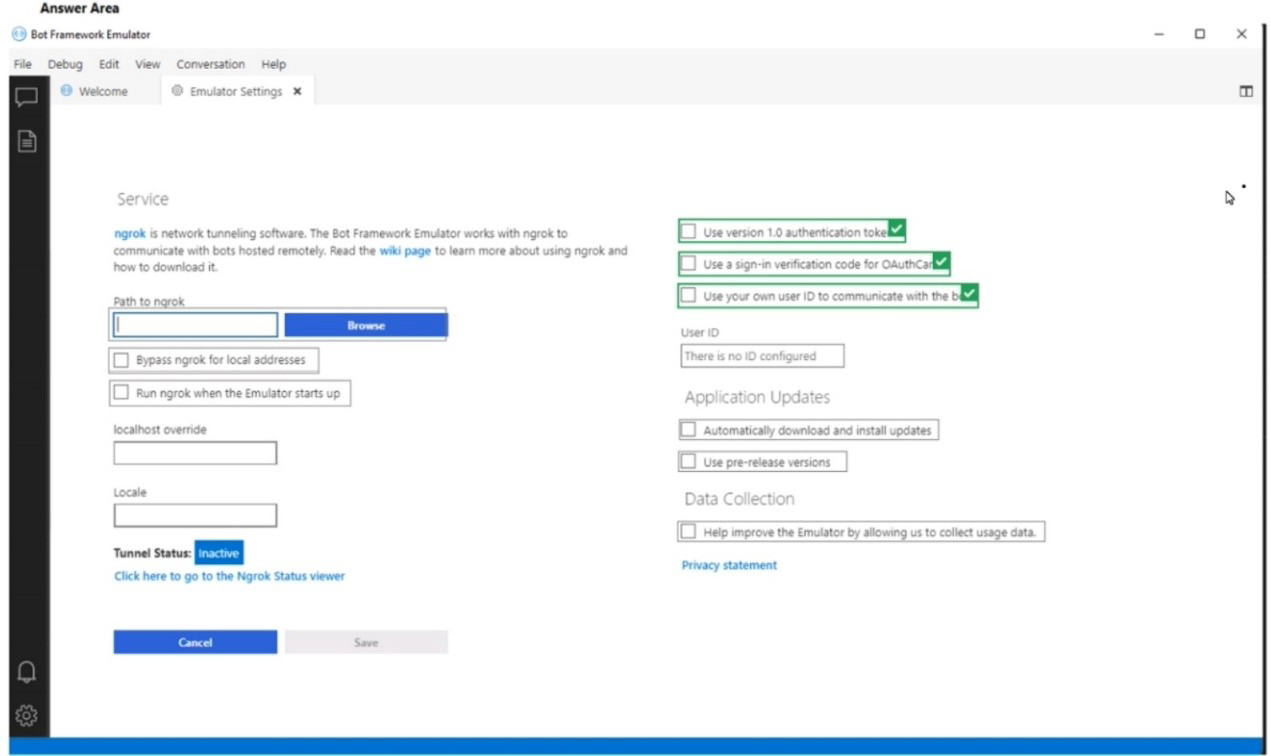
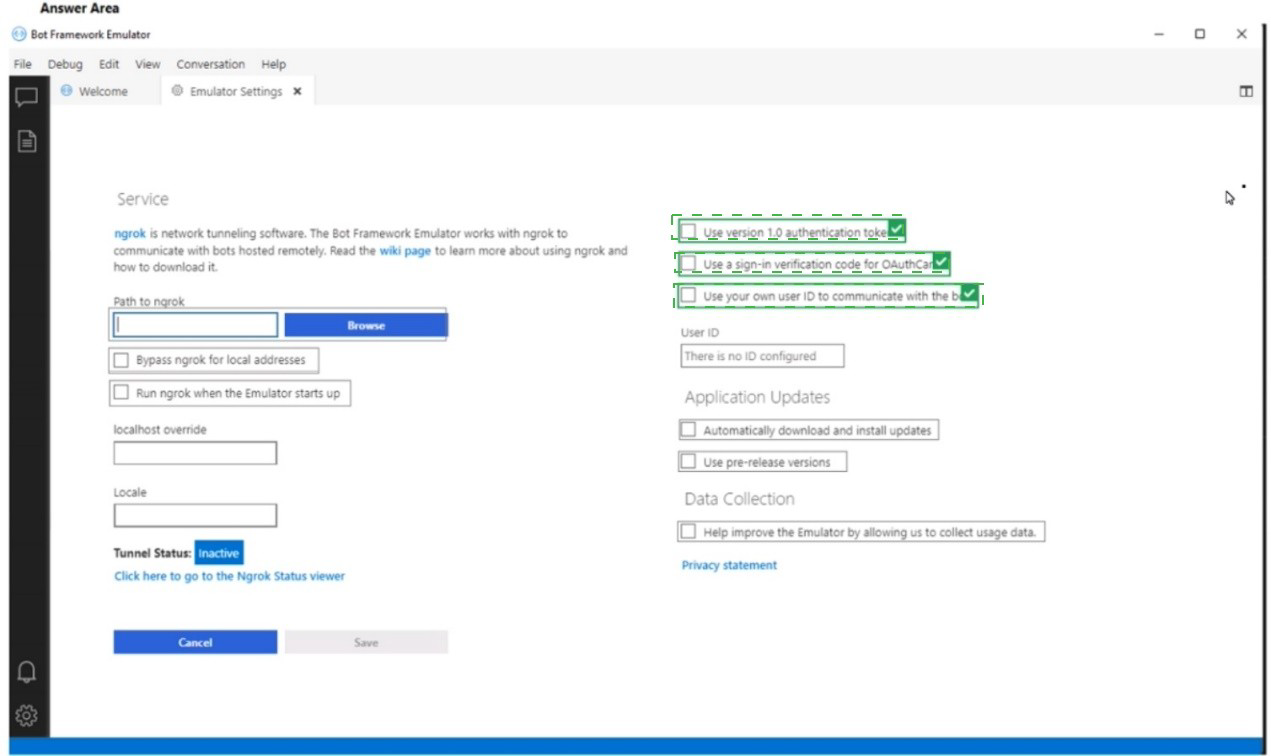


Explanation:
This scenario involves a multi-language inbound call system with two distinct phases: 1) capturing voice messages (speech) as text, and 2) converting stored text messages into English speech for replay. The key is to identify the services that perform speech-to-text conversion and text-to-speech conversion, with the added requirement of translating the original text to English before synthesis.

Correct Selections:

To capture messages: Speech-to-text
This is the core service for transcribing spoken audio (voice messages in French or German) into written text. The Azure Speech service's speech-to-text capability supports real-time transcription of audio streams from phone calls into text for storage and processing.

To replay messages:
Text-to-speech and Translator

Text-to-speech:
This service synthesizes natural-sounding speech from text. It is needed to convert the final English text back into audible English speech for replay.

Translator:
The requirement is to replay messages in English, regardless of the original language. Therefore, the captured text (in French or German) must first be translated to English. The Azure AI Translator service performs this language translation before the text is passed to the text-to-speech service.

Incorrect Options for "To replay messages":

Speech-to-text only:
This is for the initial capture phase, not for generating audio output for replay.

Speech-to-text and Language:
"Language" is ambiguous; likely refers to Language service (e.g., for sentiment), not translation. This combination does not produce English speech.

Speaker Recognition and Language:
Speaker Recognition identifies who is speaking, not what is said or translating it. This does not fulfill the replay task.

Text-to-speech and Language:
While text-to-speech is correct, "Language" alone is not the specific service for cross-language translation. The Azure AI Translator service is the dedicated tool for this task.

Reference:
Microsoft Learn documentation for Azure AI Speech (Speech-to-text, Text-to-speech) and Azure AI Translator, which are the standard services for building multilingual voice solutions involving transcription, translation, and synthesis.

You are building a Language Understanding solution.

You discover that many intents have similar utterances containing airport names or airport codes.

You need to minimize the number of utterances used to fram the model.

Which type of custom entity should you use?

A. Pattera.any

B. machine-learning

C. list

D. regular expression

C.   list

Explanation:
The problem describes a scenario where many intents share similar utterances differentiated only by specific airport names or codes. To reduce redundant utterance labeling, you need to extract these variable values as a single, reusable entity. The most efficient method is to define a closed, finite list of possible values (airport names/codes) that the model can recognize without requiring extensive examples in every intent.

Correct Option:

C. List:
A List entity is the optimal choice. It allows you to define a closed set of canonical airport names and their synonymous forms (e.g., "JFK", "John F. Kennedy International"). Once defined, the model can recognize any of these values in any utterance, significantly reducing the need to provide numerous example utterances for each intent just to teach the airport variations.

Incorrect Options:

A. Pattern.any:
This entity is used within patterns to mark where a variable-length entity appears, primarily for complex composite patterns. It is not designed for recognizing a specific, predefined list of values like airport codes.

B. Machine-learning:
While a machine-learning entity could learn to identify airports, it requires many labeled examples across utterances to train. This would increase, not minimize, the number of utterances needed for training.

D. Regular expression:
A regex entity is ideal for structured patterns like flight numbers (e.g., "AB1234") but is inefficient for a large, arbitrary list of proper names like airports. Maintaining a regex for all possible airport names and codes would be cumbersome compared to a simple list.

Reference:
Microsoft Learn - "List entities in LUIS" - Explains that list entities are used for a fixed, closed set of related terms, exactly matching the use case for standard airport names and codes.

You have an app that manages feedback.

You need to ensure that the app can detect negative comments by using the Sentiment Analysis API in Azure Cognitive Service for Language. The solution must ensure that the managed feedback remains on your company's internal network.

Which three actions should you perform in sequence? To answer, move the appropriate actions from the list of actions to the answer area and arrange them in the correct order.
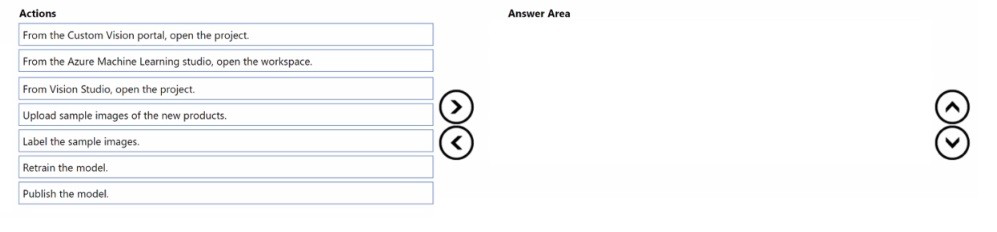
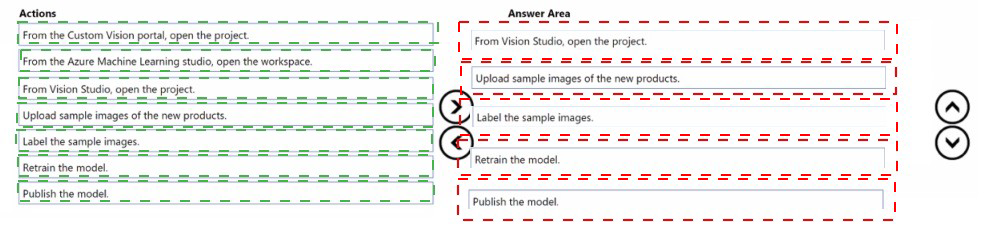
NOTE: More than one order of answer choices is correct You will receive credit for any of the correct orders you select.


Explanation:
The requirement to keep all data on the company's internal network mandates the use of the Language service's containerized deployment for Sentiment Analysis. The correct sequence involves provisioning the cloud resource for management/licensing, deploying its container locally, and then running and querying that local endpoint.

Correct Actions in Sequence:

Provision the Language service resource in Azure.
This is the mandatory first step. The Azure resource provides the billing key and endpoint information required to download and license the official Docker container from the Microsoft Container Registry (MCR). You cannot run the container without linking it to a provisioned Azure resource.

Deploy a Docker container to an on-premises server.
To keep data internal, you must run the container locally. "On-premises server" is specified as the target to meet the internal network requirement, as opposed to a cloud-based Azure Container Instance. This step involves pulling the container image and running it on internal infrastructure.

Run the container and query the prediction endpoint.
Once the container is deployed and running on the on-premises server, your application can send feedback text to the container's local HTTP API endpoint (e.g., http://:5000) for sentiment analysis, ensuring no data leaves the network.

Incorrect/Action Not Used:
Deploy a Docker container to an Azure container instance (ACI): This would run the container in Azure's public cloud, which would send your data outside the internal network, violating the core requirement.

Identify the Language service endpoint URL and query the prediction endpoint: This describes querying the cloud-based API endpoint (cognitiveservices.azure.com), which would transmit data over the internet, not keeping it internal. This action is for the standard SaaS offering, not the container solution.

Reference:
Microsoft Learn - "Install and run containers for Azure Cognitive Services" - Documents the workflow: 1) Create the resource in Azure portal, 2) Get the container image and run it on a local host, 3) Send requests to the container's endpoint.

You are developing an app that will use the Decision and Language APIs.

You need to provision resources for the app. The solution must ensure that each service is accessed by using a single endpoint and credential.

Which type of resource should you create?

A. Language

B. Speech

C. Azure Cognitive Services

D. Content Moderator

C.   Azure Cognitive Services

Explanation:
The requirement is to access multiple Cognitive Services (Decision, Language) using a single endpoint and credential. This is a specific feature of a multi-service resource. A single-service resource (like Language or Speech) provides a key and endpoint for only that service. To simplify management and authentication for an app using multiple APIs, a multi-service umbrella resource is required.

Correct Option:

C. Azure Cognitive Services:
This is the multi-service resource type. When you provision a "Cognitive Services" resource, you get one set of keys and one regional endpoint (e.g., https://.cognitiveservices.azure.com) that can be used to access multiple supported services (including Language, Decision, Vision, etc.), fulfilling the requirement for a single credential and endpoint.

Incorrect Options:

A. Language:
This is a single-service resource. It provides credentials and an endpoint dedicated only to the Language service APIs (like Text Analytics, Translator). It cannot be used to access Decision service APIs like Anomaly Detector or Content Safety.

B. Speech:
This is a single-service resource for Speech service APIs (Speech-to-Text, Text-to-Speech). It does not provide access to Language or Decision APIs.

D. Content Moderator:
This is a legacy single-service resource (now largely integrated into the Language service under Content Safety). It would not provide a single endpoint for accessing the broader suite of Decision and Language APIs.

Reference:
Microsoft Learn - "What are Azure Cognitive Services?" - Describes that a multi-service resource allows access to multiple Cognitive Services with a single key and endpoint, simplifying development and key management for apps that consume several services.

Note: This question is part of a series of questions that present the same scenario. Each question in the series contains a unique solution that might meet the stated goals. Some question sets might have more than one correct solution, while others might not have a correct solution.

After you answer a question in this section, you will NOT be able to return to it. As a result, these questions will not appear in the review screen.

You build a language model by using a Language Understanding service. The language model is used to search for information on a contact list by using an intent named FindContact.

A conversational expert provides you with the following list of phrases to use for training.

Find contacts in London. Who do I know in Seattle?

Search for contacts in Ukraine.

You need to implement the phrase list in Language Understanding.

Solution: You create a new intent for location.

Does this meet the goal?

A. Yes

B. No

B.   No

Explanation:
The goal is to implement the provided phrase list in a way that helps the LUIS model correctly identify the FindContact intent. The given phrases contain a common, variable element: the location ("London," "Seattle," "Ukraine"). The solution proposes creating a new intent for location, which fundamentally misunderstands the purpose of an intent. Intents represent the user's goal or action, not the variable data within the utterance.

Correct Answer:

B. No
This solution does not meet the goal.

Why it is Incorrect:

Intent Misapplication:
Creating a Location intent would incorrectly teach the model that the user's goal is to... state a location. The actual user goal for all provided phrases is FindContact. The location is a parameter (entity) of that request, not the intent itself.

Negative Training Impact:
Adding a Location intent and labeling these phrases under it would directly conflict with training the FindContact intent. It would confuse the model, as the same phrases would be split between two different intents representing different user actions, severely reducing accuracy for the primary FindContact task.

What Should Be Done:

To properly implement the phrase list, you should:
Label all provided phrases under the existing FindContact intent.

Within those utterances, label the location words ("London," etc.) as a Machine Learned entity (e.g., Location). This teaches the model to extract the location as a parameter while solidifying the FindContact intent.

Reference:
Microsoft Learn - "Intents in LUIS" clarifies that an intent represents a task or action the user wants to perform, while entities are the details or parameters extracted from the utterance to fulfill that intent.

You have an Azure subscription that contains an Anomaly Detector resource. You deploy a Docker host server named Server 1 to the on-premises network. You need to host an instance of the Anomaly Detector service on Server 1. Which parameter should you include in the docker run command?

A. Fluentd

B. Billing

C. Http Proxy

D. Mounts

B.   Billing

Explanation:
To run a Cognitive Services container (like Anomaly Detector) on-premises, you must provide billing information to authenticate and link the container instance to your provisioned Azure resource. This is mandatory because the container itself is billed through the associated Azure resource. The parameter in the docker run command supplies the Azure endpoint and API key to the container for this purpose.

Correct Option:

B. Billing:
The Billing argument (-e Billing= and -e ApiKey=) is required. It provides the container with the endpoint URI of your provisioned Anomaly Detector resource in Azure and its API key. Without this, the container will not start, as it cannot validate its licensing.

Incorrect Options:

A. Fluentd:
This is an optional logging parameter used to connect the container to a Fluentd logging server. It is not required for the core function or licensing of the container.

C. Http Proxy:
This optional parameter is used if the container needs to route requests through an HTTP proxy server to connect to the internet (e.g., for initial telemetry). It is not the mandatory parameter for authentication and billing.

D. Mounts:
This refers to mounting host directories into the container using -v or --mount for input/output logging. While useful for persistence, it is optional and not required for authenticating the container with Azure.

Reference:
Microsoft Learn - "Install and run Anomaly Detector containers" - The documentation explicitly states that you must specify the Billing and ApiKey environment variables using the -e option in the docker run command to start the container.

You have a collection of Microsoft Word documents and PowerPoint presentations in German.

You need to create a solution to translate the file to French. The solution must meet the following requirements:

* Preserve the original formatting of the files.

* Support the use of s custom glossary.

You create a blob container for German files and a blob container for French files. You upload the original files to the container for German files.

Which three actions should you perform in sequence actions from the list of actions to the answer area and arrange them in the correct order.
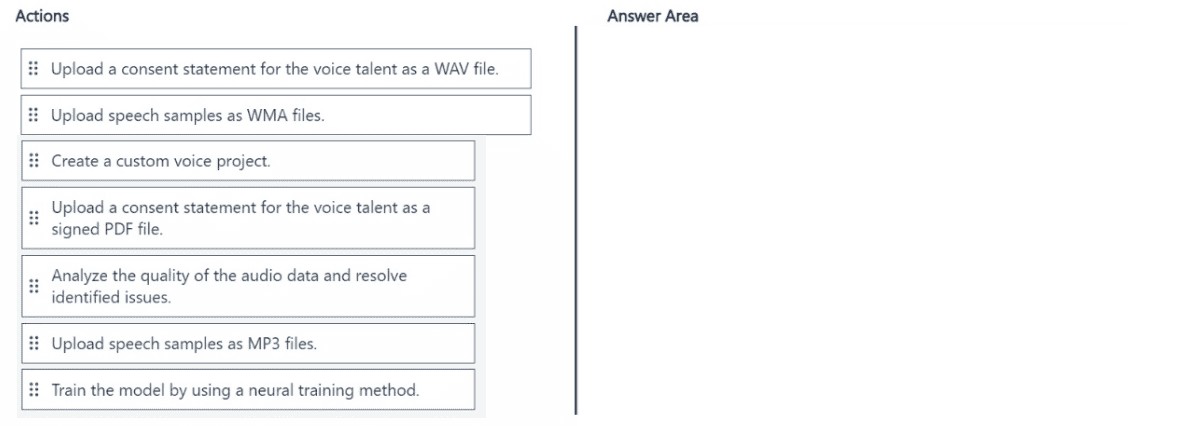
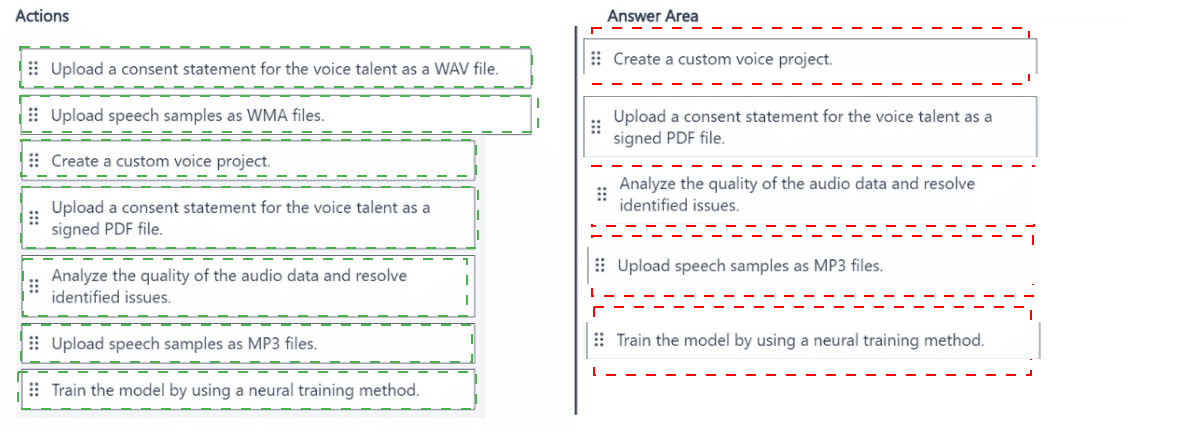


Explanation:
The goal is to use the Azure Document Translation service (part of Translator), which asynchronously translates entire documents while preserving formatting. To use a custom glossary, it must be uploaded first. The workflow requires: 1) preparing the glossary, 2) defining the job parameters, and 3) submitting the job.

Correct Actions in Sequence:

Upload a glossary file to the container for German files.
The custom glossary must be available in the source container before translation begins. The service will use this glossary to ensure specific terms are translated correctly. This is a prerequisite step for configuring the translation job.

Define a document translation specification that has a French target.
This step involves creating the translation request body (specification). You define the source container (German files), the target container (French files), the target language (fr), and must specify the glossary's location within the source container. This configuration object tells the service what to do and how.

Perform an asynchronous translation by using the document translation specification.
Finally, you submit the defined specification to the Document Translation service's API to start the long-running, asynchronous job. The service will process each document in the source container, apply the glossary, preserve formatting, and place the translated versions in the target French container.

Incorrect/Action Not Used:

Upload a glossary file to the container for French files:
The glossary must be placed in the source (German) container so the translation engine can reference it during the conversion from German to French. Placing it in the target container is incorrect.

Generate a list of files to be translated:
Document Translation automatically processes all files in the specified source container (or a filtered subset via prefixes). Manually generating a file list is not a standard step for the basic batch translation workflow.

Perform an asynchronous translation by using the list of files to be translated:
This describes a different, file-by-file translation approach, not the batch document translation service which uses a specification defining source/target containers and settings.

Reference:
Microsoft Learn - "Document Translation quickstart" outlines the core steps: prepare storage containers (including glossary), create a translation request payload (specification), and send a translation request using the Document Translation API.

You are building a chatbot by using Microsoft Bot Framework Composer.

You need to configure the chatbot to present a list of available options. The solution must ensure that an image is provided for each option.

Which two features should you use? Each correct answer presents part of the solution.

NOTE: Each correct selection is worth one point.

A. an Azure function

B. an adaptive card

C. an entity

D. a dialog

E. an utterance

B.   an adaptive card
D.   a dialog

Explanation:
The requirement is to present a list of options, each with an accompanying image, within a chatbot. This is a user interface and conversational flow challenge. The solution requires a feature to define the rich, structured visual layout (cards with images) and a feature to manage the conversation step where this layout is presented to the user.

Correct Options:

B. An adaptive card:
Adaptive Cards are platform-agnostic JSON snippets that define a rich UI. They are the primary method in Bot Framework to present interactive content like lists with images, text, and buttons. You would design an Adaptive Card with a list (e.g., FactSet, Container with Image and TextBlock elements) to visually present each option with its picture.

D. A dialog:
Dialogs in Composer control a conversational unit or task. To present the list of options, you would create or use a dialog (e.g., a "ShowOptionsDialog") that contains the logic to send the Adaptive Card to the user. The dialog manages the step-by-step interaction, including waiting for and processing the user's selection from the card.

Incorrect Options:

A. An Azure function:
While an Azure Function could be called as an action to fetch dynamic data for the list, it is not the feature used to present the list to the user. The presentation layer is handled by the Adaptive Card sent via a dialog.

C. An entity:
Entities are used to extract and categorize specific pieces of information from user input (like a selected option's value). They are important for processing the user's response to the list but are not used to present the visual list itself.

E. An utterance:
Utterances are sample phrases users might say, used to train a language understanding model for intent recognition. They are not used to construct or display a visual interface element like a list with images.

Reference:
Microsoft Bot Framework Composer documentation on using Dialogs to manage conversation flow and Adaptive Cards as a way to send rich, structured visual content within a bot's message.

You have a factory that produces food products.

You need to build a monitoring solution for staff compliance with personal protective equipment (PPE) requirements. The solution must meet the following requirements:

• identify staff who have removed masks or safety glasses.

• Perform a compliance check every 15 minutes.•

Minimize development effort.
• Minimize costs.
Which service should you use?

A. Face

B. Computer Vision

C. Azure Video Analyzer for Media (formerly Video indexer)

A.   Face

Explanation:
The core requirement is to identify if staff are wearing specific PPE—masks and safety glasses—which is a task of detecting facial features and accessories on individuals. The solution must be low-cost and low-development effort, ruling out complex custom model development. A managed service offering pre-built detection for these specific attributes is ideal.

Correct ption:
A. Face:
The Azure AI Face service provides a Detect API with specific attributes, including faceAttributes for headwear, glasses, and mask. This is a direct, pre-built solution. By analyzing images (e.g., from cameras every 15 minutes), you can check if mask or glasses attributes are detected, minimizing development effort and cost as you only pay for
API calls without training models.

Incorrect Options:

B. Computer Vision
While Computer Vision can detect objects and tags, its generic object detection is not optimized for precise facial attribute detection like masks and safety glasses. It might tag a person but wouldn't reliably return attributes for specific PPE on the face, leading to inaccurate compliance checks.

C. Azure Video Analyzer for Media (formerly Video Indexer):
This service excels at analyzing video/audio for insights like transcripts, keywords, and faces over time, but it is a higher-level, more expensive service designed for media content analysis. It is overkill and more costly for a simple, periodic image-based PPE check. Its primary output is not fine-grained, real-time facial accessory detection.

Reference:

Microsoft Learn - "Face detection and attributes" - Documents that the Face API's detect operation can return attributes for glasses, headwear, and mask, making it the appropriate managed service for this specific PPE compliance scenario.

You are building an app that will use the Azure Video Indexer service.

You plan to train a language model to recognize industry-specific terms.

You need to upload a file that contains the industry-specific terms.

Which file format should you use?

A.

PDF

B.

XML

C.

TXT

D.

XLS

C.   

TXT


Explanation:
Azure Video Indexer allows you to improve speech recognition accuracy by uploading a custom language model with a list of specific terms. The service requires this list to be in a simple, plain text format where each line contains a single term or phrase. This format is straightforward for the service to parse and integrate into its speech-to-text processing for the specified videos.

Correct Option:

C. TXT:
The required format is a plain text file (.txt). You create a file where each industry-specific term or phrase is on a new line. This simple list is then uploaded to Video Indexer's Custom Language Model to bias the speech recognition engine towards recognizing those terms accurately.

Incorrect Options:

A. PDF:
Video Indexer's custom language model feature does not support uploading PDF files. PDFs are complex document formats containing layout and formatting data, which the service cannot directly parse for a simple term list

B. XML:
While Video Indexer uses XML for output transcripts, it does not accept XML as the input format for uploading a custom term list. The input for the language model must be a plain text file.

D. XLS: Excel (.xls or .xlsx) spreadsheet files are not supported for uploading custom terms. The service requires the simpler, line-delimited .txt format for this specific purpose.

Reference:
Microsoft Learn - "Customize a Language Model with Video Indexer" explicitly states: "To add words to the language model, the recommended way is to use a text file." It details that the file should be a .txt file with UTF-8 encoding, with each word or phrase on its own line.

Page 11 out of 35 Pages