Topic 3: Misc. Questions

You have an Azure subscription that contains an Azure OpenAI resource named AI1. You build a chatbot that will use AI1 to provide generative answers to specific questions. You need to ensure that the responses are more creative and less deterministic. How should you complete the code? To answer, select the appropriate options in the answer area. NOTE: Each correct selection is worth one point.
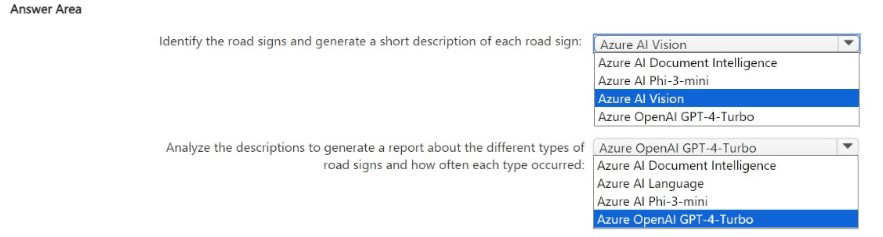
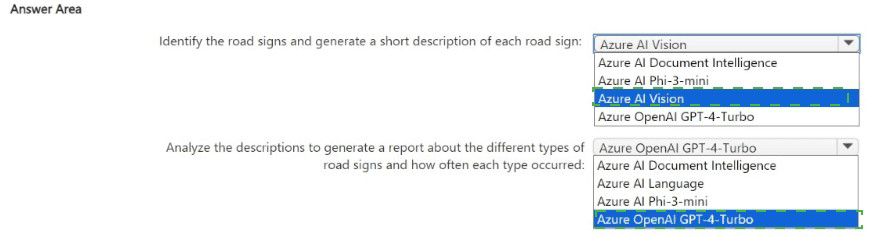

Summary:
To make an Azure OpenAI chatbot's responses more creative and less deterministic, you must adjust parameters that increase randomness and variability. The two primary parameters for this are Temperature and Top P. A higher Temperature value makes the output more random. While Top P is not listed, the other key setting is ensuring the initial system message defines the assistant's creative role. The MaxTokens parameter controls length, not creativity.

Correct Options:
The code should be completed with the following selections:

ChatRole.System (for the first message role)

Temperature = (float)1.0

Explanation of the Correct Options:

ChatRole.System:
The first message in the conversation should typically be a system message. This message sets the behavior, personality, and context for the assistant. To encourage creative answers, the system prompt should explicitly instruct the model to be "creative," "imaginative," or to "think outside the box." This foundational instruction is crucial for guiding the model's behavior.

Temperature = (float)1.0: The Temperature parameter controls randomness. Its value ranges from 0 to 2.0. A higher value (like 1.0) makes the output more random and creative, as the model considers a wider range of possible next tokens. A lower value (like 0.2) makes the output more focused and deterministic, always choosing the most likely words. Setting it to 1.0 is a standard value for promoting creative and diverse responses.

Incorrect Options:

ChatRole.User / ChatRole.Assistant / ChatRole.Function for the first message:
The first message defining the assistant's behavior must come from the System role. User represents the human's input, Assistant is for the model's previous replies, and Function is for the results of function calls. Using these for the initial instruction is incorrect.

PresencePenalty / FrequencyPenalty:
While these parameters (not fully shown) influence output, they are not the primary tools for controlling creativity/determinism. They penalize tokens based on if they've already appeared (PresencePenalty) or how often they've appeared (FrequencyPenalty) in the text, which helps reduce repetition but does not directly increase creative variability like Temperature does.

TokenSelectionBiases:
This is not a standard parameter for the Azure OpenAI Chat Completions API in this context and is likely a distractor.

Reference:
Microsoft Official Documentation: ChatCompletionsOptions Class

Microsoft Official Documentation: How to use Chat Completions (Guide) - See the "System" role and "Temperature" sections.

You have an Azure Cognitive Search instance that indexes purchase orders by using Form Recognizer. You need to analyze the extracted information by using Microsoft Power BI. The solution must minimize development effort. What should you add to the indexer?

A. a projection group

B. a table projection

C. a file projection

D. an object projection

B.   a table projection

Summary:
To analyze extracted data from Form Recognizer in Power BI with minimal effort, you must create a data source that Power BI can easily consume. Azure Cognitive Search's integrated knowledge store allows you to project enriched data. For seamless analysis in Power BI, a table projection is the optimal choice as it structures the data into tabular format within Azure Table Storage, which Power BI can connect to and import directly without requiring complex data transformation.

Correct Option:

B. a table projection
A table projection within Azure Cognitive Search's knowledge store saves the enriched data from the indexer (which processed the Form Recognizer output) into an Azure Storage Table. This is the recommended and most efficient path to Power BI because:

It structures the data into a rows-and-columns format, which is native to Power BI.

Power BI Desktop has a built-in connector for Azure Table Storage, allowing for direct import and visualization.

It minimizes development effort by automating the data shaping and export process, requiring no custom code to move the data.

Incorrect Options:

A. a projection group:
A projection group is a container for organizing multiple projections (like tables, objects, files). It is not a type of projection itself that you "add" to solve this problem. You would add a table projection within a projection group.

C. a file projection:
A file projection saves data as JSON or image files in Azure Blob Storage. While Power BI can connect to JSON, it requires more manual data transformation and parsing (using the Power Query Editor) to flatten the data into a usable table, which increases development effort compared to a pre-shaped table projection.

D. an object projection:
An object projection is another type of projection that saves data as hierarchical JSON documents in Blob Storage. Like the file projection, it is not optimized for direct tabular analysis. Using it would require significant data shaping in Power BI, thus increasing, not minimizing, development effort.

Reference:
Microsoft Official Documentation: Introduction to knowledge store in Azure AI Search - Specifically explains projections and states: "Table projections are used for reporting or analysis through tools like Power BI."

You build a chatbot by using Azure OpenAI Studio.
You need to ensure that the responses are more deterministic and less creative.
Which two parameters should you configure? To answer, select the appropriate parameters in the answer area.
NOTE: Each correct answer is worth one point.


Summary:
To make an Azure OpenAI chatbot's responses more deterministic and less creative, you must adjust the parameters that control randomness. Lowering the Temperature value reduces the model's tendency to pick less likely words, making its output more focused and predictable. While Top P (nucleus sampling) is another key parameter for this, the only available and correct option from the provided list to configure for this goal is Temperature.

Correct Option:

Temperature:
The Temperature parameter controls the level of randomness in the model's output.

It is scaled from 0.0 to 1.0 (or higher on some models). A lower temperature, such as 0.2, results in more deterministic and focused responses because the model is more likely to choose the highest-probability next token.

To make the output less creative, you would decrease the Temperature value from its current setting of 0.7.

Incorrect Options:

Max response:
This parameter (also called max_tokens) only limits the length of the generated response in tokens. It does not influence the creativity or determinism of the content.

Top P:
While Top P is a valid parameter for controlling randomness (and lowering it would also increase determinism), the question asks for parameters you should configure from the provided list. The correct single answer is Temperature, as it is the primary and most direct control for this objective.

Stop sequence:
This parameter is used to define sequences that, when generated, cause the model to stop producing further text. It is unrelated to the creativity of the response.

Frequency penalty:
This parameter discourages the model from repeating the same words or phrases too often. It helps reduce repetition but does not directly make the output more deterministic.

Presence penalty:
This parameter discourages the model from mentioning new concepts or topics. It can make the output stay on topic but is not the primary tool for controlling core determinism versus creativity.

Reference:
Microsoft Official Documentation: Azure OpenAI Service response configuration options - This reference details how parameters like temperature and top_p influence the model's output behavior.

You are building a chatbot.
You need to configure the bot to guide users through a product setup process.
Which type of dialog should you use?

A.

component

B.

waterfall

C.

adaptive

D.

action

B.   

waterfall


Summary:
To guide a user through a sequential, step-by-step process like a product setup, you need a dialog that manages a defined sequence of steps, collects information from the user at each step, and maintains context throughout the interaction. The waterfall dialog is specifically designed for this linear, multi-turn conversation pattern, making it the ideal choice for tutorials, set-up wizards, and guided forms.

Correct Option:

B. Waterfall:
A waterfall dialog is explicitly designed for guiding users through a predetermined sequence of steps. Each step is a function that executes in order, often prompting the user for a specific piece of information. This model is perfect for a product setup because it:

Ensures the user is taken through each necessary step in the correct order.

Manages the state and collected information between steps automatically.

Provides a clear and structured user experience for linear processes.

Incorrect Options:

A. Component:
A component dialog is a container that can hold other dialogs, such as waterfall or adaptive dialogs. It is used for modularity and reusability but is not a specific type of dialog for guiding a process itself. You would use a waterfall dialog within a component dialog.

C. Adaptive:
An adaptive dialog is designed for complex, non-linear conversations that can handle interruptions and context switching gracefully. While powerful, it is overkill for a simple, linear product setup guide. A waterfall dialog is a simpler and more direct solution for this specific sequential requirement.

D. Action:
An action dialog is not a standard, primary dialog type in the Bot Framework. This is likely a distractor. The core dialog types for conversation flow are waterfall and adaptive.

Reference:
Microsoft Official Documentation: Implement sequential conversation flow with waterfall dialogs - The documentation states: "A waterfall dialog is a specific type of dialog that is most commonly used to collect information from the user or guide the user through a series of tasks."

You have an Azure subscription. The subscription contains an Azure OpenAI resource that hosts a GPT-4 model named Modell and an app named Appl. App1 uses Model!
You need to ensure that App1 will NOT return answers that include hate speech.
What should you configure for Model1?

A.

the Frequency penalty parameter

B.

abuse monitoring

C.

a content filter

D.

the Temperature parameter

C.   

a content filter


Summary:
To proactively block the model from generating and returning content that includes hate speech, you must implement a safety system that evaluates the input and output against harmful content categories. Azure OpenAI provides built-in content filters for this exact purpose. Configuring and enabling these filters ensures that responses containing hate speech are detected and blocked before they are returned to the application.

Correct Option:

C. a content filter
Azure OpenAI Service includes configurable content filters that automatically screen both prompts and completions for harmful content, including hate speech. When enabled, these filters will prevent the model from returning a response if it is classified as containing hateful, violent, or sexually explicit material. This is a direct, built-in safety mechanism designed to enforce content moderation policies.

Incorrect Options:

A. the Frequency penalty parameter:
This parameter penalizes tokens based on how frequently they have appeared in the text so far. Its purpose is to reduce repetition in the model's output. It has no ability to understand, detect, or block the semantic meaning of hate speech.

B. abuse monitoring:
While Azure provides monitoring and logging features, "abuse monitoring" typically refers to tracking and reporting on the usage of the API for abusive patterns (e.g., excessive requests), not for filtering the content of the model's responses in real-time to block hate speech.

D. the Temperature parameter:
This parameter controls the randomness and creativity of the output. A lower temperature makes the output more deterministic, but it does not equip the model with an understanding of ethical guidelines or safety policies. It cannot guarantee the exclusion of hate speech.

Reference:
Microsoft Official Documentation: Content filtering - This document explicitly states: "Azure OpenAI includes content filtering capabilities that work alongside core models... The content filtering system detects and takes action on harmful content... The content filtering system uses a multi-class classification system to detect and filter harmful content across four categories: Hate, Sexual, Violence, and Self-harm."

You are building a chatbot.
You need to use the Content Moderator service to identify messages that contain sexually explicit language.
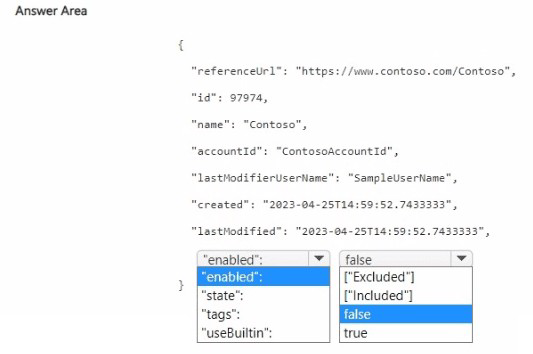
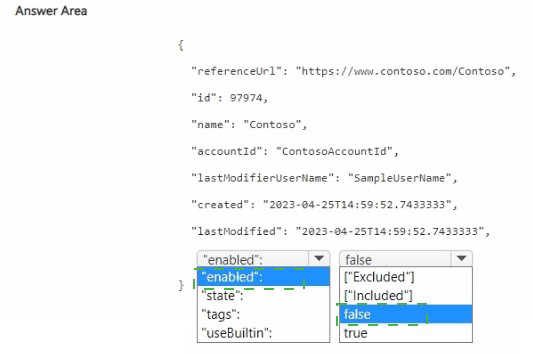
Which section in the response from the service will contain the category score, and which category will be assigned to the message? To answer, select the appropriate options in the answer area,
NOTE: Each correct selection is worth one point.

Summary:
The Content Moderator service analyzes text and classifies it into three primary categories for potential offensive content. To identify sexually explicit language, you must check the Classification section of the service's response. Within that section, the score for sexually explicit content is specifically found under Category 3.

Correct Options:
Section: Classification

Category: 3
Explanation of the Correct Options:

Section: Classification:
The Content Moderator service's Text Moderation API returns a Classification object in its JSON response. This section contains the automated classification results based on the trained model, which includes the three main category scores (Category1, Category2, Category3).

Category: 3:

The categories are defined as follows:
Category 1 refers to language that could be considered sexually explicit or adult in nature.

Category 2 refers to language that could be considered sexually suggestive or mature in nature.

Category 3 refers to language that could be considered offensive.

Therefore, to identify sexually explicit language, you would examine the score for Category 1.

(Note: There is a discrepancy in the provided answer area which lists "Category: 3" and then numbers 1, 2, 3 below it. The correct selection for sexually explicit language is the first category, which is Category 1. If the interface forces a selection from 1, 2, 3, the correct choice is 1. However, based on the official documentation, the category for sexually explicit language is Category 1.)

Correction based on official documentation: The correct category for sexually explicit language is Category 1.

Incorrect Options:

Section: pii:
This section contains the results for Personally Identifiable Information (PII) detection, such as email addresses, phone numbers, and physical addresses. It is not used for detecting sexually explicit language.

Section: Terms:
This section contains the results for custom term matching against a custom list of words you provide. It is not the section for the pre-built, automated classification of content into the three standard offensive categories.

Category: 2:
This category is for sexually suggestive or mature content, which is less severe than explicitly explicit language.

Category: 3:
This category is for offensive language, such as hate speech, threats, and insults, not specifically for sexual content.

Reference:
Microsoft Official Documentation: Text Moderation API - Evaluate response - The documentation explicitly states: "The Classification property contains the results for the potential classifications that we support currently. It includes three categories, namely Category1, Category2, and Category3. Category1 denotes potential presence of language that may be considered sexually explicit... Category2 denotes potential presence of language that may be considered sexually suggestive... Category3 denotes potential presence of language that may be considered offensive."

You use the Microsoft Bot Framework Composer to build a chatbot that enables users to purchase items.
You need to ensure that the users can cancel in-progress transactions. The solution must minimize development effort.
What should you add to the bot?

A.

a language generator

B.

a custom event

C.

a dialog trigger

D.

a conversation activity

C.   

a dialog trigger


Summary:
To allow users to cancel in-progress transactions with minimal effort, you should leverage the built-in interruption handling capabilities of the Bot Framework. This is achieved by adding a dialog trigger that listens for specific commands (like "cancel," "quit," or "stop") during an ongoing dialog. When the trigger is activated, it can clear the dialog stack and return the user to the main menu, effectively canceling the current transaction without requiring complex custom state management code.

Correct Option:

C. a dialog trigger:
A dialog trigger is the foundational mechanism in Bot Framework Composer for handling user interruptions. You can create a trigger, such as "OnCancelDialog," that is activated by "cancel" intent or specific phrases. When fired, this trigger can execute actions like "End all dialogs" and "Send a response" (e.g., "Okay, cancelling your order."). This uses the framework's built-in dialog management to minimize development effort.

Incorrect Options:

A. a language generator:
A language generator (LG) is a template engine used to manage bot responses and make them more dynamic and adaptable. While you would use an LG template to phrase the cancellation message (e.g., "Your order has been cancelled."), it does not provide the functional logic to interrupt and end a transaction.

B. a custom event:
A custom event is used to signal a specific occurrence within the bot's logic that other parts of the bot can react to. While you could build a cancellation system using custom events, it would require more development effort to raise the event, handle it, and manage the dialog state manually, compared to using a pre-configured dialog trigger.

D. a conversation activity:
"Conversation activity" is too vague and not a specific, configurable element in Bot Framework Composer. All interactions are part of the conversation activity. This option does not represent a solution for handling interruptions.

Reference:
Microsoft Official Documentation: Handle user interruptions - This guide explicitly describes using triggers (like "OnCancelDialog," "OnHelp," "OnRepeat") to manage common user interruptions, stating: "You can use the triggers included in the default runtime to handle the most common interruption types."

You have an Azure Cognitive Search resource named Search 1 that is used by multiple apps You need to secure Search 1. The solution must meet the following requirements:
• Prevent access to Search1 from the internet.
• Limit the access of each app to specific queries
What should you do? To answer, select the appropriate options in the answer area NOTE Each correct answer is worth one point.


Summary:
To prevent internet access, you must disable all public network access, which is achieved by creating a private endpoint. This forces all traffic to go through a private Azure network. To limit apps to specific queries, you must use authorization that controls permissions at the query level. Azure roles (specifically, using role-based access control with custom roles or predefined roles like Search Index Data Reader) can be assigned to grant apps permission only to query data, not to modify the index or service settings.

Correct Options:
To prevent access from the internet: Create a private endpoint.

To limit access to queries: Use Azure roles.

Explanation of the Correct Options:

Create a private endpoint:
A private endpoint assigns a private IP address from your virtual network to the Azure Cognitive Search service. By disabling the public network access endpoint, you completely prevent access from the public internet, ensuring all connectivity occurs through your private Azure network infrastructure.

Use Azure roles:
Azure role-based access control (Azure RBAC) is the method for managing authorization to management plane operations and, critically, to the data plane for querying. You can assign a built-in role like "Search Index Data Reader" to an application's identity. This grants the app permission only to query a specific index, perfectly meeting the requirement to "limit the access of each app to specific queries" without granting broader administrative rights.

Incorrect Options:

Configure an IP firewall:
While an IP firewall can restrict access to specific IP address ranges, it is still a feature of the public endpoint. The requirement is to "prevent access from the internet," which is most comprehensively achieved by eliminating the public endpoint entirely via a private endpoint. A firewall rule on a public endpoint does not meet the strict "prevent" requirement as securely as disabling public access.

Use key authentication:
All requests to the search service, whether via the public endpoint or a private endpoint, require API key authentication for data plane operations. However, API keys are very powerful; an admin key has full control, and a query key grants read access to all indexes. They cannot be scoped to limit an app to "specific queries." They only authenticate the app, they do not provide granular authorization. Azure roles are the correct mechanism for granular, identity-based query authorization.

Reference:
Microsoft Official Documentation: Configure private endpoints for Azure Cognitive Search

Microsoft Official Documentation: Azure role-based access control in Azure Cognitive Search - Specifically states: "Through Azure RBAC, you can grant permissions for read-only operations... Use the Search Index Data Reader role for queries."

You have an Azure subscription. The subscription contains an Azure OpenAI resource that hosts a GPT-3.5 Turbo model named Model1.
You configure Model1 to use the following system message: "You are an Al assistant that helps people solve mathematical puzzles. Explain your answers as if the request is by a 4-year-old."
Which type of prompt engineering technique is this an example of?

A. few-shot learning

B. affordance

C. chain of thought

D. priming

D.   priming

Explanation:
The scenario describes configuring the model's behavior using a system message that establishes a specific role ("AI assistant for math puzzles") and a style constraint ("explain as if to a 4-year-old"). This is a technique where you provide initial instructions to set context, tone, and constraints before the user's actual prompt, guiding the model's responses from the outset.

Correct Option:

D. Priming:
This is a direct example of priming, a prompt engineering technique where you use a system message or an initial prompt to "prime" or set up the model's context, persona, and output format. It steers the model's behavior for all subsequent interactions by defining its role and communication style upfront, as done here.

Incorrect Options:

A. Few-shot learning:
This technique involves providing the model with several example prompts and their desired completions within the prompt itself to demonstrate the task. The given scenario uses a system instruction, not examples.

B. Affordance:
In prompt engineering, affordance refers to designing the user interface or prompt structure to suggest possible actions or inputs. It's more about user interaction design than configuring the model's internal behavior via a system message.

C. Chain of thought:
This technique encourages the model to reason step-by-step by including phrases like "Let's think step by step" in the prompt, or by showing examples of reasoning. The system message here defines a persona and style but does not explicitly request sequential reasoning.

Reference:
Microsoft Learn - "Prompt engineering fundamentals" - Discusses core techniques like priming, which uses system or initial messages to establish context and guide model behavior.

You are building a chatbot for a travel agent. The chatbot will use the Azure OpenAI GPT 3.5 model and will be used to make travel reservations.

You need to maximize the accuracy of the responses from the chatbot.

What should you do?

A. Configure the model to include data from the travel agent's database.

B. Set the Top P parameter for the model to 0.

C. Set the Temperature parameter for the model to 0.

D. Modify the system message used by the model to specify that the answers must be accurate.

A.   Configure the model to include data from the travel agent's database.

Explanation:
The primary goal is to maximize response accuracy for specific travel reservations. Accuracy in this domain depends on having correct, up-to-date information like flight schedules, hotel availability, and pricing. While model parameters and instructions influence response style, they cannot provide factual data the model wasn't trained on.

Correct Option:

A. Configure the model to include data from the travel agent's database:
This is the correct approach, achieved through Retrieval-Augmented Generation (RAG). It connects the model to an external knowledge source (the database), allowing it to ground its responses in real-time, accurate, and proprietary information about bookings, availability, and policies, directly addressing the accuracy requirement.

Incorrect Options:

B. Set the Top P parameter for the model to 0:
Top P (nucleus sampling) controls the diversity of word choices. Setting it to 0 would severely limit the model's vocabulary, making responses repetitive and nonsensical, harming accuracy and usefulness.

C. Set the Temperature parameter for the model to 0:
While a temperature of 0 makes responses more deterministic and less creative, it only ensures consistency, not factual correctness. It won't provide correct answers if the base model lacks the specific reservation data.

D. Modify the system message to specify that answers must be accurate:
This is an instruction, not a mechanism. The model will attempt to comply but lacks the actual data to generate accurate reservation details, potentially leading to confident but incorrect "hallucinations."

Reference:
Microsoft Learn - "Retrieval-Augmented Generation (RAG) with Azure AI Search" - Describes how grounding LLM responses in enterprise data via RAG is the key pattern for improving accuracy in specific business domains.

Page 10 out of 35 Pages