Multiple Choice Questions
A company uses Microsoft Dynamics 365 Supply Chain Management.
You are designing an AI supply chain process that meets the following requirements:
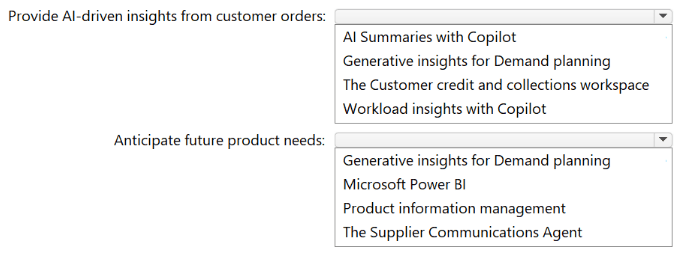
Provides managers with AI-driven insights that surface key information from customer orders
Helps planners use AI to anticipate future product needs more accurately
You need to recommend which Microsoft Copilot features to include in the design.
What should you recommend for each requirement? To answer, select the appropriate
options in the answer area.
NOTE: Each correct selection is worth one point.
Explanation:
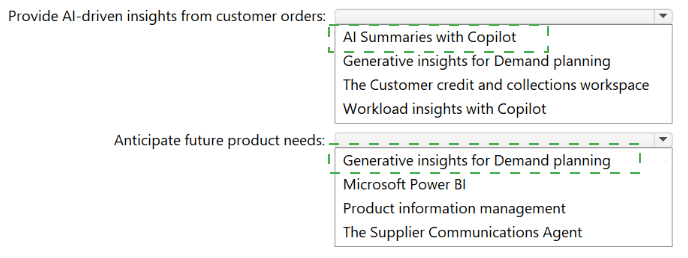
For AI-driven insights from customer orders in Dynamics 365 Supply Chain Management, use Workload insights with Copilot (surfaces key patterns, bottlenecks, and order anomalies). To anticipate future product needs, use Generative insights for Demand planning — AI-powered forecasting based on historical sales, trends, and external signals. AI Summaries (A) is generic. Customer credit/collections (C) is finance, not supply chain. Power BI (B) requires manual setup.
Correct Options:
Provide AI-driven insights from customer orders:
Workload insights with Copilot
Built into Dynamics 365 Supply Chain Management.
Analyzes customer order data to surface bottlenecks, delays, and anomalies.
Provides proactive AI-driven insights for operations managers.
Anticipate future product needs:
Generative insights for Demand planning
AI-powered demand forecasting feature.
Uses historical orders, market trends, and generative models to predict future product needs.
Improves accuracy of inventory and production planning.
Incorrect Options (excluded):
For customer orders insights:
AI Summaries with Copilot → Generic summarization, not specifically for order insights.
Generative insights for Demand planning → Focused on future demand, not current order insights.
Customer credit and collections workspace → Finance/accounts receivable, not supply chain.
For anticipating future product needs:
Microsoft Power BI → Requires custom model building; not a prebuilt AI feature.
Product information management → Master data management, not demand forecasting.
Supplier Communications Agent → Supplier-focused, not demand planning.
Reference:
Microsoft Learn – “Workload insights with Copilot in Supply Chain Management” – AI insights from customer orders.
Microsoft Learn – “Generative insights for Demand planning” – AI-powered demand forecasting.
A company has Microsoft 365 Copilot agents.
You need to design a security solution for the agents. The solution must meet the following
requirements:
Identify and mitigate potential risks that relate to AI use.
Protect AI apps and the sensitive data processed or generated by the agents.
Support responsible AI governance by retaining and logging interactions, detecting policy
violations, and investigating incidents.
Which two components should you include in the design? Each correct answer presents
part of the solution.
NOTE: Each correct selection is worth one point.
A. Microsoft Purview
B. Azure AI Content Safety
C. role-based access control (RBAC) in Microsoft Foundry
D. Microsoft Defender
Explanation:
Microsoft Purview provides responsible AI governance (retain and log interactions, detect policy violations, investigate incidents) and data protection. Microsoft Defender (specifically Defender for Cloud Apps or Defender for AI) protects AI apps and sensitive data by identifying threats, monitoring user behavior, and mitigating AI-specific risks (e.g., data exfiltration, prompt injection). Content Safety (B) blocks harmful content but does not log interactions or investigate incidents. RBAC (C) controls access but not risk mitigation or governance.
Correct Options:
A. Microsoft Purview
Retains and logs agent interactions for compliance and auditing.
Detects policy violations (sensitive data, malicious prompts) via data loss prevention (DLP).
Supports incident investigation with activity logs and data lineage.
D. Microsoft Defender
Protects AI apps from threats (e.g., privilege escalation, abnormal access patterns).
Safeguards sensitive data processed by agents via risk-based conditional access.
Identifies and mitigates AI-specific risks (e.g., prompt injection, model inversion).
Incorrect Options:
B. Azure AI Content Safety → Detects harmful user inputs/model outputs (violence, hate speech) but does not log interactions, investigate incidents, or protect against broader security risks.
C. RBAC in Microsoft Foundry → Controls who can deploy/manage agents but does not provide interaction logging, policy violation detection, or incident investigation.
Reference:
Microsoft Learn – “Responsible AI governance with Microsoft Purview” – Retention, logging, policy violation detection, incident investigation.
Microsoft Learn – “Microsoft Defender for AI” – Protect AI apps and data from threats and mitigate AI-specific risks.
You need to design a Microsoft Copilot Studio agent that meets the following requirements:
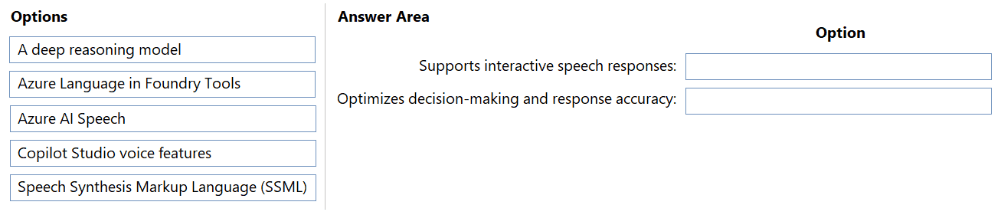
Supports interactive speech responses
Optimizes decision-making and the accuracy of responses
What should you include in the design for each requirement? To answer, drag the appropriate options to the correct requirements. Each option may be used once, more than once, or not at all.
Explanation:
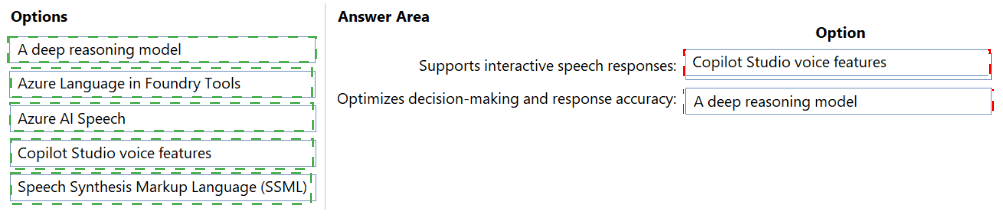
For interactive speech responses, Copilot Studio agents use Copilot Studio voice features (telephony, IVR, and voice channel integration). To optimize decision-making and response accuracy, use a deep reasoning model (e.g., GPT-4 with enhanced reasoning capabilities) rather than standard models. Azure AI Speech and SSML are supportive but not the primary requirement for interactive speech or accuracy optimization.
Correct Options:
Supports interactive speech responses:
Copilot Studio voice features
Native voice channel support in Copilot Studio (telephony, inbound/outbound calling).
Enables interactive speech responses (two-way voice conversation).
Includes speech recognition and synthesis without custom coding.
Optimizes decision-making and response accuracy:
A deep reasoning model
Models like GPT-4 with advanced reasoning (chain-of-thought) improve decision accuracy.
Reduces hallucinations and improves complex task handling.
Can be selected in Copilot Studio under AI models.
Incorrect Options (excluded):
Azure Language in Foundry Tools → Text analytics, not speech or decision optimization.
Azure AI Speech → Provides speech-to-text and text-to-speech but lacks interactive session management; Copilot Studio voice features are higher-level.
Speech Synthesis Markup Language (SSML) → Fine-tunes voice output (pitch, rate), but does not enable interactive speech or optimize decision accuracy.
Reference:
Microsoft Learn – “Voice features in Copilot Studio” – Interactive speech responses via telephony/voice channel.
Microsoft Learn – “Deep reasoning models for accuracy” – Use GPT-4 or advanced models to optimize decision-making and response accuracy.
A company uses a fine-tuned Microsoft Foundry model that requires frequent updates as
new customer feedback becomes available.
You need to design an application lifecycle management (ALM) process that meets the
following requirements:
Data changes must be tracked and versioned.
The model must be retrained consistently by using approved training data.
Which two actions should you include in the design?
NOTE: Each correct selection is worth one point.
A. Associate the storage location to the fine-tuning job.
B. Create a content filter.
C. Store the training data in Azure Files.
D. Upload the training data to Microsoft Foundry data files.
E. Store the training data in Azure Blob Storage that has version control enabled.
Explanation:
To track and version training data for frequent model updates, store training data in Azure Blob Storage with version control enabled (E) to track changes over time. Upload training data to Microsoft Foundry data files (D) to ensure the fine-tuning job references approved, versioned data consistently. Azure Files (C) lacks native versioning. Content filters (B) are for safety, not ALM. Associating storage location (A) is incomplete without version control.
Correct Options:
D. Upload the training data to Microsoft Foundry data files.
Foundry data files integrates with fine-tuning jobs.
Ensures the model is retrained using approved, tracked datasets.
Provides lineage between training data and model version.
E. Store the training data in Azure Blob Storage that has version control enabled.
Blob storage with versioning tracks changes to customer feedback files.
Enables rollback to previous training data versions if needed.
Supports ALM requirements for data change tracking and consistency.
ncorrect Options:
A. Associate the storage location to the fine-tuning job.
Associates location but does not provide version control or tracking.
Incomplete alone; must be paired with versioned storage.
B. Create a content filter.
Content filters block harmful inputs/outputs, not for ALM or data versioning.
Irrelevant to the requirement.
C. Store the training data in Azure Files.
Azure Files lacks built-in version control.
Not recommended for tracked, versioned training data in ML ALM.
Reference:
Microsoft Learn – “Version control for training data in Azure AI Foundry” – Use Azure Blob Storage with versioning + Foundry data files.
Microsoft Learn – “Fine-tuning ALM best practices” – Track and version training data for repeatable retraining.
You are designing a Microsoft Copilot Studio agent that uses a custom Microsoft Foundry model to generate responses. You need to ensure that the agent can securely connect to and invoke the custom model during user interactions. What should you include in the design?
A. Create a connection to Microsoft Foundry in the agent
B. Configure the agent to use classic orchestration.
C. Add the Microsoft Foundry model as a Copilot Studio skill.
D. Create a custom engine agent
Explanation:
To securely connect a Copilot Studio agent to a custom Microsoft Foundry (Azure AI Foundry) model, you must create a connection to Microsoft Foundry in the agent via the Copilot Studio interface (Settings → AI models → Add custom model). This authenticates (managed identity or API key) and enables runtime invocation. Classic orchestration (B) disables generative capabilities. Skills (C) are for agent-to-agent integration. Custom engine agent (D) is a different architecture.
Correct Option:
A. Create a connection to Microsoft Foundry in the agent
Direct, supported integration path in Copilot Studio.
Handles authentication (Azure AD, API key, managed identity).
Enables the agent to invoke the Foundry model for response generation.
No custom coding required.
Incorrect Options:
B. Configure the agent to use classic orchestration
Classic orchestration disables generative AI features.
Would prevent calling a custom Foundry model for responses.
C. Add the Microsoft Foundry model as a Copilot Studio skill
Skills connect Copilot Studio agents to other agents, not to custom models.
A Foundry model is not a skill; skills are agent entities.
D. Create a custom engine agent
Custom engine agents are built with Semantic Kernel or other SDKs.
Overly complex and not the standard Copilot Studio integration method.
Reference:
Microsoft Learn – “Connect Copilot Studio to Azure AI Foundry models” – Create a connection in Copilot Studio to invoke custom models securely.
Microsoft Learn – “Custom AI models in Copilot Studio” – Use Settings → AI models → Connection.
A company has a Microsoft Dynamics 365 Sales environment that has Microsoft Copilot
enabled.
You need to customize Copilot by tailoring how opportunity summaries are generated or how they are presented to users.
Solution: You add the opportunity summary widget to the Opportunity form. Does this meet the goal?
A. Yes
B. No
Explanation:
Adding the opportunity summary widget to the Opportunity form controls where the summary appears, but it does not customize how the summary is generated (content, tone, fields included) or how it is presented beyond placement. Customizing generation requires prompt engineering or AI configuration in Copilot Studio. Presentation customization requires formatting changes (e.g., layout, font). The widget addition only enables visibility.
Correct Option:
B. No
The widget controls placement on the form, not generation logic or presentation styling.
Generation customization (e.g., including specific fields, changing tone) requires Copilot Studio or Power Automate.
Presentation customization (e.g., font size, color, layout) requires form personalization or CSS.
Adding the widget alone does not tailor the summary itself.
Incorrect Option (if selecting Yes):
Yes would be incorrect because adding a widget does not change how the summary is generated or presented — only where it appears.
Reference:
Microsoft Learn – “Customize opportunity summaries in Dynamics 365 Sales Copilot” – Use Copilot Studio for generation changes, form editor for widget placement (placement ≠ customization of content/presentation).
Microsoft Learn – “Opportunity summary widget” – Adds visibility, does not alter generation or presentation.
A company has a Microsoft Copilot Studio agent that uses generative Al to assist Microsoft Dynamics 365 Customer Service representatives. The agent currently exhibits a low resolution rate and a high escalation rate. You need to identify the issue. What should you use?
A. the Insights tab from the Search & intelligence settings of the Microsoft 365 admin center
B. the Copilot hub in the Power Platform admin center
C. the Agent dashboard of Dynamics 365 Customer Service historical analytics
D. the Analytics tab in Copilot Studio
Explanation:
To diagnose low resolution rate and high escalation rate for a Copilot Studio agent, use the Analytics tab in Copilot Studio. It provides conversation outcomes (resolved vs. escalated), fallback triggers, answer quality, and topic-level metrics. The Insights tab (A) is for Microsoft 365 Search. Copilot hub (B) is for environment management. Dynamics 365 Customer Service analytics (C) focuses on human agent metrics, not Copilot Studio agent performance.
Correct Option:
D. the Analytics tab in Copilot Studio
Directly shows resolution rate, escalation rate, and abandoned sessions.
Provides drill-down by topic to identify which topics cause escalations.
Includes fallback triggers and answer quality metrics.
Purpose-built for Copilot Studio agent performance analysis.
Incorrect Options:
A. the Insights tab from Search & intelligence settings (Microsoft 365 admin center)
Focuses on Microsoft 365 Search (SharePoint, OneDrive).
No Copilot Studio agent metrics.
B. the Copilot hub in the Power Platform admin center
Used for managing Copilot features across environments (e.g., enable/disable).
Does not provide resolution or escalation analytics.
C. the Agent dashboard of Dynamics 365 Customer Service historical analytics
Tracks human agent performance (handle time, CSAT).
Does not show Copilot Studio agent resolution/escalation rates.
Reference:
Microsoft Learn – “Copilot Studio Analytics tab” – View resolution rate, escalation rate, and conversation outcomes.
Microsoft Learn – “Troubleshoot low resolution rates” – Use Analytics tab to identify problematic topics.
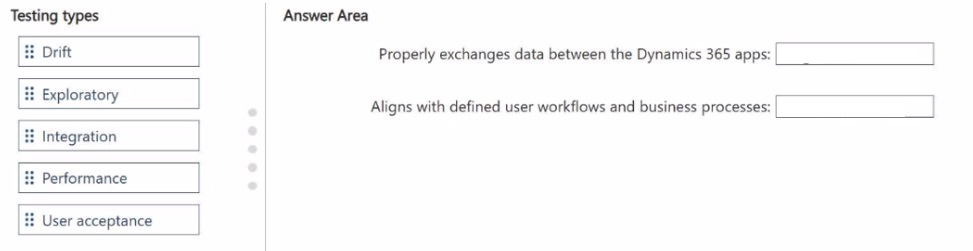
You are designing end-to-end test scenarios for a business solution that uses Microsoft Dynamics 365 Sales and Dynamics 365 Finance. You need to ensure that the business solution meets the following test requirements:
• Properly exchanges data between the Dynamics 365 apps
• Aligns with defined user workflows and business processes
Which type of testing should you use for each requirement? To answer, drag the appropriate testing types to the correct requirements. Each testing type may be used once, more than once, or not at all. You may need to drag the split bar between panes or scroll to view content.
NOTE: Each correct selection is worth one point.
Explanation:
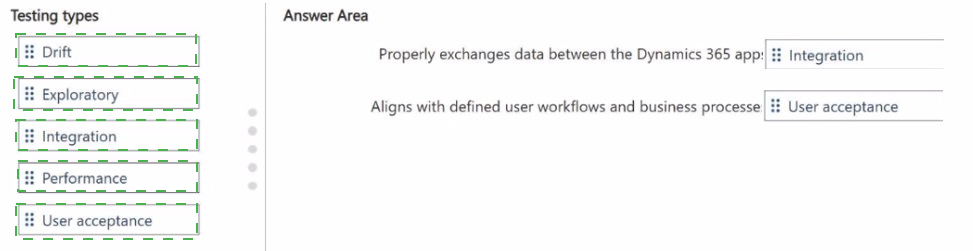
Testing data exchange between Dynamics 365 Sales and Finance requires integration testing (validates that systems communicate correctly via APIs, connectors, or Dataverse). Aligning with user workflows and business processes requires user acceptance testing (UAT) , where end-users validate that the solution meets real-world process requirements. Performance, drift, and exploratory testing are not appropriate for these specific requirements.
Correct Options:
Properly exchanges data between the Dynamics 365 apps:
Integration
Integration testing verifies data flow between multiple systems (Sales ↔ Finance).
Checks API calls, field mappings, and sync frequency.
Ensures that data created in Sales appears correctly in Finance (e.g., orders, invoices).
Aligns with defined user workflows and business processes:
User acceptance
UAT involves actual users testing the solution against documented business processes.
Validates that workflows (e.g., opportunity to quote to order) are intuitive and complete.
Final sign-off before production deployment.
Incorrect Options (excluded):
Drift → Detects changes in model performance over time (ML Ops), not data exchange or workflows.
Exploratory → Ad-hoc testing without predefined scripts; not for structured data exchange validation.
Performance → Measures speed, scalability, and load handling; not data exchange correctness or workflow alignment.
Reference:
Microsoft Learn – “Integration testing for Dynamics 365” – Validates data exchange between apps.
Microsoft Learn – “User acceptance testing (UAT)” – Ensures alignment with business processes and workflows.
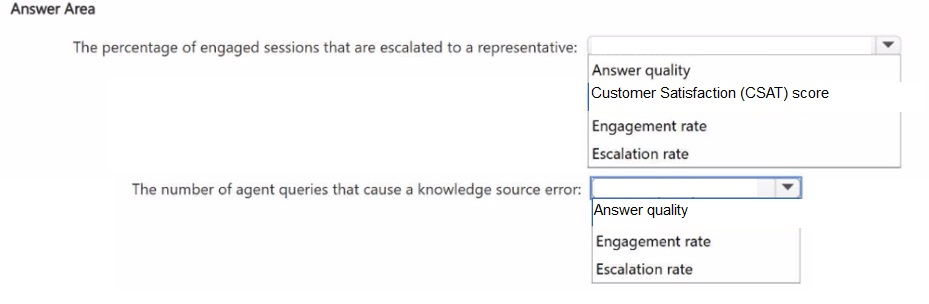
You use Microsoft Copilot Studio analytics to analyze the performance of a deployed Copilot Studio agent. You need to identify which performance metrics to use to measure the following:
• The percentage of engaged sessions that are escalated to a live customer service representative
• The number of agent queries that cause a knowledge source error
What should you identify for each requirement? To answer, select the appropriate options in the answer area.
NOTE: Each correct selection is worth one point.
Explanation:
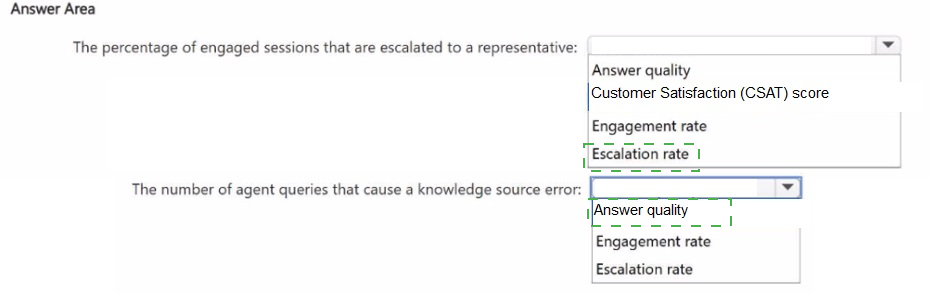
The percentage of engaged sessions escalated to a live representative is measured by the Escalation rate (escalated sessions / total engaged sessions). The number of agent queries causing knowledge source errors is tracked under Answer quality (specifically knowledge source errors or no-match due to grounding failures). CSAT measures satisfaction, not errors. Engagement rate measures active sessions, not escalations or errors.
Correct Options:
The percentage of engaged sessions that are escalated to a live customer service representative:
Escalation rate
Direct metric in Copilot Studio Analytics (Conversation Health).
Calculated as (escalated sessions) / (total engaged sessions).
Indicates how often the agent hands off to a human.
The number of agent queries that cause a knowledge source error:
Answer quality
Answer quality metrics include fallback rate and knowledge source errors (e.g., Dataverse timeout, Azure AI Search failure).
Found in Analytics → Customer Engagement → Generated answers.
Tracks when grounding sources fail to return data.
Incorrect Options (excluded):
Customer Satisfaction (CSAT) score → User survey rating, not escalation or knowledge errors.
Engagement rate → Percentage of users who interact with the agent vs. those who see it. Not escalation or error metric.
Reference:
Microsoft Learn – “Copilot Studio analytics – Escalation rate” – Percentage of engaged sessions escalated to live agent.
Microsoft Learn – “Answer quality metrics” – Includes knowledge source errors and fallback rate.
A company uses Microsoft 365 and Dynamics 365.
You need to recommend a solution to automatically summarize email threads, generate suggested replies in Microsoft Outlook, and provide meeting preparation summaries that include relevant customer relationship management (CRM) data.
Solution: You recommend a Microsoft 365 Copilot agent template.
Does this meet the goal?
A. Yes
B. No
Explanation:
A Microsoft 365 Copilot agent template is a framework for building custom agents within Microsoft 365 Copilot. However, the capabilities described (email thread summarization, suggested replies in Outlook, meeting prep summaries with CRM data) are native features of Microsoft 365 Copilot (or Copilot for Sales), not something you build from an agent template. The template is for extending Copilot, not for providing these out-of-the-box functions.
Correct Option:
B. No
Microsoft 365 Copilot agent templates are for building custom agents (e.g., a procurement agent), not for enabling native Outlook summarization or suggested replies.
The required features are part of the core Microsoft 365 Copilot license, not a template.
Recommending a template implies custom development, which is unnecessary and does not directly meet the goal.
Incorrect Option (if selecting Yes):
Yes would be incorrect because agent templates are for custom scenarios, not for activating built-in Copilot features like email thread summarization or suggested replies.
Reference:
Microsoft Learn – “Microsoft 365 Copilot agent templates” – Used for building custom agents, not for enabling native Copilot email/Outlook features.
Microsoft Learn – “Copilot in Outlook and Teams” – Built-in capabilities, not template-dependent.
| Page 2 out of 10 Pages |