For each of the following statements, select Yes if the statement is true. Otherwise, select
 <
<
Explanation:
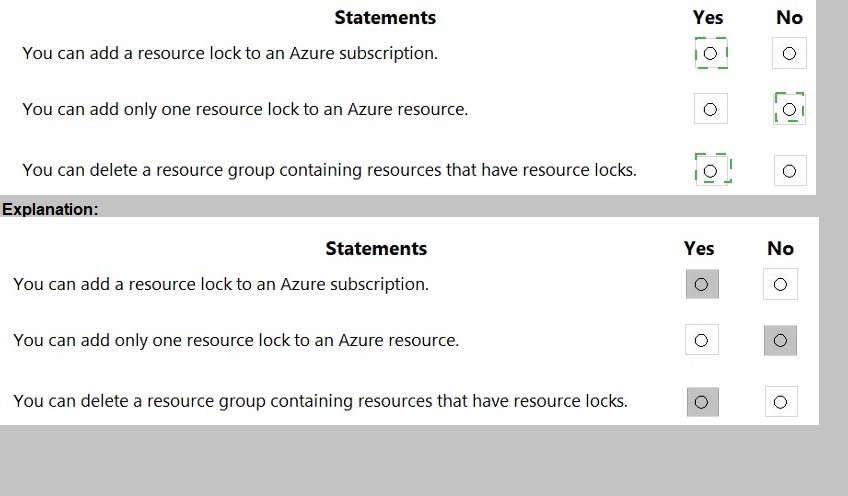
This question tests your knowledge of Azure resource locks, which are settings that prevent accidental deletion or modification of resources. Resource locks operate at different scopes (subscription, resource group, or individual resource) and have specific behaviors regarding inheritance, application limits, and deletion scenarios that SC-900 candidates must understand.
Correct Option:
Statement 1: "You can add a resource lock to an Azure subscription." → YES
Resource locks can be applied at the subscription scope. When you apply a lock at the subscription level, it inherits down to all resource groups and resources within that subscription. This is a common practice for implementing governance controls across an entire Azure environment to prevent accidental deletion of critical workloads.
Statement 2: "You can add only one resource lock to an Azure resource." → NO
An Azure resource can have multiple resource locks applied simultaneously. You can apply both a Read-only lock and a Delete lock, or multiple locks from different scopes (subscription, resource group, and directly on the resource). These locks are cumulative, with the most restrictive lock taking precedence.
Statement 3: "You can delete a resource group containing resources that have resource locks." → NO
If any resource within a resource group has a resource lock (either Delete or Read-only), you cannot delete the resource group. The delete operation will fail, and Azure returns an error message indicating that resources with locks cannot be deleted. You must remove all locks before successful deletion.
Reference:
lock-resources
For each of the following statements, select Yes if the statement is true. Otherwise, select
No.
NOTE: Each correct selection is worth one point.
Explanation:
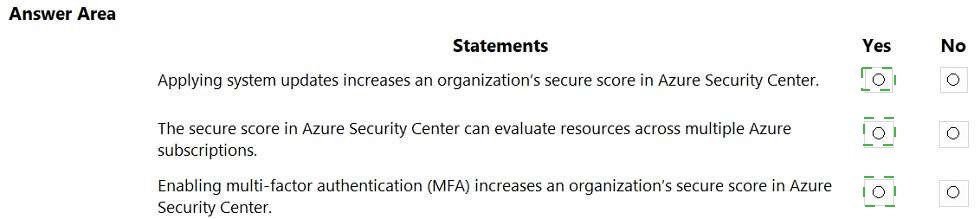
Microsoft Secure Score is a measurement of an organization's security posture, with higher numbers indicating more recommended improvement actions. It is available in Microsoft 365 Defender portal and Azure Security Center. Secure Score helps organizations track their security efforts and improve their overall security posture by completing recommended actions such as enabling MFA or applying updates.
Correct Option:
Statement 1: Applying system updates increases an organization's secure score in Azure Security Center.
Yes.
Applying system updates and patches is a security recommendation in Azure Security Center. When organizations remediate vulnerabilities by applying missing system updates, they receive points toward their secure score. This is a measurable improvement action that directly contributes to reducing security risks.
Statement 2: The secure score in Azure Security Center can evaluate resources across multiple Azure subscriptions.
Yes.
Azure Security Center's secure score aggregates security recommendations and calculates scores across all subscriptions managed within the tenant. Security administrators can view the overall secure score consolidated across multiple subscriptions, enabling centralized security posture management.
Statement 3: Enabling multi-factor authentication (MFA) increases an organization's secure score in Azure Security Center.
Yes.
MFA enablement is one of the highest-impact security controls in Azure Security Center secure score. Recommendations such as "MFA should be enabled on accounts with owner permissions on subscriptions" and similar MFA-related controls directly improve the secure score when implemented.
Incorrect Option:
None. All three statements are correct.
Reference:
Microsoft Learn: What is Microsoft Secure Score?
Microsoft Docs: Secure score in Azure Security Center
Microsoft Docs: Track your Microsoft Secure Score
For each of the following statements, select Yes if the statement is true. Otherwise, select
No.
NOTE: Each correct selection is worth one point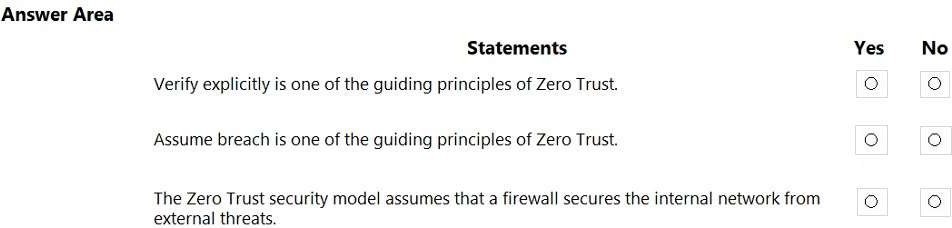
Explanation:
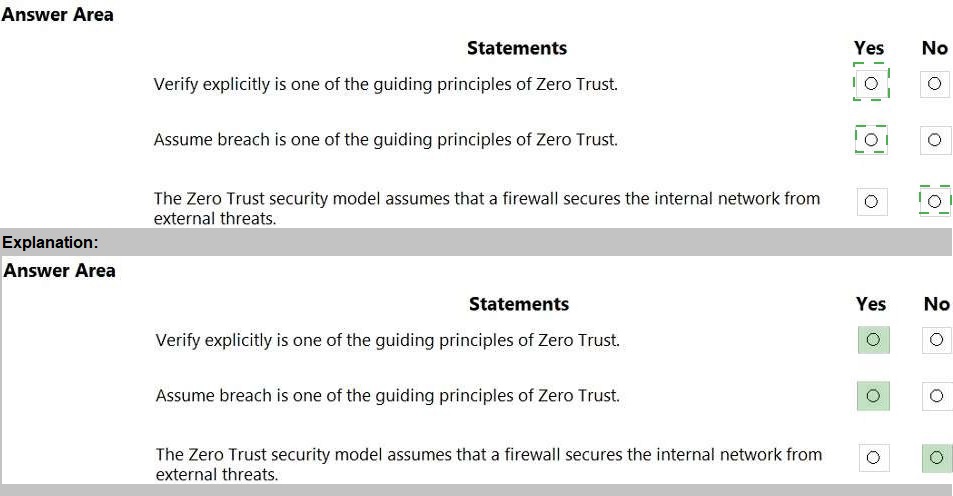
Zero Trust is a security model that assumes breach and verifies each request as though it originates from an open network. The three core guiding principles of Zero Trust are: verify explicitly, least privilege access, and assume breach. It does not trust any network, internal or external, implicitly.
Correct Option:
Statement 1: Verify explicitly is one of the guiding principles of Zero Trust.
Yes.
Verify explicitly is a fundamental pillar of Zero Trust. It requires every access request to be fully authenticated, authorized, and encrypted regardless of the source network. No user or device is trusted by default, even if they are within the corporate network perimeter.
Statement 2: Assume breach is one of the guiding principles of Zero Trust.
Yes.
Assume breach is another core principle of Zero Trust. It operates on the mindset that a breach has already occurred or will occur. This principle drives organizations to implement micro-segmentation, continuous monitoring, end-to-end encryption, and analytics to detect and respond to threats quickly.
Incorrect Option:
Statement 3: The Zero Trust security model assumes that a firewall secures the internal network from external threats.
No.
This statement describes the traditional perimeter-based security model (castle-and-moat approach), not Zero Trust. Zero Trust explicitly assumes that firewalls and perimeter defenses are insufficient because threats can originate from inside the network as well. Zero Trust eliminates implicit trust in network location and requires continuous verification.
Reference:
Microsoft Learn: Zero Trust guiding principles
Microsoft Docs: What is Zero Trust?
Microsoft Security: Zero Trust model
For each of the following statements, select Yes if the statement is true. Otherwise, select
No.
NOTE: Each correct selection is worth one point
Explanation:
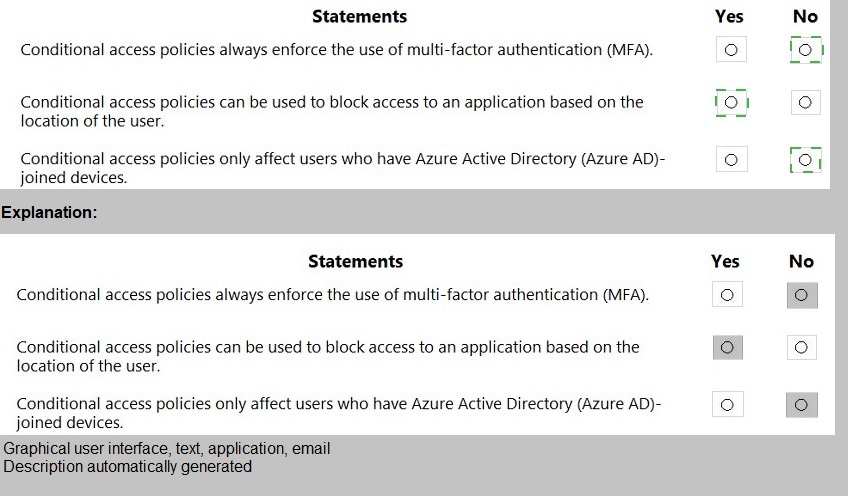
Azure AD Conditional Access is a policy-driven tool that evaluates signals such as user, device, location, and risk to enforce access decisions. It provides granular control beyond just MFA and supports various conditions and grant controls. Policies can apply to any user, not limited to specific device join states.
Correct Option:
Statement 2: Conditional access policies can be used to block access to an application based on the location of the user.
Yes.
Conditional Access policies include location as a condition. Administrators can configure named locations (IP ranges, countries) and block access when users attempt to sign in from specific locations. Alternatively, they can allow access only from trusted locations while blocking others.
Incorrect Option:
Statement 1: Conditional access policies always enforce the use of multi-factor authentication (MFA).
No.
Conditional Access policies are highly flexible. While they can require MFA, they can also block access entirely, require compliant devices, approve client applications, or use terms of use. MFA is one of several grant controls, not a mandatory enforcement in every policy.
Incorrect Option:
Statement 3: Conditional access policies only affect users who have Azure Active Directory (Azure AD)-joined devices.
No.
Conditional Access policies apply to all user sign-ins regardless of device join state. Policies can target specific device states as a condition, but they are not restricted to only Azure AD-joined devices. Users signing in from personal devices, non-joined devices, or any platform are subject to policies unless explicitly excluded.
Reference:
Microsoft Learn: What is Conditional Access?
Microsoft Docs: Conditional Access policy components
Microsoft Docs: Location condition in Conditional Access
For each of the following statements, select Yes if the statement is true. Otherwise, select No. NOTE: Each correct selection is worth one point.

Explanation:
Microsoft Purview Information Protection sensitivity labels provide classification and protection capabilities across containers, emails, and documents. Labels apply persistent protections that travel with the content. They support various actions including encryption, content marking (headers/footers/watermarks), and visual markings across Microsoft 365 apps.
Correct Option:
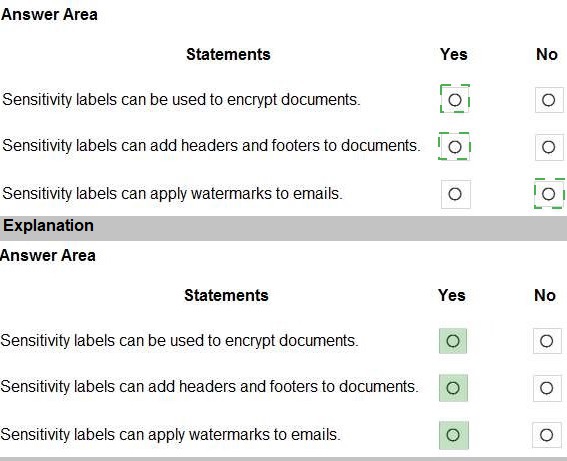
Statement 1: Sensitivity labels can be used to encrypt documents.
Yes.
Sensitivity labels can apply encryption by defining who can access content and what permissions they have. This uses Azure Rights Management services to protect documents and emails, ensuring only authorized users can access encrypted content regardless of location.
Statement 2: Sensitivity labels can add headers and footers to documents.
Yes.
Content marking is a built-in action for sensitivity labels. When applied, labels can automatically add custom headers, footers, or watermarks to Word, Excel, PowerPoint, and PDF documents. These visual markings indicate the classification level and handling instructions.
Statement 3: Sensitivity labels can apply watermarks to emails.
Yes.
Sensitivity labels support watermarking for emails through Outlook. Labels configured with content marking can apply text watermarks to email messages. The watermark persists regardless of whether the email is forwarded, replied to, or viewed on different devices.
Incorrect Option:
None. All three statements are correct.
Reference:
Microsoft Learn: Learn about sensitivity labels
Microsoft Docs: Apply encryption using sensitivity labels
Microsoft Docs: Apply content marking to documents and emails
For each of the following statements, select Yes if the statement is true. Otherwise, select No. NOTE: Each correct selection is worth one point
Explanation:
Hybrid identity creates a unified identity solution across on-premises and cloud environments. It synchronizes and optionally integrates on-premises directory objects with Azure AD. Azure AD Connect is Microsoft's primary tool for achieving hybrid identity, allowing users to access both on-premises and cloud resources with a single identity.
Correct Option:
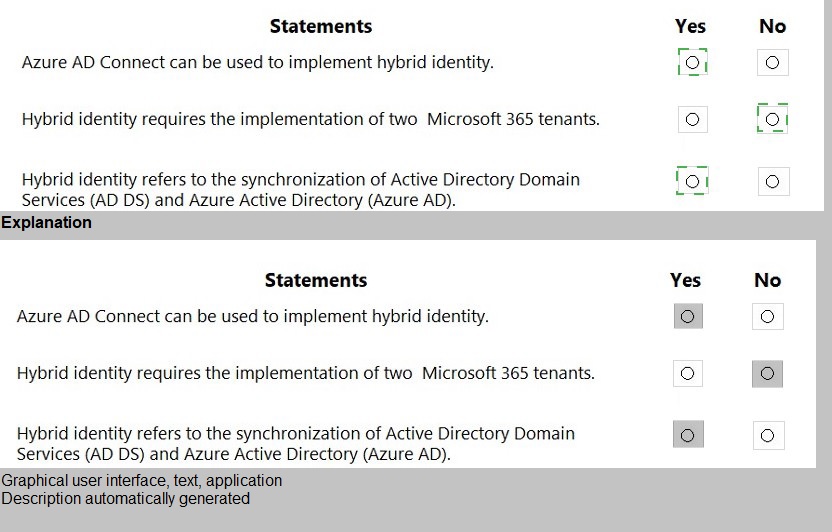
Statement 1: Azure AD Connect can be used to implement hybrid identity.
Yes.
Azure AD Connect is Microsoft's primary solution for hybrid identity. It synchronizes on-premises Active Directory with Azure AD, provides optional password hash synchronization, pass-through authentication, and federation capabilities. This creates a unified identity bridge between on-premises and cloud environments.
Statement 3: Hybrid identity refers to the synchronization of Active Directory Domain Services (AD DS) and Azure Active Directory (Azure AD).
Yes.
At its core, hybrid identity involves synchronizing identity objects from on-premises AD DS to Azure AD. This creates matching user identities in both directories, enabling single sign-on and consistent access controls. Users maintain one identity that works across both environments.
Incorrect Option:
Statement 2: Hybrid identity requires the implementation of two Microsoft 365 tenants.
No.
Hybrid identity connects a single on-premises Active Directory environment to a single Azure AD tenant. Organizations do not need multiple tenants. The goal is unification, not duplication. Multiple tenants would fragment identity management and defeat the purpose of hybrid identity.
Reference:
Microsoft Learn: What is hybrid identity?
Microsoft Docs: What is Azure AD Connect?
Microsoft Docs: Choose the right authentication method for your hybrid identity solution
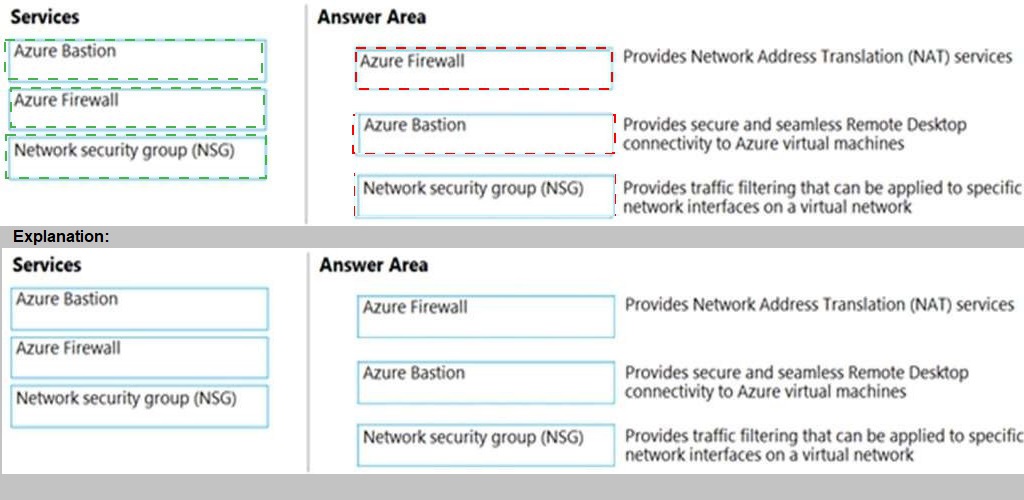
Match the Azure networking service to the appropriate description.
To answer, drag the appropriate service from the column on the left to its description on the
right. Each service may be used once, more than once, or not at all.
NOTE: Each correct match is worth one point.
Explanation:
Azure offers multiple networking services with distinct purposes. Azure Bastion provides secure RDP/SSH connectivity to VMs directly from the Azure portal. Azure Firewall is a managed, stateful firewall-as-a-service with NAT capabilities. NSGs are distributed firewalls that filter traffic at the network interface or subnet level.
Correct Matches:
Service that provides Network Address Translation (NAT) services:
Azure Firewall
Azure Firewall includes Destination Network Address Translation (DNAT) capabilities, allowing inbound internet traffic to be translated and forwarded to private IP addresses on your virtual network. This enables secure exposure of internal resources to the internet.
Service that provides secure and seamless Remote Desktop connectivity to Azure virtual machines:
Azure Bastion
Azure Bastion is a fully managed PaaS service that provides secure RDP and SSH connectivity to Azure VMs directly through the Azure portal over SSL/TLS. It eliminates public IP addresses on VMs and protects against port exposure and brute-force attacks.
Service that provides traffic filtering that can be applied to specific network interfaces on a virtual network:
Network security group (NSG)
NSGs contain security rules that allow or deny inbound/outbound traffic. They can be associated with subnets or individual network interfaces (NICs). This granular control enables micro-segmentation and traffic filtering at the virtual NIC level.
Incorrect/Not Used:
None. All three services are correctly matched to one description each.
Reference:
Microsoft Docs: What is Azure Bastion?
Microsoft Docs: What is Azure Firewall?
Microsoft Docs: Network security groups
Microsoft Learn: Secure and isolate access to Azure resources
| Page 2 out of 9 Pages |