Topic 2, Adventure Works
Case study
This is a case study. Case studies are not timed separately. You can use as much
exam time as you would like to complete each case. However, there may be additional
case studies and sections on this exam. You must manage your time to ensure that you
are able to complete all questions included on this exam in the time provided.
To answer the questions included in a case study, you will need to reference information
that is provided in the case study. Case studies might contain exhibits and other resources
that provide more information about the scenario that is described in the case study. Each
question is independent of the other questions in this case study.
At the end of this case study, a review screen will appear. This screen allows you to review
your answers and to make changes before you move to the next section of the exam. After
you begin a new section, you cannot return to this section.
To start the case study
To display the first question in this case study, click the Next button. Use the buttons in the
left pane to explore the content of the case study before you answer the questions. Clicking
these buttons displays information such as business requirements, existing environment,
and problem statements. If the case study has an All Information tab, note that the
information displayed is identical to the information displayed on the subsequent tabs.
When you are ready to answer a question, click the Question button to return to the
question.
Background
Current environment
Adventure Works Cycles wants to replace their paper-based bicycle manufacturing
business with an efficient paperless solution. The company has one manufacturing plant in
Seattle that produces bicycle parts, assembles bicycles, and distributes finished bicycles to
the Pacific Northwest.
Adventure Works Cycles has a retail location that performs bicycle repair and warranty
repair work. The company has six maintenance vans that repair bicycles at various events
and residences.
Adventure Works Cycles recently deployed Dynamics 365 Finance and Dynamics 365
Manufacturing in a Microsoft-hosted environment for financials and manufacturing. The
company plans to leverage the Microsoft Power Platform to migrate all of their distribution
and retail workloads to Dynamics 365 Unified Operations.
The customer uses Dynamics 365 Sales. Dynamics 365 Customer Service and Dynamics
365 Field Service.
Retail store information
Adventure Works Cycle has one legal entity, four warehouses, and six field service
technicians.
Warehouse counting is performed manually by using a counting journal. All
warehouse boxes and items are barcoded.
The Adventure Works Cycles retail location performs bicycle inspections and
performance tune-ups.
Technicians use paper forms to document the bicycle inspection performed before
a tune-up and any additional work performed on the bicycle.
Adventure Works Cycles uses a Power Apps app for local bike fairs to attract new
customers.
A canvas app is being developed to capture customer information when customers
check in at the retail location. The app has the following features:
Technology
Requirements
A plug-in for Dynamics 365 Sales automatically calculated the total billed time from
all activities on a particular customer account, including sales representative visits,
phone calls, email correspondence, and repair time compared with hours spent.
A shipping API displays shipping rates and tracking information on sales orders.
The contract allows for 3,000 calls per month.
Ecommerce orders are processed in batch daily by using a manual import of sales
orders in Dynamics 365 Finance.
Microsoft Teams is used for all collaboration.
All testing and problem diagnostics are performed in a copy of the production
environment.
Customer satisfaction surveys are recorded with Microsoft Forms Pro. Survey
replies from customers are sent to a generic mailbox.
Automation
A text message must be automatically sent to a customer to confirm an
appointment and to notify when a technician is on route that includes their location.
Ecommerce sales orders must be integrated into Dynamics 365 Finance and then
exported to Azure every night.
A text alert must be sent to employees scheduled to assist in the repair area of the
retail store if the number of repair check-ins exceeds eight.
Submitted customer surveys must generate an email to the correct department.
Approval and follow-up must occur within a week.
Reporting
The warehouse manager’s dashboard must contain warehouse counting variance
information.
A warehouse manager needs to quickly view warehouse KPIs by using a mobile
device.
Power BI must be used for reporting across the organization.
User experience
Warehouse counting must be performed by using a mobile app that scans
barcodes on boxes.
All customer repairs must be tracked in the system no matter where they occur.
Qualified leads must be collected from local bike fairs.
Issues
Warehouse counting must be performed by using a mobile app that scans
barcodes on boxes.
All customer repairs must be tracked in the system no matter where they occur.
Qualified leads must be collected from local bike fairs.
Internal
User1 reports receives an intermittent plug-in error when viewing the total bill
customer time.
User2 reports that Azure consumption for API calls has increased significantly to
100 calls per minute in the last month.
User2 reports that sales orders have increased.
User5 receives the error message: ‘Endpoint unavailable’ during a test of the
technician dispatch ISV solution.
The parts department manager who is the approver for the department is currently
on sabbatical.
External
CustomerB reports that the check-in app returned only one search result for their
last name, which is not the correct name.
Nine customers arrive in the repair area of the retail store, but no texts were sent
to scheduled employees.
Customers report that the response time from the information email listed on the
Adventure Works Cycles website is greater than five days.
CustomerC requested additional information from the parts department through
the customer survey and has not received a response one week later.
A company has a Common Data Service (CDS) environment.
All accounts in the system with a relationship type of Customer set must have an account
number. A plug-in has been developed.
When a Customer is updated with a relationship type, the plug-in sets the account number
if not provided by the user.
You need to register the plug-in.
Which three actions should you perform in sequence? To answer, move the appropriate
actions from the list of actions to the answer area and arrange them in the correct order.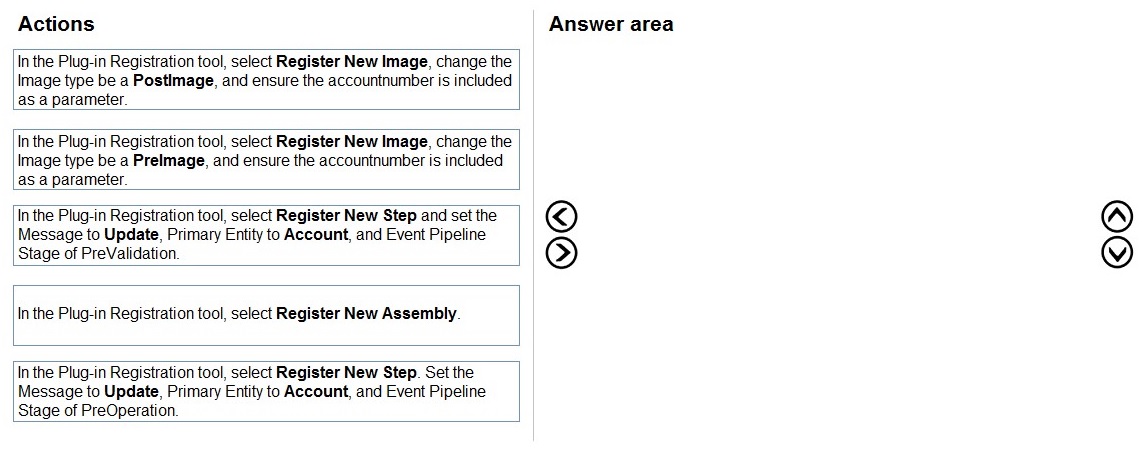
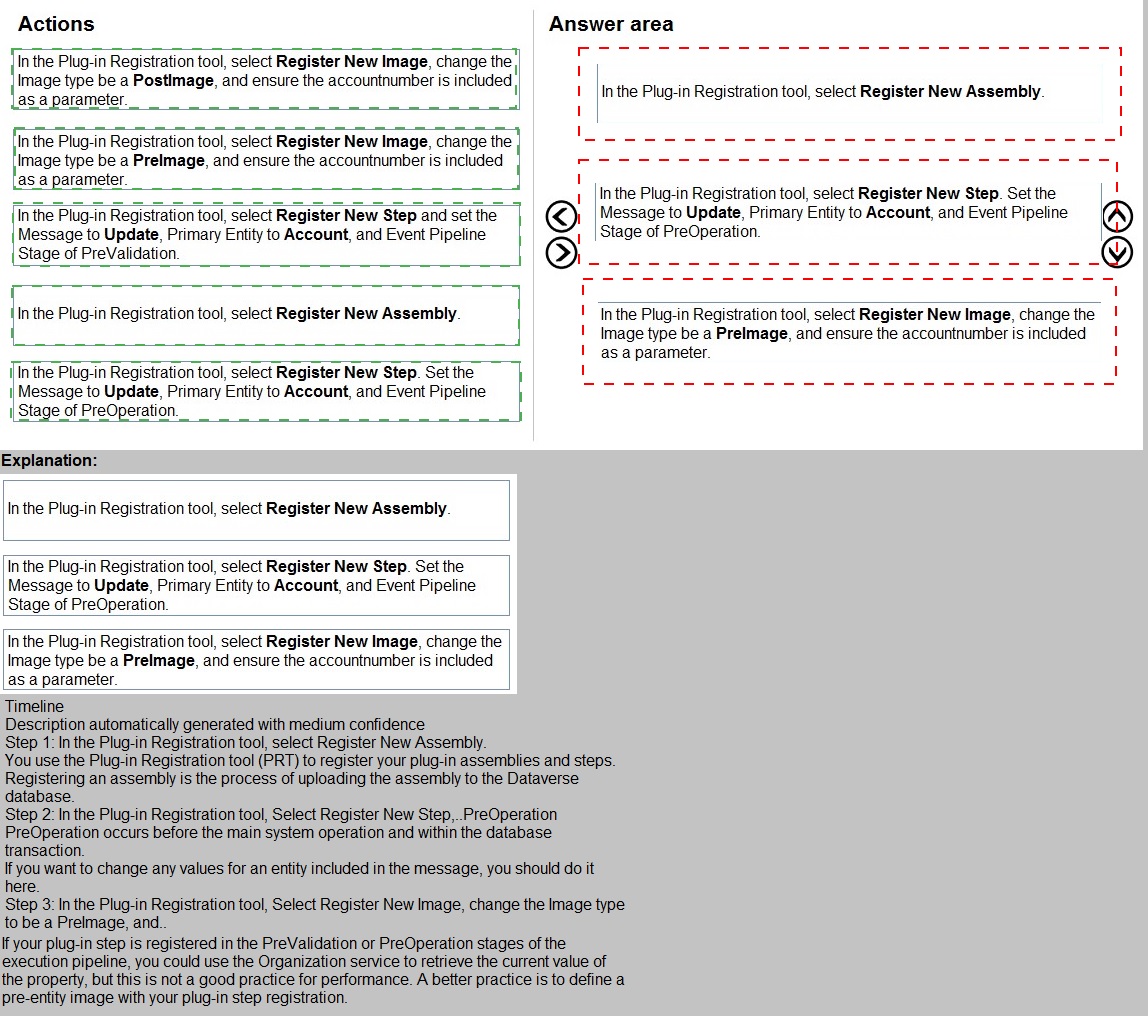
Explanation:
This question assesses your knowledge of plug-in registration in Dataverse. The scenario requires a plug-in that sets an account number automatically when a Customer (Account) is updated with a specific relationship type, but only if the user did not provide one. To accomplish this, the plug-in needs to execute before the update operation saves to the database (PreOperation) and must have access to the current values to determine if an account number was provided.
Correct Sequence:
In the Plug-in Registration tool, select Register New Assembly.
In the Plug-in Registration tool, select Register New Step. Set the Message to Update, Primary Entity to Account, and Event Pipeline Stage of PreOperation.
In the Plug-in Registration tool, select Register New Image, change the Image type to be a PreImage, and ensure the accountnumber is included as a parameter.
Explanation of Sequence:
Register New Assembly: The first step is always to register the compiled plug-in assembly (.dll) that contains your custom code. This makes the plug-in available in the Dataverse environment.
Register New Step with PreOperation: Registering a step defines when and for what event your plug-in executes. The PreOperation stage (executes after main system operation but before database write) is correct because the plug-in needs to modify the account number before it is saved to the database.
Register New Image as PreImage: A PreImage captures the entity's state before the update occurs. This is essential because the plug-in needs to check whether the accountnumber field originally had a value to determine if the user provided one during this update.
Why this sequence works:
Assembly registration must happen before you can register steps
PreOperation stage ensures the plug-in runs before the data is committed, allowing modifications
PreImage provides access to the original values to compare with the incoming update
Why other options are incorrect:
PostImage: Would capture values after the update, too late for the plug-in to modify the data
PreValidation: Runs too early, before basic validation, and might not have all necessary context
Register New Image before step registration: You must register the step first, then add images to that specific step
Reference:
Register a plug-in, Event execution pipeline, PreOperation stage, PreImage and PostImage - Microsoft Learn
Teachers in a school district use Azure skill bots to teach specific classes. Students sign
into an online portal to submit completed homework to their teacher for review. Students
use a Power Virtual Agents chatbot to request help from teachers.
You need to incorporate the skill bot for each class into the homework bot.
Which three actions should you perform in sequence? To answer, move the appropriate
actions from the list of actions to the answer area and arrange them in the correct order.
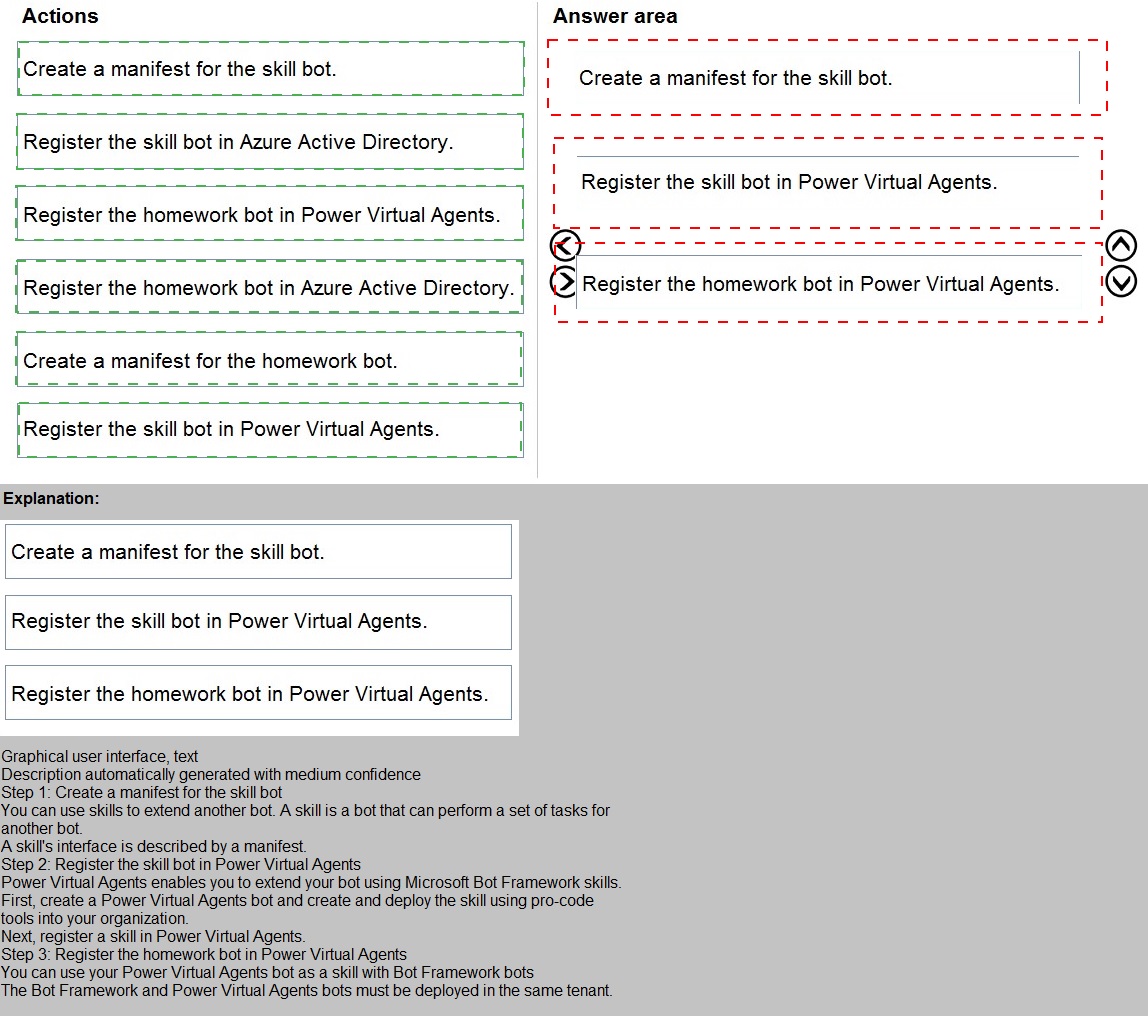
Explanation:
This question tests your understanding of integrating skill bots with a Power Virtual Agents chatbot. In this scenario, multiple Azure skill bots (for specific classes) need to be incorporated into a main homework bot (Power Virtual Agents chatbot). The process requires proper registration and configuration to enable the skill bot to be called from within the Power Virtual Agents bot.
Correct Sequence:
Register the skill bot in Azure Active Directory.
Create a manifest for the skill bot.
Register the skill bot in Power Virtual Agents.
Explanation of Sequence:
Register the skill bot in Azure Active Directory: The skill bot must first be registered as an application in Azure AD. This creates a service principal and generates the necessary App ID and client credentials that will be used for authentication between bots.
Create a manifest for the skill bot: A skill manifest is a JSON file that describes the skill bot's capabilities, endpoints, and available actions. This manifest is what the Power Virtual Agents bot will consume to understand how to interact with the skill.
Register the skill bot in Power Virtual Agents: Finally, you add the skill to the Power Virtual Agents homework bot using the manifest and Azure AD registration details. This makes the skill bot's capabilities available to be called from within the homework bot's conversations.
Why this sequence is correct:
Azure AD registration must happen first to establish identity and security credentials
The manifest creation depends on having the bot registered and knowing its endpoints and App ID
Registering in Power Virtual Agents requires both the manifest and the Azure AD registration information
Why other options are incorrect:
Register the homework bot in Azure Active Directory: The homework bot (Power Virtual Agents) already has its own identity; this step is not required for skill integration
Create a manifest for the homework bot: Manifests are for skill bots being exposed, not for the consuming bot
Register the homework bot in Power Virtual Agents: The homework bot is already the Power Virtual Agents bot; this step is meaningless
Reference:
Use skill bots in Power Virtual Agents, Register a bot as a skill, Create a skill manifest - Microsoft Learn
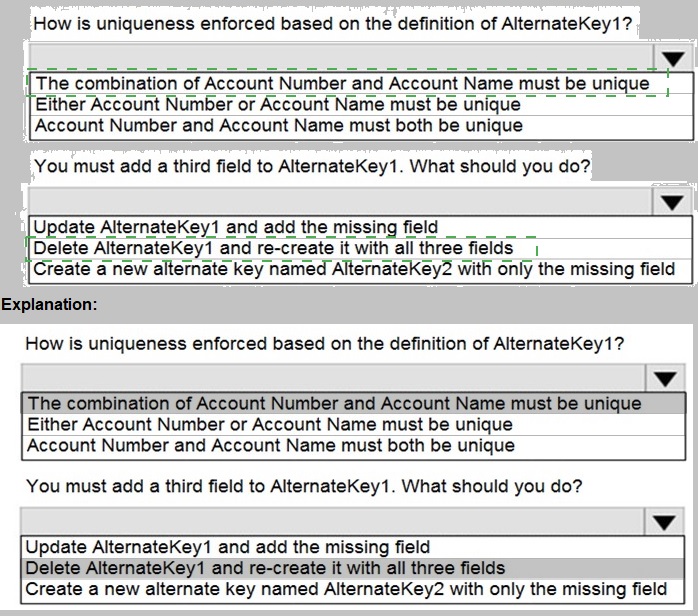
You create an alternate key named AlternateKey1 on the Account entity. The definition for AlternateKey1 is shown in the following exhibit: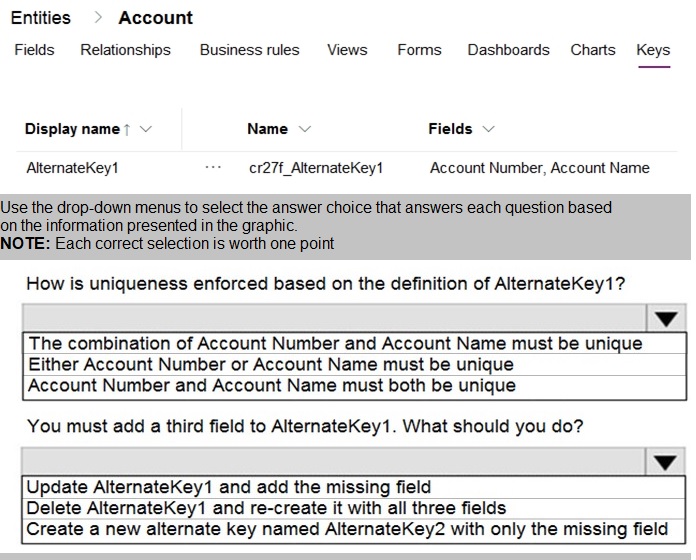
Explanation:
This question tests your understanding of alternate keys in Dataverse. Alternate keys provide a way to uniquely identify records using natural keys instead of the system GUID. The exhibit shows that AlternateKey1 is defined with two fields, and you need to understand how uniqueness is enforced with multiple fields, as well as how to modify an existing alternate key when additional fields need to be included.
Answers:
How is uniqueness enforced based on the definition of AlternateKey1?
The combination of Account Number and Account Name must be unique
You must add a third field to AlternateKey1. What should you do?
Delete AlternateKey1 and re-create it with all three fields
Explanation of Correct Options:
For question 1: The combination of Account Number and Account Name must be unique
When an alternate key contains multiple fields, uniqueness is enforced on the combination of values across all fields in the key. This means that no two records can have the same values for both Account Number AND Account Name simultaneously. However, individual records could have duplicate Account Numbers if their Account Names differ, and vice versa. This composite key approach allows for natural business rules where uniqueness requires multiple identifying attributes.
For question 2: Delete AlternateKey1 and re-create it with all three fields
Once an alternate key is created and activated in Dataverse, it cannot be modified directly. This is because the system generates database indexes and enforces uniqueness constraints based on the key definition. To change the fields included in an alternate key, you must delete the existing key and create a new one with the desired fields. Attempting to update the existing key is not supported by the platform.
Why other options are incorrect for question 1:
Either Account Number or Account Name must be unique: This describes an OR condition, which is not how composite keys work. The system does not require either field to be individually unique.
Account Number and Account Name must both be unique: This describes two separate unique constraints on individual fields, which is different from a composite key enforcing uniqueness on the combination.
Why other options are incorrect for question 2:
Update AlternateKey1 and add the missing field: Alternate keys cannot be modified after creation; they must be deleted and recreated
Create a new alternate key named AlternateKey2 with only the missing field: This would create a separate key on just the third field, not a composite key combining all three fields as required
Reference:
Define alternate keys to reference records, Manage alternate keys - Microsoft Learn
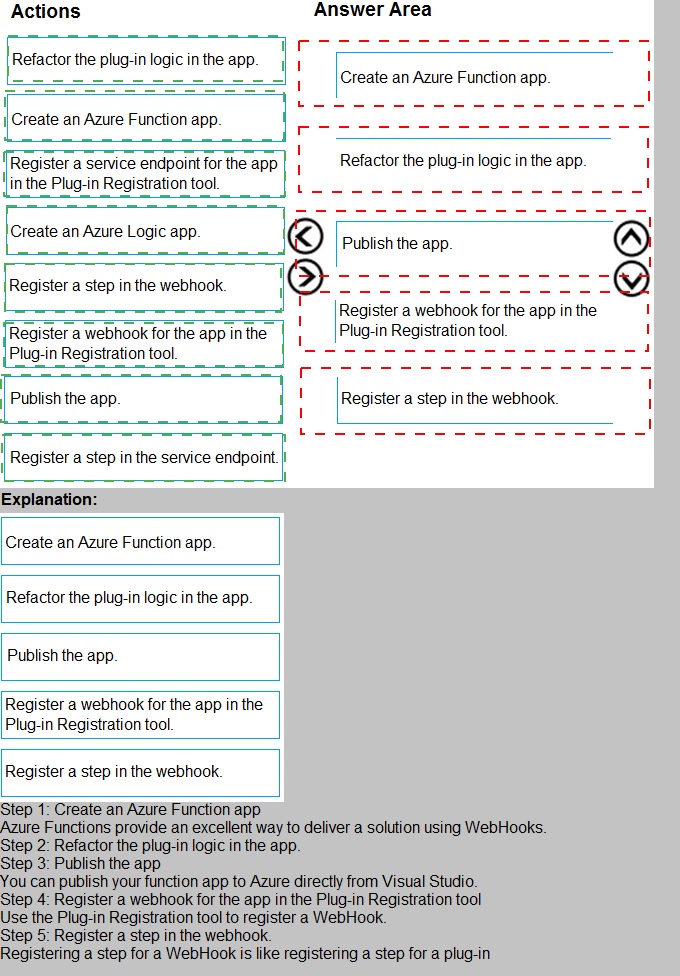
An organization uses plug-in to retrieve specific information from legacy data stores each
time a new order is submitted.
You review the Common Data Service analytics page. The average plug-in execution time
is increasing.
You need to replace the plug-in with another component, reusing as much of the current
plug-in code as possible.
Which five actions should you perform in sequence? To answer, move the appropriate
actions from the list of actions to the answer area and arrange them in the correct order
Explanation:
This question tests your knowledge of migrating long-running plug-in logic to more suitable Azure-based integrations. When plug-in execution time increases, it impacts Dataverse performance because plug-ins run synchronously within the platform's transaction scope. The scenario requires replacing the plug-in with an alternative component while reusing existing code. Azure Functions provide an ideal solution as they support C# code reuse and run asynchronously outside Dataverse.
Correct Sequence:
Create an Azure Function app.
Publish the app.
Register a webhook for the app in the Plug-in Registration tool.
Register a step in the webhook.
Refactor the plug-in logic in the app.
Explanation of Sequence:
Create an Azure Function app: First, you need to create the Azure Function that will host your refactored code. Azure Functions support C# and allow you to reuse most of your existing plug-in logic with minimal changes.
Publish the app: After developing the function, publish it to Azure so it becomes accessible via an HTTPS endpoint that Dataverse can call.
Register a webhook for the app in the Plug-in Registration tool: Webhooks are the recommended way to call external services from Dataverse. Registering a webhook creates a record in Dataverse that points to your Azure Function's endpoint.
Register a step in the webhook: This step configures when the webhook should be triggered (e.g., on Create of Order). This is analogous to registering a step for a plug-in.
Refactor the plug-in logic in the app: Finally, you migrate the existing plug-in code into the Azure Function. Notice that refactoring happens last because you need the function and webhook infrastructure in place first.
Why this order is correct:
The Azure Function must exist and be published before you can register it as a webhook
Webhook registration must precede step registration because the step references the webhook
Refactoring code comes after infrastructure is set up, though in practice development might be iterative
Why other options are incorrect:
Create an Azure Logic App: Logic Apps are no-code/low-code tools and would not allow reusing existing plug-in C# code
Register a service endpoint: Service endpoints are for Azure Service Bus, not for Azure Functions
Register a step in the service endpoint: This applies only if you used a service endpoint instead of a webhook
Any sequence placing code refactoring before infrastructure setup would be impractical
Reference:
Use webhooks with Dataverse, Azure Functions integration, Register a webhook - Microsoft Learn
A company has a model-driven app.
A form that validates the date entered requires a custom button. The button must be
available only under certain conditions.
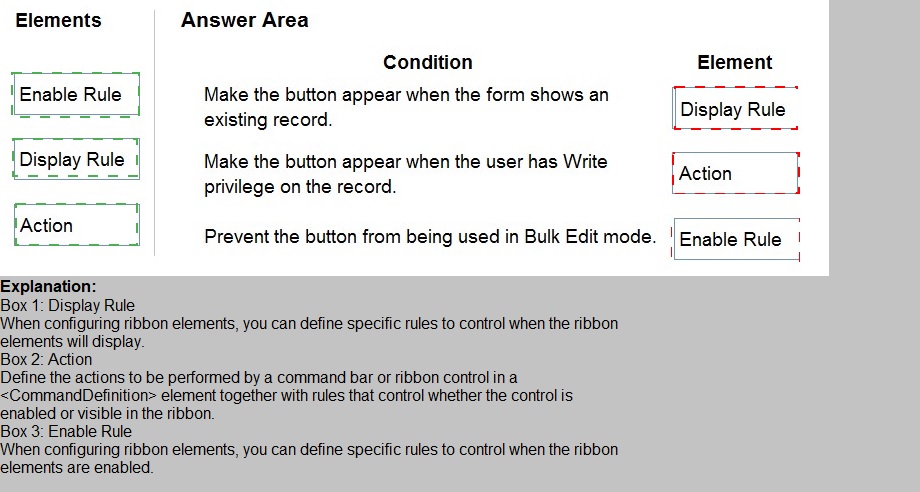
You need to define the CommandDefinition in the RibbonDiffXML to meet the conditions for
the button.
Which elements should you use? To answer, drag the appropriate elements to the correct
conditions. Each element may be used once, more than once, or not at all. You may need
to drag the split bar between panes or scroll to view content.
NOTE: Each correct selection is worth one point.
Explanation:
This question tests your knowledge of ribbon customization in model-driven apps using RibbonDiffXML. The CommandDefinition element contains rules that control when and how a button appears or behaves. Three types of rules are commonly used: Enable Rules (control whether the button is enabled/disabled), Display Rules (control whether the button is visible/hidden), and Actions (define what happens when clicked). The conditions described relate to visibility and enablement states.
Explanation of Correct Options:
Display Rule for "Make the button appear when the form shows an existing record":
Display rules control the visibility of a button on the ribbon. The condition "when the form shows an existing record" determines whether the button should be visible at all. This is a visibility condition, not an enablement condition. If the form is showing a new record, the button should be hidden entirely using a Display Rule with a FormState rule checking for "Existing."
Enable Rule for "Make the button appear when the user has Write privilege on the record":
Despite the wording "appear," this condition actually controls whether the button is enabled or disabled based on user privileges. Enable rules determine if the button can be clicked. If the user lacks Write privilege, the button should be visible but disabled (grayed out). This is implemented with an Enable Rule containing a Privilege rule checking for Write permission.
Enable Rule for "Prevent the button from being used in Bulk Edit mode":
This condition explicitly controls whether the button can be used (clicked) in Bulk Edit mode. The button should be disabled when the form is in Bulk Edit mode, which is implemented using an Enable Rule with an EntityRule checking the context. This ensures the button remains visible but non-functional in that mode.
Why other elements are not used:
Action is not used for any of these conditions because actions define what happens when the button is clicked, not when or how the button appears or behaves. Actions contain command code (JavaScript) that executes upon button click.
Reference:
Define ribbon commands, Command elements and rules, EnableRule and DisplayRule - Microsoft Learn
| Page 2 out of 21 Pages |