Topic 4, Misc. Questions
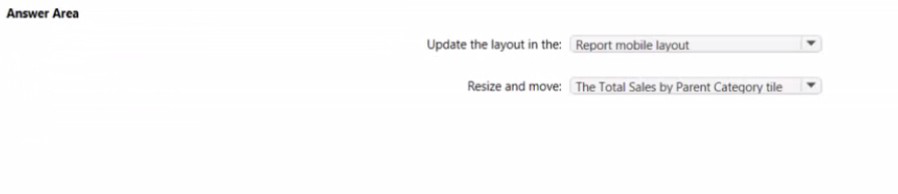
You have the Power Bi dashboard shown in the Dashboard exhibit (Click the Dashboard tab.)
You need to ensure that when users view the dashboard on a mobile device, the dashboard appears as shown in the Mobile exhibit. (Click the Mobile tab.)
What should you do? To answer, select the appropriate options m the answer area.
NOTE: Each correct selection is worth one point.
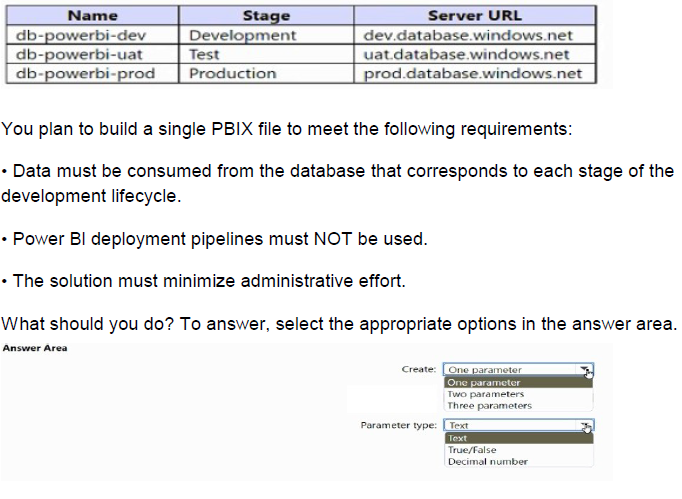
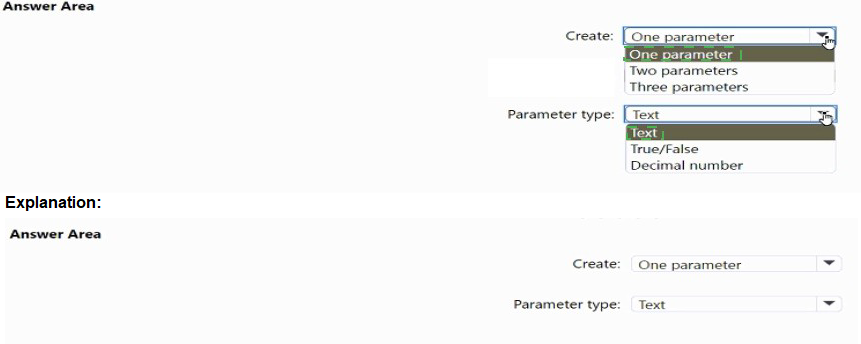
You have the Azure SQL databases shown in the following table.
You have more than 100 published datasets.
Ten of the datasets were verified to meet your corporate quality standards.
You need to ensure that the 10 verified datasets appear at the top of the list of published datasets whenever users search for existing datasets.
What should you do?
A.
Publish the datasets in an app.
B.
Promote the datasets.
C.
Feature the dataset on the home page.
D.
Certify the datasets.
You attempt to connect Purer 81 Desktop to a Cassandra database.
From the Get Data connector list you discover that there is no specific connector for the Cassandra database, You need to select an alternate data connector that will connect to the database.
Which of connector should you choose?
A.
Microsoft SQL Server database
B.
ODBC
C.
OData
D.
OLE DB
ODBC
ou have a Power Bl report that uses row-level security (RLS).
You need to transfer RLS membership maintenance to an Azure network security team.
The solution must NOT provide the Azure network security team with the ability to manage reports, datasets. or dashboards.
What should you do?
A.
Add the Azure network security team as members of the RLS role.
B.
Instruct the Azure network security team to create security groups. Configure RLS to use the groups.
C.
Configure custom instructions for the Request access feature that instructs users to contact the Azure network security team.
D.
Grant the Read and Build permissions for the Power Bl datasets to the Azure network security team.
Instruct the Azure network security team to create security groups. Configure RLS to use the groups.
Explanation: It is common practice that the PBI developer creates RLS groups and instructs the network team to create the corresponding AD roles. Then the developer assigns the AD groups to the RLS groups.
You maintain a Power Bl workspace that contains a supplier quality dashboard. The dashboard contains 10 card visuals, two map visuals and five bar chart visuals.
The dashboard mobile layout is shown in the exhibit. (Click the Exhibit tab.)

You need to modify the dashboard mobile layout to meet the following requirements:
• Only show single-value visuals.
• Minimize scrolling.
What should you do?
A.
Remove the card visual, increase the size of the map and bar chart visuals
B.
Decrease the size of the map and bar chart visuals Move all the card visuals to the top of the layout.
C.
Move the bar chart visuals to the top of the layout Remove the map visuals. Decrease the size of the card visuals.
D.
Decrease the size of the card visuals. Remove the map and bar chart visuals.
Note: This question is part of a series of questions that present the same scenario. Each question in the series contains a unique solution that might meet the stated goals. Some question sets might have more than one correct solution, while others might not have a correct solution.
After you answer a question in this section, you will NOT be able to return to it. As a result, these questions will not appear in the review screen.
From Power Query Editor, you profile the data shown in the following exhibit.

The IoT GUID and IoT ID columns are unique to each row in query.
You need to analyze IoT events by the hour and day of the year. The solution must improve dataset performance.
Solution: You split the loT DateTime column into a column named Date and a column named Time.
Does this meet the goal?
A.
Yes
B.
No
No
You need to create a Power Bl report. The first page or the report must contain the following two views:
* Sales By Postal Code
* Sales by Month
Both views must display a slicer to select a value for a field named Chain.
The Sales By Postal Code view must display a map visual as shown in the following exhibit.
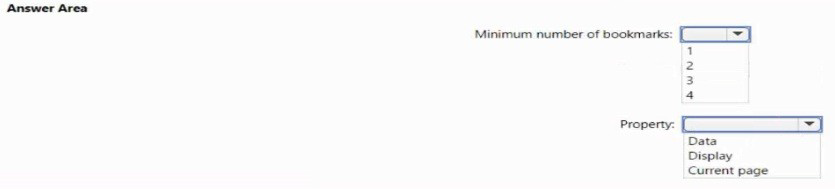
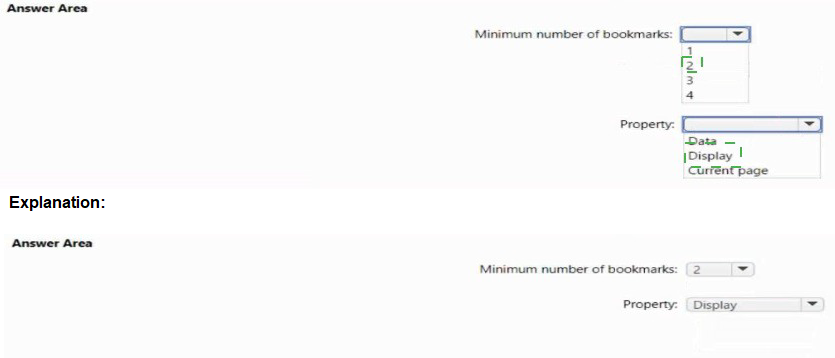
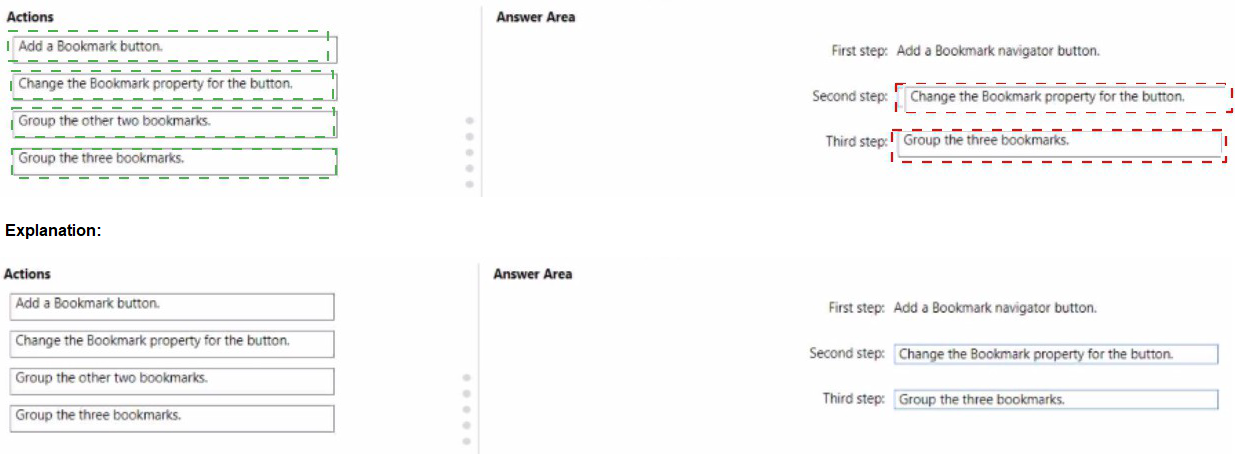
You have a Power Bi report that contains five bookmarks.
You need to add an object to the report from which users can navigate between three specific bookmarks.
How should you complete the task? To answer, drag the appropriate actions to the correct steps, each action may be used once more than once, or not at all. You may need to drag the split bar between panes or scroll lo view content.
NOTE: Each correct selection is worth one point.

A manager can represent only a single country.
You need to use row-level security (RLS) to meet the following requirements:
The managers must only see the data of their respective country.
The number of RLS roles must be minimized.
Which two actions should you perform? Each correct answer presents a complete solution.
NOTE: Each correct selection is worth one point.
A.
Create a single role that filters Country[Manager_Email] by using the USERNAME DAX function.
B.
Create a single role that filters Country[Manager_Email] by using the USEROBJECTID DAX function.
C.
For the relationship between Purchase Detail and Purchase, select Apply security filter in both directions.
D.
Create one role for each country.
E.
For the relationship between Purchase and Purchase Detail, change the Cross filter direction to Single.
Create a single role that filters Country[Manager_Email] by using the USERNAME DAX function.
C.
For the relationship between Purchase Detail and Purchase, select Apply security filter in both directions.
In Power BI Service the username and userprincipalname both return the email address, it's only in Power BI Desktop that username is domain/username rather than the email address. So I agree that userprincipalname is better generally as you always get the same value, the answer is correct and you can use username as your RLS since the role will be applied in the Service. See https://community.powerbi.com/t5/Community-Blog/USERNAME-v-s-USERPRINCIPALNAME-in-RLS-for-Power-BI-Embedded/bap/1867670 for more information.
| Page 7 out of 29 Pages |