A company has a Microsoft 365 subscription that includes Office apps.
A user has identified a new issue while working with an app. When the user attempts to
create a support request, the following message displays:

You need to determine the cause of the error message.
What is the cause?

A.

The user account is disabled.

B.

The user does not have a license assigned for the app.

C.

The user account is not a member of the global admin role.

D.

The company does not have Premier support.

C.   

The user account is not a member of the global admin role.


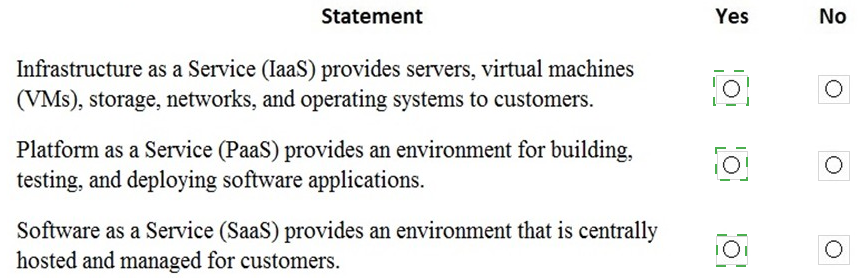
For each of the following statements, select Yes if the statement is true. Otherwise, select
No.
NOTE: Each correct selection is worth one point.

A company plans to deploy Microsoft 365.

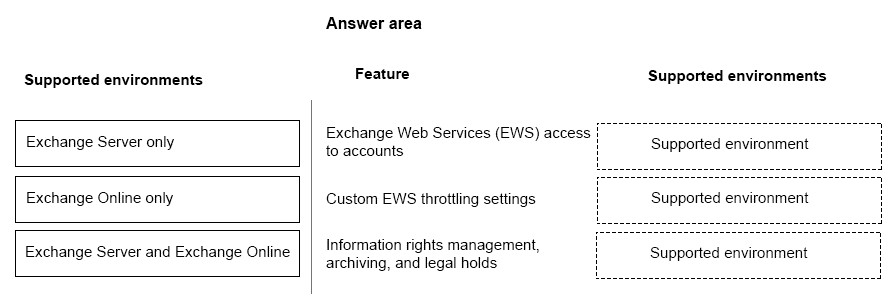
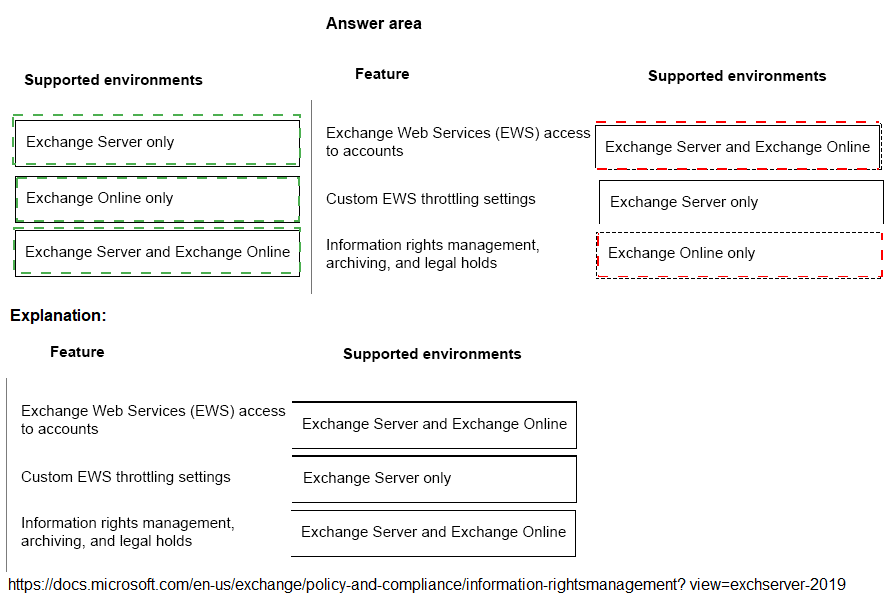
You need to identify differences between the features in Exchange Online and Exchange
Server.
Match the appropriate features to the corresponding supported environments. To answer,
drag the appropriate environments to the correct features. Each environment may be used
once, more than once, or not at all. You may need to drag the split bar between panes or
scroll to view content.
NOTE: Each correct selection is worth one point.
A company plans to deploy Microsoft 365.
You need to identify differences between the features in Exchange Online and Exchange
Server.
Match the appropriate features to the corresponding supported environments. To answer,
drag the appropriate environments to the correct features. Each environment may be used
once, more than once, or not at all. You may need to drag the split bar between panes or
scroll to view content.
NOTE: Each correct selection is worth one point.


A company uses Microsoft cloud services.
You need to change the update channels for the Microsoft 365 Apps for enterprise by using
a Microsoft supported method.
Which two methods can you use? Each correct answer presents a complete solution.
NOTE: Each correct selection is worth one point.

A.

Windows 10 Update Assistant

B.

Group Policy

C.

Client app

D.

Office Deployment Tool

E.

Readiness Toolkit

B.   

Group Policy


D.   

Office Deployment Tool


You are the Microsoft 365 administrator for a company.
You install Microsoft Office 365 ProPlus on five devices. You deactivate one device.
Which task can you perform on the deactivated device?

A.

Print a document

B.

Leave a comment in a document

C.

Start a new document from a template

D.

Set properties on a document

A.   

Print a document


Explanation: References:
https://blogs.technet.microsoft.com/office_resource_kit/2014/01/17/office-365-proplusmultiple-
devices-and-deactivation/
When you deactivate a Microsoft Office 365 ProPlus license, Office 365 ProPlus remains
installed on the computer, but you can only view and print documents. All features for
editing or creating new documents are disabled.
References:
https://docs.microsoft.com/en-us/deployoffice/overview-of-licensing-and-activation-in-office-365-proplus

A company is evaluating Microsoft 365.
You need to recommend a service that meets the company s requirements.
A company can improve employee engagement by allowing employees to create user
posts and share files within an interest group by using Microsoft ________

Values
Yammer
 

A company is moving to Microsoft Azure. Some applications cannot be moved.
You need to identity which application will remain in a hybrid environment after the
migration.
Which applications will remain in a hybrid environment?

A.

applications that manage sensitive information

B.

applications that use a USB token device to control access

C.

legacy applications that use a message based interlace

D.

a new server that runs several line-of business applications

A.   

applications that manage sensitive information


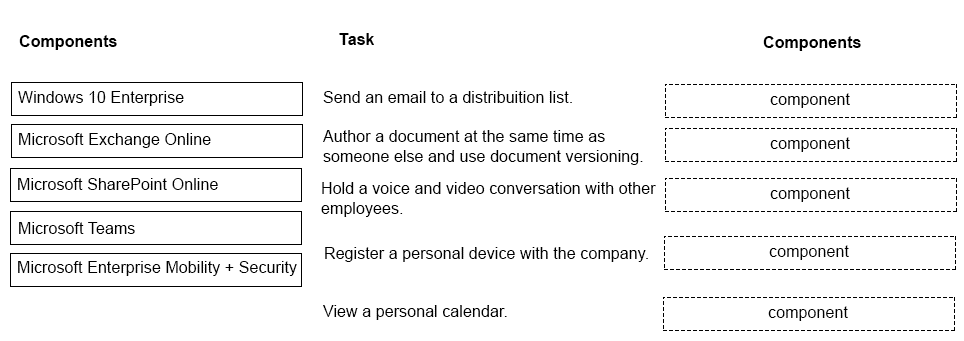
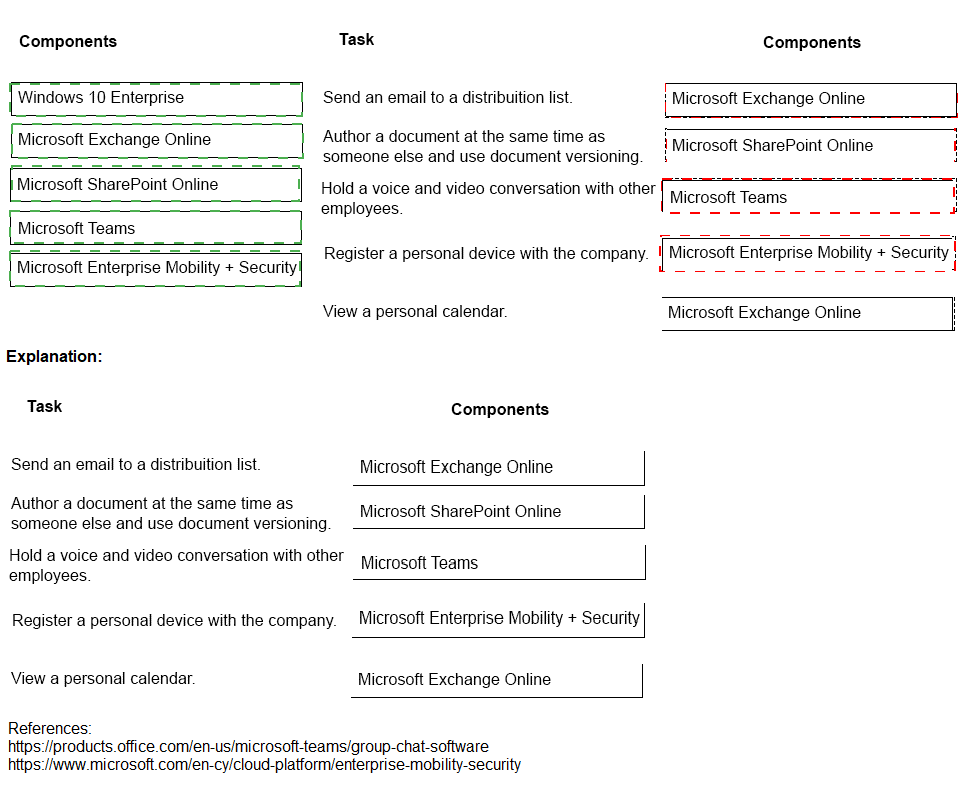
You are the Microsoft 365 administrator for a company.
Which Microsoft 365 components should employees use?
Match each component to its task. To answer, drag the appropriate components from the
column on the left to the tasks on the right. Each component may be used once, more than
once, or not at all.
NOTE: Each correct match is worth one point.


A company has offices in multiple regions. The company has a Microsoft 365 subscription.
The company is developing a line-of-business (LOB) app. The app must meet the following
requirements.
Ensure availability regardless of an employee’s location.
Track the devices on which the app is installed by using Microsoft cloud services.
Minimize costs.
What should you do?

A.

Copy the app to Microsoft OneDrive. Allow employees to download and install the app
from One Drive.

B.

Deploy the app to all devices by using Microsoft Intune

C.

Copy the app to local servers. Allow employees to download and install the app from the
servers.

D.

Deploy the app to all devices by using group policy.

B.   

Deploy the app to all devices by using Microsoft Intune


https://docs.microsoft.com/en-us/mem/intune/apps/apps-windows-10-app-deploy
https://docs.microsoft.com/en-us/mem/intune/apps/apps-monitor

Page 8 out of 31 Pages