You are the Microsoft 365 administrator for a company that uses only on-premises
resources. The company does not have a private cloud.
You need to deploy cloud-based resources for the company that minimizes costs.
Which cloud models should you use? To answer, drag the appropriate cloud models to the
correct requirements. Each cloud model may be used one, more than once, or not at all. You may need to drag the split bar between panes or scroll to view content.
NOTE: Each correct selection is worth one point.

Explanation:
This question requires selecting the appropriate cloud deployment model (private, public, or hybrid) for specific business requirements while minimizing costs. Since the company currently has no private cloud, deploying a private cloud would require significant capital investment. Public cloud offers cost-effective on-demand services, while hybrid combines on-premises with cloud resources. Understanding the characteristics of each model is essential.
Correct Matching:
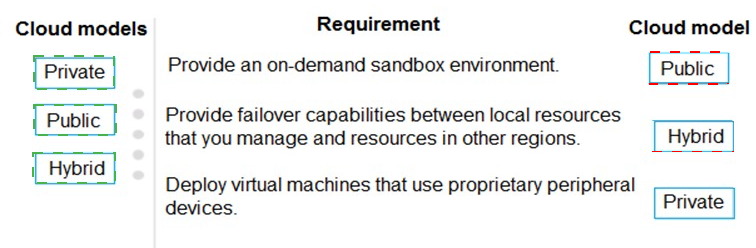
Requirement 1: Provide an on-demand sandbox environment.
Cloud model: Public
A sandbox environment for testing and development is best achieved using public cloud services like Azure. Public cloud offers pay-as-you-go pricing, allowing the company to spin up resources only when needed and delete them afterward, minimizing costs. No upfront infrastructure investment is required.
Requirement 2: Provide failover capabilities between local resources that you manage and resources in other regions.
Cloud model: Hybrid
This requirement describes disaster recovery where on-premises resources fail over to cloud resources in another region. Hybrid cloud connects the existing on-premises environment to public cloud services (like Azure Site Recovery), enabling failover to cloud regions while maintaining local resources. This provides cost-effective disaster recovery without building a second data center.
Requirement 3: Deploy virtual machines that use proprietary peripheral devices.
Cloud model: Private
Proprietary peripheral devices (specialized hardware, USB dongles, legacy hardware) often cannot be virtualized or accessed in public cloud environments. These workloads typically require on-premises infrastructure with direct hardware access. Since the company has no private cloud, this requirement would necessitate building one, which is costly but necessary for proprietary hardware dependencies.
Note:
Public cloud is used once for the sandbox requirement.
Hybrid cloud is used once for failover capabilities.
Private cloud is used once for proprietary peripheral devices.
All three cloud models are used exactly once based on the requirements.
Reference:
What is public cloud?
What is hybrid cloud?
What is private cloud?
Azure disaster recovery solutions
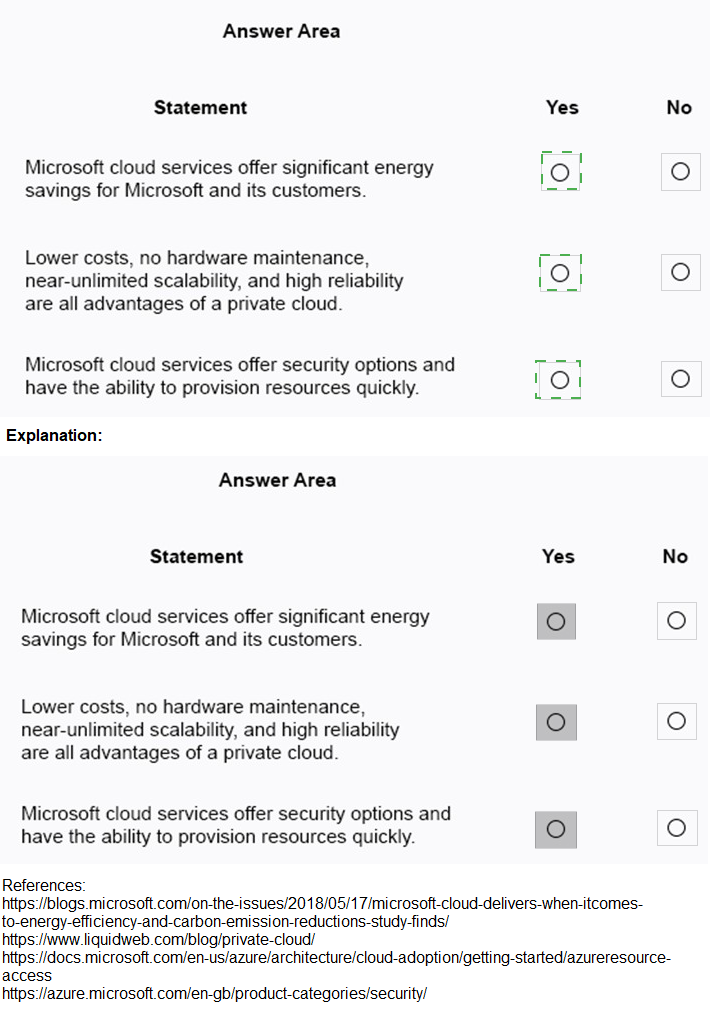
For each of the following statements, select Yes if the statement is true. Otherwise, select No.NOTE: Each correct selection is worth one point.

Explanation:
This question tests knowledge of cloud computing benefits and characteristics, specifically regarding Microsoft's cloud services and cloud deployment models. Understanding the differences between public cloud advantages and private cloud limitations is essential for accurate assessment.
Statement 1: Microsoft cloud services offer significant energy savings for Microsoft and its customers.
Answer: Yes
Microsoft cloud services operate in highly efficient data centers that utilize renewable energy, advanced cooling technologies, and server utilization optimization. This reduces energy consumption per workload compared to traditional on-premises data centers. Customers benefit from Microsoft's sustainability investments and shared efficiency gains.
Statement 2: Lower costs, no hardware maintenance, near-unlimited scalability, and high reliability are all advantages of a private cloud.
Answer: No
These advantages describe public cloud characteristics, not private cloud. Private cloud requires organizations to purchase, maintain, and manage their own hardware, resulting in upfront costs and ongoing maintenance. Near-unlimited scalability and no hardware maintenance are public cloud benefits. Private cloud offers control and customization but not these specific advantages.
Statement 3: Microsoft cloud services offer security options and have the ability to provision resources quickly.
Answer: Yes
Microsoft cloud services include built-in security features such as encryption, identity management, and threat protection, with additional options for enhanced security. Rapid provisioning is a core cloud benefit, allowing resources like virtual machines, storage, and applications to be deployed in minutes through self-service portals.
Reference:
Microsoft sustainability commitment
Public vs private cloud comparison
Microsoft cloud security
Cloud provisioning benefits
Your company has a Microsoft 365 subscription.
You need to implement security policies to ensure that sensitive data is protected.
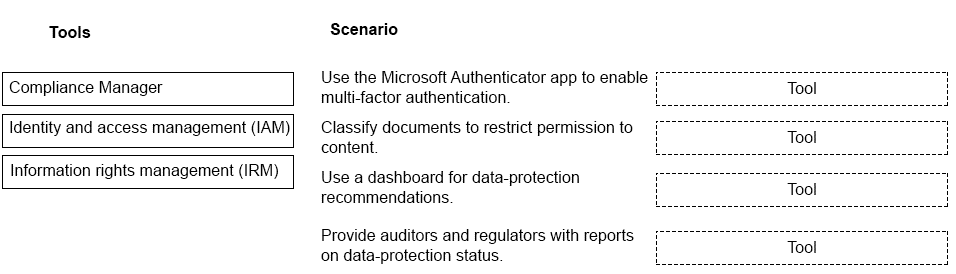
Which tools should you use? To answer, drag the appropriate tools to the correct
scenarios. Each tool may be used once, more than once, or not at all. You may need to drag the split bar between panes or scroll to view content.
NOTE: Each correct selection is worth one point.
Explanation:
This question requires matching Microsoft 365 security and compliance tools to specific scenarios. Each tool serves a distinct purpose: Identity and Access Management (IAM) controls authentication, Information Rights Management (IRM) protects content, and Compliance Manager provides recommendations and reporting. Understanding these distinctions is essential for correct matching.
Correct Matching:
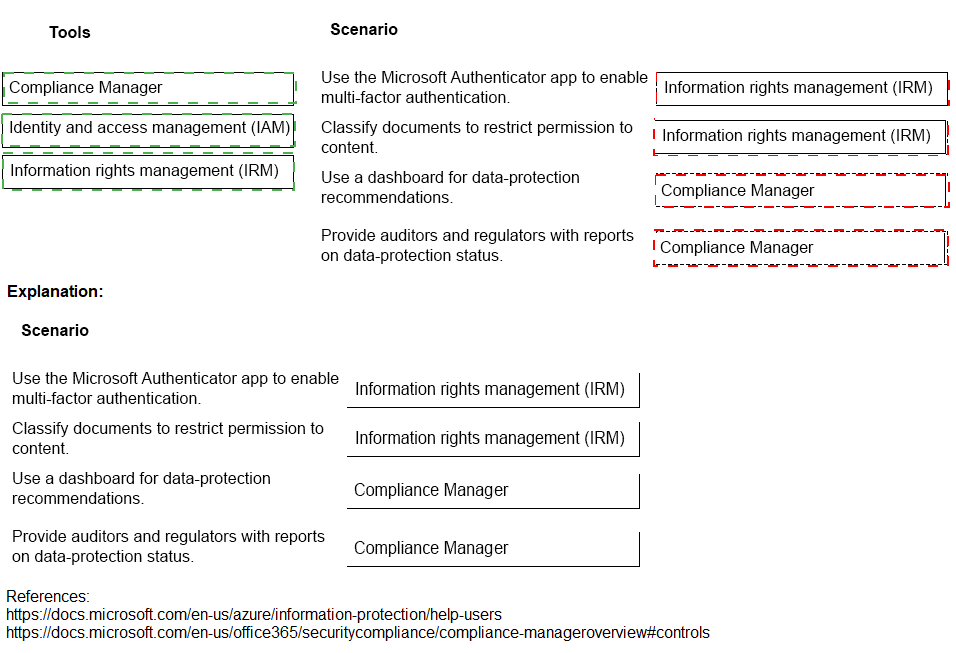
Scenario 1: Use the Microsoft Authenticator app to enable multi-factor authentication.
Tool: Identity and access management (IAM)
IAM encompasses authentication methods including multi-factor authentication (MFA). Microsoft Authenticator is an MFA tool used within Azure AD's IAM framework to verify user identities during sign-in. IAM manages who can access resources and under what conditions, with MFA being a core component.
Scenario 2: Classify documents to restrict permission to content.
Tool: Information rights management (IRM)
IRM protects sensitive content by restricting permissions such as view, edit, print, or forward. When documents are classified with sensitivity labels, IRM applies encryption and usage restrictions that follow the content wherever it goes. This ensures only authorized users can access protected information.
Scenario 3: Use a dashboard for data-protection recommendations.
Tool: Compliance Manager
Compliance Manager provides a dashboard with data-protection recommendations based on regulatory standards and Microsoft best practices. It offers improvement actions, compliance scores, and guidance to help organizations strengthen their data protection posture.
Scenario 4: Provide auditors and regulators with reports on data-protection status.
Tool: Compliance Manager
Compliance Manager generates reports that demonstrate an organization's compliance posture to auditors and regulators. These reports include evidence of implemented controls, improvement actions, and compliance scores across various standards and regulations.
Note:
IAM is used once for MFA scenario.
IRM is used once for document classification scenario.
Compliance Manager is used twice for dashboard recommendations and reporting scenarios.
Reference:
What is Azure AD Identity and Access Management?
Information Rights Management in Microsoft 365
Microsoft Compliance Manager overview
A company is migrating to Microsoft 365.
You need to recommend solutions for the company.
Which Microsoft 365 Apps apps should you use? To answer, drag. the appropriate apps to
the correct features. Each app may be used once, more than once, or not at all. You may
need to drag the split bar between panes or scroll to view content.
NOTE: Each correct selection is worth one point.


Explanation:
This question requires matching Microsoft 365 Apps features to the correct application. The Researcher and bibliography tools are specific to Microsoft Word. Other apps like Excel, PowerPoint, and OneNote do not include this functionality. Understanding which app provides which research and citation features is essential for correct matching.
Correct Matching:
Feature: Provides a service to help you find and incorporate reliable sources and content with automatic bibliography updates.
App: Microsoft Word
Microsoft Word includes the Researcher tool that helps users find reliable sources, quotes, and images from trusted academic websites. It also has a built-in citation manager that automatically generates and updates bibliographies in various styles (APA, MLA, Chicago). This feature is unique to Word and streamlines academic and professional writing.
Note:
Microsoft Excel is not used. Excel is for spreadsheets, data analysis, and calculations. It does not include research or bibliography tools.
Microsoft OneNote is not used. OneNote is a digital notebook for note-taking and organization. It lacks citation management features.
Microsoft PowerPoint is not used. PowerPoint is for presentations and does not include research tools or automatic bibliography generation.
Reference:
Research your paper with Researcher in Word
Add citations in Word
Create a bibliography in Word
A company wants to analyze content by using Microsoft 365 Apps.
You need to describe the connected experiences the company can use.
Which connected experiences should you describe? TO answer, drag the appropriate connected experiences to the correct descriptions. Each connected experience
may be used once, more than once. or not at all. You may need to drag the split bar
between panes or scroll to view content.
NOTE: Each correct selection is worth one point.

Explanation:
This question requires matching connected experiences in Microsoft 365 Apps to their correct descriptions. Connected experiences are cloud-powered features that enhance productivity. Editor provides advanced writing assistance, while Tap (formerly "Ideas" or "Resume Assistant" in some contexts) helps users leverage existing content. Understanding these features is essential for correct matching.
Correct Matching:
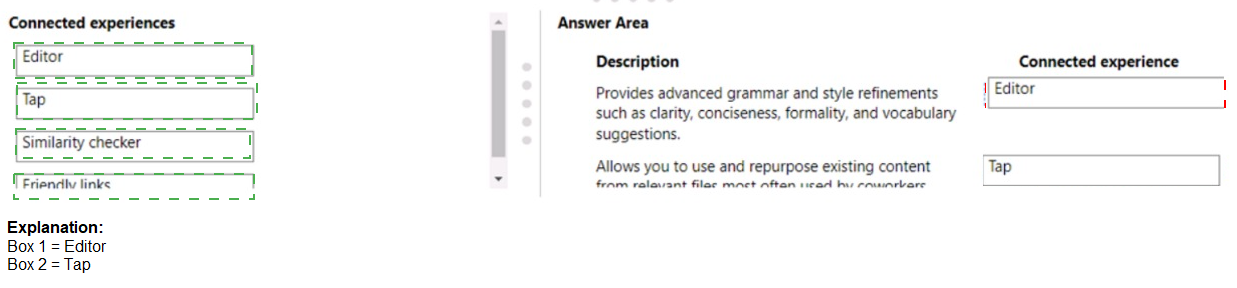
Description 1: Provides advanced grammar and style refinements such as clarity, conciseness, formality, and vocabulary suggestions.
Connected experience: Editor
Microsoft Editor is an AI-powered writing assistant available across Word, Outlook, and browser extensions. It goes beyond basic spell check to offer advanced grammar, style, and clarity suggestions. Editor helps users improve conciseness, formality, and vocabulary choices, making writing more polished and professional.
Description 2: Allows you to use and repurpose existing content from relevant file or text that is used by a contributor.
Connected experience: Tap
Tap (formerly known as "Ideas" in PowerPoint or "Resume Assistant" in Word) helps users discover and incorporate relevant content from existing files or contributors within the organization. It suggests design ideas, relevant content, or similar documents to help users build upon existing work efficiently.
Note:
Similarity checker is not used. This feature in Word checks documents against online sources to detect plagiarism or similarities. It does not provide grammar refinements or help repurpose existing organizational content.
Friendly links is not used. This feature converts URLs into readable, shareable link titles with metadata. It is unrelated to writing assistance or content repurposing.
Reference:
Microsoft Editor documentation
Use Designer in PowerPoint
Similarity checker in Word
Friendly links in Word
Instructions: For each of the following statements, select Yes if the statement is true.
Otherwise, select No.
NOTE: Each correct selection is worth one point.
Explanation:
The Microsoft 365 Roadmap is the official source for upcoming releases, updates, and features across Microsoft 365 services. It covers productivity apps, security, compliance, and management tools within the Microsoft 365 ecosystem. Understanding what is included versus excluded helps set accurate expectations for feature planning.
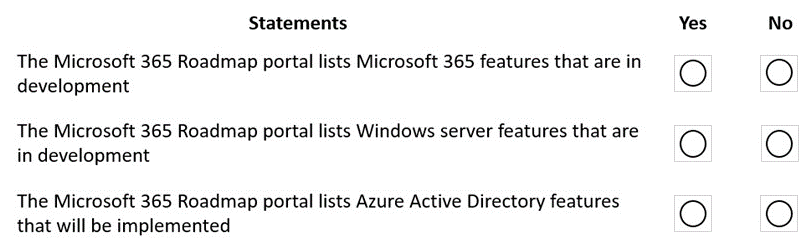
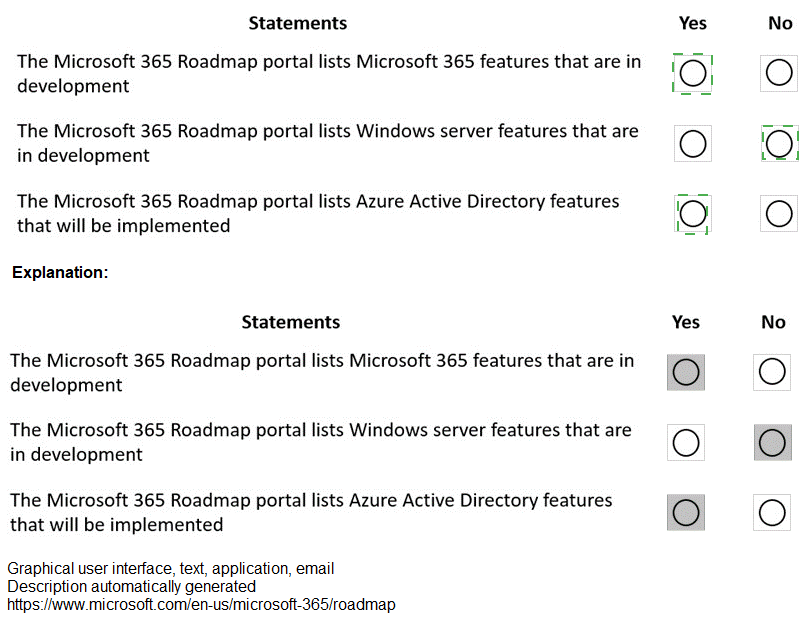
Statement 1: The Microsoft 365 Roadmap portal lists Microsoft 365 features that are in development.
Answer: Yes
The Microsoft 365 Roadmap provides visibility into features currently in development, rolling out, or recently launched for Microsoft 365 services. It includes details on expected release dates, product areas, and deployment stages. This helps administrators and users plan for upcoming capabilities.
Statement 2: The Microsoft 365 Roadmap portal lists Windows server features that are in development.
Answer: No
The Microsoft 365 Roadmap focuses exclusively on Microsoft 365 services such as Teams, Exchange Online, SharePoint, and security/compliance features. Windows Server updates and features are documented through separate channels like the Windows Server release health dashboard or Windows IT Pro Blog.
Statement 3: The Microsoft 365 Roadmap portal lists Azure Active Directory features that will be implemented.
Answer: Yes
Azure Active Directory is a core component of Microsoft 365 identity and access management. Many Azure AD features that impact Microsoft 365 services are listed in the Microsoft 365 Roadmap. However, Azure AD features specific to Azure infrastructure may also appear in the Azure updates channel.
Reference:
Microsoft 365 Roadmap
Microsoft 365 Roadmap FAQ
Azure Active Directory what's new
Windows Server release health
You are the Microsoft 365 administrator for a company.
You identify the following requirements:
Explanation:
This question requires matching department requirements to the appropriate Microsoft 365 subscription licenses. Microsoft 365 F1 is for frontline workers with limited needs, E3 provides core productivity with desktop apps, and E5 adds advanced security, compliance, and audio conferencing. Understanding the feature sets of each license type is essential for correct matching.
Correct Matching:
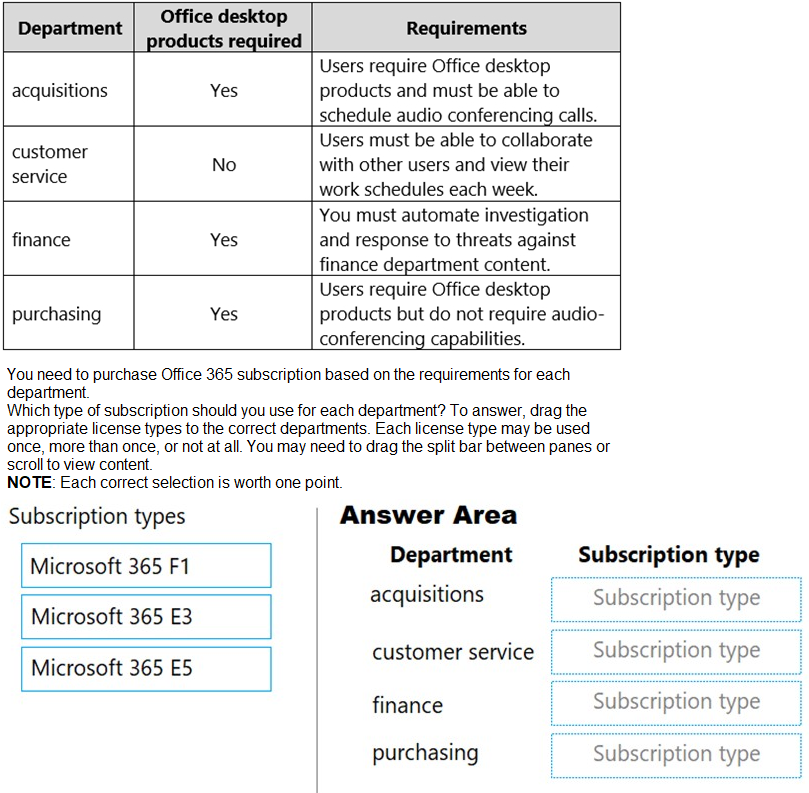
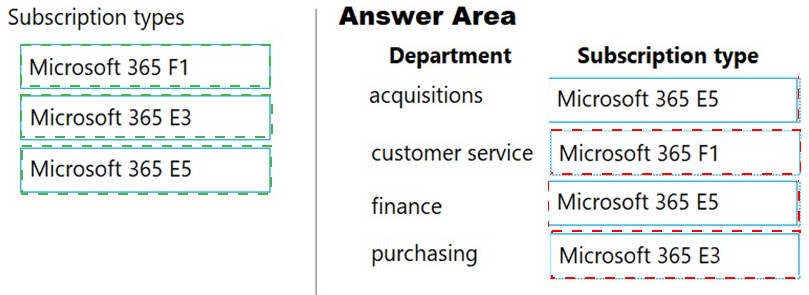
Department: acquisitions
Requirements: Users require Office desktop products and must be able to schedule audio conferencing calls.
Subscription type: Microsoft 365 E5
Microsoft 365 E5 includes desktop versions of Office apps and adds advanced features like audio conferencing for meetings. Audio conferencing is not included in E3 by default, making E5 the appropriate choice for this requirement.
Department: customer service
Requirements: Users must be able to collaborate with other users and view their work schedules each week.
Subscription type: Microsoft 365 F1
Microsoft 365 F1 is designed for frontline workers who need collaboration tools (Teams, SharePoint) and schedule management (Shifts app) but do not require desktop Office apps. This meets the customer service department's needs without paying for unnecessary features.
Department: finance
Requirements: You must automate investigation and response to threats against finance department content.
Subscription type: Microsoft 365 E5
Microsoft 365 E5 includes advanced security features such as Microsoft Defender for Office 365, Insider Risk Management, and automated investigation and response capabilities. These are essential for protecting sensitive finance department content with automated threat remediation.
Department: purchasing
Requirements: Users require Office desktop products but do not require audio-conferencing capabilities.
Subscription type: Microsoft 365 E3
Microsoft 365 E3 provides desktop versions of Office apps along with core security and compliance features. It does not include audio conferencing by default, making it the cost-effective choice for users who need desktop apps without advanced meeting capabilities.
Note:
Microsoft 365 E5 is used twice (acquisitions and finance).
Microsoft 365 E3 is used once (purchasing).
Microsoft 365 F1 is used once (customer service).
All subscription types are used at least once.
Reference:
Microsoft 365 F1 overview
Microsoft 365 E3 overview
Microsoft 365 E5 overview
Audio Conferencing in Microsoft 365
Instructions: For each of the following statements, select Yes if the statement is true.
Otherwise, select No.
NOTE: Each correct selection is worth one point.

Explanation:
This question tests foundational knowledge of Microsoft Dynamics 365 and its relationship to Microsoft 365. Dynamics 365 is a Software as a Service (SaaS) solution for enterprise resource planning (ERP) and customer relationship management (CRM). Understanding licensing, integration, and service models is essential for accurate assessment.
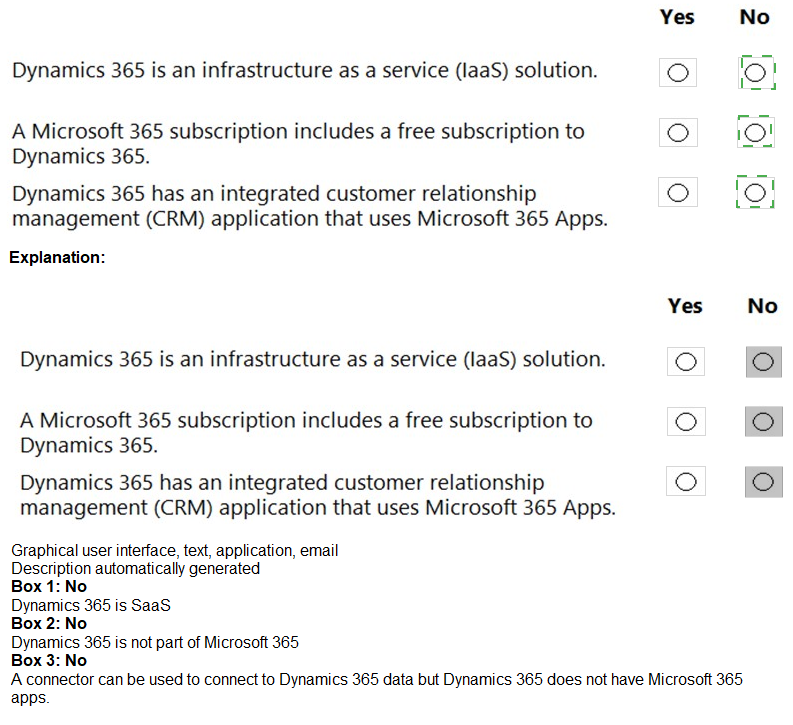
Statement 1: Dynamics 365 is an infrastructure as a service (IaaS) solution.
Answer: No
Dynamics 365 is a Software as a Service (SaaS) solution, not IaaS. It provides ready-to-use business applications for CRM and ERP that run on Microsoft's cloud infrastructure. Customers access the software without managing underlying servers, operating systems, or middleware, which is characteristic of SaaS.
Statement 2: A Microsoft 365 subscription includes a free subscription to Dynamics 365.
Answer: No
Microsoft 365 and Dynamics 365 are separate product families with independent licensing. Microsoft 365 subscriptions do not include free access to Dynamics 365 applications. While they integrate together, each requires its own license purchase. Some bundles may offer discounts, but not free inclusion.
Statement 3: Dynamics 365 has an integrated customer relationship management (CRM) application that uses Microsoft 365 Apps.
Answer: Yes
Dynamics 365 includes CRM capabilities (Dynamics 365 Sales, Customer Service, Marketing) that integrate with Microsoft 365 Apps. Users can access Dynamics 365 data within Outlook, Excel, and Teams. For example, Dynamics 365 App for Outlook allows users to view CRM records and track emails directly in Outlook.
Reference:
What is Dynamics 365?
Dynamics 365 licensing guide
Dynamics 365 and Microsoft 365 integration
| Page 3 out of 31 Pages |