A company uses Microsoft 365.
The company wants to improve their compliance score based on Microsoft
recommendations.
You need to identify the task that has the largest impact to the compliance score.
Which task should you choose?

A. Preventative mandatory

B. Corrective discretionary

C. Corrective mandatory

D. Detective discretionary

A.   Preventative mandatory

Explanation:
The Microsoft Compliance Manager uses a point system to calculate a compliance score based on improvement actions. Each action is categorized by impact (high, medium, low) and implementation type (preventative, detective, corrective) along with mandatory or discretionary status. Preventative mandatory actions carry the largest point value because they actively stop non-compliance before it occurs and are required by regulations.

Correct Option:

A - Preventative mandatory
Preventative controls are designed to prevent non-compliant activities from happening, such as data loss prevention policies or access restrictions. Mandatory actions are those required by regulations or standards. The combination of preventative and mandatory receives the highest impact rating in Compliance Manager because it provides the strongest protection and is essential for meeting compliance requirements.

Incorrect Option:

B - Corrective discretionary
Corrective actions fix issues after they occur, such as remediation workflows. Discretionary actions are recommended but not required by regulations. These have lower impact scores because they are reactive rather than proactive and are optional for compliance.

C - Corrective mandatory
While mandatory corrective actions are required by regulations, they are reactive in nature—addressing issues after they have already happened. Preventative actions are valued higher because they stop non-compliance before it occurs, reducing risk more effectively.

D - Detective discretionary
Detective actions identify non-compliance after it happens, such as audit alerts. Discretionary actions are optional recommendations. This combination has the lowest impact because it only detects issues without preventing them and is not required by regulations.

Reference:
Compliance Manager overview

Understanding compliance score calculation

Improvement actions in Compliance Manager

A company uses Microsoft 36S.
The company requires that you implement least privileged access.
You need to recommend solutions that meet the requirements.
Which two solutions should you recommend? Each correct answer presents a complete
solution.
NOTE: Each correct selection is worth one point.

A. Device compliance

B. IP address range restrictions

C. Just-in-time (JIT) access

D. Privileged Access Workstations (PAW) devices

C.   Just-in-time (JIT) access
D.   Privileged Access Workstations (PAW) devices

Explanation:
Least privileged access means granting users only the permissions necessary to perform their tasks and no more. This reduces the risk of excessive privileges being exploited. Two key Microsoft solutions that directly enforce least privilege are Just-in-Time (JIT) access, which grants temporary elevated permissions, and Privileged Access Workstations (PAW), which provide dedicated secure devices for administrative tasks.

Correct Option:

C - Just-in-time (JIT) access
JIT access is a feature of Microsoft Defender for Identity and Privileged Identity Management (PIM) in Azure AD. It allows administrators to request temporary elevation of privileges for specific tasks, which are automatically revoked after a defined period. This ensures users do not have standing administrative rights, directly implementing least privilege.

D - Privileged Access Workstations (PAW) devices
PAWs are hardened, dedicated devices used only for administrative tasks. They isolate sensitive accounts from everyday productivity work and potential threats like phishing or web attacks. By restricting administrative access to these secure workstations, PAWs support least privilege by limiting where privileged actions can be performed.

Incorrect Option:

A - Device compliance
Device compliance policies ensure devices meet security requirements (encryption, patch levels) before accessing resources. While this improves security, it does not directly control user privilege levels or enforce least privileged access to administrative functions.

B - IP address range restrictions
IP restrictions limit access to resources based on network location. This provides network-level security but does not address the principle of least privilege for user permissions. Users could still have excessive standing privileges regardless of their IP address.

Reference:
What is Privileged Identity Management?

Privileged Access Workstations

Least privileged access in Microsoft 365

A company uses Microsoft 365.

You need to assign licenses to users.

Which two portals can you use? Each correct answer presents a complete solution.

NOTE: Each correct selection is worth one point.

A. Azure Active Directory admin center

B. Microsoft Compliance Manager

C. Microsoft 365 admin center

D. Security & Compliance Center

A.   Azure Active Directory admin center
C.   Microsoft 365 admin center

Explanation:
Microsoft 365 licenses can be assigned through multiple administrative portals. The two primary portals for license assignment are the Microsoft 365 admin center and the Azure Active Directory admin center. Both provide interfaces for managing user licenses, though they may offer different additional capabilities. Other portals like Compliance Manager and Security & Compliance Center focus on compliance and security policies rather than license management.

Correct Option:

A - Azure Active Directory admin center
The Azure AD admin center (portal.azure.com) allows administrators to manage user licenses through the Azure Active Directory section. Under Users, you can select individual users or groups and assign Microsoft 365 licenses directly. This portal is useful for organizations already managing identities in Azure AD.

C - Microsoft 365 admin center
The Microsoft 365 admin center (admin.microsoft.com) is the primary portal for managing Microsoft 365 subscriptions, users, and licenses. Administrators can assign licenses to individual users or bulk assign licenses through the Billing or Users sections. It provides the most comprehensive license management experience for Microsoft 365.

Incorrect Option:

B - Microsoft Compliance Manager
Compliance Manager is a tool within Microsoft Purview for managing compliance activities, tracking improvement actions, and calculating compliance scores. It does not have any functionality for assigning or managing user licenses.

D - Security & Compliance Center
The Security & Compliance Center (protection.office.com) is used for managing security policies, threat management, data governance, and compliance features. It does not provide license assignment capabilities for users.

Reference:
Assign licenses in Microsoft 365 admin center

Assign licenses in Azure AD

Microsoft 365 admin center overview

Your company uses Microsoft 365 services. instructions: For each of the following statements, select Yes if the statement is true
Otherwise, select No.
NOTE: Each correct selection is worth one point

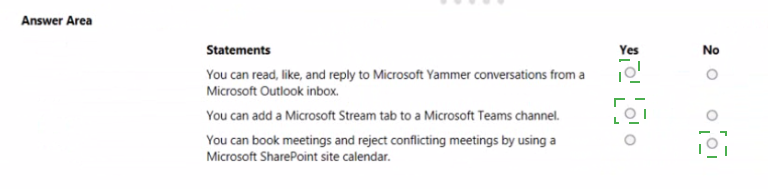


Explanation:
This question tests knowledge of integrations between Microsoft 365 services. You need to determine whether specific cross-platform capabilities exist between Yammer and Outlook, Stream and Teams, and SharePoint calendars and meeting booking. Understanding which services integrate and how they function is essential for accurate assessment.

Statement 1: You can read, like, and reply to Microsoft Yammer conversations from a Microsoft Outlook inbox.

Answer: Yes
The Yammer Outlook add-in allows users to interact with Yammer conversations directly from Outlook. When enabled, users can read, like, and reply to Yammer discussions without leaving their email inbox. This integration helps users stay connected with Yammer communities while working in Outlook.

Statement 2: You can add a Microsoft Stream tab to a Microsoft Teams channel.

Answer: Yes
Microsoft Teams allows users to add tabs for various services, including Microsoft Stream. By adding a Stream tab to a Teams channel, team members can access and share videos directly within the channel. This integration brings video content into the collaboration workspace.

Statement 3: You can book meetings and reject conflicting meetings by using a Microsoft SharePoint site calendar.

Answer: No
SharePoint site calendars are primarily for tracking team events, deadlines, and schedules. They do not function as personal calendars for booking meetings or automatically rejecting conflicting meetings. Meeting booking with conflict checking requires Exchange Online calendars or Outlook, which have scheduling assistant capabilities. SharePoint calendars lack this functionality.

Reference:
Yammer and Outlook integration

Add a Stream tab to Teams

SharePoint calendar overview

A company plans to use Microsoft 365. The company needs to determine licensing costs.
Instructions: For each of the following statements, select Yes if the statement is true.
Otherwise, select No.
NOTE: Each correct selection is worth one point.
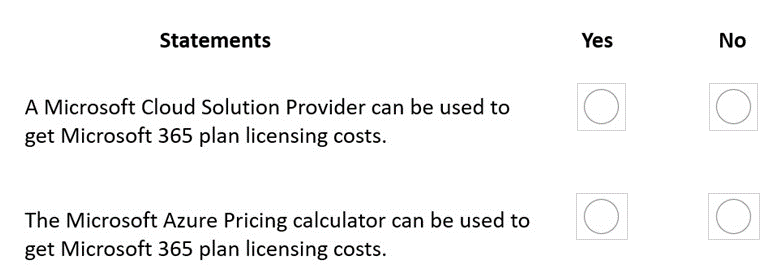
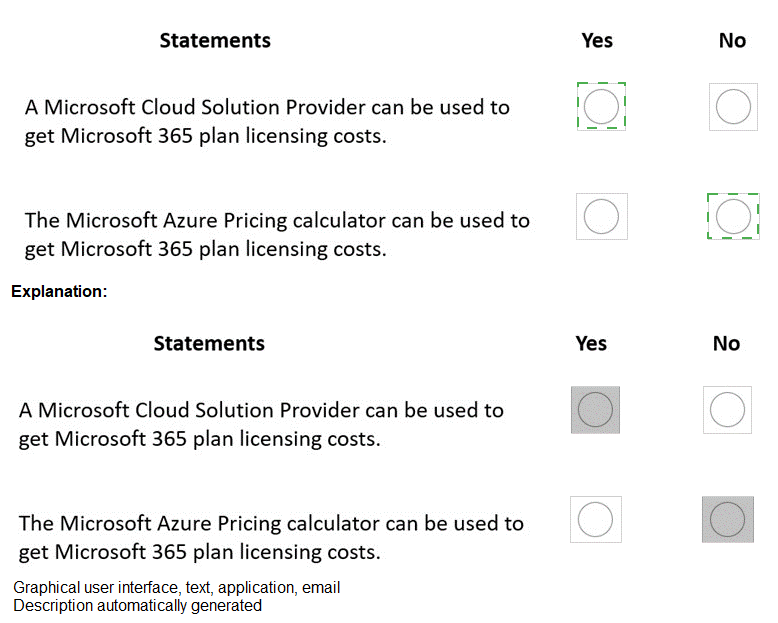


Explanation:
This question tests knowledge of which sources can provide Microsoft 365 licensing cost information. Cloud Solution Providers (CSPs) can quote actual pricing based on agreements, while the Azure Pricing Calculator is designed for Azure services, not Microsoft 365 plans. Understanding the distinction between these tools and channels is essential.

Statement 1: A Microsoft Cloud Solution Provider can be used to get Microsoft 365 plan licensing costs.

Answer: Yes
Microsoft Cloud Solution Providers (CSPs) are authorized partners who sell Microsoft subscriptions, including Microsoft 365 plans. They provide customers with pricing quotes, licensing advice, and billing support. CSPs can offer both standard and customized pricing based on customer agreements and volume discounts.

Statement 2: The Microsoft Azure Pricing calculator can be used to get Microsoft 365 plan licensing costs.

Answer: No
The Azure Pricing Calculator is specifically designed to estimate costs for Azure cloud services such as virtual machines, storage, and databases. Microsoft 365 licensing costs are estimated using the Microsoft 365 pricing calculator or by viewing pricing on the Microsoft 365 product pages. The Azure Pricing Calculator does not include Microsoft 365 plans.

Reference:
Find a Cloud Solution Provider

Microsoft 365 pricing

Azure Pricing Calculator

For each of the following statements, select Yes if the statement is true. Otherwise, select No.
NOTE: Each correct selection is worth one point.
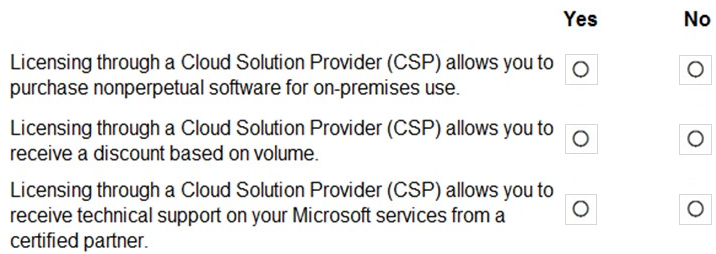


Explanation:
This question tests understanding of Cloud Solution Provider (CSP) licensing benefits. CSP is a Microsoft partner program that allows partners to resell Microsoft cloud services and provide value-added services. The statements cover software licensing types, discount structures, and support offerings available through CSP.

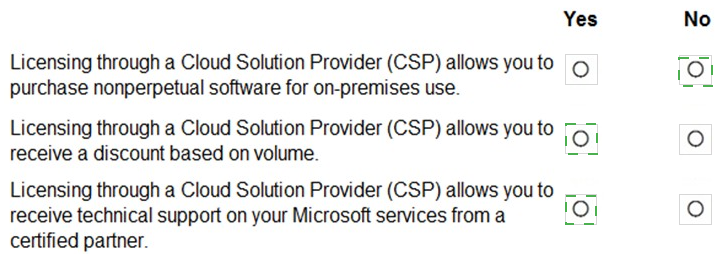
Statement 1: Licensing through a Cloud Solution Provider (CSP) allows you to purchase nonperpetual software for on-premises use.

Answer: Yes
CSP supports purchasing subscription-based software for on-premises use through programs like Software Subscriptions. This allows customers to license products such as Windows 10/11 Enterprise or Microsoft 365 Apps on a pay-as-you-go basis without owning perpetual licenses. The software is nonperpetual and requires ongoing subscription payments.

Statement 2: Licensing through a Cloud Solution Provider (CSP) allows you to receive a discount based on volume.

Answer: Yes
CSP partners can offer tiered pricing and volume discounts to their customers. Microsoft provides CSP partners with pricing tables that include different discount levels based on customer commitment, seat count, or contract duration. Customers can negotiate discounted rates directly with their CSP partner.

Statement 3: Licensing through a Cloud Solution Provider (CSP) allows you to receive technical support on your Microsoft services from a certified partner.

Answer: Yes
CSP partners are required to provide first-line technical support to their customers. This includes troubleshooting, issue resolution, and escalation to Microsoft if needed. Partners must maintain certified support staff and offer support in accordance with Microsoft's CSP program requirements. This provides customers with localized, personalized support.

Reference:
Cloud Solution Provider program overview

CSP software subscription licensing

CSP partner support responsibilities

Your company has a Microsoft Office 365 subscription.
You need to co-author files with other users.
Which tool should you use?

A. Microsoft SharePoint Online

B. Microsoft Skype for Business Online

C. Microsoft Office Delve

D. Microsoft Exchange Online

A.   Microsoft SharePoint Online

Explanation:
Co-authoring is the ability for multiple users to work on the same document simultaneously. Microsoft 365 supports co-authoring across several applications, but it requires files to be stored in a cloud location that supports real-time collaboration. SharePoint Online and OneDrive for Business provide this storage and sync capability for Word, Excel, and PowerPoint files.

Correct Option:

A - Microsoft SharePoint Online
SharePoint Online enables co-authoring by storing documents in the cloud where multiple users can open and edit files at the same time. When files are saved in SharePoint document libraries, changes are merged in real-time, and users can see each other's edits. SharePoint integrates with Microsoft 365 apps to provide this collaborative experience.

Incorrect Option:

B - Microsoft Skype for Business Online
Skype for Business Online is a communication tool for instant messaging, audio/video calls, and online meetings. It does not provide document storage or co-authoring capabilities. While users can share screens during meetings, simultaneous document editing is not a feature of Skype for Business.

C - Microsoft Office Delve
Delve is a discovery and profile tool that surfaces relevant documents and content based on your work patterns and relationships. It helps users find information but does not provide editing or co-authoring capabilities. Delve is for content discovery, not collaboration on files.

D - Microsoft Exchange Online
Exchange Online is an email, calendar, and contacts solution. It does not include document storage or file collaboration features. While attachments can be shared via email, co-authoring requires cloud storage with real-time editing capabilities, which Exchange Online does not provide.

Reference:
Collaborate on documents in SharePoint

Co-authoring in Microsoft 365

What is SharePoint?

You add a comment to a Word document that includes the @ sign and a user’s name.
Instructions: For each of the following statements, select Yes if the statement is true.
Otherwise, select No.
NOTE: Each correct selection is worth one point.


Explanation:
The @mention feature in Microsoft 365 documents allows users to notify colleagues and assign actions within comments. When you use @mention in a Word document stored in OneDrive or SharePoint, the mentioned user receives an email notification with specific information and links. Understanding the exact behavior of these notifications is important for collaboration workflows.

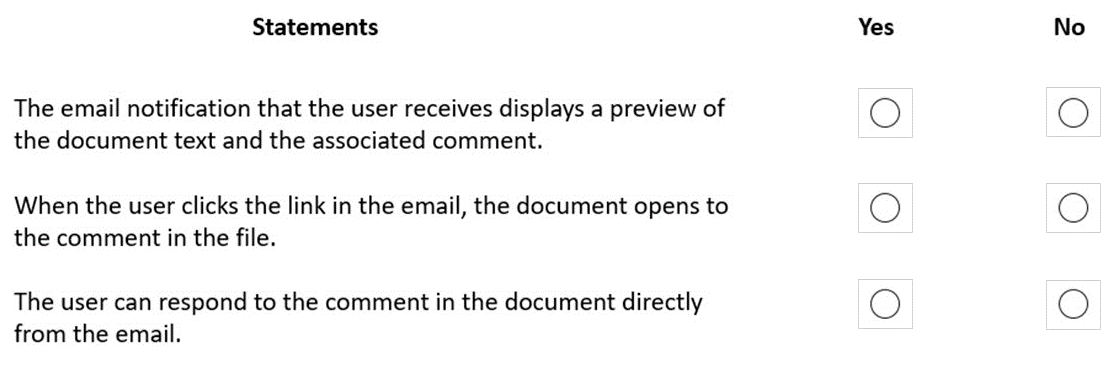
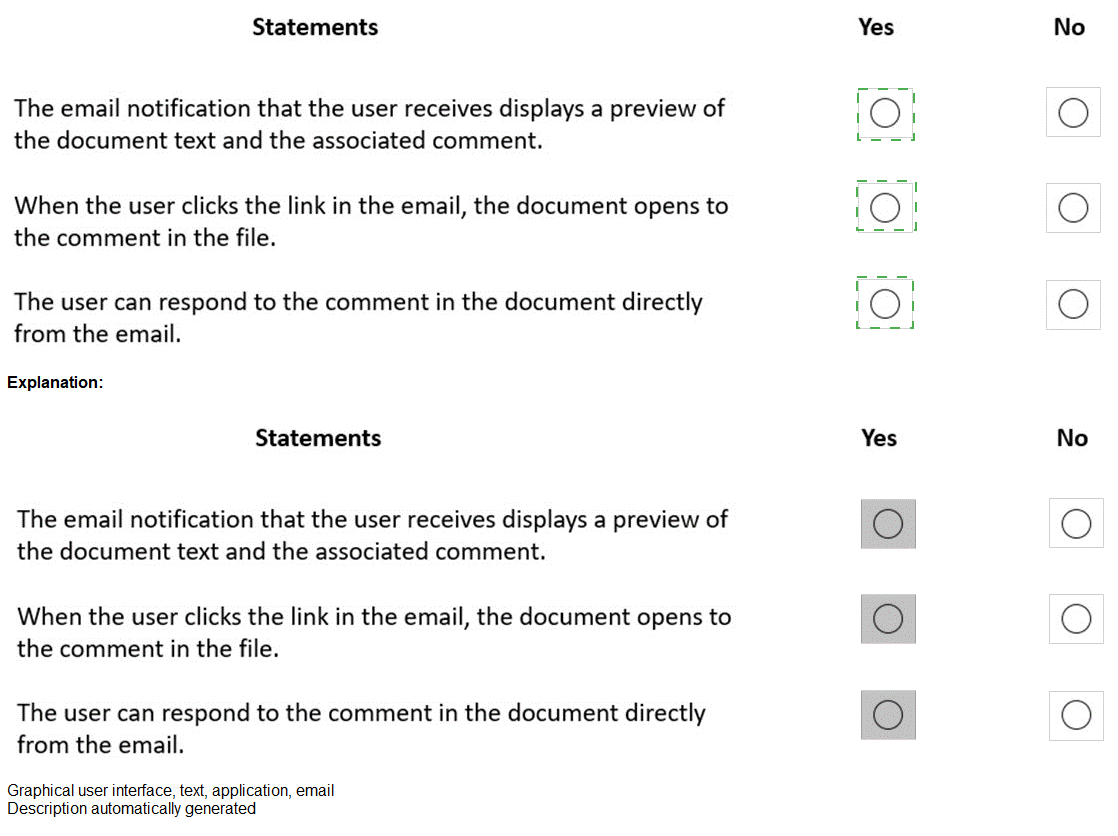
Statement 1: The email notification that the user receives displays a preview of the document text and the associated comment.

Answer: Yes
When a user is @mentioned in a Word document comment, the email notification includes a preview of the document content surrounding the comment, along with the full comment text. This gives the recipient context without needing to open the document immediately.

Statement 2: When the user clicks the link in the email, the document opens to the comment in the file.

Answer: Yes
The email notification contains a deep link that opens the document directly to the location of the comment. In Word Online or the desktop app, the document loads with the comment highlighted and visible, allowing the user to respond or resolve the mention efficiently.

Statement 3: The user can respond to the comment in the document directly from the email.

Answer: No
Email notifications for @mentions are informational only. They do not contain reply fields or comment boxes. To respond to the comment, the user must click the link to open the document and reply within the file. Email notifications do not support direct replies back to the comment thread.

Reference:
Use @mentions in comments

Get notified when you're @mentioned

Collaborate with comments in Word

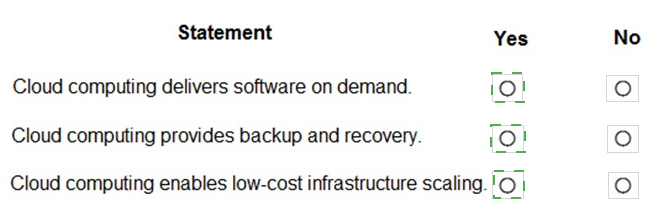
For each of the following statements, select Yes if the statement is true. Otherwise, select No.
NOTE: Each correct selection is worth one point.


Explanation:
This question tests foundational knowledge of cloud computing characteristics. Cloud computing is defined by on-demand self-service, broad network access, resource pooling, rapid elasticity, and measured service. The statements reflect common benefits and capabilities of cloud computing models (IaaS, PaaS, SaaS).

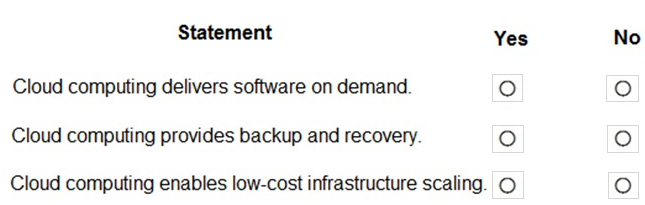
Statement 1: Cloud computing delivers software on demand.

Answer: Yes
Software as a Service (SaaS) is a cloud computing model where applications are delivered on-demand over the internet. Users can access software like Microsoft 365 without installing or maintaining it locally. The cloud provider handles updates, infrastructure, and availability, making software available whenever needed.

Statement 2: Cloud computing provides backup and recovery.

Answer: Yes
Cloud providers include data backup, disaster recovery, and redundancy as part of their services. Data stored in the cloud is automatically replicated across multiple locations, protecting against hardware failures or outages. Many cloud services also offer point-in-time recovery and versioning capabilities.

Statement 3: Cloud computing enables low-cost infrastructure scaling.

Answer: Yes
Cloud computing uses a pay-as-you-go model, allowing organizations to scale resources up or down based on demand. This eliminates the need for large upfront capital investments in hardware. Infrastructure elasticity ensures you only pay for what you use, making scaling more cost-effective than traditional on-premises models.

Reference:
What is cloud computing?

Benefits of cloud computing

Cloud service models

A company plans to purchase Microsoft 365 Enterprise licenses.
Which two options can you use? Each correct answer presents a complete solution.
NOTE: Each correct selection is worth one point.

A. through a Cloud Solution Provider (CSP)

B. from the Microsoft website using a corporate credit card

C. from the Microsoft retail store

D. with an Enterprise Agreement (EA) subscription from Microsoft

A.   through a Cloud Solution Provider (CSP)
D.   with an Enterprise Agreement (EA) subscription from Microsoft

Explanation:
Microsoft 365 Enterprise licenses are designed for large organizations and are available through specific purchasing channels. Unlike small business plans that can be purchased directly from the Microsoft website or retail stores, Enterprise plans require volume licensing agreements or authorized partner channels. Understanding these enterprise purchasing options is essential for proper procurement.

Correct Option:

A - through a Cloud Solution Provider (CSP)
CSP partners can sell Microsoft 365 Enterprise plans to organizations of all sizes. They provide licensing, billing, and support services under the CSP program. This is a valid purchasing channel for Enterprise subscriptions, offering flexibility in payment terms and partner-managed services.

D - with an Enterprise Agreement (EA) subscription from Microsoft
Enterprise Agreement (EA) is a volume licensing program for organizations with 500+ users. It provides customized enterprise-wide licensing, including Microsoft 365 Enterprise plans, with options for three-year commitments and optimized pricing. EA is a primary channel for large organizations purchasing Microsoft 365 Enterprise.

Incorrect Option:

B - from the Microsoft website using a corporate credit card
The Microsoft website direct purchase option is available for Microsoft 365 Business plans (Business Basic, Business Standard, Business Premium) but not for Enterprise plans (E3, E5). Enterprise plans require volume licensing agreements or CSP purchases and cannot be bought directly with a credit card from the public website.

C - from the Microsoft retail store
Microsoft retail stores sell consumer products, devices, and small business software licenses. They do not sell Microsoft 365 Enterprise volume licenses, which require enterprise agreements or CSP partners. Retail purchases are limited to small business and consumer plans.

Reference:
Microsoft 365 Enterprise purchasing options

Cloud Solution Provider program

Enterprise Agreement overview

Page 2 out of 31 Pages