Topic 5, Misc. Questions

You have a Microsoft 365 F5 subscription.
You plan to deploy 100 new Windows 10 devices.
You need to order the appropriate version of Windows 10 for the new devices. The version must Meet the following requirements.
Be serviced for a minimum of 24 moths.
Support Microsoft Application Virtualization (App-V)
Which version should you identify?

A.

Window 10 Pro, version 1909

B.

Window 10 Pro, version 2004

C.

Window 10 Pro, version 1909

D.

Window 10 Enterprise, version 2004

D.   

Window 10 Enterprise, version 2004


Reference:
https://docs.microsoft.com/en-us/windows/release-health/release-information
https://docs.microsoft.com/en-us/windows/application-management/app-v/appv-supportedconfigurations

You have a Microsoft 365 E5 tenant that contains 100 Windows 10 devices.
You plan to deploy a Windows 10 Security Baseline profile that will protect secrets stored in memory.
What should you configure in the profile?

A.

Microsoft Defender Credential Guard

B.

BitLocker Drive Encryption (BitLocker)

C.

Microsoft Defender

D.

Microsoft Defender Exploit Guard

A.   

Microsoft Defender Credential Guard


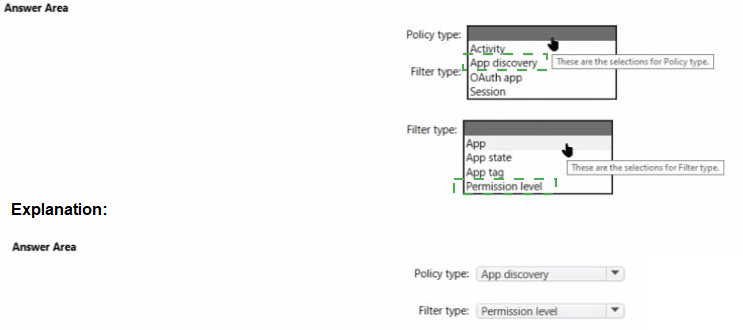
You have a Microsoft 365 E5 subscription that uses Microsoft Defender for Cloud Apps. You need to create a policy that will generate an email alert when a banned app is detected requesting permission to access user information or data in the subscription. What should you configure? To answer, select the appropriate options in the answer area.

NOTE: Each correct selection is worth one point.


You have a Microsoft 365 tenant that contains two groups named Group1 and Group2.
You need to prevent the members or Group1 from communicating with the members of Group2 by using Microsoft Teams. The solution must comply with regulatory requirements and must not affect other user in the tenant.
What should you use?

A.

information barriers

B.

communication compliance policies

C.

moderated distribution groups

D.

administrator units in Azure Active Directory (Azure AD)

A.   

information barriers


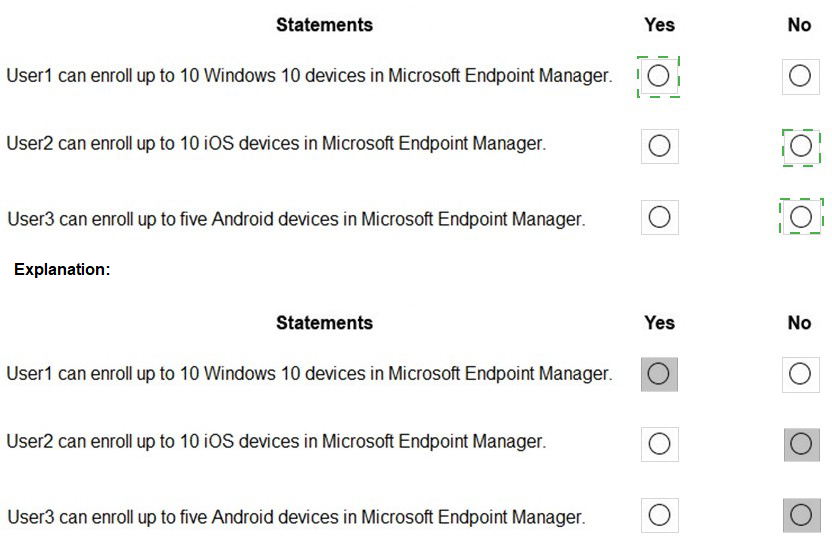
You have a Microsoft 365 subscription that contains the users in the following table.


Note: This question is part of a series of questions that present the same scenario.

Each question in the series contains a unique solution that might meet the stated goals. Some question sets might have more than one correct solution, while others might not have a correct solution.

After you answer a question in this section, you will NOT be able to return to it. As a result, these questions will not appear in the review screen. Your network contains an on-premises Active Directory domain named contoso.com. The domain contains the users shown in the following table.
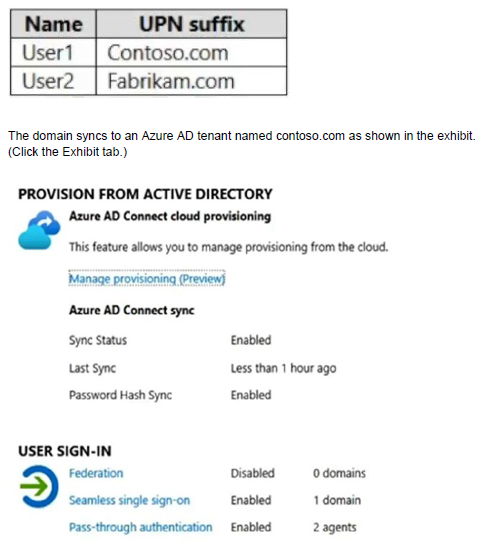
User2 fails to authenticate to Azure AD when signing in as user2@fabrikam.com.
You need to ensure that User2 can access the resources in Azure AD.
Solution: From the Microsoft Entra admin center, you assign User2 the Security Reader role. You instruct User2 to sign in as user2@contoso.com.
Does this meet the goal?

A.

Yes

B.

No

B.   

No


Explanation:
This is not a permissions issue so you do not need to assign the Security Reader role.
The on-premises Active Directory domain is named contoso.com. User2 could sign on as user2@contoso.com but you would first need to change the UPN of User2 to user2@contoso.com.

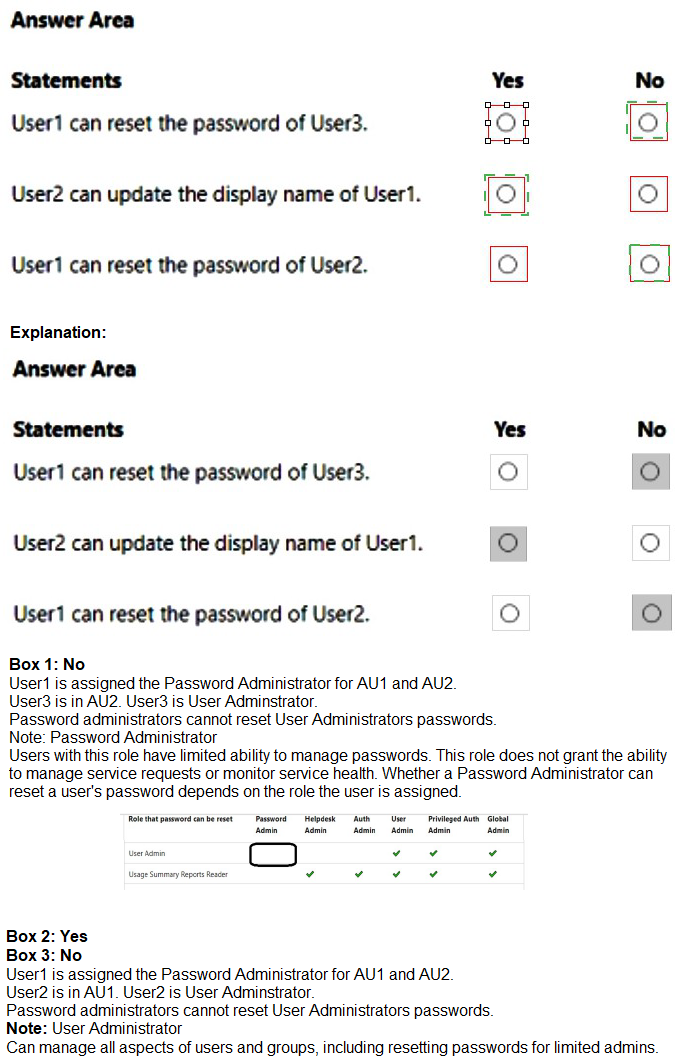
You have an Azure AD tenant that contains the administrative units shown in the following table.


You have a Microsoft 365 subscription.
You configure a new Azure AD enterprise application named App1. App1 requires that a user be assigned the Reports Reader role.
Which type of group should you use to assign the Reports Reader role and to access App1?


A.

a Microsoft 365 group that has assigned membership

B.

a Microsoft 365 group that has dynamic user membership

C.

a security group that has assigned membership

D.

a security group that has dynamic user membership

C.   

a security group that has assigned membership


Explanation:
To grant permissions to assignees to manage users and group access for a specific enterprise app, go to that app in Azure AD and open in the Roles and Administrators list for that app. Select the new custom role and complete the user or group assignment. The assignees can manage users and group access only for the specific app.

Note: You can add the following types of groups:
Assigned groups - Manually add users or devices into a static group.
Dynamic groups (Requires Azure AD Premium) - Automatically add users or devices to user groups or device groups based on an expression you create.

Note:
Security groups
Security groups are used for granting access to Microsoft 365 resources, such as SharePoint. They can make administration easier because you need only administer the group rather than adding users to each resource individually. Security groups can contain users or devices. Creating a security group for devices can be used with mobile device management services, such as Intune. Security groups can be configured for dynamic membership in Azure Active Directory, allowing group members or devices to be added or removed automatically based on user attributes such as department, location, or title; or device attributes such as operating system version.

Security groups can be added to a team.
Microsoft 365 Groups can't be members of security groups.

Microsoft 365 Groups
Microsoft 365 Groups are used for collaboration between users, both inside and outside your company. With each Microsoft 365 Group, members get a group email and shared workspace for conversations, files, and calendar events, Stream, and a Planner.

Reference:
https://learn.microsoft.com/en-us/azure/active-directory/roles/custom-enterprise-apps
https://learn.microsoft.com/en-us/microsoft-365/admin/create-groups/compare-groups?
https://learn.microsoft.com/en-us/mem/intune/apps/apps-deploy

You have a Microsoft 365 E5 subscription that contains the users shown in the following table.


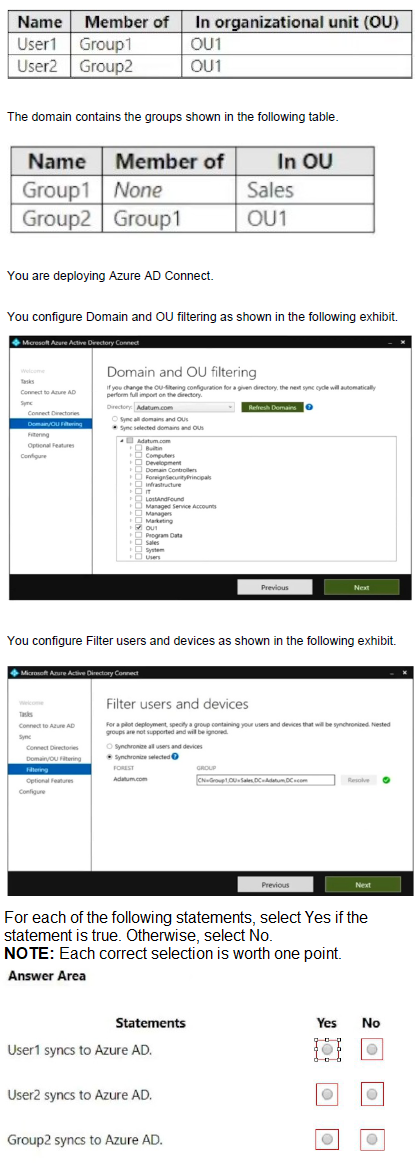
Your network contains an on-premises Active Directory domain and a Microsoft 365 subscription.
The domain contains the users shown in the following table.


Page 8 out of 31 Pages