Topic 5, Misc. Questions
You have a Microsoft 365 E5 subscription that uses Microsoft Defender for Office 365. You have the policies shown in the following table.
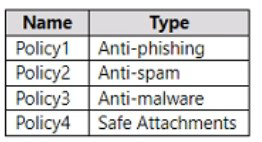
All the policies are configured to send malicious email messages to quarantine. Which policies support a customized quarantine retention period?
A.
Policy1 and Policy2 only
B.
Policy2 and Policy4 only
C.
Policy3 and Policy4 only
D.
Policy1 and Policy3 only
Policy1 and Policy2 only
You have a Microsoft 365 tenant that contains the groups shown in the following table.
You plan to create a compliance policy named Compliance1.
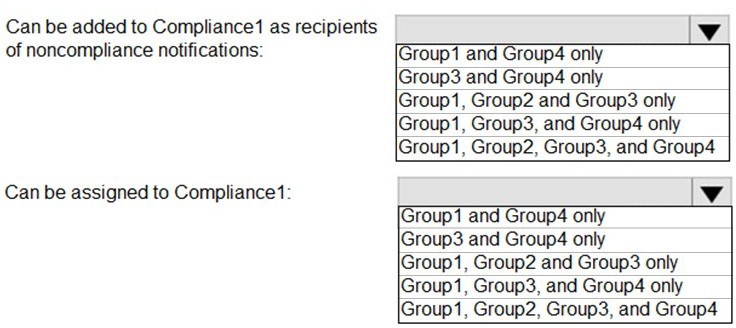
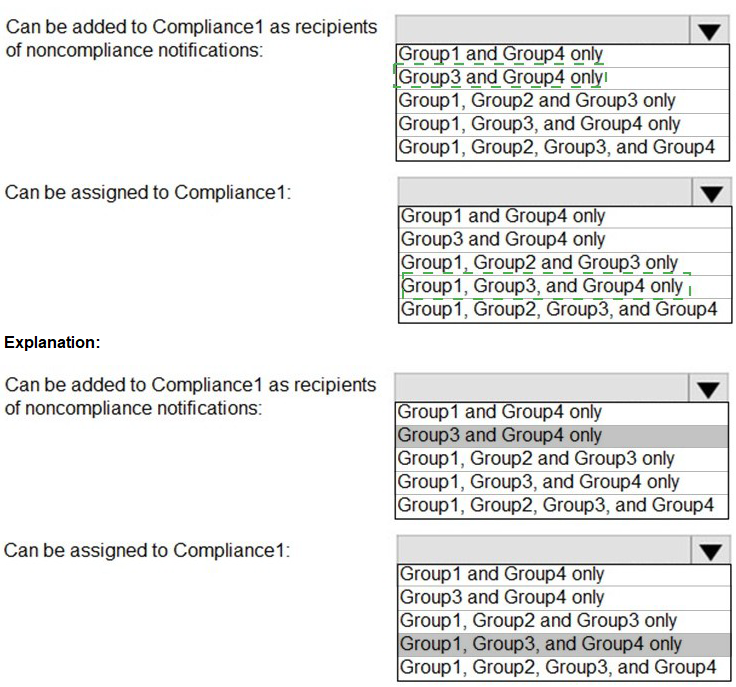
You need to identify the groups that meet the following requirements:
Can be added to Compliance1 as recipients of noncompliance notifications
Can be assigned to Compliance1
To answer, select the appropriate options in the answer area.
NOTE: Each correct selection is worth one point.
Your company has a Microsoft 365 subscription. You need to identify all the users in the subscription who are licensed for Office 365 through a group membership. The solution must include the name of the group used to assign the license. What should you use?
A.
Active users in the Microsoft 365 admin center
B.
Reports in Microsoft Purview compliance portal
C.
the Licenses blade in the Microsoft Entra admin center
D.
Reports in the Microsoft 365 admin center
Reports in the Microsoft 365 admin center
Microsoft 365 Reports in the admin center
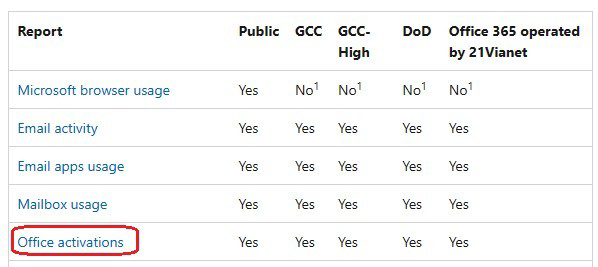
You can easily see how people in your business are using Microsoft 365 services. For example, you can identify who is using a service a lot and reaching quotas, or who may not need a Microsoft 365 license at all.
Which activity reports are available in the admin center. Depending on your subscription, here are the available reports in all environments.
You have a Microsoft 365 subscription that contains the users shown in the following table.

You have a Microsoft 365 tenant that contains two users named User1 and User2. You create the alert policy shown in the following exhibit.

User2 runs a script that modifies a file in a Microsoft SharePoint Online library once every four minutes and runs for a period of two hours.
How many alerts will User1 receive?
A.
2
B.
5
C.
10
D.
25
25
You have a Microsoft 365 E5 subscription that contains the resources shown in the following table.
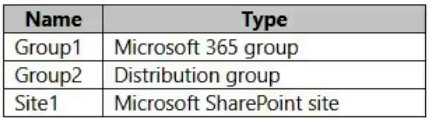
You create a sensitivity label named Label1.
To which resource can you apply Label1?
A.
Group1 only
B.
Group2 only
C.
Sitel only
D.
Groupl and Group2 only
E.
Group1, Group2, and Sitel
Group1, Group2, and Sitel
Explanation:
Assign sensitivity labels to Microsoft 365 groups in Azure Active Directory. Azure Active Directory (Azure AD), part of Microsoft Entra, supports applying sensitivity labels published by the Microsoft Purview compliance portal to Microsoft 365 groups.
In addition to using sensitivity labels to protect documents and emails, you can also use sensitivity labels to protect content in the following containers: Microsoft Teams sites, Microsoft 365 groups (formerly Office 365 groups), and SharePoint sites.
When you configure a label policy, you can:
Choose which users and groups see the labels. Labels can be published to any specific user or email-enabled security group, distribution group, or Microsoft 365 group (which can have dynamic membership) in Azure AD.
Reference:
https://learn.microsoft.com/en-us/microsoft-365/compliance/sensitivity-labels-teamsgroups-sites
https://learn.microsoft.com/en-us/microsoft-365/compliance/sensitivity-labels?view=o365-worldwide
| Page 7 out of 31 Pages |