Topic 5, Misc. Questions
Note: This question is part of a series of questions that present the same scenario.
Each question in the series contains a unique solution that might meet the stated goals. Some question sets might have more than one correct solution, while others might not have a correct solution.
After you answer a question in this section, you will NOT be able to return to it. As a result, these questions will not appear in the review screen.
You have a Microsoft 365 subscription.
From the Microsoft 365 Defender, you create a role group named US eDiscovery Managers by copying the eDiscovery Manager role group.
You need to ensure that the users in the new role group can only perform content searches of mailbox content for users in the United States.
Solution: From the Microsoft 365 Defender, you modify the roles of the US eDiscovery Managers role group.
Does this meet the goal?
A.
Yes
B.
No
No
You have a Microsoft 365 subscription that contains the domains shown in the following exhibit.
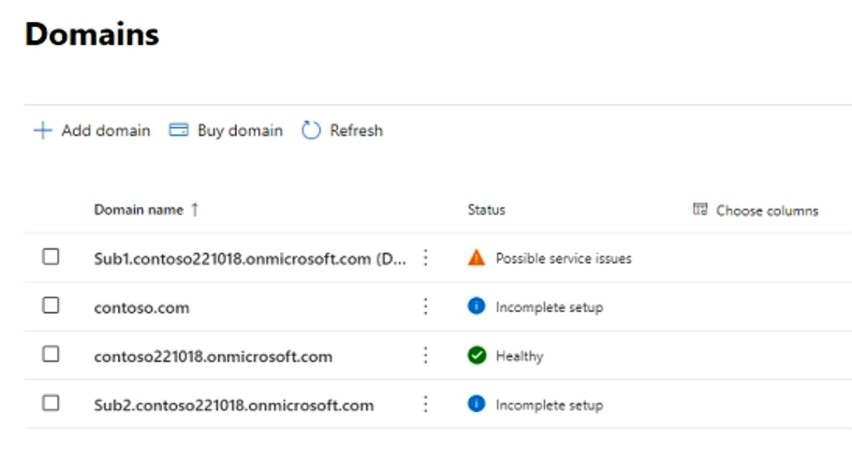
Which domain name suffixes can you use when you create users?
A.
only Sub1.contoso221018.onmicrosoft.com
B.
onlycontoso.com and Sub2.contoso221018.onmicrosoft.com
C.
onlvcontoso221018.onmicrosoft.com, Sub.contoso221018.onmicrosoft.com, and
Sub2.contoso221018.onmicrosoft.com
D.
all the domains in the subscription
onlycontoso.com and Sub2.contoso221018.onmicrosoft.com
You have a Microsoft 365 E5 subscription that uses Microsoft Defender for Endpoint.
When users attempt to access the portal of a partner company, they receive the message shown in the following exhibit.
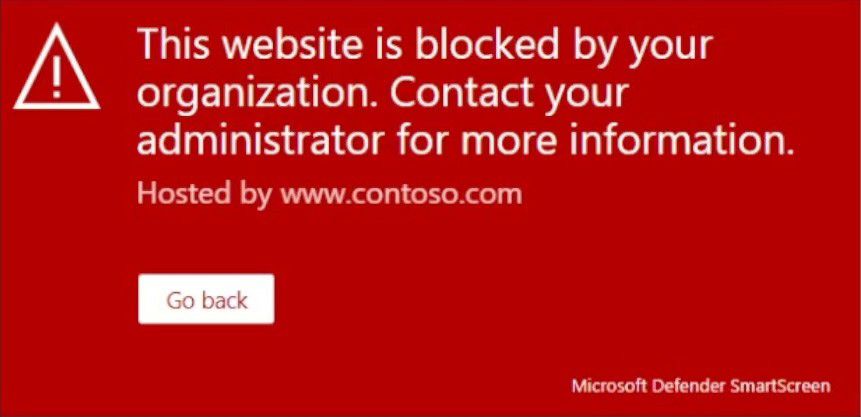
You need to enable user access to the partner company's portal.
Which Microsoft Defender for Endpoint setting should you modify?
A.
Alert notifications
B.
Alert suppression
C.
Custom detections
D.
Advanced hunting
E.
Indicators
Indicators
You have a Microsoft 365 tenant that contains 1,000 Windows 10 devices. The devices are enrolled in Microsoft Intune.
Company policy requires that the devices have the following configurations:
Require complex passwords.
Require the encryption of removable data storage devices.
Have Microsoft Defender Antivirus real-time protection enabled.
You need to configure the devices to meet the requirements.
What should you use?
A.
an app configuration policy
B.
a compliance policy
C.
a security baseline profile
D.
a conditional access policy
a compliance policy
You have a Microsoft 365 E5 subscription that has Microsoft Defender for Endpoint integrated with Microsoft Endpoint Manager.
Devices are onboarded by using Microsoft Defender for Endpoint.
You plan to block devices based on the results of the machine risk score calculated by Microsoft Defender for Endpoint.
What should you create first?
A.
a device configuration policy
B.
a device compliance policy
C.
a conditional access policy
D.
an endpoint detection and response policy
a device compliance policy
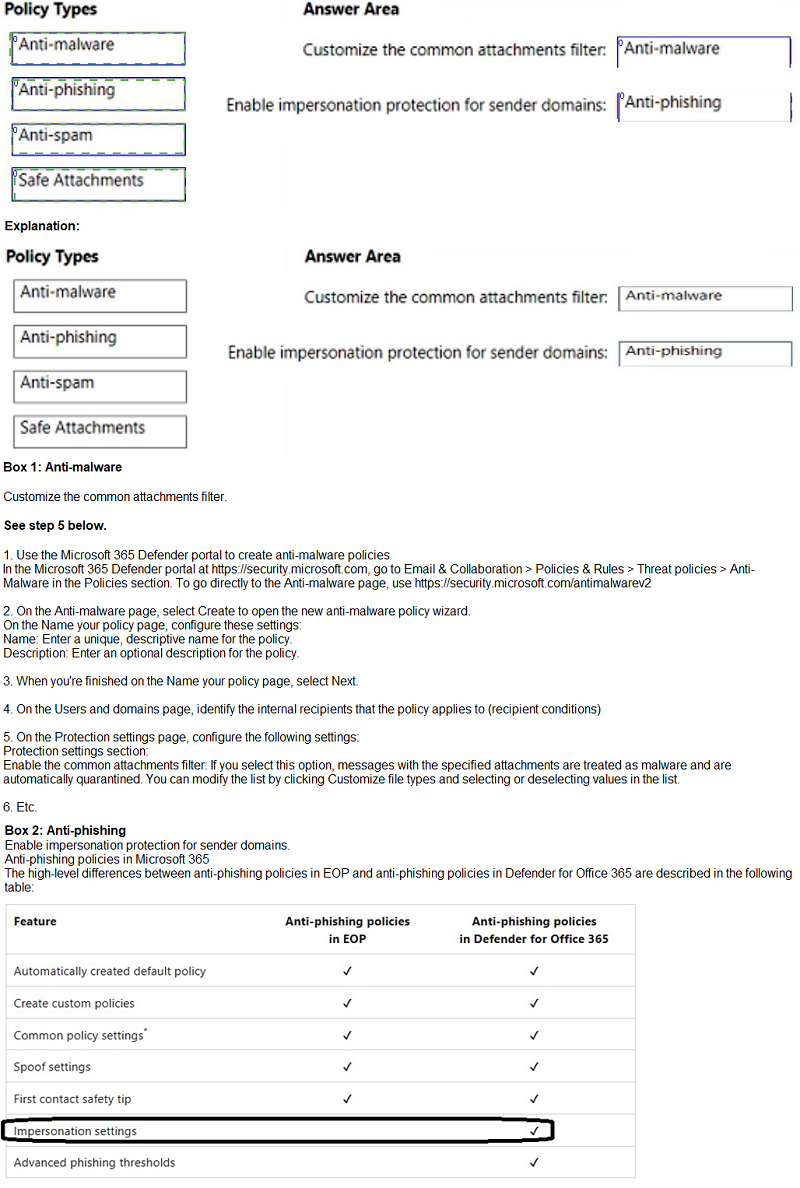
You have a Microsoft 365 subscription that uses Microsoft Defender for Office 365.
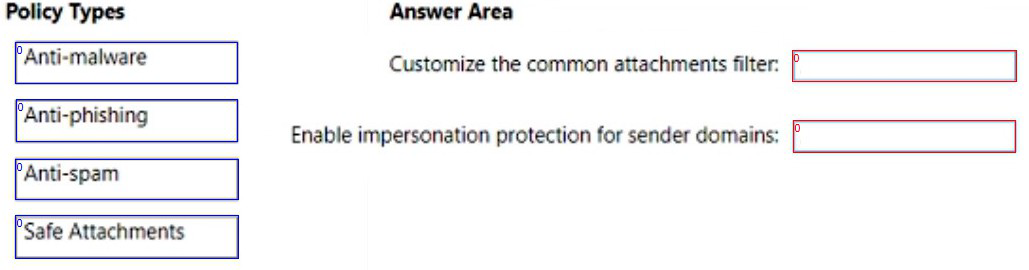
You need to configure policies to meet the following requirements:
Customize the common attachments filter.
Enable impersonation protection for sender domains.
Which type of policy should you configure for each requirement? To answer, drag the appropriate policy types to the correct requirements. Each policy type may be used once, more than once, or not at all. You may need to drag the split bar between panes or scroll to view content.
NOTE: Each correct selection is worth one point.
You have a Microsoft 365 E5 subscription.
Users access Microsoft 365 from both their laptop and a corporate Virtual Desktop Infrastructure (VDI) solution. From Azure AD Identity Protection, you enable a sign-in risk policy.
Users report that when they use the VDI solution, they are regularly blocked when they attempt to access Microsoft 365.
What should you configure?
A.
the Tenant restrictions settings in Azure AD
B.
a trusted location
C.
a Conditional Access policy exclusion
D.
the Microsoft 365 network connectivity settings
a trusted location
Explanation:
There are two types of risk policies in Azure Active Directory (Azure AD) Conditional. Access you can set up to automate the response to risks and allow users to self-remediate. when risk is detected:
Sign-in risk policy
User risk policy
Configured trusted network locations are used by Identity Protection in some risk detections to reduce false positives.
Reference:
https://learn.microsoft.com/en-us/azure/active-directory/identity-protection/howto-identityprotection-configure-risk-policies
https://learn.microsoft.com/en-us/azure/active-directory/conditional-access/locationcondition
Note: This question is part of a series of questions that present the same scenario.
Each question in the series contains a unique solution that might meet the stated goals. Some question sets might have more than one correct solution, while others might not have a correct solution.
After you answer a question in this section, you will NOT be able to return to it. As a result, these questions will not appear in the review screen.
You have a Microsoft 365 E5 subscription.
You create an account for a new security administrator named SecAdmin1.
You need to ensure that SecAdmin1 can manage Office 365 Advanced Threat Protection (ATP) settings and policies for Microsoft Teams, SharePoint, and OneDrive.
Solution: From the Azure Active Directory admin center, you assign SecAdmin1 the Security administrator role.
Does this meet the goal?
A.
Yes
B.
No
Yes
You have a Microsoft 365 E5 tenant.
You need to be notified when emails with attachments that contain sensitive personal data are sent to external recipients.
Which two policies can you use? Each correct answer presents a complete solution.
NOTE: Each correct selection is worth one point.
A.
a data loss prevention (DLP) policy
B.
a sensitivity label policy
C.
a Microsoft Cloud App Security file policy
D.
a communication compliance policy
E.
a retention label policy
a data loss prevention (DLP) policy
D.
a communication compliance policy
You have a Microsoft 365 E5 tenant that uses Microsoft Intune. You need to ensure that users can select a department when they enroll their device in Intune. What should you create?
A.
scope tags
B.
device configuration profiles
C.
device categories
D.
device compliance policies
device categories
| Page 6 out of 31 Pages |