Topic 5, Misc. Questions
You need to ensure that all the sales department users can authenticate successfully during Project1 and Project2.
Which authentication strategy should you implement for the pilot projects?
A.
pass-through authentication
B.
pass-through authentication and seamless SSO
C.
password hash synchronization and seamless SSO
D.
password hash synchronization
password hash synchronization and seamless SSO
Explanation:
Project1: During Project1, the mailboxes of 100 users in the sales department will be moved to Microsoft 365.
Project2: After the successful completion of Project1, Microsoft Teams & Skype for Business will be enabled in Microsoft 365 for the sales department users.
After the planned migration to Microsoft 365, all users must be signed in to on-premises and cloud-based applications automatically.
Fabrikam does NOT plan to implement identity federation.
After the planned migration to Microsoft 365, all users must continue to authenticate to their mailbox and to SharePoint sites by using their UPN.
You need to enable password hash synchronization to enable the users to continue to authenticate to their mailbox and to SharePoint sites by using their UPN.
You need to enable SSO to enable all users to be signed in to on-premises and cloudbased applications automatically.
Reference:
https://docs.microsoft.com/en-us/azure/active-directory/hybrid/choose-ad-authn
You create the Microsoft 365 tenant.
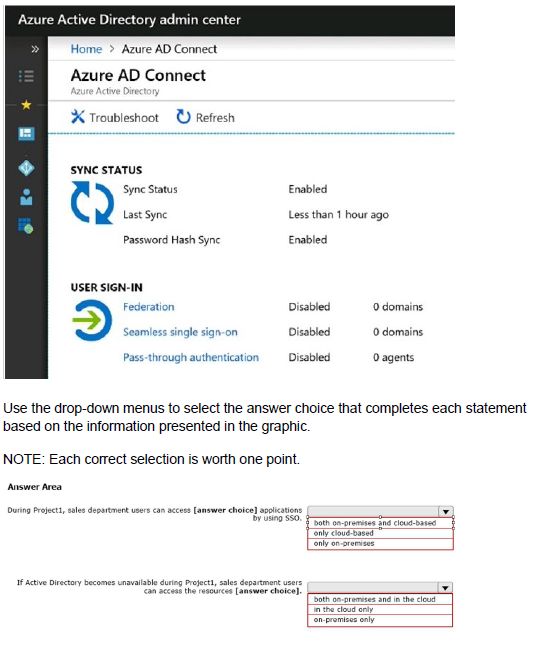
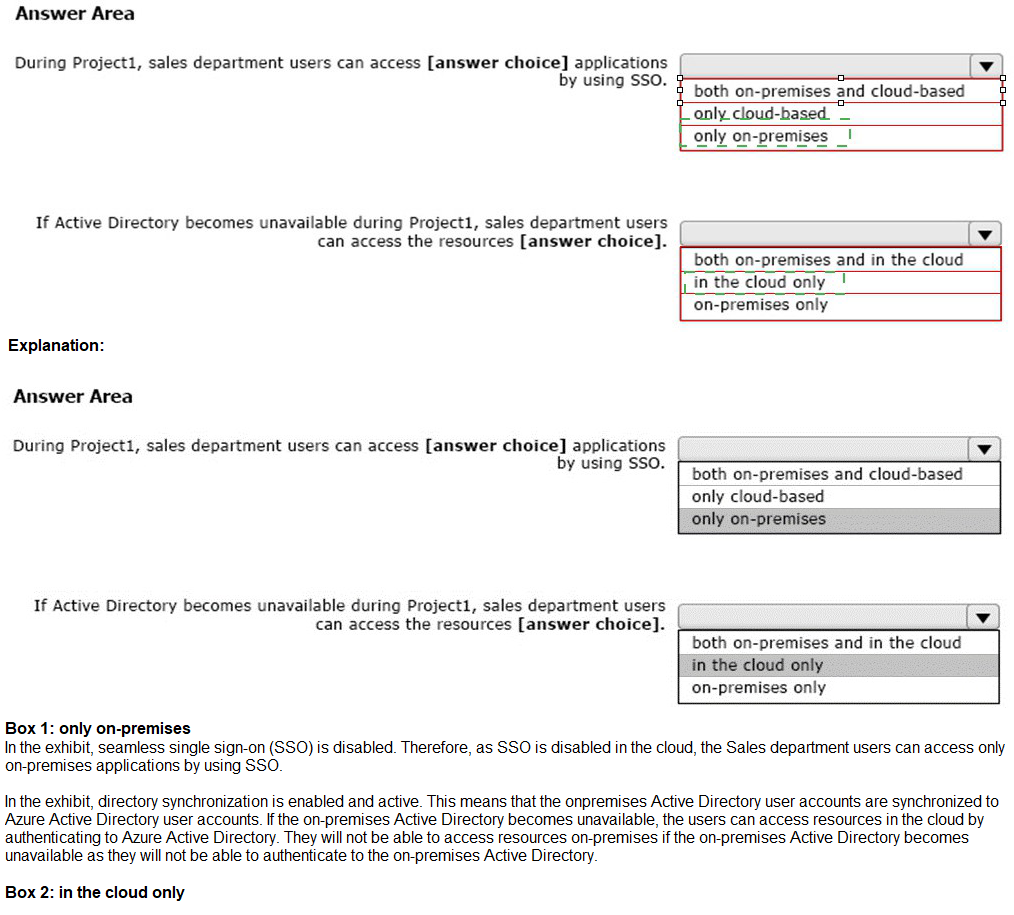
You implement Azure AD Connect as shown in the following exhibit.
Which role should you assign to User1?
Available Choices (select all choices that are correct)
A.
Hygiene Management
B.
Security Reader
C.
Security Administrator
D.
Records Management
Security Reader
Explanation:
A user named User1 must be able to view all DLP reports from the Microsoft 365 admin center.
Users with the Security Reader role have global read-only access on security-related features, including all information in Microsoft 365 security center, Azure Active Directory, Identity Protection, Privileged Identity Management, as well as the ability to read Azure. Active Directory sign-in reports and audit logs, and in Office 365 Security & Compliance Center.
Reference:
https://docs.microsoft.com/en-us/azure/active-directory/users-groups-roles/directoryassign-admin-roles
Note: This question is part of a series of questions that present the same scenario.
Each question in the series contains a unique solution that might meet the stated goals. Some question sets might have more than one correct solution, while others might not have a correct solution.
After you answer a question in this section, you will NOT be able to return to it. As a result, these questions will not appear in the review screen.
Your network contains an on-premises Active Directory domain named contoso.com. The domain contains the users shown in the following table.
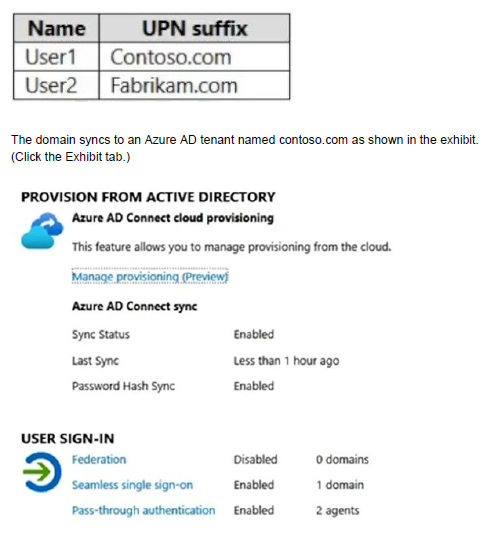
User2 fails to authenticate to Azure AD when signing in as user2@fabrikam.com.
You need to ensure that User2 can access the resources in Azure AD.
Solution: From the on-premises Active Directory domain, you assign User2 the Allow logon locally user right. You instruct User2 to sign in as user2@fabrikam.com.
Does this meet the goal?
A.
Yes
B.
No
No
Explanation:
This is not a permissions issue.
The on-premises Active Directory domain is named contoso.com. To enable users to sign on using a different UPN (different domain), you need to add the domain to Microsoft 365 as a custom domain
Note: This question is part of a series of questions that present the same scenario.
Each question in the series contains a unique solution that might meet the stated goals. Some question sets might have more than one correct solution, while others might not have a correct solution. After you answer a question in this section, you will NOT be able to return to it. As a result, these questions will not appear in the review screen.
You have a Microsoft 365 subscription.
You need to prevent users from accessing your Microsoft SharePoint Online sites unless the users are connected to your on-premises network.
Solution: From the Endpoint Management admin center, you create a device configuration profile.
Does this meet the goal?
A.
Yes
B.
No
No
Explanation:
You need to create a trusted location and a conditional access policy.
You purchase a new computer that has Windows 10, version 2004 preinstalled.
You need to ensure that the computer is up-to-date. The solution must minimize the number of updates installed.
What should you do on the computer?
A.
Install all the feature updates released since version 2004 and all the quality updates released since version 2004 only.
B.
install the West feature update and the latest quality update only.
C.
install all the feature updates released since version 2004 and the latest quality update only.
D.
install the latest feature update and all the quality updates released since version 2004.
install the West feature update and the latest quality update only.
Your company uses a legacy on-premises LDAP directory that contains 100 users.
The company purchases a Microsoft 365 subscription.
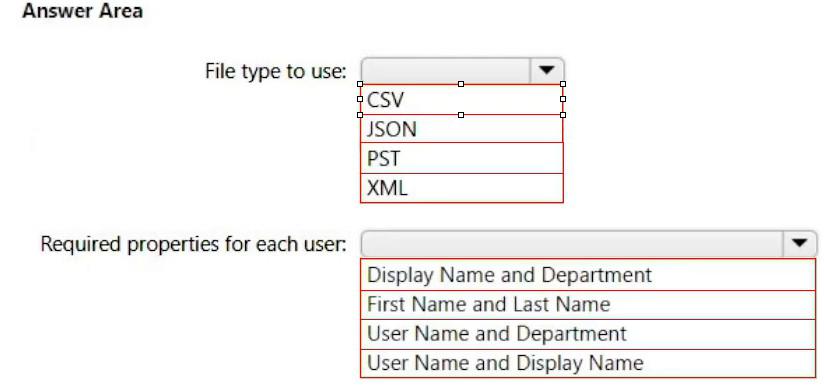
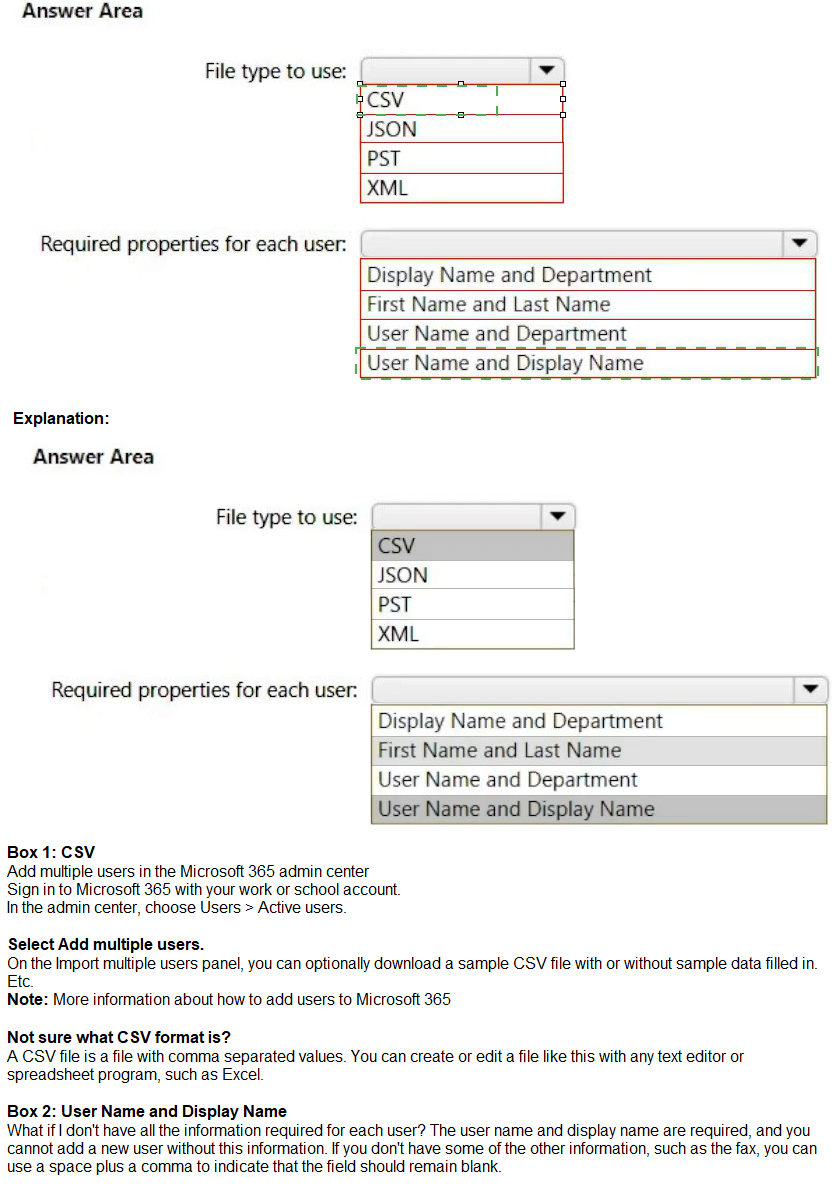
You need to import the 100 users into Microsoft 365 by using the Microsoft 365 admin center.
Which type of file should you use and which properties are required? To answer, select the appropriate options in the answer area.
NOTE: Each correct selection is worth one point.
Your network contains three Active Directory forests. There are forests trust relationships between the forests.
You create an Azure AD tenant.
You plan to sync the on-premises Active Directory to Azure AD.
You need to recommend a synchronization solution. The solution must ensure that the synchronization can complete successfully and as quickly as possible if a single server fails.
What should you include in the recommendation?
A.
one Azure AD Connect sync server and one Azure AD Connect sync server in staging mode
B.
three Azure AD Connect sync servers and one Azure AD Connect sync server in staging mode
C.
six Azure AD Connect sync servers and three Azure AD Connect sync servers in staging mode
D.
three Azure AD Connect sync servers and three Azure AD Connect sync servers in staging mode
one Azure AD Connect sync server and one Azure AD Connect sync server in staging mode
Explanation:
Azure AD Connect can be active on only one server. You can install Azure AD Connect on another server for redundancy but the additional installation would need to be in Staging mode. An Azure AD connect installation in Staging mode is configured and ready to go but it needs to be manually switched to Active to perform directory synchronization.
You have a Microsoft 365 E5 tenant that contains the users shown in the following table.


You have a Microsoft 365 tenant.
You plan to implement device configuration profiles in Microsoft Intune.
Which platform can you manage by using the profiles?
A.
Ubuntu Linux
B.
macOS
C.
Android Enterprise
D.
Windows 8.1
Windows 8.1
| Page 4 out of 31 Pages |