Note: This question is part of a series of questions that present the same scenario. Each question in the series contains a unique solution that might meet the stated goals. Some question sets might have more than one correct solution, while others might not have a correct solution. After you answer a question in this section, you will NOT be able to return to it. As a result, these questions will not appear in the review screen. You have a Microsoft 365 E5 subscription. You create an account for a new security administrator named SecAdmin1. You need to ensure that SecAdmin1 can manage Office 365 Advanced Threat Protection (ATP) settings and policies for Microsoft Teams, SharePoint, and OneDrive. Solution: From the Microsoft 365 admin center, you assign SecAdmin1 the SharePoint admin role. Does this meet the goal?
A.
Yes
B.
No
B.
No
Explanation: You need to assign the Security Administrator role.
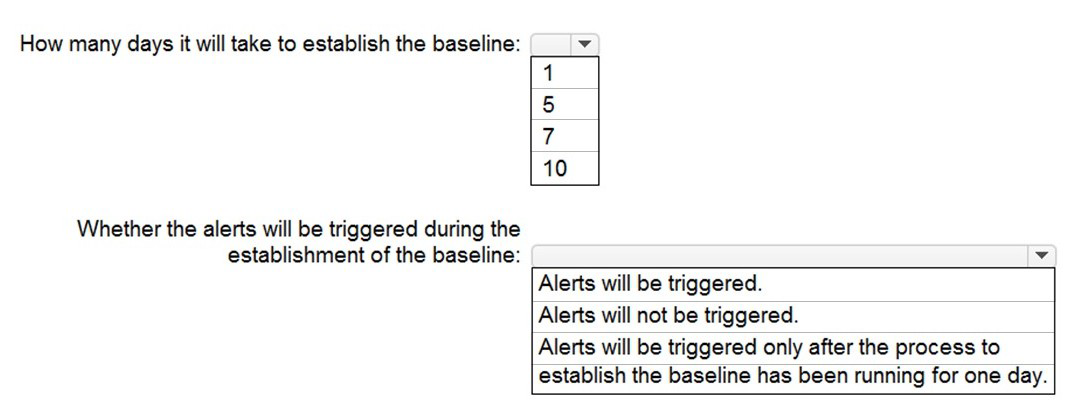
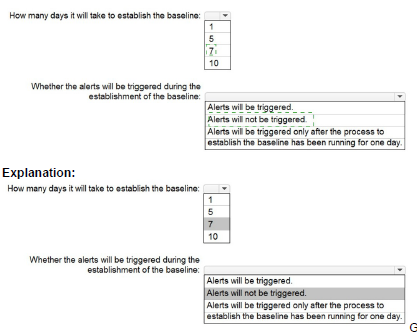
You have a Microsoft 365 E5 subscription. You configure a new alert policy as shown in the following exhibit. You need to identify the following: How many days it will take to establish a baseline for unusual activity. Whether alerts will be triggered during the establishment of the baseline. What should you identify? To answer, select the appropriate options in the answer area. NOTE: Each correct selection is worth one point.
You have a Microsoft 365 E5 subscription. You plan to create a data loss prevention (DLP) policy that will be applied to all available locations. Which conditions can you use in the DLP rules of the policy?
A.
sensitive info types
B.
content search queries
C.
keywords
D.
sensitivity labels
C.
keywords
Explanation: Apply retention labels to content automatically if it matches specific conditions, that includes cloud attachments that are shared in email or Teams, or when the content contains: Specific types of sensitive information. Specific keywords that match a query you create. Pattern matches for a trainable classifier.
Note: Retention policies can be applied to the following locations: Exchange mailboxes SharePoint classic and communication sites OneDrive accounts Microsoft 365 Group mailboxes & sites Skype for Business Exchange public folders Teams channel messages (standard channels and shared channels) Teams chats Teams private channel messages Yammer community messages Yammer user messages
Note: This question is part of a series of questions that present the same scenario. Each question in the series contains a unique solution that might meet the stated goals. Some question sets might have more than one correct solution, while others might not have a correct solution. After you answer a question in this section, you will NOT be able to return to it. As a result, these questions will not appear in the review screen. You have a Microsoft 365 E5 subscription. You create an account for a new security administrator named SecAdmin1. You need to ensure that SecAdmin1 can manage Microsoft Defender for Office 365 settings and policies for Microsoft Teams, SharePoint, and OneDrive. Solution: From the Microsoft 365 admin center, you assign SecAdmin1 the Exchange admin role. Does this meet the goal?
A.
Yes
B.
No
B.
No
Explanation: You need to assign the Security Administrator role.
You have a Microsoft 365 E5 subscription. You need to compare the current Safe Links configuration to the Microsoft recommended configurations. What should you use?
A.
Microsoft Purview
B.
Azure AD Identity Protection
C.
Microsoft Secure Score
D.
the configuration analyzer
C.
Microsoft Secure Score
You have an Azure AD tenant. You have 1,000 computers that run Windows 10 Pro and are joined to Azure AD. You purchase a Microsoft 365 E3 subscription. You need to deploy Windows 10 Enterprise to the computers. The solution must minimize administrative effort. What should you do?
A.
From the Microsoft Endpoinf Manager admin center, create a Windows Autopilot deployment profile. Assign the profile to all the computers. Instruct users to restart their computer and perform a network restart.
B.
Enroll the computers in Microsoft Intune. Create a configuration profile by using the Edition upgrade and mode switch template. From the Microsoft Endpoint Manager admin center, assign the profile to all the computers and instruct users to restart their computer.
C.
From Windows Configuration Designer, create a provisioning package that has an EditionUpgrade configuration and upload the package to a Microsoft SharePoint Online site. Instruct users to run the provisioning package from SharePoint Online.
D.
From the Azure Active Directory admin center, create a security group that has dynamic device membership. Assign licenses to the group and instruct users to sign in to their computer.
B.
Enroll the computers in Microsoft Intune. Create a configuration profile by using the Edition upgrade and mode switch template. From the Microsoft Endpoint Manager admin center, assign the profile to all the computers and instruct users to restart their computer.
Note: This question is part of a series of questions that present the same scenario. Each question in the series contains a unique solution that might meet the stated goals. Some question sets might have more than one correct solution, while others might not have a correct solution. After you answer a question in this section, you will NOT be able to return to it. As a result, these questions will not appear in the review screen. You have a computer that runs Windows 10. You need to verify which version of Windows 10 is installed. Solution: At a command prompt, you run the winver.exe command. Does this meet the goal?
A.
Yes
B.
No
A.
Yes
You have a Microsoft 365 E5 tenant. Users store data in the following locations: Microsoft Teams Microsoft OneDrive Microsoft Exchange Online Microsoft SharePoint Online You need to retain Microsoft 365 data for two years. What is the minimum number of retention policies that you should create?
A.
1
B.
2
C.
3
D.
4
C.
3
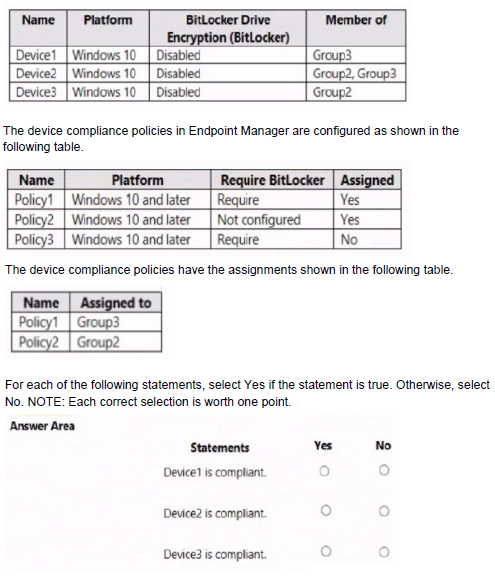
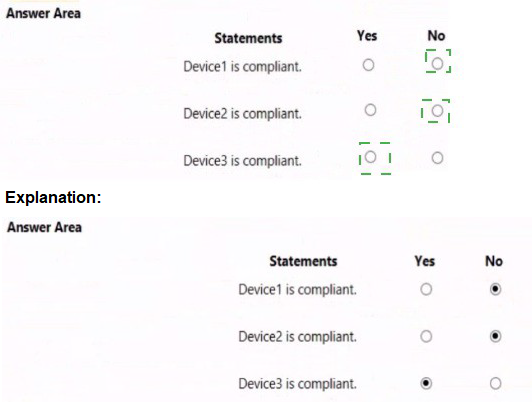
You have three devices enrolled in Microsoft Endpoint Manager as shown in the following table.
You have a new Microsoft 365 E5 tenant. You need to enable an alert policy that will be triggered when an elevation of Microsoft Exchange Online administrative privileges is detected. What should you do first?
A.
Enable auditing.
B.
Enable Microsoft 365 usage analytics.
C.
Create an Insider risk management policy.
D.
Create a communication compliance policy.
A.
Enable auditing.
Explanation: Microsoft Purview auditing solutions provide an integrated solution to help organizations effectively respond to security events, forensic investigations, internal investigations, and compliance obligations. Thousands of user and admin operations performed in dozens of Microsoft 365 services and solutions are captured, recorded, and retained in your organization's unified audit log. Audit records for these events are searchable by security ops, IT admins, insider risk teams, and compliance and legal investigators in your organization. This capability provides visibility into the activities performed across your Microsoft 365 organization.
Note: Permissions alert policies Example: Elevation of Exchange admin privilege Generates an alert when someone is assigned administrative permissions in your Exchange Online organization. For example, when a user is added to the Organization Management role group in Exchange Online.