Topic 3: Misc. Questions
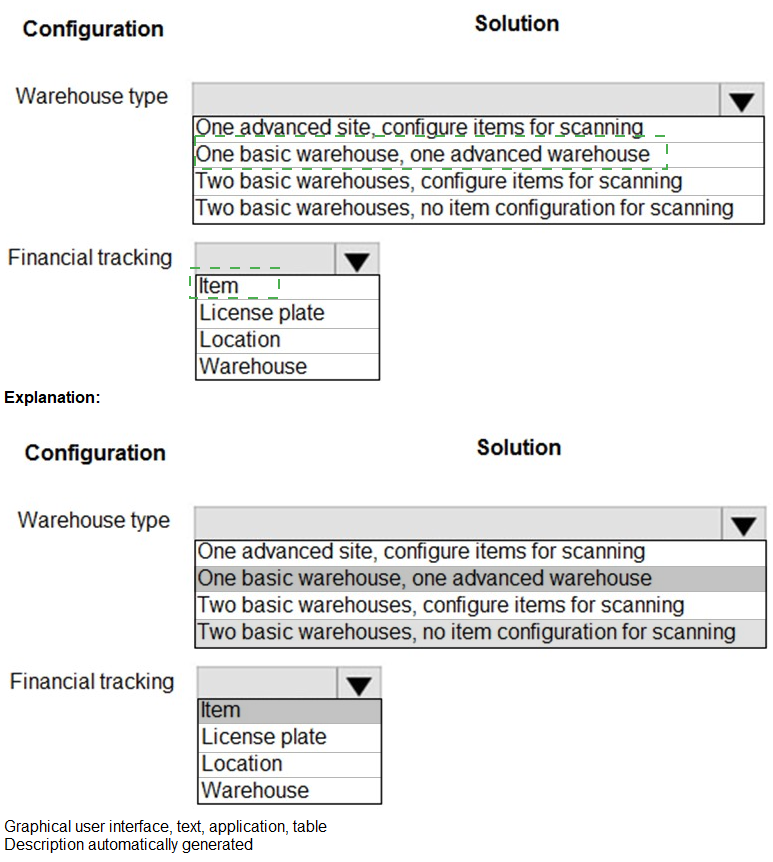
You need to recommend a site and warehouse configuration.
What should you recommend? To answer, select the appropriate options in the answer area.
NOTE: Each correct selection is worth one point.

Explanation:
This question tests your knowledge of warehouse configuration options in Dynamics 365 Supply Chain Management, specifically regarding warehouse types (advanced vs. basic) and financial tracking dimensions. The solution requires matching the appropriate warehouse type configuration and financial tracking level to meet specific business requirements that would be described in the scenario.
Warehouse Type Options Analysis:
One advanced site, configure items for scanning - This configuration enables full warehouse management functionality (WMS) with barcode scanning capabilities for all items in a single site.
One basic warehouse, one advanced warehouse - This mixed configuration allows different warehouse management levels within the same site, with some warehouses using basic inventory and others using advanced WMS functionality.
Two basic warehouses, configure items for scanning - Basic warehouses with item-level scanning configuration provides limited scanning capabilities without full WMS processes.
Two basic warehouses, no item configuration for scanning - Simple inventory management without any scanning capabilities, suitable for facilities with minimal warehousing requirements.
Financial Tracking Options Analysis:
Item - Financial tracking at the item level only, providing cost and inventory value tracking by product.
License plate - Tracking at the license plate level enables detailed tracking of individual handling units throughout warehouse processes.
Location - Financial tracking by warehouse location provides visibility into inventory value stored in specific warehouse areas.
Warehouse - Tracking at the warehouse level aggregates financial information by physical warehouse or site.
Reference:
Microsoft Learn: "Warehouse management overview in Dynamics 365 Supply Chain Management"
Microsoft Docs: "Configure warehouses for advanced or basic warehousing"
Microsoft Learn: "Inventory valuation and financial tracking dimensions"
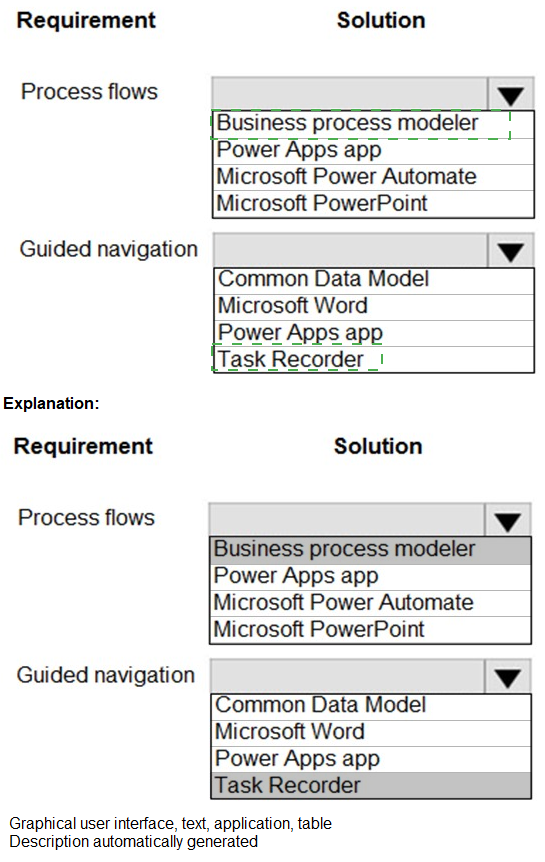
You need to recommend a tool to meet the solution requirement.
What should you recommend? To answer, select the appropriate options in the answer area.
NOTE: Each correct selection is worth one point.

Process Flows Tool Options Analysis:
Business process modeler (BPM) -
A Lifecycle Services tool used to document, analyze, and align business processes with Dynamics 365 functionality. It helps map existing processes to standard application features and identify gaps.
Power Apps app -
A low-code application development platform for creating custom apps that can automate or digitize specific business processes.
Microsoft Power Automate -
An automation tool for creating workflows that connect multiple systems and automate repetitive tasks across applications.
Microsoft PowerPoint -
A presentation tool that can be used for high-level process documentation and stakeholder communication, but not for formal process modeling.
Guided Navigation Tool Options Analysis:
Common Data Model -
A shared data language for business and analytical applications that provides standardized schema and data shapes, not a guided navigation tool.
Microsoft Word -
A document creation tool that can produce user manuals and training materials, but does not provide in-application guided navigation.
Power Apps app -
Can be designed to provide guided navigation through custom business processes and workflows.
Task Recorder -
A Dynamics 365 tool that captures user interactions to create step-by-step documentation, training materials, and test scripts. It provides guided navigation by recording exact clicks and data entry paths.
Reference:
Microsoft Learn: "Business process modeler (BPM) in Lifecycle Services"
Microsoft Docs: "Task recorder overview in Finance and Operations apps"
Microsoft Learn: "Power Apps and Power Automate integration with Dynamics 365"
Microsoft Docs: "Common Data Model and data integration"
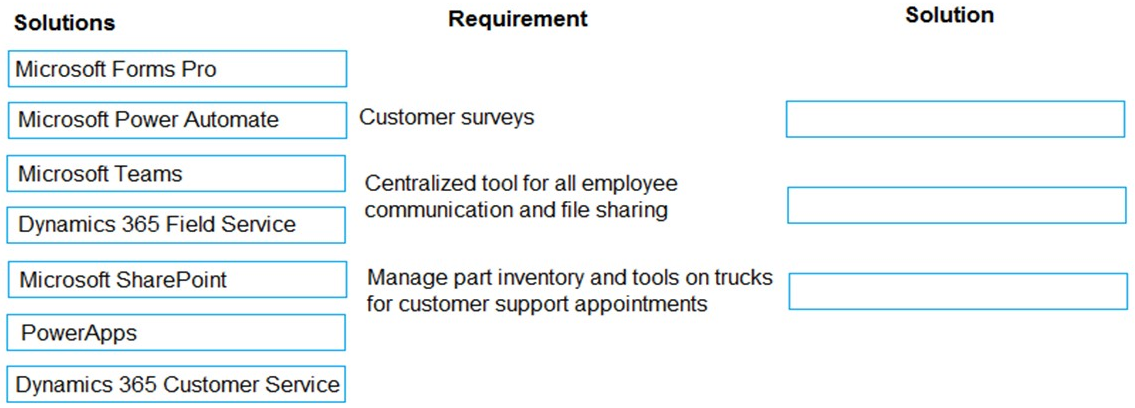
You need to recommend solutions for City Power and Light’s new system.
What should you recommend? To answer, drag the appropriate tools to the correct requirements. Each tool may be used once, more than once, or not at all. You may need to drag the split bar between panes or scroll to view content.
NOTE: Each correct selection is worth one point
Explanation:
This question tests your knowledge of Microsoft business applications and their appropriate use cases for different business requirements. City Power and Light needs three distinct capabilities: gathering customer feedback, enabling employee communication and file sharing, and managing field service inventory. Each requirement maps to a specific Microsoft solution designed for that purpose.
Correct Option Matching:
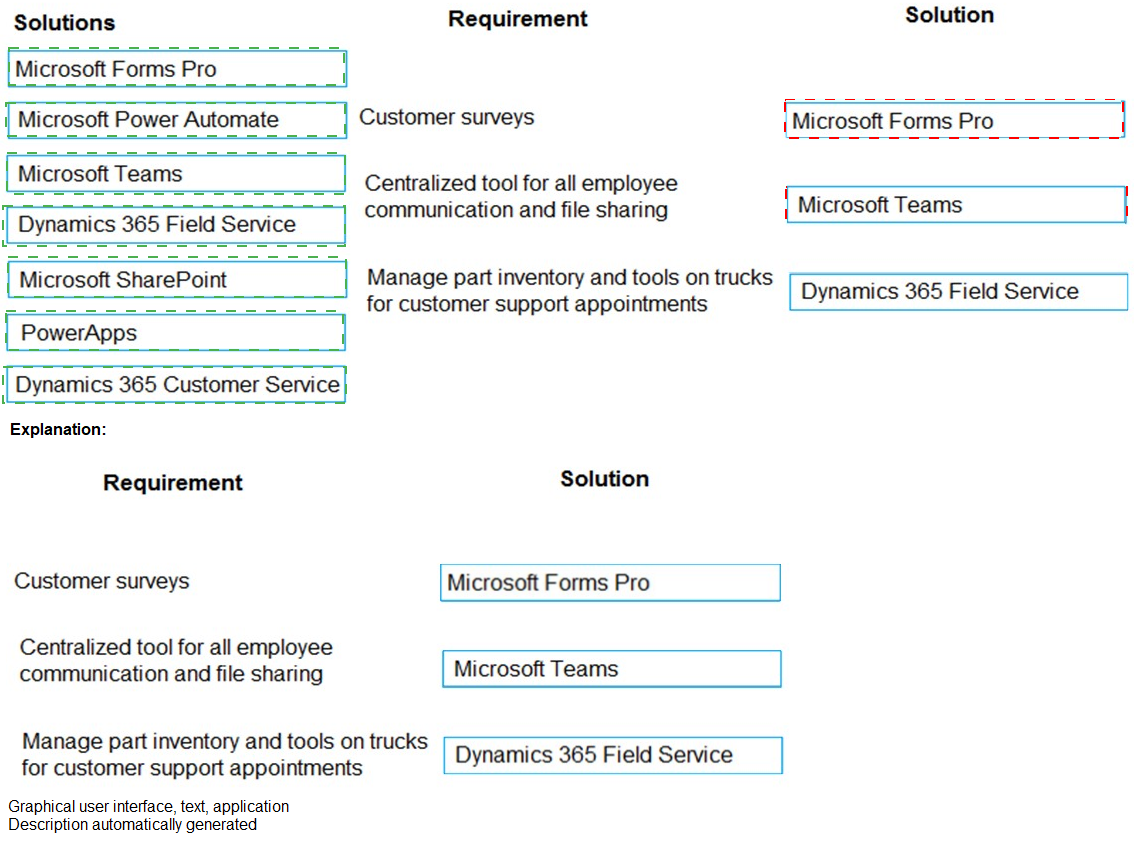
Requirement 1: Customer surveys
Solution: Microsoft Forms Pro
Microsoft Forms Pro (now part of Microsoft Dynamics 365 Customer Voice) is specifically designed for creating and distributing customer surveys. It provides customizable survey templates, response tracking, analytics, and integration with Dynamics 365 for capturing customer feedback directly within the customer engagement platform.
Requirement 2: Centralized tool for all employee communication and file sharing
Solution: Microsoft Teams
Microsoft Teams serves as a centralized hub for collaboration, combining chat, video meetings, file sharing, and application integration. It provides persistent channels for communication, integrated SharePoint document libraries, and enterprise-grade security, making it ideal for employee communication and file sharing needs.
Requirement 3: Manage part inventory and tools on trucks for customer support appointments
Solution: Dynamics 365 Field Service
Dynamics 365 Field Service is specifically designed to manage field service operations including inventory management on service vehicles. It tracks parts and tools assigned to trucks, manages inventory levels, supports barcode scanning, and ensures technicians have the right inventory for scheduled customer support appointments.
Incorrect Options:
Microsoft Power Automate - While useful for workflow automation, it is not a primary solution for any of these three requirements. It could complement other solutions but doesn't independently meet any requirement.
Microsoft SharePoint - Although SharePoint supports file sharing, it lacks the comprehensive communication features of Teams for employee collaboration.
PowerApps - Can build custom applications but requires development effort and doesn't provide out-of-the-box functionality for these specific requirements.
Dynamics 365 Customer Service - Focuses on customer support case management, not surveys, employee collaboration, or field inventory management.
Reference:
Microsoft Learn: "Dynamics 365 Customer Voice (formerly Forms Pro) overview"
Microsoft Docs: "Microsoft Teams for enterprise collaboration"
Microsoft Learn: "Inventory management in Dynamics 365 Field Service"
Microsoft Docs: "Microsoft business applications comparison"
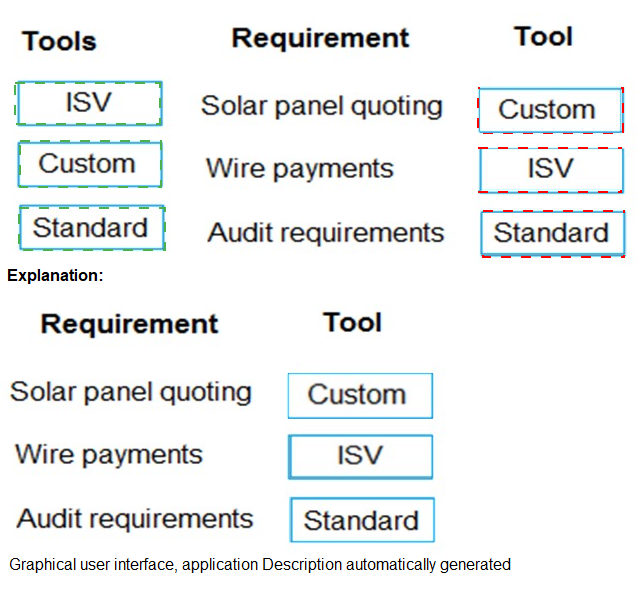
You need to recommend solutions for City Power and Light’s new system.
What should you recommend? To answer, drag the appropriate tools to the correct requirements. Each tool may be used once, more than once, or not at all. You may need to drag the split bar between panes or scroll to view content.
NOTE: Each correct selection is worth one point.

Explanation:
This question tests your understanding of when to use Independent Software Vendor (ISV) solutions, custom development, or standard Dynamics 365 functionality. City Power and Light has three distinct requirements that each align with different implementation approaches based on industry specificity, regulatory needs, and availability of out-of-the-box features.
Correct Option Matching:
Requirement 1: Solar panel quoting
Tool: ISV
Solar panel quoting requires specialized calculations for energy production, panel positioning, incentive calculations, and regulatory compliance that are not part of standard Dynamics 365. ISV solutions exist specifically for solar industry quoting, providing pre-built functionality that would be costly and time-consuming to develop custom.
Requirement 2: Wire payments
Tool: Custom
Wire payment processing typically involves bank-specific protocols, security requirements, and integration with financial institutions that vary by region and bank. While standard Dynamics 365 includes payment functionality, wire transfers often require custom development to connect with specific banking APIs and meet unique business requirements.
Requirement 3: Audit requirements
Tool: Standard
Audit requirements in Dynamics 365 are addressed through standard functionality including audit logs, change tracking, data retention policies, and security compliance features. The platform provides built-in capabilities for tracking user activities, data modifications, and system changes that satisfy most audit requirements.
Reference:
Microsoft Learn: "ISV solutions for Dynamics 365 industry verticals"
Microsoft Docs: "Custom development versus ISV evaluation criteria"
Microsoft Learn: "Audit and compliance features in Dynamics 365"
Microsoft Docs: "Payment integration patterns and standards"
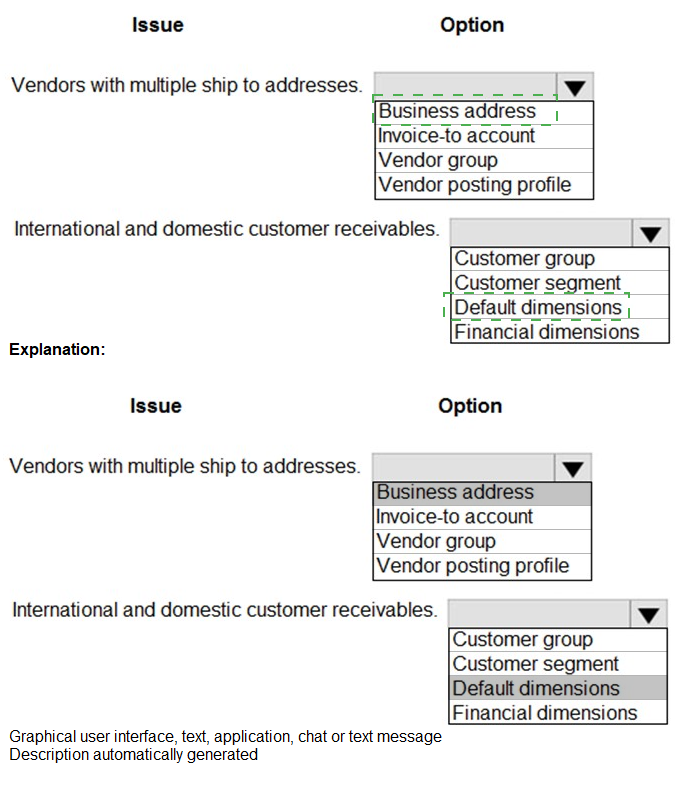
You need to correctly structure the master data.
What should you recommend? To answer, select the appropriate options in the answer area.
NOTE: Each correct selection is worth one point.

Explanation:
This question tests your knowledge of master data configuration in Dynamics 365 Finance, specifically regarding vendor and customer setup options. The issues described require understanding which data elements control specific functionality: vendor ship-to addresses and customer receivable segmentation.
Correct Option Matching:
Issue 1: Vendors with multiple ship to addresses
Recommendation: Business address
Vendors with multiple ship-to addresses should be managed through the business address functionality. In Dynamics 365, each vendor can have multiple addresses assigned with different purposes (ship-to, invoice-to, delivery address). The business address record type allows specifying multiple ship-to locations for the same vendor, enabling correct order routing and purchasing processes.
Incorrect Options for Issue 1:
Invoice-to account - This determines the account that receives invoices, not ship-to locations for orders.
Vendor group - Used for grouping vendors with similar characteristics for posting and reporting, not for managing multiple addresses.
Vendor posting profile - Controls how vendor transactions are posted to the general ledger, unrelated to ship-to address management.
Issue 2: International and domestic customer receivables
Recommendation: Customer group
Customer groups are the appropriate mechanism for separating international and domestic customer receivables. By creating different customer groups for domestic and international customers, you can assign different terms of payment, posting profiles, and reporting categories that align with the specific requirements of each customer type.
Incorrect Options for Issue 2:
Customer segment - While segmentation can classify customers, it doesn't directly control receivable processing rules.
Default dimensions - These are for financial dimension defaulting on transactions, not for segmenting receivables processing.
Financial dimensions - Used for reporting and analytical purposes, not for determining receivable handling rules.
Reference:
Microsoft Learn: "Vendor master data configuration in Dynamics 365 Finance"
Microsoft Docs: "Customer groups and posting profiles in Accounts receivable"
Microsoft Learn: "Address management for vendors and customers"
Microsoft Docs: "Segmentation strategies for domestic and international customers"
Fourth Coffee plans to implement Dynamics 365 Finance and Dynamics 365 Supply Chain Management. The company owns and operates the following divisions:
You need to ensure that Fourth Coffee can report financial results by division. Which strategy should you recommend?
A. Create two legal entities, create one warehouse and associate the financial dimension to the warehouse.
B. Create one legal entity with one site that has two warehouses. Associate the financial dimensions to the warehouses.
C. Create two legal entities, create one site and associate a financial dimension per company.
D. Create one legal entity with two sites. Associate financial dimensions to sites.
Explanation:
This question tests your knowledge of organizational structure design in Dynamics 365 Finance and Supply Chain Management to support divisional financial reporting. Fourth Coffee has two distinct divisions (Production and Distribution) that need separate financial reporting while operating as a single legal entity. Understanding how sites and financial dimensions work together is essential for this requirement.
Correct Option:
D. Create one legal entity with two sites. Associate financial dimensions to sites.
Creating one legal entity with two sites meets both operational and financial reporting requirements. Sites represent physical locations where inventory is stored or produced. By associating financial dimensions to each site, all transactions from the Production site and Distribution site automatically carry the appropriate dimension values, enabling accurate financial reporting by division without creating unnecessary legal entities.
Incorrect Option:
A. Create two legal entities, create one warehouse and associate the financial dimension to the warehouse.
Creating two legal entities is excessive and adds complexity to intercompany transactions, consolidation, and reporting. The requirement is to report by division, not to create separate legal entities. Warehouses are subordinate to sites and associating dimensions at warehouse level would miss site-level transactions.
Incorrect Option:
B. Create one legal entity with one site that has two warehouses. Associate the financial dimensions to the warehouses.
One site with two warehouses implies both divisions operate from the same physical location, which may not reflect reality. Warehouses are sub-locations within sites, and associating dimensions at warehouse level would not capture all site-related activities and transactions properly for divisional reporting.
Incorrect Option:
C. Create two legal entities, create one site and associate a financial dimension per company.
Creating two legal entities adds significant administrative overhead for intercompany transactions, financial consolidation, and regulatory compliance. The requirement only calls for divisional reporting, which can be achieved within a single legal entity using financial dimensions on sites.
Reference:
Microsoft Learn: "Organizational hierarchies in Dynamics 365 Supply Chain Management"
Microsoft Docs: "Sites and warehouses configuration for financial reporting"
Microsoft Learn: "Financial dimensions for divisional reporting"
Microsoft Docs: "Legal entity versus site strategy considerations"
A telecom provider uses Microsoft SharePoint to track and manage mobile phones that are
issued to employees.
All information about employee-issued mobile phones be visible in Dynamics 365.
Managers must be able to issue new phones directly from the system.
You need to design an integration solution using Dynamics 365 and SharePoint.
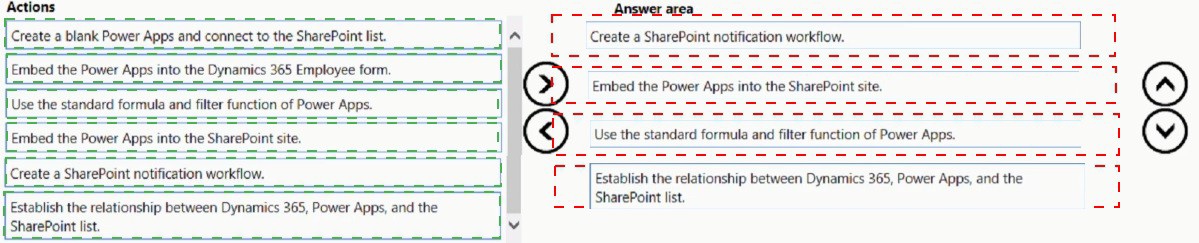
Which four actions should you perform in sequence? To answer, move the appropriate actions from the list of actions to the answer area and arrange them in the correct order.

Explanation:
This question tests your knowledge of integrating Dynamics 365 with SharePoint and Power Apps to create a seamless solution for tracking employee-issued mobile phones. The requirements include making SharePoint data visible in Dynamics 365 and enabling managers to issue phones directly from the system. Power Apps serves as the bridge between these platforms.
Correct Sequence:
Step 1: Establish the relationship between Dynamics 365, Power Apps, and the SharePoint list.
This foundational step defines how the three components will interact. It involves setting up connections, defining data sources, and establishing the integration architecture that enables SharePoint list data to be accessible through Power Apps within Dynamics 365.
Step 2: Create a blank Power Apps and connect to the SharePoint list.
With the relationships established, create a new Power App from scratch and configure it to use the SharePoint list as its data source. This creates the user interface that managers will use to view and manage mobile phone inventory.
Step 3: Use the standard formula and filter function of Power Apps.
Configure the Power App with appropriate formulas and filter functions to display relevant mobile phone information, enable searching, and support the issuance process. This includes setting up galleries, forms, and logic for updating the SharePoint list when phones are issued.
Step 4: Embed the Power Apps into the Dynamics 365 Employee form.
Finally, embed the completed Power App into the Dynamics 365 Employee form where managers can access it directly. This makes the mobile phone management functionality available within the context of employee records, meeting the requirement for issuing phones from the system.
Incorrect Actions:
Embed the Power Apps into the SharePoint site - This would put the interface in SharePoint, opposite to the requirement of having functionality in Dynamics 365.
Create a SharePoint notification workflow - While notifications could be useful, this is not one of the four core actions needed to meet the primary requirements of visibility and issuance.
Reference:
Microsoft Learn: "Integrate Power Apps with Dynamics 365 and SharePoint"
Microsoft Docs: "Embed Power Apps in Dynamics 365 model-driven apps"
Microsoft Learn: "SharePoint integration with Power Platform"
Microsoft Docs: "Building employee-facing apps with Power Apps and Dynamics 365"
| Page 3 out of 11 Pages |