For each of the following statements, select Yes if the statement is true. Otherwise, select
No. NOTE: Each correct selection is worth one point.
Explanation:
This question tests understanding of Azure Cosmos DB fundamental concepts including API configuration, partition key functionality, and logical partition behavior. Cosmos DB is a globally distributed, multi-model database service with specific design patterns for scalability and performance optimization.
Correct Option:
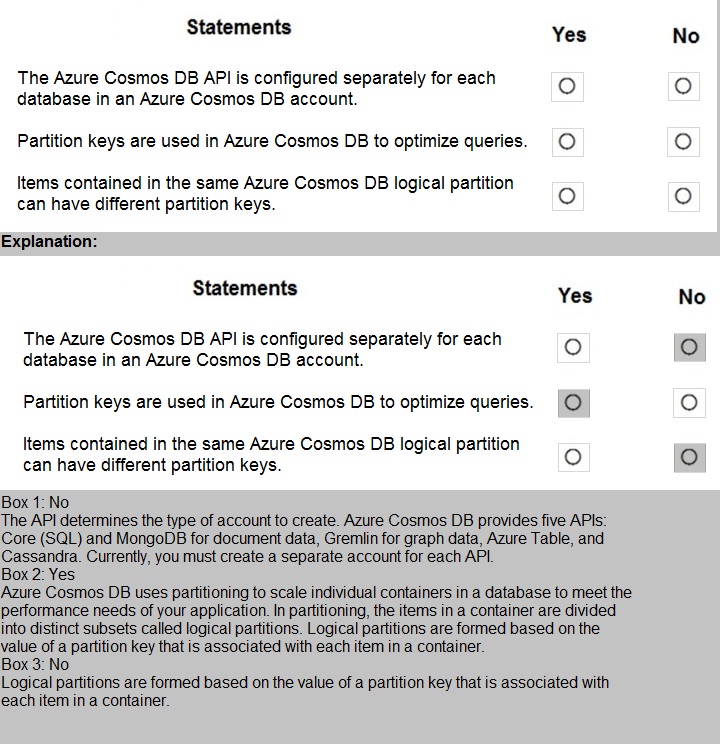
Statement 1: The Azure Cosmos DB API is configured separately for each database in an Azure Cosmos DB account.
Answer: No
The API is configured at the Azure Cosmos DB account level, not per database. When you create a Cosmos DB account, you select a specific API (Core SQL, MongoDB, Cassandra, Gremlin, or Table). All databases created within that account must use the same API. You cannot have different APIs for different databases within a single Cosmos DB account.
Statement 2: Partition keys are used in Azure Cosmos DB to optimize queries.
Answer: Yes
Partition keys are fundamental to Cosmos DB performance and scalability. They determine how data is distributed across physical partitions. When queries include the partition key in the filter, Cosmos DB can route the query directly to the specific physical partition containing the data, significantly improving query performance and reducing RU consumption.
Statement 3: Items contained in the same Azure Cosmos DB logical partition can have different partition keys.
Answer: No
All items within the same logical partition must share the exact same partition key value. The partition key value defines which logical partition an item belongs to. If items had different partition key values, they would belong to different logical partitions by definition. Logical partitions are created based on unique partition key values.
Reference:
Azure Cosmos DB account management, Partitioning and horizontal scaling in Cosmos DB, Logical partitions in Cosmos DB documentation
For each of the following statements, select Yes if the statement is true. Otherwise, select
No. NOTE: Each correct selection is worth one point.
Explanation:
This question tests understanding of the difference between batch processing and streaming data workloads. Batch processing involves processing data in large, discrete chunks at scheduled intervals, while streaming involves continuous processing of data in real-time as it is generated.
Correct Option:
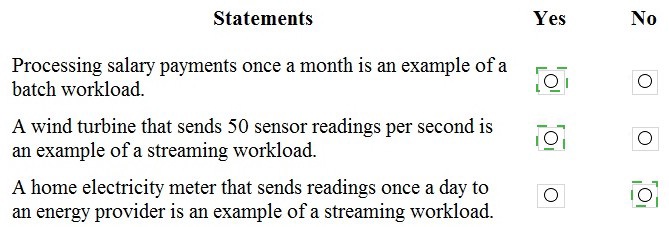
Statement 1: Processing salary payments once a month is an example of a batch workload.
Answer: Yes
Batch processing handles data in groups at scheduled intervals. Monthly salary payments are processed together as a single batch operation on a predictable schedule. This is a classic example of batch processing where data accumulates over time and is processed together during a specific window, rather than being handled continuously as individual transactions.
Statement 2: A wind turbine that sends 50 sensor readings per second is an example of a streaming workload.
Answer: Yes
Streaming workloads involve continuous data generation and processing in near real-time. The wind turbine sending 50 readings per second creates a constant flow of small data messages that require immediate or near-immediate processing. This high-frequency, continuous data flow is characteristic of streaming architectures.
Statement 3: A home electricity meter that sends readings once a day to an energy provider is an example of a streaming workload.
Answer: No
This is a batch workload, not streaming. The electricity meter sends data only once daily, creating discrete daily batches rather than a continuous stream. Streaming workloads involve ongoing, real-time data flow, not scheduled, infrequent data transfers. The once-daily schedule makes this clearly a batch pattern.
Reference:
Batch vs streaming data processing, Azure Stream Analytics documentation, Azure Batch documentation
Match the types of data stores to the appropriate scenarios.
To answer, drag the appropriate data store type from the column on the left to its scenario
on the right. Each data store type may be used once, more than once, or not at all.
NOTE: Each correct match is worth one point.

Explanation:
This question tests the ability to match different data store types with appropriate real-world scenarios based on their characteristics and optimal use cases. Understanding which data model fits which type of data is essential for designing effective data solutions in Azure.
Correct Matches:
Key/value → Application users and their default language
Key/value stores are ideal for simple lookups where each user ID (key) maps directly to their default language preference (value). This scenario requires fast, simple read and write operations based on a unique identifier without complex relationships or queries. Key/value stores provide the lowest latency for such point lookups.
Object → Medical images and their associated metadata
Object storage is designed for storing large unstructured binary data like medical images (X-rays, MRIs, CT scans) along with associated metadata. Object stores handle massive files efficiently and can store metadata alongside the binary data. This makes them perfect for medical imaging archives where files are large and need to be retrieved with descriptive information.
Graph → Employee data that shows the relationships between employees
Graph databases excel at managing highly connected data where relationships are as important as the entities themselves. Employee relationship data involves complex connections (manager-reports, teams, reporting structures) that are naturally modeled as vertices (employees) and edges (relationships). Graph databases efficiently traverse these relationship paths for organizational charts and reporting hierarchies.
Not Used:
Table/Columnar/Document
The other data store types listed in the image but not needed for these specific scenarios include table storage for structured records, columnar for analytics, and document for semi-structured JSON data.
Reference:
Azure Cosmos DB data models, Azure Blob Storage for object data, Graph databases overview, Key-value store documentation
Match the types of visualizations to the appropriate descriptions.
To answer, drag the appropriate visualization type from the column on the left to its
description on the right. Each visualization type may be used once, more than once, or not
at all. NOTE: Each correct match is worth one point.
Explanation:
This question tests knowledge of different Power BI visualization types and their appropriate use cases. Understanding which visualization to use for specific data storytelling purposes is essential for creating effective reports and dashboards in Power BI.
Correct Matches:
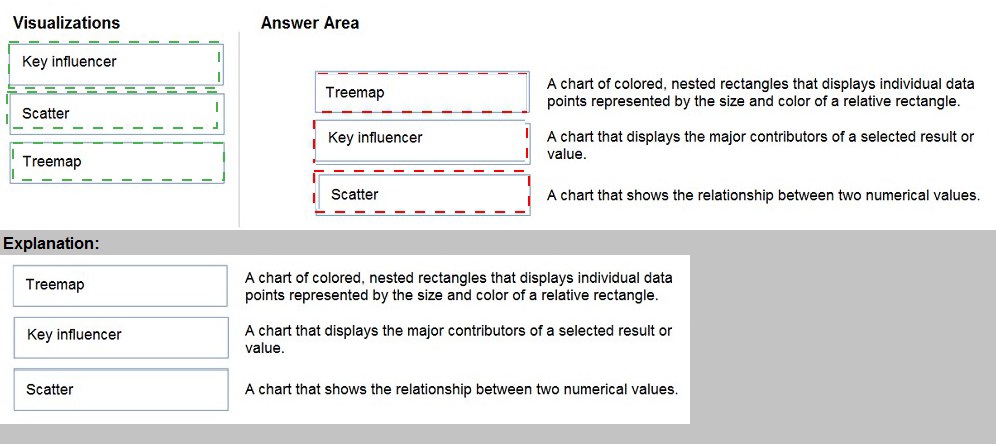
Treemap → A chart of colored, nested rectangles that displays individual data points represented by the size and color of a relative rectangle.
Treemaps display hierarchical data as a set of nested rectangles. Each branch of the hierarchy is given a rectangle, which is then tiled with smaller rectangles representing sub-branches. The size and color of each rectangle represent different data dimensions, making treemaps ideal for showing part-to-whole relationships across categories.
Key influencer → A chart that displays the major contributors of a selected result or value.
The key influencers visual in Power BI helps you understand which factors influence a specific metric or outcome. It analyzes your data and ranks the factors that most affect the selected result, showing major contributors and their impact. This is valuable for root cause analysis and understanding drivers behind business metrics.
Scatter → A chart that shows the relationship between two numerical values.
Scatter charts (or scatter plots) display points representing individual data points based on two numerical axes. They reveal correlations, patterns, and outliers in the relationship between variables. Scatter charts can also incorporate a third dimension through point size or color, making them powerful for exploring data relationships.
Reference:
Power BI visualization types, Treemaps in Power BI, Key influencers visual in Power BI, Scatter charts in Power BI documentation
You have an inventory management database that contains the following table.
Which statement should you use in a SQL query to change the inventory quantity of
Product1 to 270?
A. INSERT
B. MERGE
C. UPDATE
D. CREATE
Explanation:
This question involves modifying existing data in a database table. The inventory table already contains a record for Product1 with quantity 100. Changing this existing value to 270 requires a data modification operation that targets the specific row without creating duplicate records.
Correct Option:
C. UPDATE
The UPDATE statement is used to modify existing data in a table. To change Product1's quantity from 100 to 270, you would use: UPDATE inventory_table SET Quantity = 270 WHERE ProductName = 'Product1'. This statement specifically targets the existing row and changes only the specified column value while leaving other data intact.
Incorrect Option:
A. INSERT
INSERT adds new rows to a table. Using INSERT for Product1 would create a duplicate entry or cause a primary key violation if ProductName is unique. This would not modify the existing quantity of 100 but rather add a second record for the same product.
B. MERGE
MERGE performs insert, update, or delete operations based on source data. While it could update the record, it is unnecessarily complex for a simple single-row update. MERGE is better suited for synchronizing two tables or performing multiple operations based on matching conditions.
D. CREATE
CREATE is a Data Definition Language (DDL) statement used to create database objects like tables, views, or indexes. It cannot modify data within existing tables and is completely inappropriate for changing inventory quantities.
Reference:
SQL UPDATE statement documentation, SQL data manipulation language (DML) reference
For each of the following statements, select Yes if the statement is true. Otherwise, select
No. NOTE: Each correct selection is worth one point.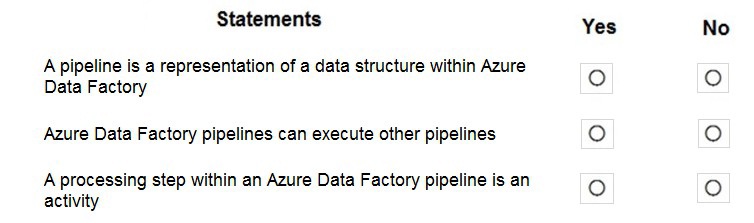
Explanation:
This question tests understanding of Azure Data Factory (ADF) core concepts including pipelines, activities, and their relationships. Azure Data Factory is a cloud-based ETL and data integration service that orchestrates data movement and transformation through logical groupings of activities.
Correct Option:
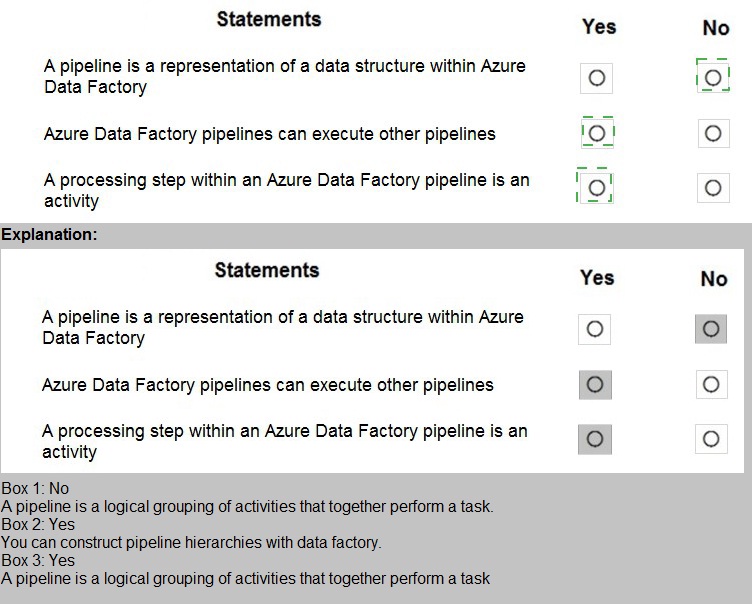
Statement 1: A pipeline is a representation of a data structure within Azure Data Factory.
Answer: No
A pipeline in Azure Data Factory is not a data structure representation. It is a logical grouping of activities that together perform a task or workflow. Pipelines define the orchestration and sequencing of activities, not the structure of data itself. Data structures are represented by datasets or schemas, not pipelines.
Statement 2: Azure Data Factory pipelines can execute other pipelines.
Answer: Yes
Azure Data Factory supports pipeline chaining where one pipeline can execute another pipeline using the Execute Pipeline activity. This enables modular workflow design, reusability, and complex orchestration scenarios. You can break down complex ETL processes into smaller, manageable pipelines and orchestrate their execution hierarchically.
Statement 3: A processing step within an Azure Data Factory pipeline is an activity.
Answer: Yes
Activities in Azure Data Factory represent the processing steps within a pipeline. Each activity defines an action to perform, such as copying data, transforming data with Data Flow, executing stored procedures, or running external processes. A pipeline contains one or more activities arranged in sequence or parallel, forming the complete workflow.
Reference:
Azure Data Factory pipelines and activities documentation, Execute Pipeline activity in ADF, Azure Data Factory concepts
Match the types of activities to the appropriate Azure Data Factory activities.
To answer, drag the appropriate activity type from the column on the left to its Data Factory
activity on the right. Each activity type may be used once, more than once, or not at all.
NOTE: Each correct match is worth one point.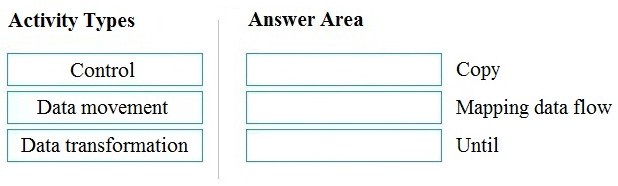
Explanation:
This question tests knowledge of Azure Data Factory activity categories and how specific activities map to these categories. Azure Data Factory organizes activities into three main types based on their function: control flow activities for orchestration, data movement activities for copying data, and data transformation activities for modifying data structure.
Correct Matches:
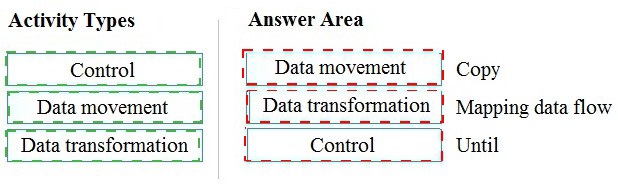
Data movement → Copy
Copy activity is the primary data movement activity in Azure Data Factory. It ingests data from various sources and sinks it to destinations across on-premises and cloud environments. Copy activity handles schema mapping, data type conversion, and connectivity through integration runtimes, enabling seamless data transfer at scale.
Data transformation → Mapping data flow
Mapping data flow is a visually designed data transformation activity in Azure Data Factory. It allows users to build transformation logic without writing code, performing operations like aggregations, joins, filtering, and pivoting at scale using Spark engines. It represents the data transformation category of activities.
Control → Until
Until activity is a control flow activity that executes a loop of activities repeatedly until a specified condition evaluates to true. It belongs to the control category, which manages workflow orchestration including conditional logic, looping, branching, and sequencing of other activities within pipelines.
Reference:
Azure Data Factory activities overview, Copy activity in Azure Data Factory, Mapping data flow in ADF, Control flow activities documentation
| Page 2 out of 10 Pages |