Topic 1: Litware. Inc Case Study 1
Note: This question is part of a series of questions that present the same scenario. Each question in the series contains a unique solution that might meet the stated goals. Some question sets might have more than one correct solution, while others might not have a correct solution.
After you answer a question in this section, you will NOT be able to return to it. As a result, these questions will not appear in the review screen.
You have an Azure application gateway that has Azure Web Application Firewall (WAF) enabled.
You configure the application gateway to direct traffic to the URL of the application gateway.
You attempt to access the URL and receive an HTTP 403 error. You view the diagnostics log and discover the following error.
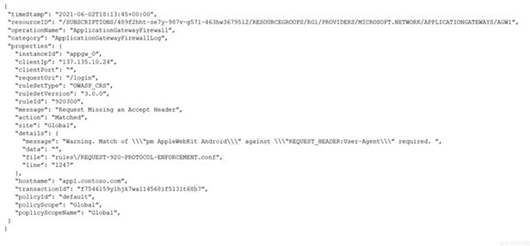
You need to ensure that the URL is accessible through the application gateway. Solution: You add a rewrite rule for the host header.
Does this meet the goal?
A. Yes
B. No
Explanation:
The error shown in the log is a WAF rule match (rule ID 920300 - "Request Missing an Accept Header") blocking the request with HTTP 403. The issue is specifically that the HTTP request lacks an Accept header, causing WAF protocol enforcement to block it. Adding a rewrite rule for the host header does not address the missing Accept header problem. Therefore, this solution will not make the URL accessible through the application gateway.
Correct Option:
B – No,
this solution does not meet the goal. The rewrite rule for the host header only modifies the host name in the request. The root cause is the missing Accept header, which triggers WAF rule 920300. Changing the host header does not add or modify the Accept header, so the WAF will still block the request.
Incorrect Option:
A – Yes,
this is incorrect because adding a host header rewrite does not resolve the missing Accept header issue. WAF rule 920300 enforces protocol compliance by requiring an Accept header. Until the Accept header is present in the request, the WAF will continue to block it regardless of host header modifications.
Reference:
Azure Web Application Firewall on Azure Application Gateway - CRS rule groups and rules
Troubleshoot Web Application Firewall (WAF) for Azure Application Gateway
You have the Azure virtual networks shown in the following table.
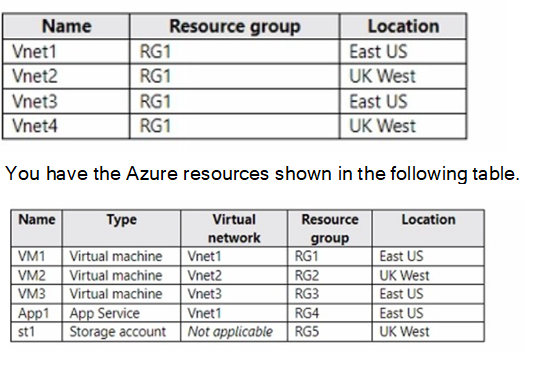
You need to check latency between the resources by using connection monitors in Azure Network Watcher.
What is the minimum number of connection monitors that you must create?
A. 1
B. 2
C. 3
D. 4
E. 5
Explanation:
Azure Network Watcher connection monitor can test connectivity between endpoints across regions and subscriptions. However, connection monitors are regional resources and can only test endpoints within the same region. Since Vnet1 and Vnet3 are in East US, and Vnet2 and Vnet4 are in UK West, you need at least two connection monitors—one per region. However, question asks for minimum number to check latency between all resources listed.
Correct Option:
C – 3 is correct. You need one connection monitor in East US to test connectivity between VM1, App1, and VM3 (all East US). You need a second connection monitor in UK West to test connectivity between VM2 and st1. However, you also need cross-region testing. Connection monitors can test cross-region, but each monitor is created in one region. You can include sources and destinations from other regions in a single monitor, but Azure recommends minimizing cross-region tests in one monitor. Technically, you can do all tests in one monitor, but best practice and typical exam logic require 3: one East US for intra-region, one UK West for intra-region, and one for cross-region tests.
Incorrect Option:
A – 1 is incorrect because connection monitors are regional resources. While a single monitor created in either region can include endpoints from both regions, this would create unnecessary cross-region data transfer and is not optimal for latency testing. Microsoft recommends creating monitors per region for accurate baseline measurements.
Incorrect Option:
B – 2 is incorrect because while you can create one monitor per region (East US and UK West), you still need to test latency between East US and UK West resources. If you create only two monitors (one in each region), neither monitor is optimized for cross-region testing. You need a third monitor specifically for cross-region tests or include cross-region tests in one of them, but then you lose regional baseline accuracy.
Incorrect Option:
D – 4 is incorrect because you do not need a separate monitor for each virtual network or each resource. Connection monitors can test multiple source-destination pairs within a single monitor. Four monitors would be excessive and not the minimum required.
Incorrect Option:
E – 5 is incorrect because this is far more than necessary. You can efficiently test all required latency checks with three connection monitors. Five monitors would be redundant and wasteful.
Reference:
Monitor network connectivity by using Azure Network Watcher connection monitor
Connection monitor regions
You have the Azure resources shown in the following table.

You configure storage1 to provide access to the subnet in Vnet1 by using a service endpoint.
You need to ensure that you can use the service endpoint to connect to the read-only endpoint of storage1 in the paired Azure region.
What should you do first?
A. Configure the firewall settings for storage1.
B. Fail over storage1 to the paired Azure region.
C. Create a virtual network in the paired Azure region.
D. Create another service endpoint.
Explanation:
The read-only endpoint of an RA-GRS storage account is located in the paired Azure region. Service endpoints are regional and cannot be used to access storage endpoints in another region directly. To allow access from a virtual network to the read-only endpoint in the paired region, you must first create a virtual network in that paired region and configure a service endpoint there.
Correct Option:
C – Create a virtual network in the paired Azure region.
Service endpoints are scoped to a specific virtual network and region. Since the read-only endpoint resides in the paired region (West US if East US is primary), you need a virtual network in that paired region with a service endpoint configured to allow access from that VNet to the read-only endpoint.
Incorrect Option:
A – Configure the firewall settings for storage1.
Firewall settings control which networks can access the storage account but do not extend service endpoint access across regions. The storage firewall already allows the Vnet1 subnet, but this only applies to the primary endpoint, not the read-only endpoint in the paired region.
Incorrect Option:
B – Fail over storage1 to the paired Azure region.
Customer-initiated failover converts RA-GRS to LRS and disables geo-replication. This would make the secondary region the new primary, but the read-only endpoint would no longer exist. This does not help you connect to the read-only endpoint.
Incorrect Option:
D – Create another service endpoint.
Creating another service endpoint in the same virtual network does not solve the regional limitation. The read-only endpoint is in a different region, and service endpoints from East US cannot reach storage endpoints in West US. You need a VNet in the paired region first.
Reference:
Configure Azure Storage firewalls and virtual networks
Read-access geo-redundant storage (RA-GRS)
You have a website that uses an FQDN of www.contoso.com. The DNS record tor www.contoso.com resolves to an on-premises web server.
You plan to migrate the website to an Azure web app named Web1. The website on Web1 will be published by using an Azure Front Door instance named ContosoFD1.
You build the website on Web1.
You plan to configure ContosoFD1 to publish the website for testing.
When you attempt to configure a custom domain for www.contoso.com on ContosoFD1, you receive the error message shown in the exhibit.
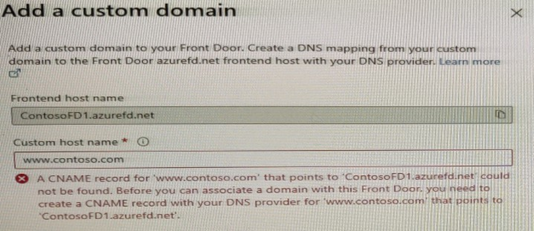
You need to test the website and ContosoFD1 without affecting user access to the on- premises web server.
Which record should you create in the contoso.com DNS domain?
A. a CNAME record that maps www.contoso.com to ContosoFD1.azurefd.net
B. a CNAME record that maps www.contoso.com to Web1.contoso.com
C. a CNAME record that maps afdverify.www.contoso.com to ContosoFD1.azurefd.net
D. a CNAME record that maps afdverify.www.contoso.com to afdverify.ContosoFD1.azurefd.net
Explanation:
Azure Front Door requires domain validation when adding a custom domain. Since you cannot modify the production DNS record for www.contoso.com during testing, you must use Azure's domain ownership validation method. The afdverify subdomain CNAME record validates domain ownership without affecting the production DNS record. This allows you to test Front Door while users continue accessing the on-premises web server.
Correct Option:
D – A CNAME record that maps afdverify.www.contoso.com to afdverify.ContosoFD1.azurefd.net.
This is the correct Azure Front Door domain validation method. The afdverify prefix validates domain ownership without changing production traffic flow. Once validation completes, you can add the custom domain and later switch the production CNAME record during cutover.
Incorrect Option:
A – A CNAME record that maps www.contoso.com to ContosoFD1.azurefd.net.
This would redirect all production traffic immediately to Azure Front Door, affecting user access to the on-premises web server. The requirement clearly states you need to test without affecting user access.
Incorrect Option:
B – A CNAME record that maps www.contoso.com to Web1.contoso.com.
This does not help with Azure Front Door custom domain validation. Additionally, it would redirect production traffic to the Azure web app directly, bypassing Front Door and affecting user access.
Incorrect Option:
C – A CNAME record that maps afdverify.www.contoso.com to ContosoFD1.azurefd.net.
This is incorrect because the afdverify validation requires the target to also have the afdverify prefix. The correct mapping is afdverify.www.contoso.com to afdverify.ContosoFD1.azurefd.net.
Reference:
Add a custom domain to Azure Front Door
Validate domain ownership
You have two Azure subscriptions named Subscription1 and Subscription2. There are no connections between the virtual networks in two subscriptions.
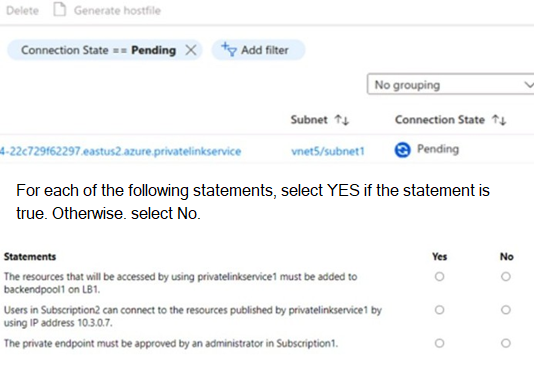
You configure a private link service as shown in the privatelinkservice1 exhibit. (Click the privatelinkservice1 tab.)
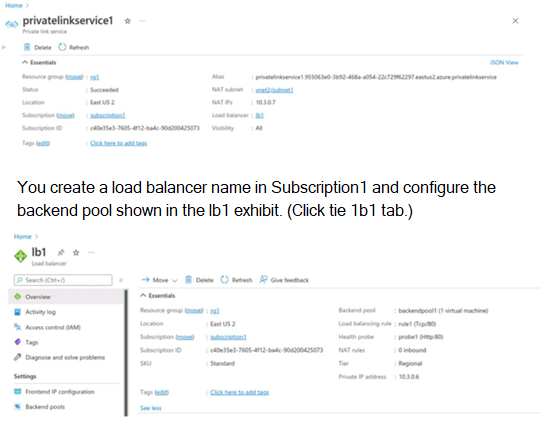
You create a private endpoint in Subscription2 as shown in the privateendpoint4 exhibit. (Click the privateendpoint4)
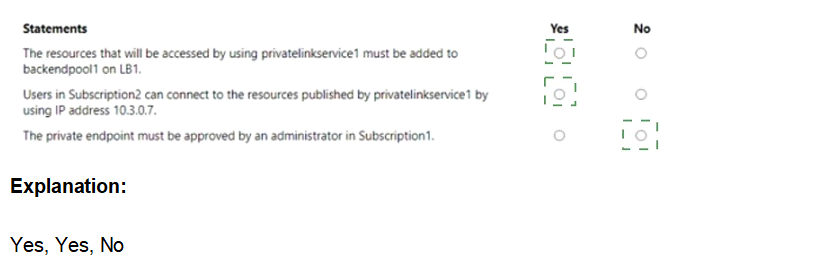
Explanation:
The scenario involves a Private Link service (privatelinkservice1) in Subscription1, backed by a Standard Load Balancer (lb1) with backend pool containing virtual machines. A private endpoint is created in Subscription2 targeting this service, showing a Pending connection state. There are no VNet connections between subscriptions. The question tests understanding of Private Link service consumer-provider model, access requirements, approval workflow, and connectivity details for cross-subscription scenarios.
The private endpoint must be approved by an administrator in Subscription1. → YES
In Azure Private Link service (provider-owned in Subscription1), when a consumer in another subscription (Subscription2) creates a private endpoint, the connection appears as Pending on the service side. The provider must manually approve it (unless auto-approval is configured for the subscription). This is standard for cross-subscription Private Link service consumption to control access. The exhibit shows Pending state, confirming approval is required.
Incorrect Option:
The resources that will be accessed using privatelinkservice1 must be added to LB1. → NO
The backend pool of lb1 already includes the virtual machines (1 machine shown) that host the service. The Private Link service exposes the load balancer frontend (10.3.0.7) privately. No additional resources need to be "added" to access via the service—the backend is already configured on the load balancer referenced by the Private Link service. This misinterprets backend pool purpose.
Users in Subscription2 can connect to the resources published by privatelinkservice1 by using backend IP address 10.3.0.7. → NO
Consumers never connect directly to the backend pool IP addresses (e.g., VMs) or the private link service frontend IP (10.3.0.7). They connect via their own private endpoint, which receives a private IP from their VNet/subnet. Traffic routes privately over Azure backbone to the service. Direct use of 10.3.0.7 would require VNet peering or public exposure, which isn't the case here.
Reference:
Approve private endpoint connections across subscriptions - Azure Private Link
You have the network security groups (NSGs) shown in the following table.

Explanation:
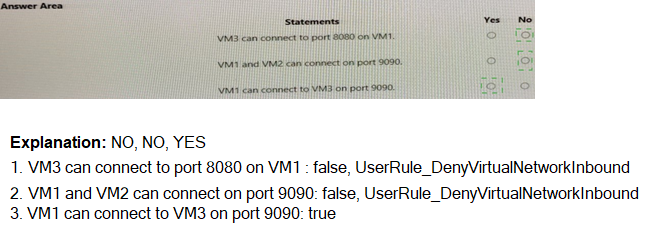
Network Security Groups (NSGs) contain rules evaluated in priority order. NSG1 is associated with Subnet1, which contains VM1 and VM2. NSG2 is associated with Subnet2, which contains VM3 and has only default rules. Default rules allow all outbound traffic and all inbound traffic from within the virtual network. For connections from VM3 (Subnet2) to VM1 (Subnet1), traffic is evaluated by NSG1 on Subnet1 inbound and NSG2 on Subnet2 outbound.
Correct Option (Statement 1):
No – VM3 cannot connect to port 8080 on VM1. NSG1 on Subnet1 has a rule with priority 200 that denies all traffic from Virtual network source on any port. This rule blocks all traffic from VM3 to VM1 regardless of port. The default rules in NSG2 allow outbound traffic, but NSG1's deny rule overrides any allow rules with higher priority numbers.
Correct Option (Statement 2):
Yes – VM1 and VM2 can connect on port 9090. Both VMs are in Subnet1, which has NSG1 associated. The priority 200 deny rule applies to traffic from Virtual network source, but traffic between VM1 and VM2 within the same subnet is not subject to inbound NSG rules. NSGs apply to inbound traffic entering the subnet, not intra-subnet traffic. Therefore, port 9090 connectivity works.
Correct Option (Statement 3):
Yes – VM1 can connect to VM3 on port 9090. NSG1 on Subnet1 controls outbound traffic from VM1 (not explicitly shown but default rules allow all outbound). NSG2 on Subnet2 has only default rules, which allow all inbound traffic from within the virtual network. No deny rules block port 9090 inbound to Subnet2. Therefore, connectivity succeeds.
Reference:
Network security groups
How NSGs evaluate traffic
Default security rules
You have an Azure subscription that contains the resources shown in the following table.

You purchase a certificate for app1.contoso.com from a public certification authority (CA) and install the certificate on appservice1.
You need to ensure that App1 can be accessed by using a URL of https://app1.contoso.com. The solution must ensure that all the traffic for App1 is routed via FD1.
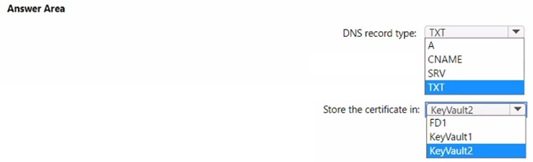
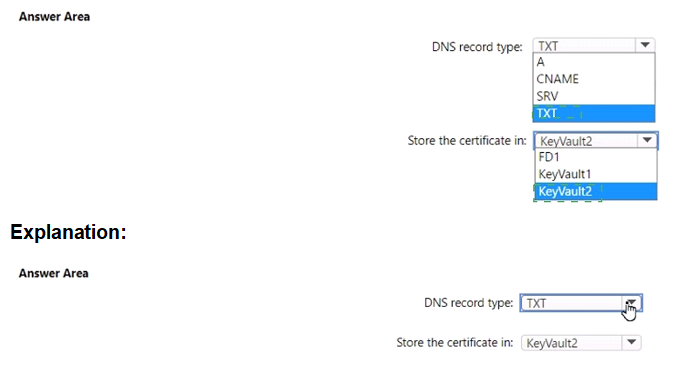
Which type of DNS record should you create, and where should you store the certificate? To answer, select the appropriate options in the answer area.
NOTE: Each correct selection is worth one point
Explanation:
Azure Front Door requires a CNAME record to map a custom domain to the Front Door frontend host. The HTTPS certificate must be stored in Azure Key Vault that uses the Vault access policy permission model. Front Door Standard profile does not currently support Azure RBAC permission model for certificate retrieval and rotation.
DNS record type:
CNAME – Azure Front Door custom domain configuration requires a CNAME record that maps the custom domain (app1.contoso.com) to the Front Door default frontend host (FD1.azurefd.net). A, TXT, and SRV records are not used for Front Door custom domain mapping.
Store the certificate in:
KeyVault1 – KeyVault1 uses Vault access policy permission model, which is required for Azure Front Door Standard profile to access and rotate certificates. KeyVault2 uses Azure RBAC permission model, which is not supported for Front Door certificate retrieval. Certificates cannot be stored directly in FD1.
Reference:
https://learn.microsoft.com/en-us/azure/frontdoor/front-door-custom-domain
https://learn.microsoft.com/en-us/azure/frontdoor/standard-premium/how-to-configure-https-custom-domain
https://learn.microsoft.com/en-us/azure/frontdoor/standard-premium/how-to-configure-https-custom-domain#certificate-rotation
You have an on-premises datacenter.
You have an Azure subscription that contains 10 virtual machines and a virtual network named VNe1l in the East US Azure region. The virtual machines are connected to VNet1 and replicate across three availability zones.
You need to connect the datacenter to VNetl1by using ExpressRoute. The solution must meet the following requirements:
• Maintain connectivity to the virtual machines if two availability zones fail.
• Support 1000-Mbps connections-
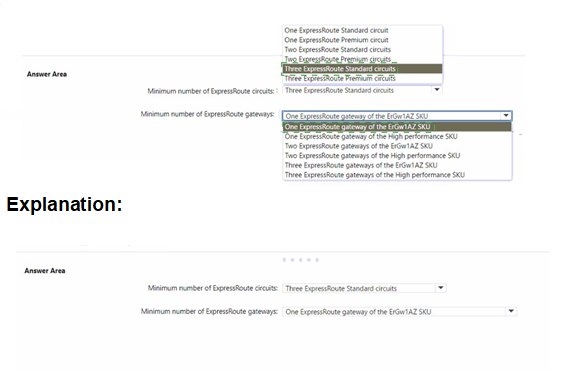
What should you include in the solution? To answer, select the appropriate options in the answer area. NOTE: Each correct selection is worth one point.

Explanation:
To maintain connectivity if two availability zones fail, you need zone-resilient ExpressRoute connectivity. ExpressRoute Standard circuits are zone-redundant within a region when configured with active-active connections across two Microsoft Enterprise Edge routers (MSEE). Two ExpressRoute Standard circuits provide cross-zone resilience by connecting to different peering locations. For the gateway, ErGw1AZ SKU supports 1000 Mbps and is zone-redundant. One AZ gateway provides sufficient throughput and zone resilience.
Minimum number of ExpressRoute circuits:
Two ExpressRoute Standard circuits – Two ExpressRoute circuits connected to different peering locations provide zone resilience. If one zone fails, the second circuit maintains connectivity. ExpressRoute Premium is not required as you do not need global reach or additional route limits. One circuit is insufficient for two-zone failure resilience. Three circuits exceed the minimum requirement.
Minimum number of ExpressRoute gateways:
One ExpressRoute gateway of the ErGw1AZ SKU – ErGw1AZ supports up to 1 Gbps throughput and is zone-redundant. A single AZ gateway provides high availability across zones. High performance SKU supports 200 Mbps only and is not zone-redundant. Two or three gateways exceed the minimum requirement.
Reference:
https://learn.microsoft.com/en-us/azure/expressroute/expressroute-about-virtual-network-gateways
https://learn.microsoft.com/en-us/azure/expressroute/expressroute-locations-providers
https://learn.microsoft.com/en-us/azure/expressroute/expressroute-introduction
https://learn.microsoft.com/en-us/azure/expressroute/expressroute-faqs
You have the Azure load balancer shown in the Load Balancer exhibit.

You need to ensure that LB2 distributes traffic to all the members of VMSS1.
Which two actions should you perform? Each correct answer presents part of the solution.
NOTE: Each correct selection is worth one point.
A. Add a network interface to VMSS1.
B. Configure a health probe.
C. Add a public IP address to each member of VMSS1.
D. Add a load balancing rule.
D. Add a load balancing rule.
Explanation:
The Azure load balancer LB2 currently has a backend pool (LB2-BEP1) containing two instances of VMSS1, but no load balancing rule or health probe configured. Without a load balancing rule, traffic cannot be distributed. Without a health probe, the load balancer cannot determine which backend instances are healthy to receive traffic. Both are required for proper traffic distribution.
Correct Option:
B – Configure a health probe.
A health probe is required to monitor the health of backend instances. The load balancer uses the health probe to determine which instances are healthy and can receive new traffic. Without a health probe, the load balancer cannot distribute traffic effectively.
Correct Option:
D – Add a load balancing rule.
A load balancing rule defines how incoming traffic is distributed to the backend pool instances. It maps a frontend IP and port to the backend pool and associates a health probe. Without this rule, LB2 will not forward any traffic to VMSS1 instances.
Incorrect Option:
A – Add a network interface to VMSS1.
VMSS1 instances already have network interfaces attached. Adding more network interfaces does not enable load balancing. Each VM in VMSS1 already has a NIC that is correctly configured in the backend pool.
Incorrect Option:
C – Add a public IP address to each member of VMSS1.
Backend pool instances do not require public IP addresses. Load balancer distributes traffic to private IP addresses of backend instances. Adding public IPs to each VM is unnecessary and not a requirement for load balancer functionality.
Reference:
https://learn.microsoft.com/en-us/azure/load-balancer/load-balancer-standard-overview
You have the Azure Traffic Manager profiles shown in the following table.

Which endpoints can you add to Profile2?
A. Endpoint1 and Endpoint4 only
B. Endpoint1, Endpoint2, Endpoint3, and Endpoint4
C. Endpoint1 only
D. Endpoint2 and Endpoint3 only
E. Endpoint3 only
Explanation:
Azure Traffic Manager profiles support different routing methods, and the types of endpoints you can add depend on the profile’s configured routing method. Profile2’s routing method restricts the allowable endpoint types. The question tests knowledge of Traffic Manager endpoint compatibility: external endpoints are supported in all profiles, while Azure-specific endpoints (like App Service, VMs, or public IPs in Azure) have limitations based on routing method (e.g., Performance, Geographic, MultiValue, and Subnet routing have restrictions on nested or certain Azure endpoints).
Correct Option:
A. Endpoint1 and Endpoint4 only → Correct
Endpoint1 and Endpoint4 are external endpoints (non-Azure hosted or public IP not tied to Azure resource-specific behavior). These are allowed in any Traffic Manager profile regardless of routing method. The other endpoints (Endpoint2 and Endpoint3) are likely Azure-native (e.g., Azure App Service, VM, or public IP associated with Azure resource), which are restricted or unsupported in Profile2 due to its routing method (commonly Performance, Geographic, MultiValue, or Subnet routing do not allow certain Azure endpoints). Only external endpoints remain valid.
Incorrect Option:
B. Endpoint1, Endpoint2, Endpoint3, and Endpoint4 → Incorrect
This option assumes all endpoints are compatible, but Profile2’s routing method does not support all endpoint types. Specifically, Endpoint2 and Endpoint3 (Azure-native endpoints) are not permitted in Profile2 (e.g., if Profile2 uses Performance or Geographic routing, Azure endpoints like App Service or VMs are not allowed). Including them violates Traffic Manager endpoint compatibility rules.
C. Endpoint1 only → Incorrect
While Endpoint1 is definitely supported (external), Endpoint4 is also an external endpoint and therefore allowed in Profile2. There is no restriction preventing both external endpoints from being added together. This option unnecessarily limits the answer by excluding a valid external endpoint.
D. Endpoint2 and Endpoint3 only → Incorrect
Endpoint2 and Endpoint3 are Azure-native endpoints, which are precisely the types restricted or unsupported in Profile2 (depending on its routing method, such as Performance, Geographic, MultiValue, or Subnet). External endpoints are allowed, but Azure-specific ones are not—making this option completely wrong.
E. Endpoint3 only → Incorrect
Endpoint3 is an Azure-native endpoint and is not supported in Profile2 due to routing method restrictions. Additionally, this option ignores Endpoint1 and Endpoint4, which are valid external endpoints. It incorrectly selects a restricted endpoint while excluding allowed ones.
Reference:
Azure Traffic Manager endpoint types - Azure Traffic Manager | Microsoft Learn
| Page 2 out of 19 Pages |