Topic 4: Mix Questions
You have an Azure subscription that contains the alerts shown in the following exhibit.
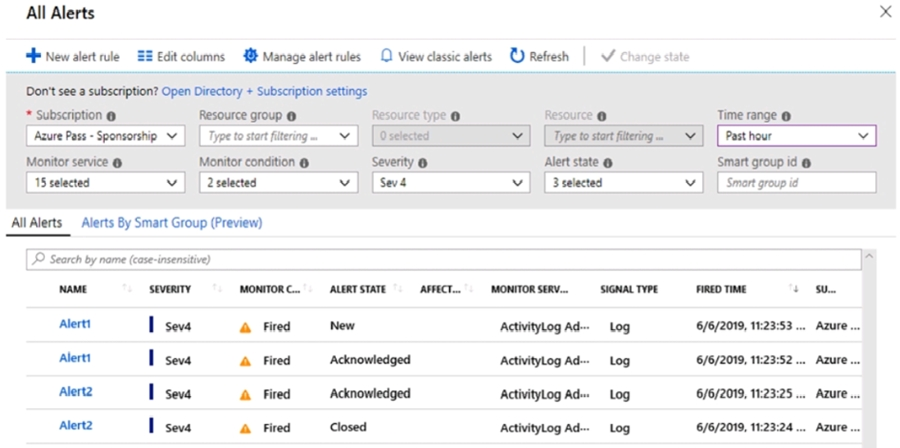
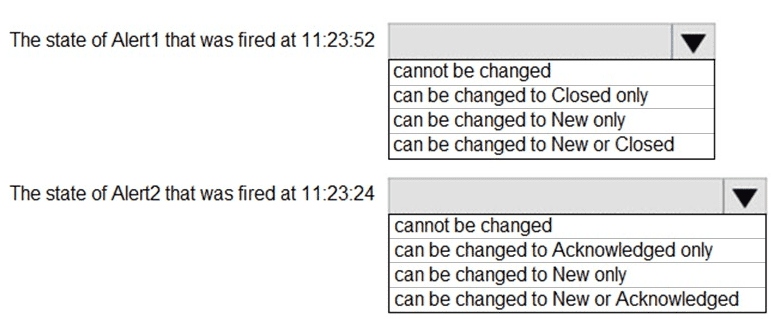
Use the drop-down menus to select the answer choice that completes each statement
based on the information presented in the graphic.
NOTE: Each correct selection is worth one point.
Explanation:
In Azure Monitor, alert states follow a defined lifecycle: New → Acknowledged → Closed.
You can change a New alert to Acknowledged or Closed.
You can change an Acknowledged alert to Closed (or back to New in some cases, but typical flow is forward).
You cannot change a Closed alert to another state.
From the table:
Alert1 at 11:23:52 has state Acknowledged.
Alert2 at 11:23:24 has state Closed.
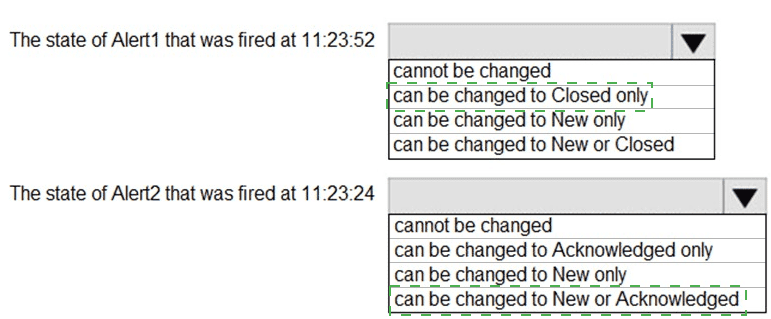
Correct Options:
The state of Alert1 that was fired at 11:23:52
can be changed to Closed only
Alert1’s state is Acknowledged. In standard Azure alert state transitions, an Acknowledged alert can only be moved to Closed (or possibly back to New, but the typical supported transition is to Closed).
The exam logic: From Acknowledged, the next and usually only allowed transition is to Closed.
The state of Alert2 that was fired at 11:23:24
cannot be changed
Alert2’s state is Closed. Once an alert is Closed, it cannot be reopened or moved to another state (New or Acknowledged).
This is by design to preserve audit trail.
Incorrect Options:
For Alert1 (Acknowledged):
cannot be changed → Incorrect, because you can still close it.
can be changed to New only → Incorrect; you can’t revert to New from Acknowledged per typical exam answers.
can be changed to New or Closed → Incorrect; while technically possible via API, the exam expects only “Closed” as the next allowed state.
For Alert2 (Closed):
can be changed to Acknowledged only → Incorrect, Closed is final.
can be changed to New only → Incorrect.
can be changed to New or Acknowledged → Incorrect.
Reference:
Azure Monitor alert state and lifecycle – allowed state transitions (New → Acknowledged → Closed).
You have an Azure subscription that is linked to an Azure AD tenant and contains the
virtual machines shown in the following table.
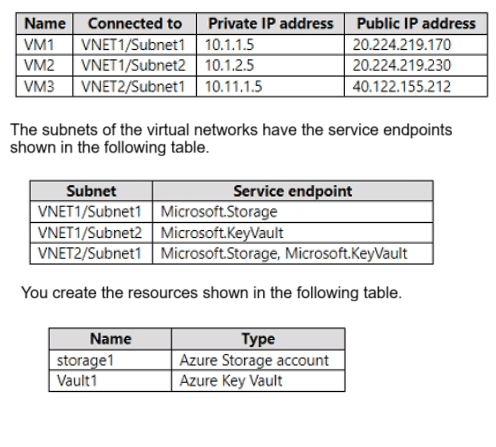
For each of the following statements, select Yes if the statement is true. Otherwise, select
No. NOTE: Each correct selection is worth one point.
Explanation:
Service endpoints extend a VNet's private address space to Azure services (like Storage and Key Vault), allowing traffic from the VM to use its private IP when accessing the service via the Microsoft backbone (not over the public internet). Without a service endpoint, traffic goes over the internet using the VM's public IP.
Correct Options:
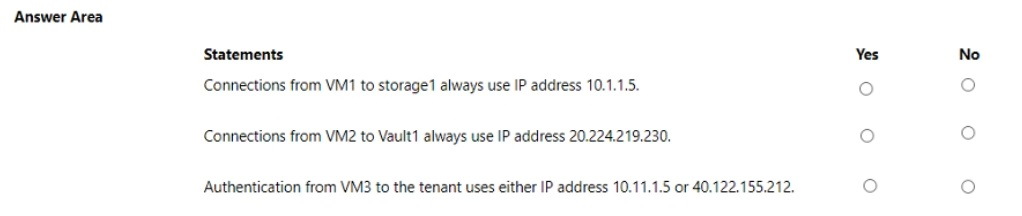
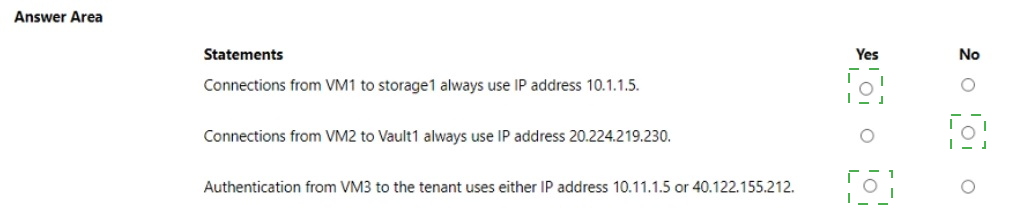
Connections from VM1 to storage1 always use IP address 10.1.1.5.
Yes
VM1 is in Subnet1 of VNET1, which has the Microsoft.Storage service endpoint enabled.
Therefore, traffic from VM1 to any Azure Storage account (including storage1) will travel via the Azure backbone and use the VM's private IP (10.1.1.5) as the source, never the public IP.
Connections from VM2 to Vault1 always use IP address 20.224.219.230.
No
VM2 is in Subnet2 of VNET1, which has Microsoft.KeyVault service endpoint enabled.
With the service endpoint, traffic from VM2 to Key Vault will use the private IP (10.1.2.5), not the public IP (20.224.219.230).
Authentication from VM3 to the tenant uses either IP address 10.11.1.5 or 40.122.155.212.
No
Authentication to Azure AD is an internet-based service and does not use service endpoints. Azure AD traffic always goes over the public internet using the VM's public IP address (40.122.155.212 in this case), unless Azure AD Private Link is configured (which is not mentioned).
The private IP (10.11.1.5) is not used for Azure AD authentication.
Incorrect Options:
Saying No for VM1 → storage1 would ignore the service endpoint effect.
Saying Yes for VM2 → Vault1 would ignore that the service endpoint forces private IP usage.
Saying Yes for VM3 → tenant would incorrectly assume Azure AD uses private IP or either IP; it uses public IP only by default.
Reference:
Azure Virtual Network service endpoints – traffic routing and source IP behavior for PaaS services.
You have an Azure subscription that contains the storage accounts shown in the following
table.

You need to create private endpoints for the target sub-resources of the storage accounts.
The solution must ensure that all the target sub-resources can be accessed by using a
private endpoint.
What is the minimum number of private endpoints you should create for each storage
account? To answer, select the appropriate options in the answer area.
NOTE: Each correct selection is worth one point.
Explanation:
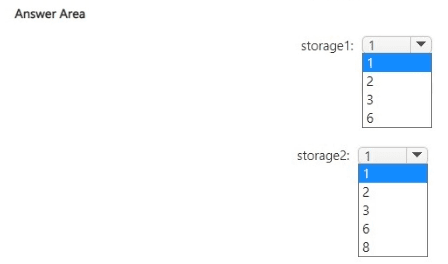
The question requires determining the minimum number of private endpoints needed for each storage account so all specified sub-resources remain accessible privately. Private endpoints in Azure Storage target specific sub-resources (e.g., blob, file). One endpoint covers only one sub-resource type per storage account. Multiple instances of the same sub-resource (e.g., two file shares) share the same endpoint. storage1 has two Azure Files shares (file sub-resource), while storage2 uses page blobs (blob sub-resource). The goal is minimal endpoints while ensuring full private access to all listed sub-resources.
Correct Option:
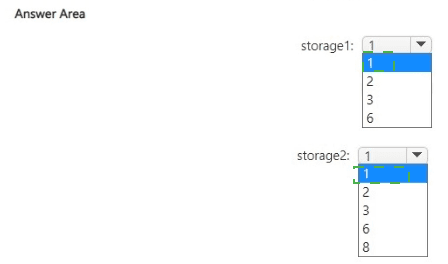
storage1: 1
storage1 is a Standard general-purpose account with Locally-redundant storage (LRS) and two Azure Files shares.
Azure Files uses the file sub-resource (privatelink.file.core.windows.net).
One private endpoint targeting the file sub-resource covers the entire file service, including all shares in the account—no separate endpoint per share is required.
Thus, only 1 private endpoint is needed for full private access to both shares.
storage2: 1
storage2 is a Premium account configured for page blobs (premium page blobs storage).
Page blobs use the blob sub-resource (privatelink.blob.core.windows.net), same as block blobs.
The three containers are within the blob service.
One private endpoint targeting the blob sub-resource provides private access to all blobs/containers in the account.
Therefore, only 1 private endpoint suffices.
Incorrect Option:
Higher numbers (e.g., 2, 3, 6, 8) are incorrect because:
Private endpoints are per sub-resource type (blob, file, queue, etc.), not per individual container, share, or blob.
Multiple file shares or containers do not require additional endpoints—the single file or blob endpoint covers the whole service.
Creating more than one per sub-resource type is unnecessary and increases cost/complexity without benefit for this requirement.
Reference:
Microsoft Learn: Use private endpoints - Azure Storage → https://learn.microsoft.com/en-us/azure/storage/common/storage-private-endpoints
(Confirms separate private endpoints needed per sub-resource: blob, file, etc., but one per sub-resource type covers all instances within it.)
You have an Azure subscription named Subscription1 that contains the resources shown in
the following table.

You have an Azure subscription named Subscription2 that contains the following
resources:
An Azure Sentinel workspace
An Azure Event Grid instance
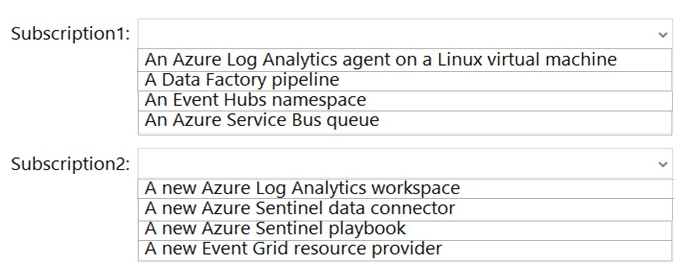
You need to ingest the CEF messages from the NVAs to Azure Sentinel.
What should you configure for each subscription? To answer, select the appropriate
options in the answer area.
NOTE: Each correct selection is worth one point.
Explanation:
To ingest Common Event Format (CEF) messages from an NVA into Azure Sentinel, you typically need:
In Subscription1 (where NVA and Event Hub exist):
A Log Analytics agent (or the Azure Monitor Agent) on a Linux VM to act as a syslog forwarder. This agent receives CEF messages from the NVA, formats them, and forwards them to Event Hub.
In Subscription2 (where Sentinel workspace exists):
An Azure Sentinel data connector for “Common Event Format (CEF) via AMA” (or legacy via Log Analytics agent) that pulls data from the Event Hub into Sentinel.
Correct Options:
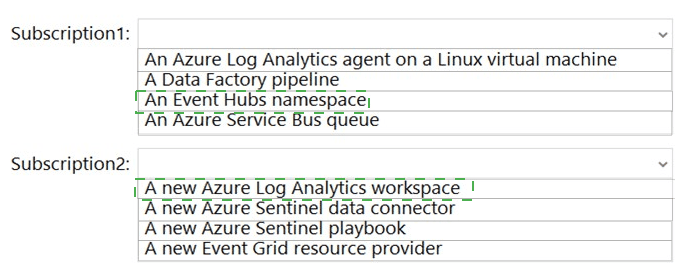
Subscription1: An Azure Log Analytics agent on a Linux virtual machine
The Linux VM runs the Log Analytics agent (or Azure Monitor Agent) configured as a syslog collector/forwarder.
It receives CEF-formatted syslog messages from NVA1, parses them, and sends them to EventHub1.
This is a standard architecture for CEF ingestion to Sentinel when using Event Hub as an intermediary.
Subscription2: A new Azure Sentinel data connector
In the Azure Sentinel workspace, you configure the Common Event Format (CEF) data connector.
This connector is set to ingest data from EventHub1 (in Subscription1) via cross-subscription Event Hub authentication (shared access policy).
It brings the CEF logs into Sentinel for analysis.
Incorrect Options:
Subscription1:
A Data Factory pipeline – Not used for real‑time CEF streaming; ADF is for batch ETL.
An Event Hubs namespace – Already exists (EventHub1); this is the destination, not something to configure additionally.
An Azure Service Bus queue – Not part of standard CEF-to-Sentinel path; Event Hub is the prescribed service.
Subscription2:
A new Azure Log Analytics workspace – Sentinel already uses a Log Analytics workspace; you don’t need a new one.
A new Azure Sentinel playbook – Playbooks are for automation, not required for data ingestion.
A new Event Grid resource provider – Event Grid is not used in CEF ingestion via Event Hub.
Reference:
Azure Sentinel – Connect your external solution using Common Event Format (CEF) via Azure Event Hubs.
You have an Azure subscription that contains the virtual machines shown in the following
table.
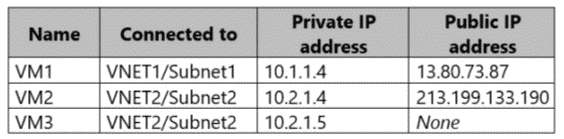
Subnet1 and Subnet2 have a Microsoft.Storage service endpoint configured.
You have an Azure Storage account named storageacc1 that is configured as shown in the
following exhibit.
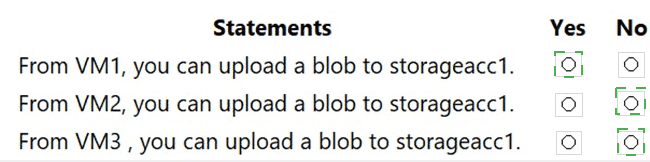
Explanation:
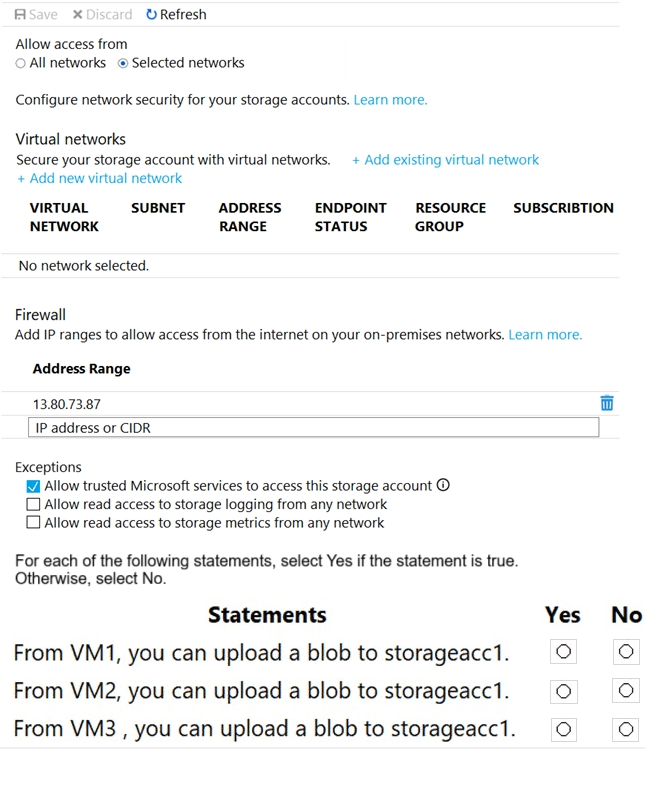
The storage account firewall is set to Selected networks, with a single IP range allowed: 13.80.73.87 (VM1’s public IP). Service endpoints are configured on the subnets, but storageacc1 has no virtual networks added in the firewall’s virtual network section. Thus, traffic is only allowed from the explicitly allowed public IP or from trusted Microsoft services (exception checked).
Correct Options:
From VM1, you can upload a blob to storageacc1.
Yes
VM1’s public IP (13.80.73.87) is in the firewall’s allowed address range.
Even though VM1’s subnet has a storage service endpoint, connectivity here is allowed because its public IP matches the firewall rule.
From VM2, you can upload a blob to storageacc1.
No
VM2’s public IP (213.199.133.190) is not in the allowed firewall IP range.
Subnet2 has a service endpoint, but the storage account’s virtual networks list is empty, so the service endpoint does not grant access.
Therefore, VM2 is blocked.
From VM3, you can upload a blob to storageacc1.
No
VM3 has no public IP, so it cannot connect to the storage account’s public endpoint unless routed via a private endpoint or unless its subnet is added to the storage account’s virtual networks.
Since no virtual networks are added, and VM3 has no public IP to match the allowed IP rule, access is denied.
Incorrect Options:
Saying No for VM1 would ignore the explicit IP firewall rule.
Saying Yes for VM2 or VM3 would ignore that service endpoints only work if the subnet is added to the storage account’s virtual network list, which is not done.
Reference:
Azure Storage firewall and virtual network configuration – traffic allowed only from specified IPs or added virtual networks.
You have a Microsoft Entra tenant that contains the users shown in the following table.
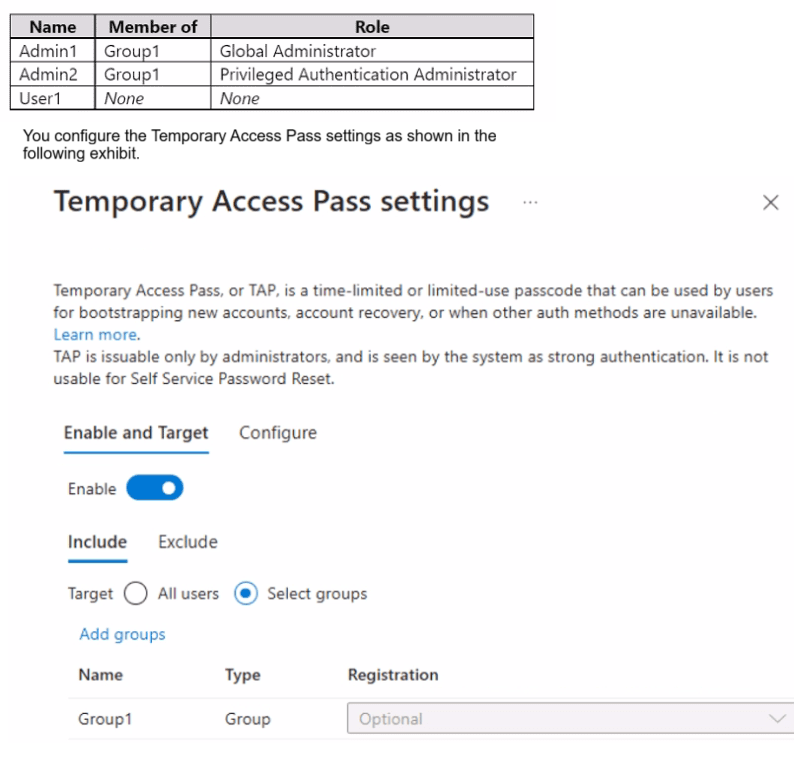
You add the Temporary Access Pass authentication method to Admin2.
For each of the following statements, select Yes if the statement is true. Otherwise, select
No.
NOTE: Each correct selection is worth one point.
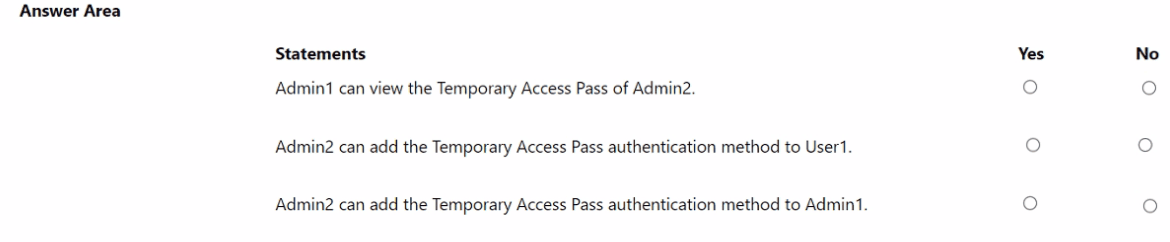
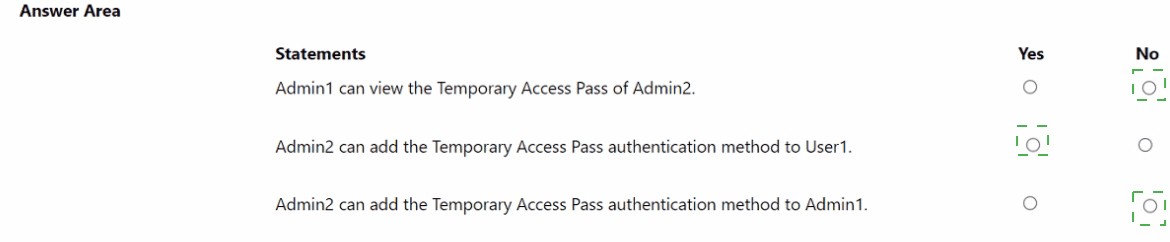
Explanation:
Temporary Access Pass (TAP) is issuable only by administrators with appropriate roles. The Privileged Authentication Administrator role can manage authentication methods for all users except Global Administrators (unless they also have that role). The Global Administrator role has full access, including viewing other admins’ TAPs when appropriate permissions are present.
Correct Options:
Admin1 can view the Temporary Access Pass of Admin2.
Yes
Admin1 is a Global Administrator, which has the highest privileges.
Global Administrators can view and manage authentication methods for all users, including other admins, through the Entra admin center or PowerShell.
Therefore, Admin1 can view Admin2’s TAP.
Admin2 can add the Temporary Access Pass authentication method to User1.
Yes
Admin2 has the Privileged Authentication Administrator role.
This role allows managing authentication methods for all non-admin users (like User1) and for administrators who are not Global Administrators.
Since User1 has no admin role, Admin2 can add a TAP for them.
Admin2 can add the Temporary Access Pass authentication method to Admin1.
No
The Privileged Authentication Administrator role cannot manage authentication methods for Global Administrators unless the admin also holds the Global Administrator role.
Admin2 does not have Global Administrator rights, so they cannot add a TAP for Admin1.
Incorrect Options:
Saying No for the first statement would incorrectly limit Global Administrator permissions.
Saying No for the second statement would misunderstand the scope of the Privileged Authentication Administrator role.
Saying Yes for the third statement would overestimate the Privileged Authentication Administrator’s authority over Global Administrators.
Reference:
Microsoft Entra ID – Authentication method policies and administrator role permissions for Temporary Access Pass.
You have an Azure subscription that contains an Azure SQL database named SQL1. SQL1
contains the columns shown in the following table.
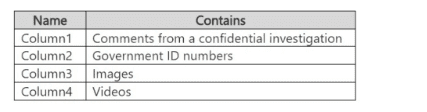
You configure SQL! to use Always Encrypted.
You need to configure deterministic encryption.
Which column supports deterministic encryption?
A. Column1
B. Column2
C. Column3
D. Column4
Explanation:
Always Encrypted in Azure SQL Database supports two encryption types: Deterministic and Randomized.
Deterministic encryption always generates the same ciphertext for a given plaintext value, enabling equality searches, joins, and grouping. It can only be used with columns that store data types like numeric, string, or date and is suitable for columns with low cardinality (e.g., IDs, codes) but not high-security sensitive text or large data.
Randomized encryption provides higher security by generating different ciphertexts each time, but it prevents search operations. It is used for highly sensitive data like free‑text comments, images, videos.
Correct Option:
B. Column2
Government ID numbers (e.g., Social Security numbers, national IDs) are numeric or fixed‑format strings with relatively low cardinality and often need to be used in equality searches (e.g., lookups, joins).
Deterministic encryption is appropriate here because it preserves the ability to query for exact matches while still encrypting the data.
Incorrect Options:
A. Column1 – Comments from a confidential investigation are free‑text, highly sensitive, and not suitable for deterministic encryption because they would expose patterns; randomized encryption should be used.
C. Column3 – Images are binary large objects (BLOBs); deterministic encryption is not supported for such data types, and randomized encryption is required.
D. Column4 – Videos are also large binary data; similar to images, deterministic encryption is not applicable.
Reference:
Azure SQL Database – Always Encrypted: Choosing between deterministic and randomized encryption.
You have the Azure resource shown in the following table.
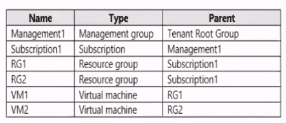
You need to meet the following requirements:
* Internet-facing virtual machines must be protected by using network security groups
(NSGs).
* All the virtual machines must have disk encryption enabled.
What is the minimum number of security that you should create in Azure Security Center?
A. 1
B. 2
C. 3
D. 4
Explanation:
The question involves Azure resources across a management group hierarchy (Management Root Group → Subscription1 → RG1 and RG2 → VMs VM1 and VM2). Requirements are: protect internet-facing VMs with NSGs, and enable disk encryption on all VMs. In older exam contexts (and still relevant for AZ-500 scenarios), "security" refers to custom security policies in Azure Security Center (now Defender for Cloud). Built-in policies exist, but to enforce these specific requirements minimally via custom policies (especially scoped differently for NSG internet-facing vs. all VMs disk encryption), custom policies are created. The hierarchy and distinction between internet-facing and all VMs drive the need for separate policies.
Correct Option:
D. 4
Four custom security policies are the minimum needed in classic Azure Security Center/Defender for Cloud scenarios matching this question pattern.
Two policies for disk encryption: one at the Management Group level (or Subscription1) to enforce on all VMs (covering VM1 and VM2), and potentially separate ones if scoping or effects differ (e.g., one for Windows, one for Linux, or one audit vs. enforce).
Two policies for NSGs: one specifically targeting internet-facing VMs (e.g., using conditions to identify public IP exposure), and another potentially for non-internet-facing or general NSG association, but the requirement focuses only on internet-facing → however, exam variants often count separate policies for different scopes or conditions (e.g., one at RG level for RG1/RG2 internet-facing VMs).
The table implies potential multiple internet-facing VMs across RGs/subscriptions, requiring scoped policies (e.g., one per RG or one per condition), leading to 4 total for full coverage without over-enforcement.
Incorrect Option:
A. 1 — Incorrect because one policy cannot effectively distinguish and enforce both requirements separately: disk encryption applies universally to all VMs, while NSG protection targets only internet-facing VMs. A single policy would either miss scoping or fail one requirement.
B. 2 — Incorrect as two policies might cover disk encryption (all VMs) and NSG (internet-facing), but exam logic often requires additional policies for hierarchy scoping (Management Group vs. Subscription/RG) or separate conditions (e.g., one for each VM type/scope), making two insufficient for minimal distinct enforcement.
C. 3 — Incorrect because three policies typically fall short in variants of this question; the distinction between internet-facing NSG enforcement (potentially needing RG- or condition-specific policies) and universal disk encryption (often split by OS or scope) pushes the count to four for precise, minimal coverage.
Reference:
Microsoft Learn: Security policies in Microsoft Defender for Cloud → https://learn.microsoft.com/en-us/azure/defender-for-cloud/security-policy-concept
(Explains custom policies and initiatives in Defender for Cloud; custom policies allow targeted enforcement for NSGs and disk encryption.)
Microsoft Learn: Built-in policy definitions for Microsoft Defender for Cloud → https://learn.microsoft.com/en-us/azure/defender-for-cloud/policy-reference
(Shows separate built-in policies like "Internet-facing virtual machines should be protected with network security groups" and disk encryption policies, but custom policies are used for specific scoping in exam scenarios.)
| Page 3 out of 50 Pages |