Topic 3: City Power & Light
Case study
This is a case study. Case studies are not timed separately. You can use as much
exam time as you would like to complete each case. However, there may be additional
case studies and sections on this exam. You must manage your time to ensure that you
are able to complete all questions included on this exam in the time provided.
To answer the questions included in a case study, you will need to reference information
that is provided in the case study. Case studies might contain exhibits and other resources
that provide more information about the scenario that is described in the case study. Each
question is independent of the other questions in this case study.
At the end of this case study, a review screen will appear. This screen allows you to review
your answers and to make changes before you move to the next section of the exam. After
you begin a new section, you cannot return to this section.
To start the case study
To display the first question in this case study, click the Next button. Use the buttons in the
left pane to explore the content of the case study before you answer the questions. Clicking
these buttons displays information such as business requirements, existing environment,
and problem statements. When you are ready to answer a question, click the Question
button to return to the question.
Background
City Power & Light company provides electrical infrastructure monitoring solutions for
homes and businesses. The company is migrating solutions to Azure.
Current environment
Architecture overview
The company has a public website located at http://www.cpandl.com/. The site is a singlepage
web application that runs in Azure App Service on Linux. The website uses files
stored in Azure Storage and cached in Azure Content Delivery Network (CDN) to serve
static content.
API Management and Azure Function App functions are used to process and store data in
Azure Database for PostgreSQL. API Management is used to broker communications to
the Azure Function app functions for Logic app integration. Logic apps are used to
orchestrate the data processing while Service Bus and Event Grid handle messaging and
events.
The solution uses Application Insights, Azure Monitor, and Azure Key Vault.
Architecture diagram
The company has several applications and services that support their business. The
company plans to implement serverless computing where possible. The overall architecture
is shown below.

User authentication
The following steps detail the user authentication process:
The user selects Sign in in the website.
The browser redirects the user to the Azure Active Directory (Azure AD) sign in
page.
The user signs in.
Azure AD redirects the user’s session back to the web application. The URL
includes an access token.
The web application calls an API and includes the access token in the
authentication header. The application ID is sent as the audience (‘aud’) claim in
the access token.
The back-end API validates the access token.
Requirements
Corporate website
Communications and content must be secured by using SSL.
Communications must use HTTPS.
Data must be replicated to a secondary region and three availability zones.
Data storage costs must be minimized.
Azure Database for PostgreSQL
The database connection string is stored in Azure Key Vault with the following attributes:
Azure Key Vault name: cpandlkeyvault
Secret name: PostgreSQLConn
Id: 80df3e46ffcd4f1cb187f79905e9a1e8
The connection information is updated frequently. The application must always use the
latest information to connect to the database.
Azure Service Bus and Azure Event Grid
Azure Event Grid must use Azure Service Bus for queue-based load leveling.
Events in Azure Event Grid must be routed directly to Service Bus queues for use
in buffering.
Events from Azure Service Bus and other Azure services must continue to be
routed to Azure Event Grid for processing.
Security
All SSL certificates and credentials must be stored in Azure Key Vault.
File access must restrict access by IP, protocol, and Azure AD rights.
All user accounts and processes must receive only those privileges which are
essential to perform their intended function.
Compliance
Auditing of the file updates and transfers must be enabled to comply with General Data
Protection Regulation (GDPR). The file updates must be read-only, stored in the order in
which they occurred, include only create, update, delete, and copy operations, and be
retained for compliance reasons.
Issues
Corporate website
While testing the site, the following error message displays:
CryptographicException: The system cannot find the file specified.
Function app
You perform local testing for the RequestUserApproval function. The following error
message displays:
'Timeout value of 00:10:00 exceeded by function: RequestUserApproval'
The same error message displays when you test the function in an Azure development
environment when you run the following Kusto query:
FunctionAppLogs
| where FunctionName = = "RequestUserApproval"
Logic app
You test the Logic app in a development environment. The following error message
displays:
'400 Bad Request'
Troubleshooting of the error shows an HttpTrigger action to call the RequestUserApproval
function.
Code
Corporate website
Security.cs:

You create the following PowerShell script: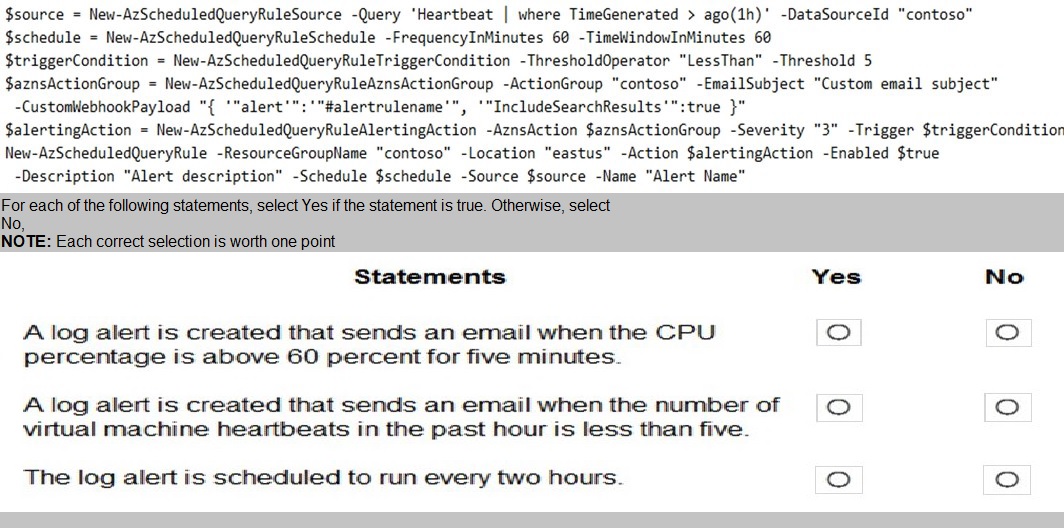
Explanation:
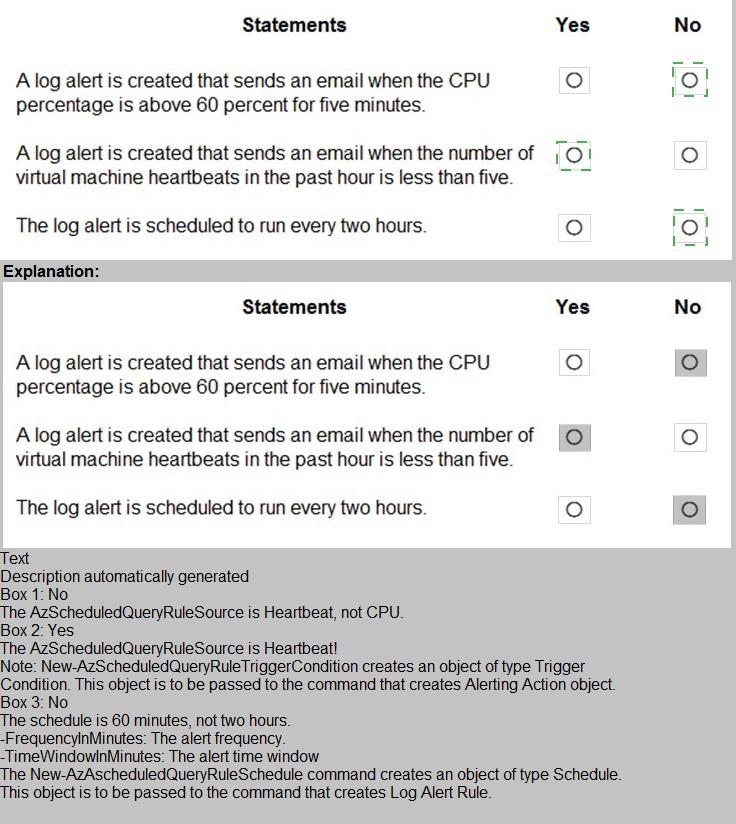
This question tests your ability to interpret Azure PowerShell commands for creating scheduled query rules (log alerts) . The script uses specific parameters to define the query, frequency, threshold, and action. Each statement must be evaluated against the actual configuration in the script.
Statement 1:
A log alert is created that sends an email when the CPU percentage is above 60 percent for five minutes.
❌ No
The query in the script is:
Heartbeat | where TimeGenerated > ago(1h)
This queries heartbeat data from Azure Monitor, not CPU percentage. The alert is based on heartbeat count, not performance counters. Additionally, the threshold operator is LessThan with a threshold of 5, and the time window is 60 minutes, not 5 minutes. This statement is completely incorrect.
Statement 2:
A log alert is created that sends an email when the number of virtual machine heartbeats in the past hour is less than five.
✅ Yes
The script queries heartbeat records from the last hour (ago(1h)). The trigger condition uses -ThresholdOperator "LessThan" -Threshold 5, meaning the alert fires when fewer than 5 heartbeat records are returned. The action group includes an email subject, so an email is sent. This matches the statement exactly.
Statement 3:
The log alert is scheduled to run every two hours.
❌ No
The schedule is defined as:
-FrequencyInMinutes 60 -TimeWindowInMinutes 60
This means the alert runs every 60 minutes (1 hour), not every 2 hours. The query looks back 60 minutes, and the evaluation frequency is also 60 minutes. There is no configuration for a 2-hour interval.
Reference:
New-AzScheduledQueryRule
ScheduledQueryRuleSource
Log alerts in Azure Monitor
Heartbeat table in Azure Monitor
You develop an Azure solution that uses Cosmos DB.
The current Cosmos DB container must be replicated and must use a partition key that is
optimized for queries.
You need to implement a change feed processor solution.
Which change feed processor components should you use? To answer, drag the
appropriate components to the correct requirements. Each component may be used once,
more than once, or not at all. You may need to drag the split bar between panes or scroll to
view the content.
NOTE: Each correct selection is worth one point.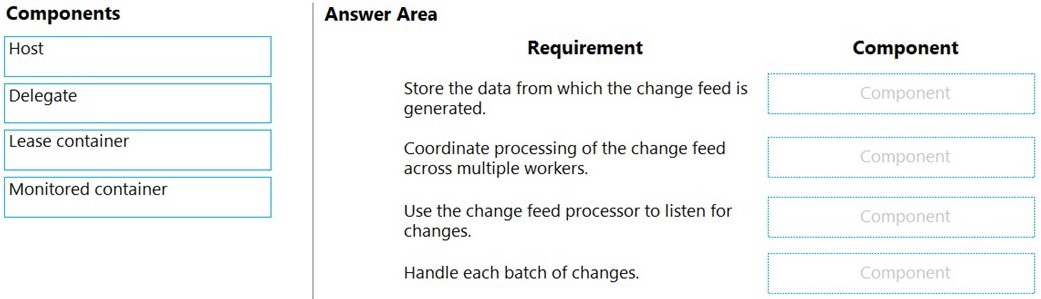
Explanation:
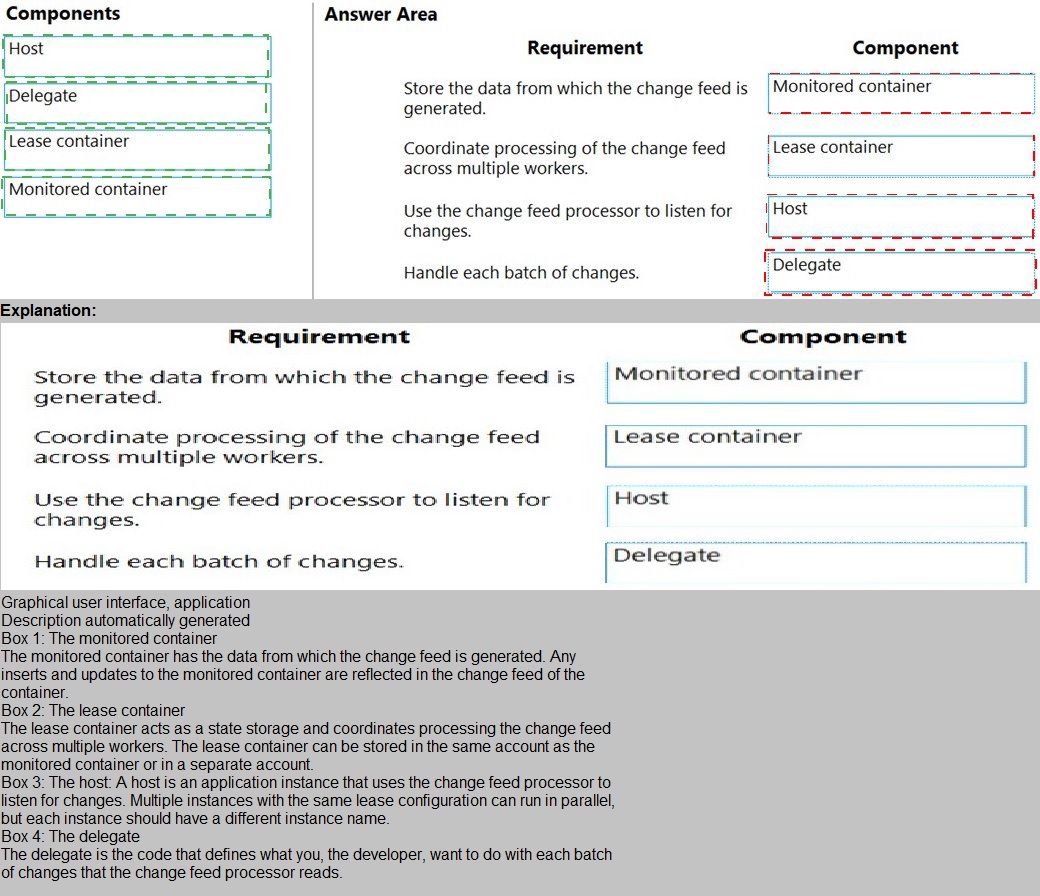
This question tests your knowledge of the Azure Cosmos DB Change Feed Processor architecture. The Change Feed Processor uses a lease container to manage state and distribution across multiple worker instances, a monitored container as the source of the change feed, and the host (or delegate/compute instance) to execute the change handling logic. Each component has a specific role in the processing pipeline.
Detailed Explanation:
1. Store the data from which the change feed is generated.
✅ Monitored container
The monitored container is the source container where your application data resides. The change feed listens for inserts and updates on this container. This is the container being replicated and optimized for queries as described in the scenario.
2. Coordinate processing of the change feed across multiple workers.
✅ Lease container
The lease container stores processing state, including leases per partition. It coordinates workload distribution across multiple change feed processor instances, ensuring each partition is processed by only one worker at a time and enabling checkpointing.
3. Use the change feed processor to listen for changes.
✅ Host
The host is an instance of the change feed processor library running in your compute environment (e.g., Azure Function, VM, App Service). It listens to the monitored container and orchestrates delegate execution.
4. Handle each batch of changes.
✅ Delegate
The delegate is your custom business logic (code) that processes each batch of changes received from the change feed. It is invoked by the host and contains the logic to handle the replicated data.
Incorrect Component Mappings:
Host is not the component that stores data or coordinates leases — it runs the processor.
Lease container is not the source of changes — it stores metadata.
Delegate is not the listener — it is the handler invoked by the host.
Monitored container does not coordinate workers — it is the data source.
Reference:
Change Feed Processor in Azure Cosmos DB
Change Feed Processor components
Working with the change feed processor
| Page 3 out of 28 Pages |