Topic 2: Misc. Questions
For each of the following statements, select Yes if the statement is true. Otherwise, select No.
NOTE: Each correct selection is worth one point.

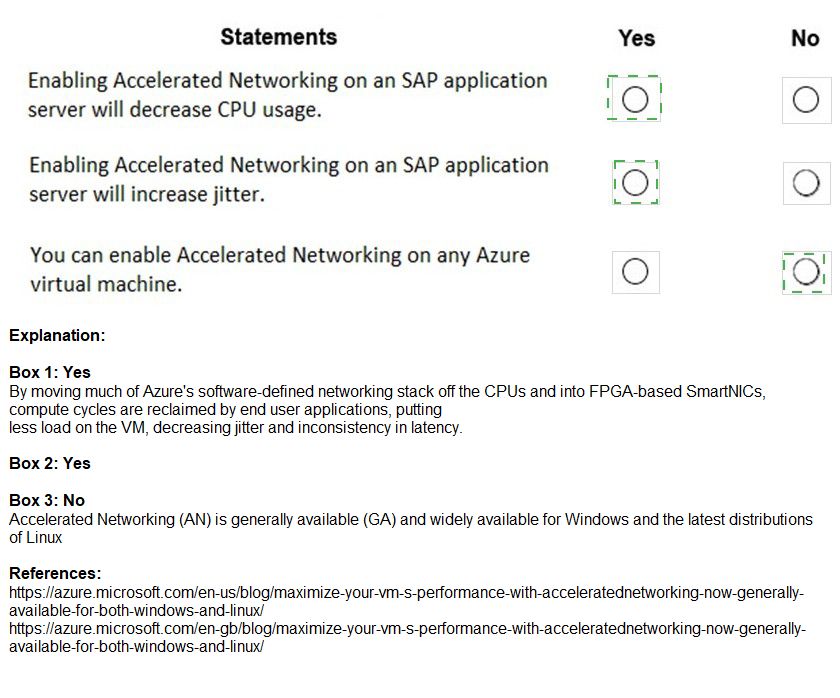
Explanation:
Accelerated Networking enables single-root I/O virtualization (SR-IOV) on Azure VMs, improving network performance by bypassing the host and switching directly to the VM. For SAP application servers, this impacts CPU usage, network latency, and VM compatibility. Evaluating these statements requires understanding how Accelerated Networking behaves in Azure environments, particularly for SAP workloads.
Correct Option:
Statement 1: Enabling Accelerated Networking on an SAP application server will decrease CPU usage. → Yes
Accelerated Networking reduces CPU utilization by offloading network processing from the VM's CPU to the physical network adapter. With SR-IOV, packets bypass the software virtual switch, lowering the overhead on the VM's vCPUs. For SAP application servers handling significant network traffic, this can free up CPU cycles for application processing, improving overall efficiency.
Statement 2: Enabling Accelerated Networking on an SAP application server will increase jitter. → No
Accelerated Networking actually reduces network latency and jitter by providing a direct path between the VM and the physical network. The SR-IOV architecture minimizes variability in packet processing times, leading to more consistent network performance. For SAP workloads requiring stable network response, this is beneficial rather than detrimental.
Statement 3: You can enable Accelerated Networking on any Azure virtual machine. → No
Accelerated Networking has specific requirements and limitations. It is supported only on certain VM series (e.g., D/DSv3, E/ESv3, F/FSv2, and newer generations) and requires specific OS versions (Windows Server 2012 R2+, Ubuntu 16.04+, etc.). Additionally, it cannot be enabled on basic tier VMs or older generations. Some SAP-certified VM sizes may also have restrictions.
Reference:
Microsoft Docs: "Accelerated Networking for Linux and Windows VMs"
Microsoft Docs: "SAP Note 1928533: SAP Applications on Azure: Supported Products and Azure VM types"
Azure Support: "Limitations and constraints of Accelerated Networking"
For each of the following statements, select Yes if the statement is true. Otherwise, select No.
NOTE: Each correct selection is worth one point.

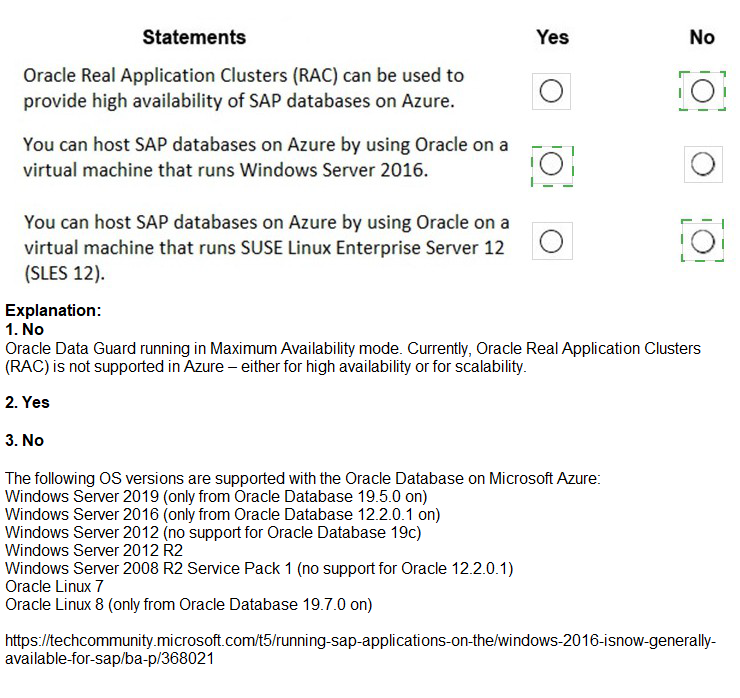
Explanation:
When deploying Oracle databases for SAP on Azure, specific configurations are supported based on SAP and Microsoft guidelines. Oracle Real Application Clusters (RAC), supported guest operating systems, and Linux distributions must align with SAP notes and Azure infrastructure capabilities to ensure proper functionality and support.
Correct Option:
Statement 1: Oracle Real Application Clusters (RAC) can be used to provide high availability of SAP databases on Azure. → No
Oracle RAC is not supported for SAP workloads on Azure. SAP Note 2039619 explicitly states that Oracle RAC is not a supported high availability solution for SAP applications on Azure. While RAC can be technically deployed, Microsoft and SAP do not provide support for this configuration. Alternative HA solutions like Oracle Data Guard with Azure Load Balancer should be used instead.
Statement 2: You can host SAP databases on Azure by using Oracle on a virtual machine that runs Windows Server 2016. → Yes
Windows Server 2016 is a supported operating system for Oracle databases running SAP workloads on Azure. SAP Note 1928533 lists Windows Server 2016 as a valid guest OS for SAP applications, and Oracle databases are certified on Windows platforms. This configuration is fully supported provided all SAP and Oracle patches are applied.
Statement 3: You can host SAP databases on Azure by using Oracle on a virtual machine that runs SUSE Linux Enterprise Server 12 (SLES 12). → Yes
SUSE Linux Enterprise Server 12 (SLES 12) is a supported operating system for Oracle databases with SAP on Azure. SAP Note 1928533 includes SLES 12 as a supported Linux distribution, and Oracle Linux certifications apply. Many production SAP on Oracle deployments use SLES due to its enterprise stability and integration with Azure.
Reference:
SAP Note 1928533: "SAP Applications on Azure: Supported Products and Azure VM types"
SAP Note 2039619: "SAP on Azure: Supported Scenarios and Configurations"
Microsoft Docs: "Oracle on Azure Virtual Machines"
You have an existing on-premises SAP landscape that is hosted on VMware VSphere. You plan to migrate the landscape to Azure.
You configure the Azure Site Recovery replication policy shown in the following exhibit.

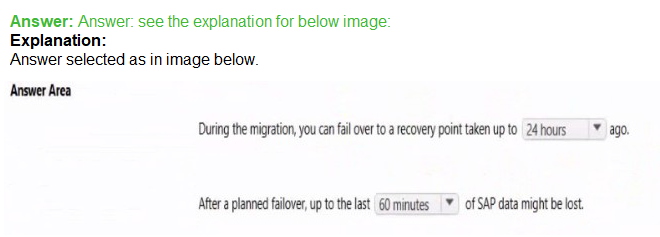
Explanation:
The question involves evaluating the Default Policy in Azure Site Recovery for replicating an on-premises VMware vSphere SAP landscape to Azure (relevant to AZ-120 migration scenarios). The exhibit shows the "Default Policy" with standard settings, typically created automatically. For VMware to Azure replication, the default policy uses a 60-minute RPO threshold (alerting), 24-hour recovery point retention, crash-consistent snapshots every ~5 minutes (fixed), and app-consistent snapshots disabled by default. This setup meets basic technical replication needs but often falls short of SAP business requirements (e.g., low RPO/RTO, application-consistent points for databases).
Correct Option:
The backup policy meets the technical requirements. → No
(Note: The question uses "backup policy" wording, but context is Azure Site Recovery replication policy for DR/migration. Technically, default policy enables replication to Azure with supported VMware versions, Mobility service, and managed disks — so basic replication works. However, for SAP workloads, technical requirements often include app-consistent protection and longer retention, which are not default. Thus, it does not fully meet SAP-specific technical needs without customization.)
The backup policy meets the business requirements. → No
SAP business requirements typically demand low RPO (e.g., <15–60 min with alerts), application-consistent recovery for databases (HANA, SQL), and longer retention (days/weeks) for compliance/point-in-time restore. Default policy (60-min RPO threshold, 24-hour retention, no app-consistent snapshots) is insufficient for production SAP landscapes, which require tailored policies.
If the backup policy is implemented, a deleted file can be restored to the running virtual machine one year after the file was deleted. → No
This is a replication/DR policy (Azure Site Recovery), not a backup policy (Azure Backup). Site Recovery provides point-in-time recovery points only within the retention window (default 24 hours). It does not support long-term retention like 1 year, nor file-level item restore to running VMs after deletion — that's an Azure Backup feature using recovery vaults with extended retention.
Incorrect Option:
(The two "No" statements above are incorrect per the evaluation; the third is clearly "No" as explained.)
Reference:
Microsoft Learn: Set up replication policies for VMware disaster recovery → https://learn.microsoft.com/en-us/azure/site-recovery/vmware-azure-set-up-replication
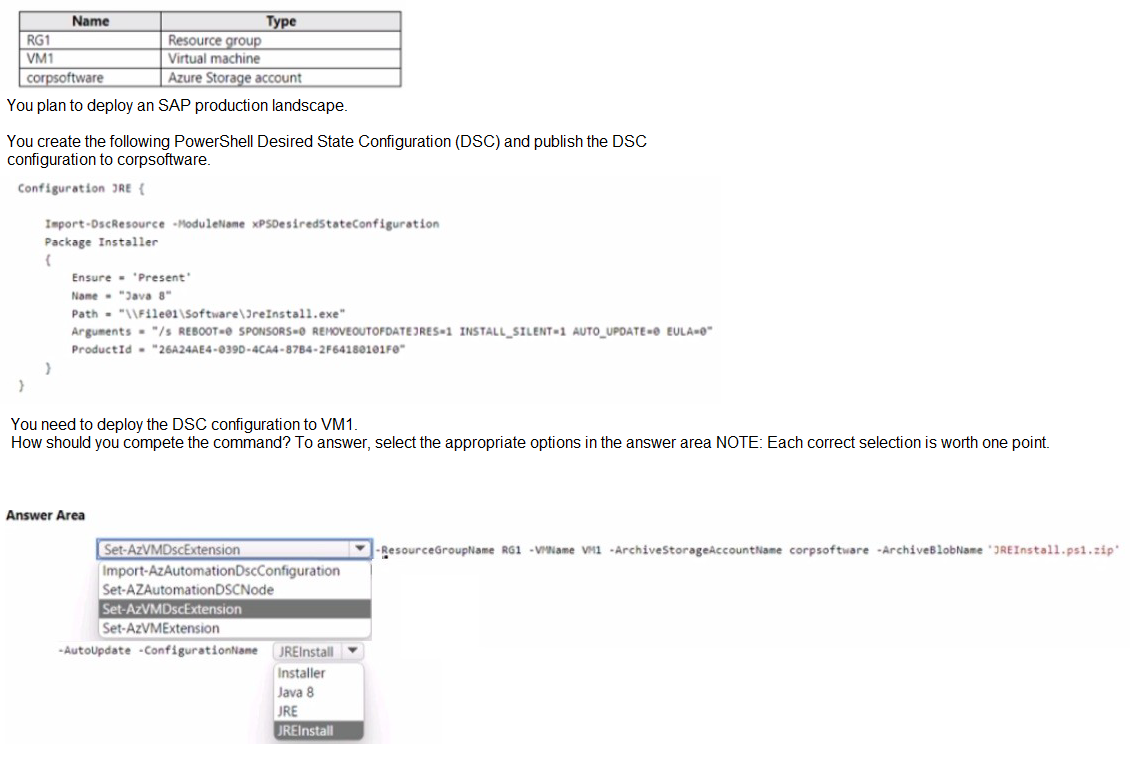
You have an Azure subscription that contains the resources shown in the following table.
Explanation:
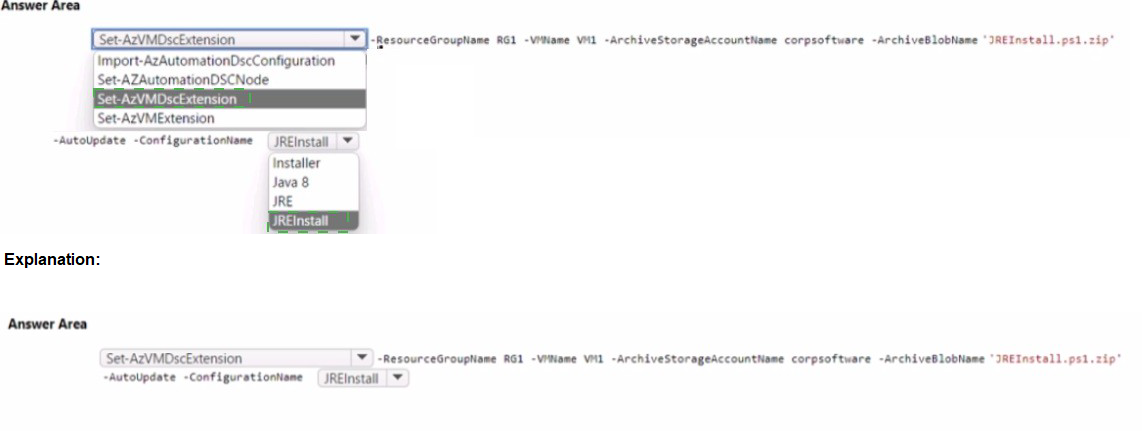
The scenario involves deploying a PowerShell DSC configuration to VM1 using a configuration published to the corpsoftware storage account. The command must properly reference the DSC extension, specify the archive location, and identify the correct configuration name from within the published .zip file. The configuration block shows the configuration is named "JRE" (from "Configuration JRE {"), and the archive is named "JREInstall.ps1.zip".
Correct Option:
Command: Set-AzVMDscExtension
Set-AzVMDscExtension is the correct cmdlet to apply a Desired State Configuration extension to an Azure VM. It pushes the DSC configuration from a storage account to the specified virtual machine. The other cmdlets (Import-AzAutomationDscConfiguration, Set-AzAutomationDscNode) are for Azure Automation DSC, not for direct VM extension deployment.
ArchiveBlobName: JREInstall.ps1.zip
The exhibit shows the DSC configuration was published to corpsoftware storage account. The archive blob name must match the published file. Since the configuration block shows "Configuration JRE" and the question mentions publishing to corpsoftware, the archive name is JREInstall.ps1.zip, which contains the compiled MOF file(s) for the JRE configuration.
ConfigurationName: JRE
Inside the published archive, there may be multiple configurations. The configuration name parameter specifies which configuration to apply. The PowerShell code shows "Configuration JRE {", indicating the configuration is named JRE. This must be passed correctly to the DSC extension to execute the right configuration.
Incorrect Option:
Commands: Import-AzAutomationDscConfiguration, Set-AzAutomationDscNode, Set-AzVMExtension
Import-AzAutomationDscConfiguration imports a DSC configuration into Azure Automation, not to a specific VM. Set-AzAutomationDscNode configures a node in Azure Automation DSC. Both are for Automation scenarios, not direct VM extension deployment. Set-AzVMExtension is a generic cmdlet but lacks DSC-specific parameters needed for this scenario.
ArchiveBlobName: Installer, Java 8, JRE
Installer and Java 8 are not valid blob names. JRE might be the configuration name but not the archive blob name. The published file must have a .zip extension containing the DSC configuration, so JREInstall.ps1.zip is the correct blob reference.
ConfigurationName: Installer, Java 8, JREInstall
Installer and Java 8 are not configuration names shown in the code. JREInstall might be confused with the archive name, but the actual configuration name inside the PowerShell script is "JRE" as shown in the Configuration statement.
Reference:
Microsoft Docs: "Set-AzVMDscExtension"
Microsoft Docs: "Desired State Configuration Extension for Azure VMs"
PowerShell Gallery: "xPSDesiredStateConfiguration" module documentation
You have an on-premises SAP environment. Application servers run on SUSE Linux Enterprise Server (SLES) servers. Databases run on SLES servers that have Oracle installed.
You need to recommend a solution to migrate the environment to Azure. The solution must use currently deployed technologies whenever possible and support high availability.
What should you include in the recommendation? To answer, select the appropriate options in the answer area.
NOTE: Each correct selection is worth one point.

Explanation:
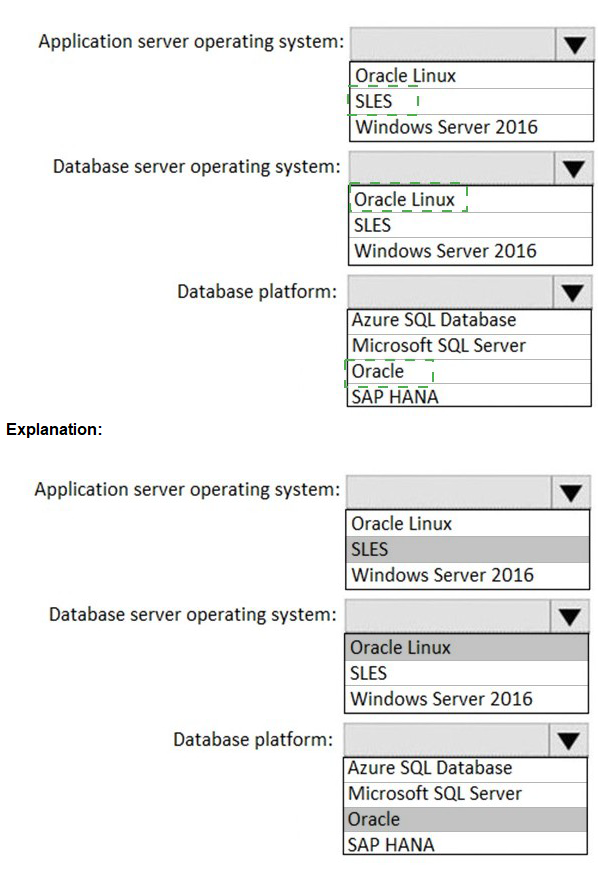
The existing on-premises SAP environment runs application servers on SLES and databases on SLES with Oracle. The migration to Azure must use currently deployed technologies whenever possible and support high availability. This means selecting SLES for both application and database servers, and Oracle as the database platform, as these match the existing stack. HA can be achieved using Azure-native features like Availability Zones or Availability Sets with Pacemaker clustering.
Correct Option:
Application server operating system: SLES
The existing environment uses SUSE Linux Enterprise Server (SLES) for application servers. To minimize changes and leverage current expertise, SLES should be retained in Azure. SLES is fully supported for SAP applications on Azure, with certified VM sizes and integration with Azure infrastructure for high availability scenarios.
Database server operating system: SLES
The on-premises database servers run on SLES with Oracle. Continuing with SLES in Azure ensures compatibility with Oracle and SAP, and allows reuse of existing administration practices. SLES is a supported platform for Oracle databases running SAP workloads on Azure, as documented in SAP notes and Azure documentation.
Database platform: Oracle
The current database platform is Oracle. Migrating to Azure should maintain Oracle to avoid re-platforming costs and risks. Oracle on Azure VMs is supported for SAP workloads, and high availability can be achieved using Oracle Data Guard with Azure Load Balancer or Pacemaker clustering on SLES.
Incorrect Option:
Application server operating system alternatives: Oracle Linux, Windows Server 2016
Oracle Linux is not currently used and would introduce unnecessary change. While supported for SAP on Azure, it deviates from the "use currently deployed technologies" requirement. Windows Server 2016 is a different platform entirely, requiring application reconfiguration and retraining, increasing migration complexity and risk.
Database server operating system alternatives: Oracle Linux, Windows Server 2016
Oracle Linux is not part of the existing stack and would require new OS expertise. Windows Server 2016 is incompatible with the existing Oracle database without significant changes, and Oracle on Windows for SAP is less common, potentially introducing support challenges.
Database platform alternatives: Azure SQL Database, Microsoft SQL Server, SAP HANA
Azure SQL Database is a PaaS offering not suitable for Oracle workloads without major application changes. Microsoft SQL Server would require database migration and schema conversion, which is complex and risky. SAP HANA would require a complete database platform change, which is expensive and time-consuming, contradicting the requirement to use currently deployed technologies.
Reference:
SAP Note 1928533: "SAP Applications on Azure: Supported Products and Azure VM types"
SAP Note 2039619: "SAP on Azure: Supported Scenarios and Configurations"
Microsoft Docs: "Oracle on Azure Virtual Machines"
You have an SAP on Azure landscape. You need to gather the following metrics:
The network latency between an SAP NetWeaver server and an SAP HANA
The throughput and latency of the storage subsystem on Windows Server and Linux platforms
What should you use for each metric? To answer, select the appropriate options in the answer area. NOTE: Each correct selection is worth one point.

Explanation:
When monitoring SAP on Azure landscapes, specific tools are recommended for measuring network latency between SAP NetWeaver servers and SAP HANA, as well as storage subsystem performance. The tools must be compatible with both Windows Server and Linux platforms where applicable, and provide accurate metrics for troubleshooting and performance validation.
Correct Option:
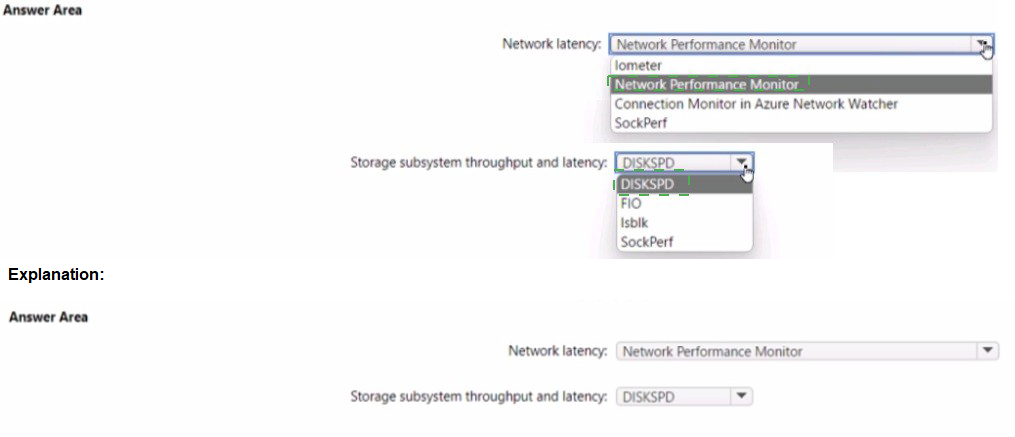
Network latency: Connection Monitor in Azure Network Watcher
Connection Monitor in Azure Network Watcher is the recommended tool for measuring network latency between Azure VMs, including between SAP NetWeaver servers and SAP HANA databases. It provides end-to-end network performance metrics, supports multi-hop network paths, and works across both Windows and Linux platforms. It can identify network bottlenecks and measure latency with high precision.
Storage subsystem throughput and latency: DISKSPD
DISKSPD is a command-line tool for storage performance testing on both Windows Server and Linux platforms. It measures throughput (IOPS and MB/s) and latency under various workload patterns. For SAP on Azure, DISKSPD is commonly used to validate that storage configurations meet required performance levels for database and application workloads across both operating systems.
Incorrect Option:
Network latency alternatives: Network Performance Monitor, Iometer, SocketPerf
Network Performance Monitor is an older tool being replaced by Connection Monitor. Iometer is primarily a storage benchmarking tool, not designed for network latency measurement between specific endpoints. SocketPerf is less commonly used and lacks the Azure integration and comprehensive monitoring capabilities of Connection Monitor.
Storage subsystem throughput and latency alternatives: FIO, Isblk, SocketPerf
FIO is a valid storage benchmarking tool for Linux, but the question requires a solution that works on both Windows Server and Linux platforms. FIO is primarily Linux-focused, though Windows versions exist but are less standardized. Isblk is a Linux utility for listing block devices, not a performance testing tool. SocketPerf is for network testing, not storage.
Reference:
Microsoft Docs: "Connection Monitor in Azure Network Watcher"
Microsoft Docs: "DISKSPD - Storage Performance Tool"
SAP Note 2015553: "SAP on Azure: Supported Products and Azure VM types"
You are deploying an SAP environment across Azure Availability Zones. The environment has the following components:
ASCS/ERS instances that use a failover cluster
SAP application servers across the Azure Availability Zones
Database high availability by using a native database solution
For each of the following statements, select Yes if the statement is true. Otherwise, select No.
NOTE: Each correct selection is worth one point.

Explanation:
Deploying SAP across Azure Availability Zones introduces inter-zone network latency that can impact performance, especially for synchronous replication and cluster communication. The statements address network latency limitations, SAP system validation tools, and zone selection methodologies. Evaluating these requires understanding Azure inter-zone latency characteristics and SAP's testing tools.
Correct Option:
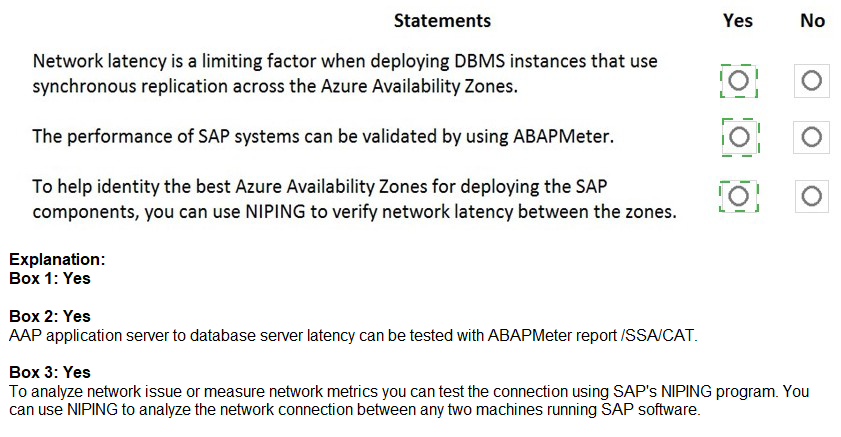
Statement 1: Network latency is a limiting factor when deploying DBMS instances that use synchronous replication across the Azure Availability Zones. → Yes
Synchronous database replication requires low-latency connections to avoid performance degradation. Azure Availability Zones have inherent network latency (typically 2-5 ms round-trip) compared to within-zone (<1 ms). For DBMS like SQL Server Always On or SAP HANA synchronous replication, this latency can impact transaction commit times and throughput, making it a limiting factor that requires careful RPO/RTO trade-offs.
Statement 2: The performance of SAP systems can be validated by using ABAPMeter. → No
ABAPMeter is not a performance validation tool. ABAPMeter is an obsolete SAP tool that measured ABAP code complexity and execution statistics. For validating SAP system performance, SAPS (SAP Application Performance Standard) tests, SAP EarlyWatch Alert, or workload-specific benchmarking tools are used. ABAPMeter does not measure system-level performance like throughput or response times.
Statement 3: To help identify the best Azure Availability Zones for deploying the SAP components, you can use NIPING to verify network latency between the zones. → Yes
NIPING (Network Ping) is an SAP tool that measures network latency and packet loss between SAP systems. When deploying across Availability Zones, NIPING can be used to test actual network performance between VMs provisioned in different zones before production deployment. This helps identify zones with lowest latency and most consistent network performance for critical components like database replication or cluster communication.
Reference:
Microsoft Docs: "Azure Availability Zones: Latency considerations"
SAP Note 500235: "Network Ping (NIPING) – A Diagnosis Tool for Network Problems"
SAP Note 2015553: "SAP on Azure: Supported Products and Azure VM types"
| Page 2 out of 22 Pages |